70-680 Exam Details
-
Exam Code
:70-680 -
Exam Name
:Windows 7 Configuring -
Certification
:Microsoft Certifications -
Vendor
:Microsoft -
Total Questions
:565 Q&As -
Last Updated
:Dec 13, 2021
Microsoft 70-680 Online Questions & Answers
-
Question 51:
A computer that runs Windows XP has on basic disk containing a single partition. The partition has 30 GB of free space. The hard disk has S GB of unallocated space.
You need to install Windows 7 in a dual-boot configuration. Windows 7 must not be installed in a virtual hard disk (VHD).
What should you do first?
A. Create a second partition.
B. Shrink the primary partition.
C. Convert the hard disk to a GPT disk.
D. Convert the hard disk to a dynamic disk. -
Question 52:
You have a computer that runs Windows XP Service Pack 3 (SP3). The computer is a member of an Active Directory domain. Several domain users log on to the computer.
You plan to install Windows 7 on the computer.
You need to ensure that all user settings are preserved after the installation.
What should you do?
A. Run Loadstate.exe, install Windows 7, and then run Scanstate.exe.
B. Run Sysprep.exe /audit, install Windows 7, and then run Sysprep.exe /oobe.
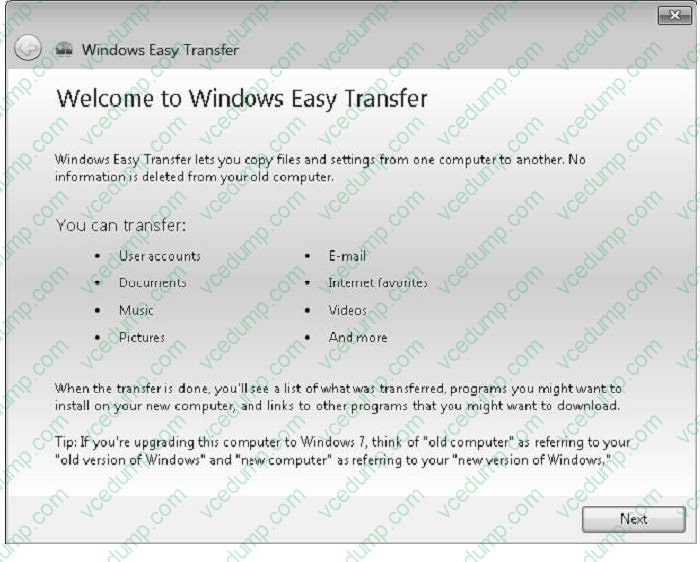
C. Run Windows Easy Transfer, install Windows 7, and then run Windows Easy Transfer again.
D. Create a backup of %systemdrive%\documents and settings, install Windows 7, and then restore the backup. -
Question 53:
You have a computer that runs Windows 7. The computer is a member of a workgroup. You use Encrypting File System (EFS) to protect your local files. You need to ensure that you can decrypt EFS files on the computer if you forget your password.
What should you do?
A. From User Accounts, select Manage your file encryption certificates.
B. From Credential Manager, select Back up vault.
C. From BitLocker Drive Encryption, select Manage BitLocker and Turn On BitLocker.
D. From Authorization Manager, modify the Authorization Manager options. -
Question 54:
You have a computer that runs Windows 7.
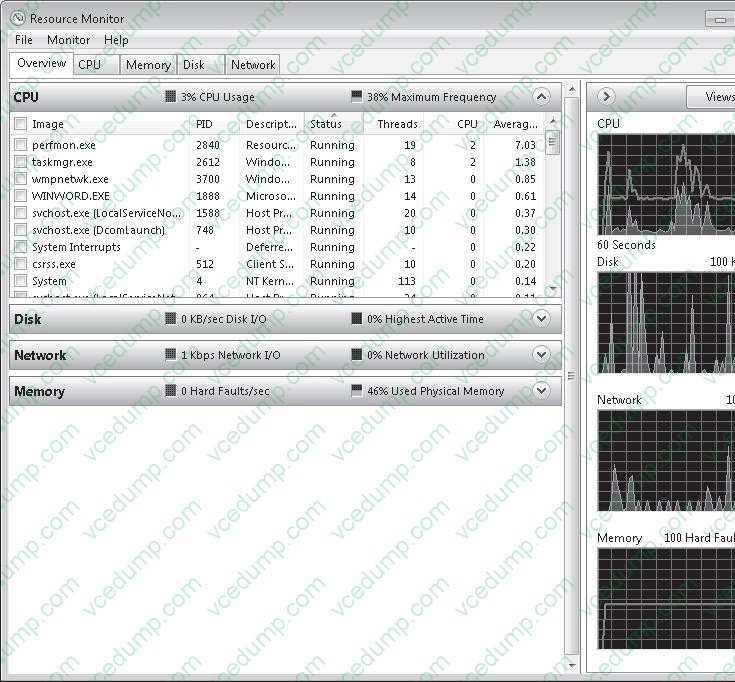
You need to identify the disk, memory, CPU, and network resources that an application is currently using.
Which tool should you use?
A. Component Services
B. Performance Information and Tools
C. Reliability Monitor
D. Resource Monitor -
Question 55:
A network has a main office and a branch office.
The branch office has five client computers that run Windows 7. All servers are located in the main office. All servers have BranchCache enabled.
Users at the branch office report that it takes several minutes to open large files located in the main office.
You need to minimize the amount of time it takes for branch office users to open files located in the main office.
What should you do?
A. At the branch office, configure the client computers to use BranchCache Hosted Cache mode.
B. At the branch office, configure the client computers to use BranchCache Distributed Cache mode.
C. At the main office, configure the Quality of Service (QoS) Packet Scheduler on all servers.
D. At the main office, configure the servers to use Distributed File System Replication (DFSR). -
Question 56:
You have a computer that runs windows 7 professional.
A removable drive is attached to the computer.
You need to protect data on the removable drive by using Bitlocker To Go.
What should you do first?
A. Upgrade the computer to Windows 7 Enterprise.
B. Install all Windows Updates for Windows 7 Professional.
C. Issue a digital certificate for the Encryption File System (EFS).
D. Select the Encrypt contents to secure data checkbox from the properties on the removable drive. -
Question 57:
You have a customized image of Windows 7 Professional.
You need to create a new unattended file to automate the deployment of the image. You must achieve this goal by using the minimum amount of administrative effort.
What should you do first?
A. Run Imagex.exe and specify the /mount parameter.
B. Run Dism.exe and specify the /mount-WIM parameter.
C. From Microsoft Deployment Toolkit (MDT), add the custom Windows image (WIM).
D. From Windows System Image Manager (Windows SIM), open the custom Windows image (WIM). -
Question 58:
You use a desktop computer that has Windows 7 SP1 Ultimate installed. As part of a disaster recovery plan, you perform regular data backups and system image backups of the desktop computer.
The hard disk drive in the computer fails after a power outage. You replace the hard disk drive and restart the desktop computer by using the Windows 7 SP1 installation media.
You need to recover the computer to its previous state.
What should you do?
A. Use Startup Repair.
B. Use the command prompt.
C. Use System Image Recovery.
D. Perform a system restore. -
Question 59:
You administer computers that have Windows 7 and Internet Explorer 8 installed.
You want to log on to one of the computers and access a web-based management application that runs on a server by using Internet Explorer.
You need to ensure that any data about your browser session is not saved on the computer.
What should you do?
A. From the Safety drop-down menu, configure InPrivate Filtering.
B. Start the Microsoft Network Access Protection service.
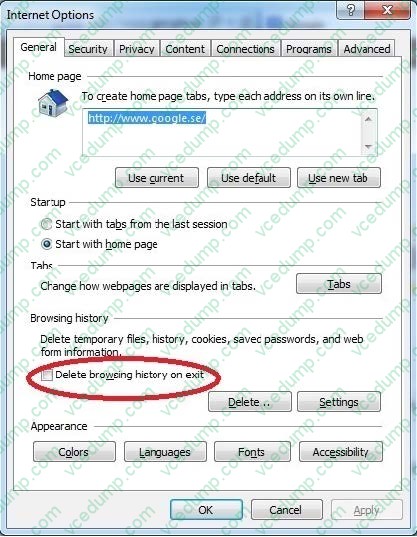
C. From Internet Options, select Delete browsing history on exit.
D. From Internet Options, on the Advanced tab, clear Enable DOM Storage. -
Question 60:
Which of the following operating systems support an offline migration using USMT? Choose three.
A. Windows 2000 Professional
B. Windows XP Professional
C. Windows Vista
D. Windows 7
Related Exams:
-
62-193
Technology Literacy for Educators -
70-243
Administering and Deploying System Center 2012 Configuration Manager -
70-355
Universal Windows Platform – App Data, Services, and Coding Patterns -
77-420
Excel 2013 -
77-427
Excel 2013 Expert Part One -
77-725
Word 2016 Core Document Creation, Collaboration and Communication -
77-726
Word 2016 Expert Creating Documents for Effective Communication -
77-727
Excel 2016 Core Data Analysis, Manipulation, and Presentation -
77-728
Excel 2016 Expert: Interpreting Data for Insights -
77-731
Outlook 2016 Core Communication, Collaboration and Email Skills
Tips on How to Prepare for the Exams
Nowadays, the certification exams become more and more important and required by more and more enterprises when applying for a job. But how to prepare for the exam effectively? How to prepare for the exam in a short time with less efforts? How to get a ideal result and how to find the most reliable resources? Here on Vcedump.com, you will find all the answers. Vcedump.com provide not only Microsoft exam questions, answers and explanations but also complete assistance on your exam preparation and certification application. If you are confused on your 70-680 exam preparations and Microsoft certification application, do not hesitate to visit our Vcedump.com to find your solutions here.