70-680 Exam Details
-
Exam Code
:70-680 -
Exam Name
:Windows 7 Configuring -
Certification
:Microsoft Certifications -
Vendor
:Microsoft -
Total Questions
:565 Q&As -
Last Updated
:Dec 13, 2021
Microsoft 70-680 Online Questions & Answers
-
Question 71:
Your network contains a wireless access point. You have a computer that runs Windows 7. The computer connects to the wireless access point.
You disable Service Set Identifier (SSID) broadcasts on the wireless access point.
You discover that you are now unable to connect to the wireless access point from the Windows 7 computer.
You need to ensure that the computer can connect to the wireless access point.
What should you do?
A. From Credential Manager, modify the generic credentials.
B. From Credential Manager, modify the Windows credentials.
C. From Network and Sharing Center, turn on Network discovery.
D. From Network and Sharing Center, modify the wireless network connection settings. -
Question 72:
You have a computer that runs Windows 7.
The computer's hard disks are configured as shown in the following table.
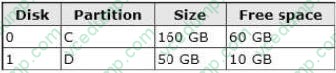
You need to ensure that you can recover the operating system and all the files on the computer if hard disk 0 experiences hardware failure. What should you do?
A. Create an Easy Transfer file on a network location.
B. Use the Backup and Restore tool to create a system image on a network location.
C. Create a system repair disk.
D. Create an Easy Transfer file on an external hard disk. -
Question 73:
You plan to install Windows 7 on a computer that contains a single hard disk drive. The hard disk drive is connected to a RAID controller.
During the installation, you discover that the Windows 7 installation media does not include the files required to install the RAID controller.
You need ensure that you can install Windows 7 on the hard disk drive.
What should you do?
A. Insert the Windows installation media and press F8 during the computer's power-on self test (POST).
B. Insert the Windows installation media and press F6 during the computer's power-on self test (POST).
C. Start the computer from the Windows installation media. From the Install Windows dialog box, click Load Driver.
D. Start the computer from the Windows installation media. From the Install Windows dialog box, click Drive options (advanced). -
Question 74:
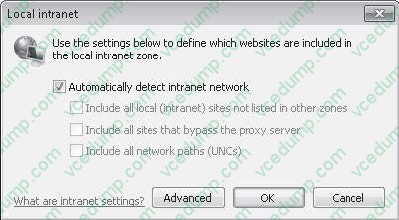
Your company has an Active Directory domain. All computers are members of the domain. Your network contains an internal Web site that uses Integrated Windows Authentication.
From a computer that runs Windows 7, you attempt to connect to the Web site and are prompted for authentication.
You verify that your user account has permission to access the Web site.
You need to ensure that you are automatically authenticated when you connect to the Web site.
What should you do?
A. Create a complex password for your user account.
B. Open Credential Manager and modify your credentials.
C. Add the URL of the Web site to the Trusted sites zone.
D. Add the URL of the Web site to the Local intranet zone. -
Question 75:
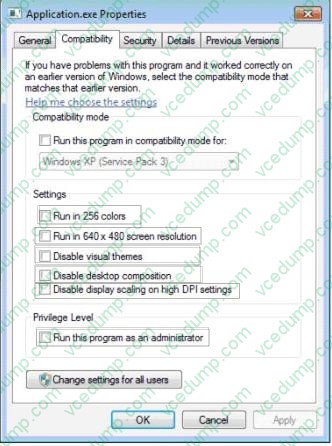
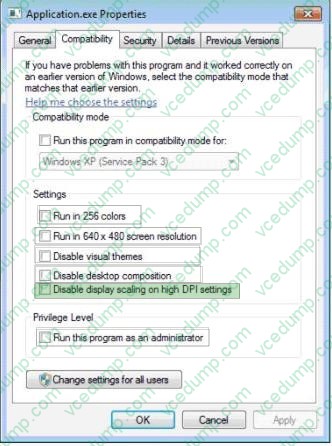
A company is upgrading its client computers from windows XP to windows 7. You add an application to the Windows 7 base image.
Large fonts are interfering with the appearance of the application.
You need to ensure that the application is displayed correctly on client computers that run Windows 7.
Which option should you select? (To answer, select the appropriate check box in the dialog box.)
Hot Area:
-
Question 76:
You install the Windows Automated Installation Kit (WAIK) for Windows 7 on a computer that runs Windows 7.
You want to deploy a Windows image (WIM) file to other computers in the domain.
You need to capture the operating system, computer configuration, and applications installed on the computer to a WIM file.
What should you do before you capture the image?
A. Run Defrag.exe.
B. Run Oscdimg.exe.
C. Start the computer by using the Windows Preinstallation Environment (WinPE) ram disk.
D. Run Diskpart.exe. -
Question 77:
Your network contains an Intrasite Automatic Tunnel Addressing Protocol (ISATAP) router.
You run Ipconfig as shown in the exhibit. (Click the Exhibit button.)
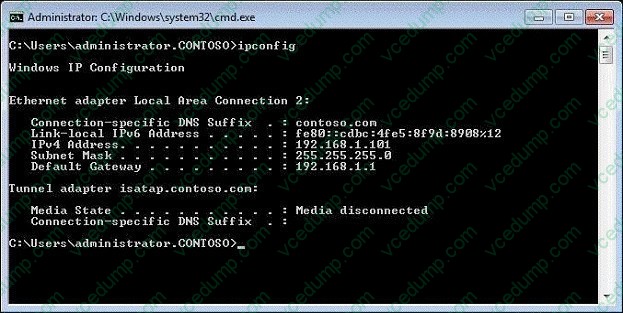
Other users on the network receive an IPv6 address for ISATAP.
You need to ensure that your computer receives an IPv6 address for ISATAP.
What should you do?
A. Run Ipconfig /renew6.
B. Run Ipconfig /setclassid6.
C. Start the Net.TCP Port Sharing service.
D. Start the Internet Protocol Helper (IP Helper) service. -
Question 78:
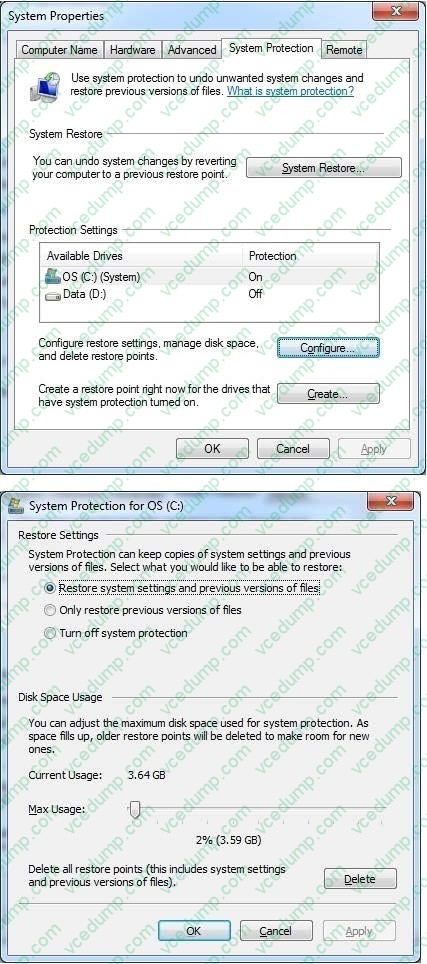
Your laptop has a 400 GB drive and currently reserves, by default, 2% (8 GB) for shadow copies.
You need to reserve more space for previous versions of files.
What should you do?
A. From System Properties, System Protection, expand the Max usage to 20 GB.
B. From System Properties, System Protection, turn off system protection.
C. From Disk Properties, change the Quota Settings from 8 GB to 20 GB.
D. From System Properties, System Protection, set it to only restore previous versions of files. -
Question 79:
You administer computers that have Windows 7 and Internet Explorer 8 installed. You want to log on to one of the computers and access a web-based management application that runs on a server by using Internet Explorer.
You need to ensure that any data about your browser session is not saved on the computer.
What should you do?
A. Disable Internet Connection Sharing.
B. From the Local Group Policy, enable the InPrivate Filtering Threshold setting.
C. From the Safety drop-down menu, open an InPrivate Browsing session.
D. From Internet Options, on the Advanced tab, clear Enable DOM Storage. -
Question 80:
You have a computer that runs Windows 7.
The computer's hard disks are configured as shown in the following table.
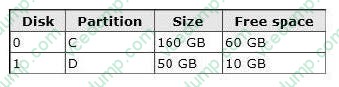
You need to ensure that you can recover the operating system and all the files on the computer if hard disk 0 experiences hardware failure. What should you do?
A. Create a system repair disk.
B. Use the Backup and Restore tool to back up data files for all users.
C. Use the Backup and Restore tool to create a system image on an external hard disk.
D. Create an Easy Transfer file on an external hard disk.
Related Exams:
-
62-193
Technology Literacy for Educators -
70-243
Administering and Deploying System Center 2012 Configuration Manager -
70-355
Universal Windows Platform – App Data, Services, and Coding Patterns -
77-420
Excel 2013 -
77-427
Excel 2013 Expert Part One -
77-725
Word 2016 Core Document Creation, Collaboration and Communication -
77-726
Word 2016 Expert Creating Documents for Effective Communication -
77-727
Excel 2016 Core Data Analysis, Manipulation, and Presentation -
77-728
Excel 2016 Expert: Interpreting Data for Insights -
77-731
Outlook 2016 Core Communication, Collaboration and Email Skills
Tips on How to Prepare for the Exams
Nowadays, the certification exams become more and more important and required by more and more enterprises when applying for a job. But how to prepare for the exam effectively? How to prepare for the exam in a short time with less efforts? How to get a ideal result and how to find the most reliable resources? Here on Vcedump.com, you will find all the answers. Vcedump.com provide not only Microsoft exam questions, answers and explanations but also complete assistance on your exam preparation and certification application. If you are confused on your 70-680 exam preparations and Microsoft certification application, do not hesitate to visit our Vcedump.com to find your solutions here.