70-680 Exam Details
-
Exam Code
:70-680 -
Exam Name
:Windows 7 Configuring -
Certification
:Microsoft Certifications -
Vendor
:Microsoft -
Total Questions
:565 Q&As -
Last Updated
:Dec 13, 2021
Microsoft 70-680 Online Questions & Answers
-
Question 41:
You administer client computers that have Windows 7 Professional SP1 64-bit installed. All desktops are members of a single Active Directory domain. You plan to install a driver manufactured by an unknown provider. You need to prepare the client computers for the driver installation.
What should you do?
A. Disable the Code signing for device drivers Domain Group Policy setting.
B. Add each user to the Domain Administrators group.
C. Run the SigVerif.exe command.
D. Enable the Code signing for device drivers Domain Group Policy setting. -
Question 42:
You use a portable computer that has Windows 7 installed. The computer has a single hard disk drive and a dual-core CPU.
You analyze the performance of the computer and discover that one of the processes uses an average of 90 percent of the CPU cores.
You need to decrease the usage of the CPU cores by the process.
What should you do?
A. Run powercfg.exe.
B. Run the Windows Experience Index.
C. Configure Event Viewer subscriptions.
D. Open Task Manager.
E. Open System Properties, and configure performance settings.
F. Open System Properties, and configure environment variables.
G. Open System Properties, and configure user profiles settings.
H. Open System Properties, and configure the page file settings.
I. Open Performance Monitor, and configure a Data Collector Set.
J. Open Performance Monitor, and customize the System Monitor view. -
Question 43:
A manufacturing company has Windows Vista and Windows XP computers.
You are responsible for upgrading all computers to Windows 7.
You test the Windows 7 installation on a Windows Vista computer. Early in the installation process, you are prompted to choose the "Upgrade" option or the "Custom (Advanced)" installation option.
You need to determine which installation option is appropriate for the different computers in your company.
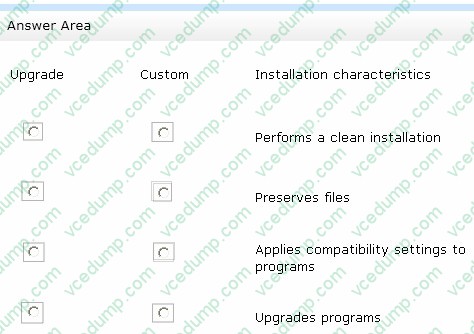
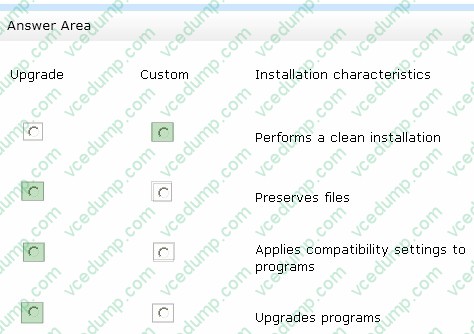
In the table below, identify the characteristics of the Upgrade and Custom installation options. (Make only one selection in each column. This question is worth two points. )
Hot Area:
-
Question 44:
You have a computer that runs Windows 7. Multiple users share the computer. The computer contains a folder named C:\folder1.
You need to identify all of the encrypted files in C:\folder1.
Which command should you run?
A. Cipher C:\folder1
B. Dir C:\folder1 /OE
C. Fsutil C:\folder1
D. Wfs C:\folder1 -
Question 45:
You use a computer that has Windows 7 SP1 installed to access your company's internal website. The website requires a secure connection. The certificate is a self-signed Secure Socket Layer (SSL).
You attempt to connect to the internal website. You receive the following error message:
"There is a problem with this website's security certificate."
You need to be able to connect to the internal website successfully.
What should you do?
A. From Internet Explorer, add the website to the Local Intranet zone.
B. From Certificate Manager, import the website's certificate into your Intermediate Certification Authorities store.
C. From Certificate Manager, import the website's certificate into your computer's Personal store.
D. From Internet Explorer, add the website to the Trusted Sites zone. -
Question 46:
Your company network includes a Windows Server 2008 R2 server named Server 1. You use a client computer named Client1 that has Windows 7 Enterprise installed. Both computers are members of an Active Directory domain.
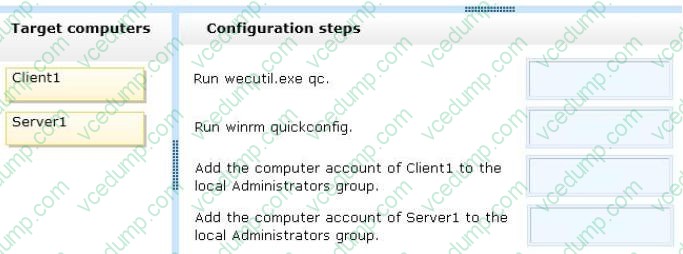
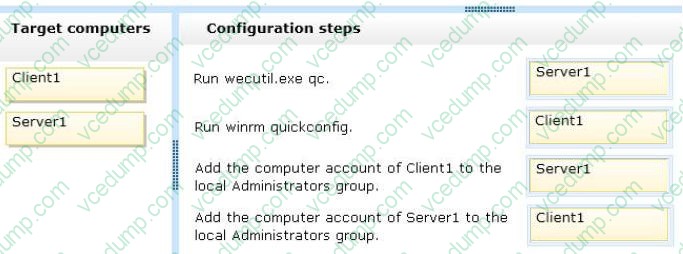
You want to automatically collect events from Client1 to Server1. Bandwidth delivery optimization will not be used along with the subscription.
You need to configure the required collector-initiated subscription.
What should you do? (To answer, drag the appropriate configuration step or configuration steps to the correct target computer or target computers in the answer area. An answer choice can be used once, more than once, or not at all.)
Select and Place:
-
Question 47:
You have a new computer that does not have an operating system installed. You have a virtual hard disk (VHD) that contains an installation of Windows 7. You start the computer from the Windows Preinstallation Environment (Windows PE). You create a partition on the computer and copy the VHD to the partition.
You need to configure the computer to start from the VHD.
Which tools should you use?
A. Diskpart.exe and Bcdboot.exe
B. Imagex.exe and Bcdedit.exe
C. Scanstate.exe and Loadstate.exe
D. Wpeutil.exe and Dism.exe -
Question 48:
Which of the following utilities can you use to transfer user encryption certificates from a computer running Windows XP Professional to Windows 7 Professional? Choose two.
A. File Settings and Transfer Wizard
B. USMT
C. Windows Easy Transfer
D. Robocopy.exe -
Question 49:
You administer a desktop computer that has the following hardware specifications:

Dual-core 2.5 GHz processor
1 GB RAM
25 GB unpartitioned disk space
Onboard graphics that has WDDM 1.0
You install a customized Windows 7 Enterprise 64-btt image on the computer by using unpartitioned disk space. The computer operates unacceptably slow.
You need to improve the performance of the computer. What should you do?
A. Install another 1 GB of RAM.
B. Upgrade the processor,
C. Open Performance Monitor. Run the System Performance Data Collector Set.
D. Install a video card that has 128 MB of video RAM. -
Question 50:
You have two computers named Computer1 and Computer2 that run Windows 7.
Computer1 has a dynamic disk.
You remove the disk from Computer1 and connect the disk to Computer2.
You need to ensure that you can open files on all hard disk drives connected to Computer2.
What should you do from the Disk Management snap-in?
A. Convert a disk.
B. Rescan the disks.
C. Import a foreign disk.
D. Attach a virtual hard disk (VHD).
Related Exams:
-
62-193
Technology Literacy for Educators -
70-243
Administering and Deploying System Center 2012 Configuration Manager -
70-355
Universal Windows Platform – App Data, Services, and Coding Patterns -
77-420
Excel 2013 -
77-427
Excel 2013 Expert Part One -
77-725
Word 2016 Core Document Creation, Collaboration and Communication -
77-726
Word 2016 Expert Creating Documents for Effective Communication -
77-727
Excel 2016 Core Data Analysis, Manipulation, and Presentation -
77-728
Excel 2016 Expert: Interpreting Data for Insights -
77-731
Outlook 2016 Core Communication, Collaboration and Email Skills
Tips on How to Prepare for the Exams
Nowadays, the certification exams become more and more important and required by more and more enterprises when applying for a job. But how to prepare for the exam effectively? How to prepare for the exam in a short time with less efforts? How to get a ideal result and how to find the most reliable resources? Here on Vcedump.com, you will find all the answers. Vcedump.com provide not only Microsoft exam questions, answers and explanations but also complete assistance on your exam preparation and certification application. If you are confused on your 70-680 exam preparations and Microsoft certification application, do not hesitate to visit our Vcedump.com to find your solutions here.