70-680 Exam Details
-
Exam Code
:70-680 -
Exam Name
:Windows 7 Configuring -
Certification
:Microsoft Certifications -
Vendor
:Microsoft -
Total Questions
:565 Q&As -
Last Updated
:Dec 13, 2021
Microsoft 70-680 Online Questions & Answers
-
Question 491:
You install the Windows Automated Installation Kit (WAIK) for Windows 7 on a computer that runs Windows 7.
You want to deploy a Windows image (WIM) file to other computers in the domain. You need to capture the operating system, computer configuration, and applications installed on the computer to a WIM file.
What should you do before you capture the image?
A. Start the computer by using the Windows Preinstallation Environment (WinPE) ram disk.
B. Run ScanState.exe.
C. Run Defrag.exe.
D. Run Diskpart.exe. -
Question 492:
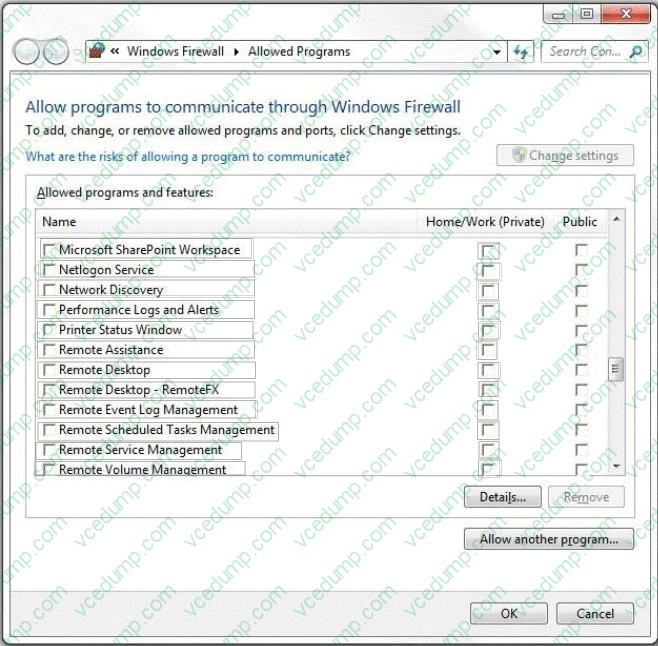
All sales employees use portable computers that have Windows 7 installed. All help desk employees use desktop computers that have Windows 7 installed.
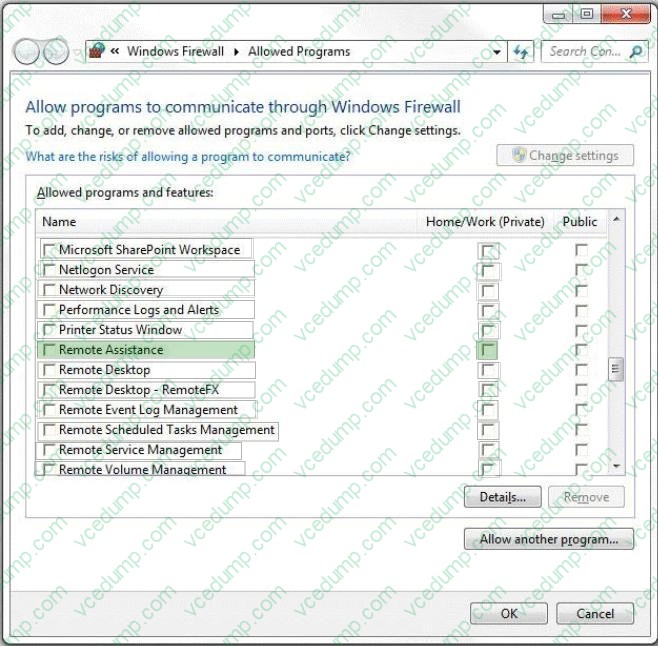
You need to ensure that the sales employees are able to request a remote support from a help desk employee when they are in the office.
You also need to ensure that sales employees are prevented from receiving remote support during their travel.
What should you do? (To answer, configure the appropriate option or options in the dialog box in the answer area.)
Hot Area:
-
Question 493:
You plan to install Windows 7 on a new notebook computer.
The computer will be used by users who speak English, French, and German.
You need to select an edition of Windows 7 that enables the users to switch between different graphical user interface (GUI) languages. The solution must minimize costs.
Which edition should you choose?
A. Window 7 Home Premium
B. Windows 7 Professional
C. Windows 7 Starter
D. Windows 7 Ultimate -
Question 494:
You perform a clean installation of Windows 7 on a computer.
You need to ensure that you can run Windows XP Mode in Windows 7.
What should you do?
A. Enable hardware-assisted virtualization.
B. Create a Data Execution Prevention (DEP) exception.
C. Install Windows XP in the same partition as Windows 7.
D. Install Windows XP in a different partition than Windows 7. -
Question 495:
You have a wireless access point that is configured to use Advanced Encryption Standard (AES) security. A pre-shared key is not configured on the wireless access point.
You need to connect a computer that runs Windows 7 to the wireless access point.
Which security setting should you select for the wireless connection?
A. 802.1x
B. WPA-Personal
C. WPA2-Enterprise
D. WPA2-Personal -
Question 496:
Your company office network includes a file server that has Windows Server 2008 R2 installed and client computers that have Windows 7 Enterprise installed. The computers are members of an Active Directory domain. The file server has the BrachCache features installed.
You add new client computers the network. The computers have Windows 7 installed and are members of a workgroup.
You need to ensure that the new client computers are configured to cache and share files.
What should you do?
A. Run the Netsh branchcache set service mode=HOSTEDSERVER client authentication=NONE command
B. Configure firewall exception rules for multicast traffic, inbound and outbound traffic for local UDP port 3702, and inbound and outbound trafficfor local TCP port 80.
C. Create a Group Policy that sets Hash Publication for BranchCache as disabled.
D. Run the netsh branchcache set service mode=DISTRIBUTED command.
E. Create a Group Policy object and configure the Set percentage of disk space used for client computer cache option.
F. Check permisions.
G. Run the netsh branchcache set service mode=HOSTEDCLIENT command.
H. Create a Group Policy object and enable the Set BranchCache Hosted Cache mode policy.
I. Configure firewall exception rules for inbound and outbound traffic for local TCP port 80 and for inbound and outbound traffic for local TCP port 8443. -
Question 497:
You are a network administrator for a law firm that has Windows 7 computers as part of a domain. Users are not administrators of their own computers.
A lawyer is working on a critical case and wants to use a Windows 7 laptop to access a computer in the office. The lawyer connects to the corporate VPN and receives a message that states that the lawyer does not have permission to use
Remote Desktop to connect to the computer.
You need to allow the lawyer to access the computer in the office.
What should you do?
A. Upgrade the Remote Desktop Client application on the users laptop.
B. Add the user to the Remote Desktop Users group of the target computer.
C. Select Allow connections from computers running any version of Remote Desktop on the Remote tab of the computer.
D. Allow Remote Desktop through Windows Firewall. -
Question 498:
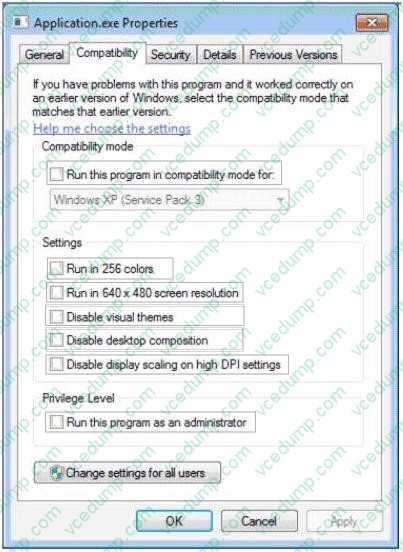
A company is upgrading its client computers from Windows XP to Windows 7. You add an application to the Windows 7 base image.
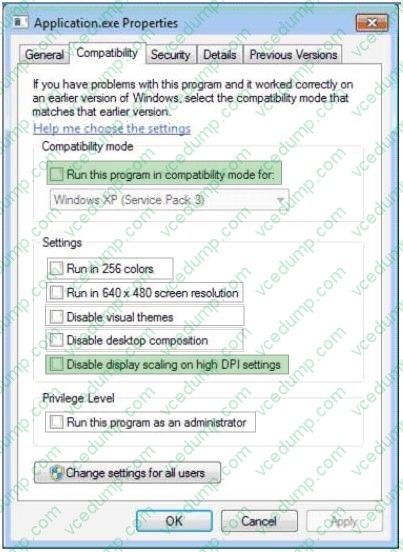
The menu on the title bar of the application is not displayed properly, although other graphical elements are displayed correctly.
You need to ensure that the application's menu is displayed correctly on client computers that run Windows 7.
Which option should you choose to achieve this goal? (To answer, select the appropriate check box in the dialog box.)
Hot Area:
-
Question 499:
Your organization uses Windows 7 computers.
You remotely administer a computer. You attempt to ping the computer to verify that it is on the network, but you do not receive a response. The user is able to ct to network resources.
You need to verify that the firewall on the computer is configured to allow pings.
What should you do?
A. Verify that the rule name Network Discovery (NB-Name-In) for inbound connections is enabled.
B. Verify that the rule name File and Printer Sharing (Echo Request -ICMPv4-IN) for outbound connections is enabled.
C. Verify that the rule name File and Printer Sharing (Echo Request -JCMPv4-IN) for inbound connections is enabled.
D. Verify that the rule name Network Discovery (NB-Name-In) for outbound connections is enabled. -
Question 500:
You have a reference computer that runs Windows 7.
You plan to create an image of the computer and then deploy the image to 100 computers.
You need to prepare the reference computer for imaging.
What should you do before you create the image?
A. Run Package Manager.
B. Run the System Preparation tool.
C. Install the User State Migration Tool.
D. Install Windows Automated Installation Kit.
Related Exams:
-
62-193
Technology Literacy for Educators -
70-243
Administering and Deploying System Center 2012 Configuration Manager -
70-355
Universal Windows Platform – App Data, Services, and Coding Patterns -
77-420
Excel 2013 -
77-427
Excel 2013 Expert Part One -
77-725
Word 2016 Core Document Creation, Collaboration and Communication -
77-726
Word 2016 Expert Creating Documents for Effective Communication -
77-727
Excel 2016 Core Data Analysis, Manipulation, and Presentation -
77-728
Excel 2016 Expert: Interpreting Data for Insights -
77-731
Outlook 2016 Core Communication, Collaboration and Email Skills
Tips on How to Prepare for the Exams
Nowadays, the certification exams become more and more important and required by more and more enterprises when applying for a job. But how to prepare for the exam effectively? How to prepare for the exam in a short time with less efforts? How to get a ideal result and how to find the most reliable resources? Here on Vcedump.com, you will find all the answers. Vcedump.com provide not only Microsoft exam questions, answers and explanations but also complete assistance on your exam preparation and certification application. If you are confused on your 70-680 exam preparations and Microsoft certification application, do not hesitate to visit our Vcedump.com to find your solutions here.