70-680 Exam Details
-
Exam Code
:70-680 -
Exam Name
:Windows 7 Configuring -
Certification
:Microsoft Certifications -
Vendor
:Microsoft -
Total Questions
:565 Q&As -
Last Updated
:Dec 13, 2021
Microsoft 70-680 Online Questions & Answers
-
Question 461:
You have a computer named Computer1 that runs Windows 7.
You need to configure Computer1 to support the collection of Windows system events from other computers.
Which command should you run?
A. Wecutil.exe qc
B. Winrm.exe quickconfig
C. Winrs r: Computer1
D. Wmic /aggregate -
Question 462:
You have a computer that runs Windows 7.
Your network contains a DHCP server that runs Windows Server 2008 R2. The server is configured as a Network Access Protection (NAP) enforcement point.
You need to configure the computer as a NAP client.
Which two actions should you perform? (Each correct answer presents part of the solution. Choose two.)
A. From Services, set the Netlogon service Startup Type to Automatic.
B. From Services, set the Network Access Protection Agent service Startup Type to Automatic.
C. From the NAP Client Configuration console, configure the user interface settings.
D. From the NAP Client Configuration console, enable the DHCP Quarantine Enforcement Client. -
Question 463:
You have a computer that runs Windows 7. The computer contains a folder named C:\data. You use Advanced Sharing to share C:\data by using the default share permissions.
When a user tries to access the share over the network, he gets an "Access is Denied" error message.
You need to ensure that the user can access the share.
What should you do?
A. Allow file and printer sharing through Windows Firewall.
B. Change the network location from a Public network to a Home or Work network.
C. From the Security settings of the folder, assign the user the Read NTFS permission.
D. From the Advanced Sharing settings of the folder, assign the user the Read share permission. -
Question 464:
You have a computer that runs windows 7.
You configure the computer to automatically install all updates.
You need to verify whether a specific update is installed.
What should you do?
A. In event viewer, examine the application log.
B. In windows update, examine the update history.
C. At the command prompt, run Wusa.exe and specify the /kb parameter.
D. At the command prompt, run Verifier.exe and specify the /query parameter. -
Question 465:
You work as the desktop support technician at Abc.com.
The Abc.com network consists of a single Active Directory domain named Abc.com. All client computers on the Abc.com network run Windows Vista Business.
You have been instructed to upgrade a client computer named GB680 to Microsoft Windows 7 Professional.
GB680 has the following specifications:

Drive C (system drive) with 12 GB of free space
Drive D (data drive) with 40 GB of free space
Four memory slots with two occupied by 512 MB memory sticks
One 2.0 GHz 32-bit processor
You need to ensure that Windows 7 Professional can be installed on GB680.
What should you do?
A. Install Windows 7 on Drive D.
B. Create more free space on Drive C.
C. Upgrade the memory.
D. Upgrade the processor. -
Question 466:
You are a network administrator for a global company that has Windows Server 2008 R2 servers and Windows 7 Enterprise computers.
Management wants to decrease VPN costs by implementing DirectAccess for remote network access.
They assign you to evaluate the current network infrastructure, which includes the following elements:
Active Directory
IPv6 network and applications
Server for DirectAccess service
You need to ensure that all critical infrastructure components are present.
What should you add to the infrastructure?
A. Windows Internet Name Service (WINS) server
B. Public key infrastructure
C. NAT-PT devices
D. Windows Server 2012 -
Question 467:
You have a computer that runs Windows 7.
You update the driver for the computer's video card and the computer becomes unresponsive. You need recover the computer in the minimum amount of time.
What should you do?
A. Restart in safe mode and then roll back the video card driver.
B. Restart in safe mode and then revert the computer to a previous restore point.
C. Start the computer from the Windows 7 installation media. Select Repair your computer and then select System Restore.
D. Start the computer from the Windows 7 installation media. Select Repair your computer and then select System Image Recovery. -
Question 468:
Your network has a main office and a branch office.
The branch office has five client computers that run Windows 7. All client computers are configured to use BranchCache.
At the branch office, a computer named Computer1 is experiencing performance issues.
You need to temporarily prevent all computers from retrieving cached content from Computer1.
What should you do on Computer1?
A. At the command prompt, run Netsh branchcache flush.
B. At the command prompt, run Netsh branchcache dump.
C. Modify the Configure BranchCache for network files Group Policy setting.
D. Modify the Set percentage of disk space used for client computer cache Group Policy setting. -
Question 469:
You have a computer that runs Windows 7. The computer is in a workgroup.
You need to ensure that you can decrypt Encrypting File System (EFS) files on the computer if you forget your password.
What are two possible ways to achieve this goal? (Each correct answer presents a complete solution. Choose two.)
A. From Credential Manager, select Back up vault.
B. From User Accounts, select Create a password reset disk.
C. From User Accounts, select Manage your file encryption certificates.
D. From Authorization Manager, modify the Authorization Manager options. -
Question 470:
A company has an Active Directory forest which is shown in the following graphic.
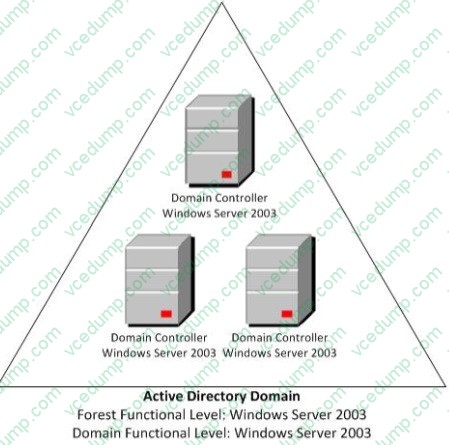
The company's client computers run Windows 7. You deploy BitLocker Drive Encryption on all the client computers.
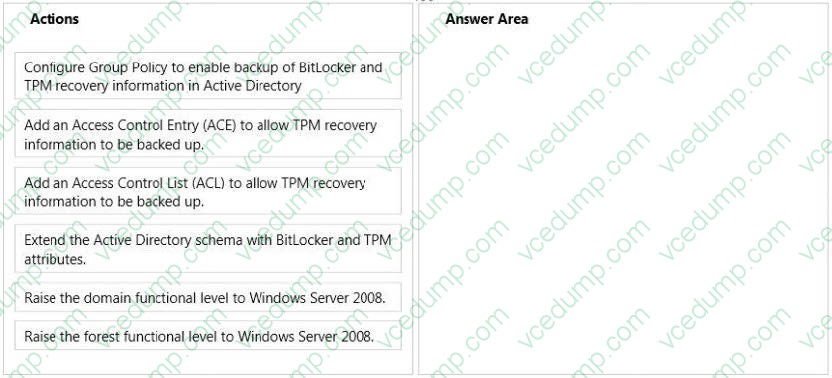
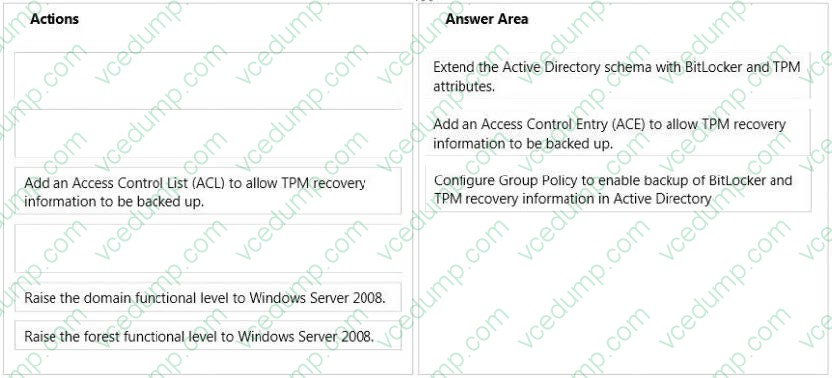
You need to configure BitLocker Drive Encryption to back up recovery information to Active Directory for BitLocker protected drives and the Trusted Platform Module (TPM).
Which actions should you perform in sequence? (To answer, move the appropriate actions from the list of actions to the answer area and arrange them in the correct order.)
Select and Place:
Related Exams:
-
62-193
Technology Literacy for Educators -
70-243
Administering and Deploying System Center 2012 Configuration Manager -
70-355
Universal Windows Platform – App Data, Services, and Coding Patterns -
77-420
Excel 2013 -
77-427
Excel 2013 Expert Part One -
77-725
Word 2016 Core Document Creation, Collaboration and Communication -
77-726
Word 2016 Expert Creating Documents for Effective Communication -
77-727
Excel 2016 Core Data Analysis, Manipulation, and Presentation -
77-728
Excel 2016 Expert: Interpreting Data for Insights -
77-731
Outlook 2016 Core Communication, Collaboration and Email Skills
Tips on How to Prepare for the Exams
Nowadays, the certification exams become more and more important and required by more and more enterprises when applying for a job. But how to prepare for the exam effectively? How to prepare for the exam in a short time with less efforts? How to get a ideal result and how to find the most reliable resources? Here on Vcedump.com, you will find all the answers. Vcedump.com provide not only Microsoft exam questions, answers and explanations but also complete assistance on your exam preparation and certification application. If you are confused on your 70-680 exam preparations and Microsoft certification application, do not hesitate to visit our Vcedump.com to find your solutions here.