70-680 Exam Details
-
Exam Code
:70-680 -
Exam Name
:Windows 7 Configuring -
Certification
:Microsoft Certifications -
Vendor
:Microsoft -
Total Questions
:565 Q&As -
Last Updated
:Dec 13, 2021
Microsoft 70-680 Online Questions & Answers
-
Question 451:
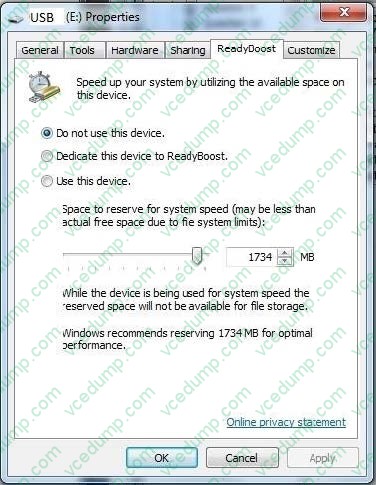
You have a computer named Computer1 that runs Windows 7.
Computer1 uses an NTFS-formatted USB drive that has ReadyBoost enabled.
You need to modify the amount of space that ReadyBoost reserves on the USB drive.
What should you do?
A. Open Computer and modify the properties of the USB drive.
B. Open Performance Information and Tools and run disk cleanup.
C. Open Devices and Printers and modify the properties of the USB drive.
D. Open Device Manager and modify the properties of the USB device. -
Question 452:
Your company network has a single-domain Active Directory forest. The forest functional level is set to Windows Server 2008 R2. All computers are members of the domain. You plan to deploy Windows BitLocker Drive Encryption (BitLocker)
on portable computers that have Windows 7 Enterprise installed.
You need to be able to automatically back up recovery passwords for BitLocker-protected disk volumes on the portable computers.
What should you do before you start encrypting the disk volumes with BitLocker?
A. Run the cscript Get-BitLockerRecoverylnfo.vbs script on the portable computers.
B. Select the Turn on BitLocker backup to Active Directory option in local policy on the portable computers.
C. Run the cscript List-ACEs.vbs script on the portable computers.
D. Run the Idifde -i -v -f BitLockerTPMSchemaExtension.Idf -c script on a domain controller. -
Question 453:
You have a computer that runs windows 7.
You need to configure the monitor on the computer to turn off after 30 minutes of inactive.
What should you do?
A. From personalization, change the theme.
B. From display, change display settings.
C. From action center, change the Action Center settings.
D. From power options, change the current power plan settings. -
Question 454:
You have a computer that runs Windows 7 and Windows Internet Explorer 8. A user named User1 attempts to access a Web page.
User1 fails to access the Web page and receives an error message stating that the page does not have a rating.
You need to configure Internet Explorer to allow User1 to access Web pages that do not have a rating.
Which settings should you modify?
A. Content Advisor
B. InPrivate Filtering
C. Parental Controls
D. Restricted Sites -
Question 455:
You have a computer that runs windows 7.
You log on to the computer by using a user account that is a member of Administrator Group.
From Windows Explorer you open C:\windows\system32\drivers\etc\hosts in notepad.
You attempt to save the file and receive the save as dialog box. You need to ensure that you can save changes to c:\windows\system32\drivers\
What should you do?
A. Stop the windows search service
B. Remove the inherited permissions from the file.
C. Start Windows Notepad by using elevated privileges.
D. Change the user account control (UAS) settings to Notify Me Only when programs try to make changes to my computer. -
Question 456:
You have a computer that runs Windows 7 and Windows Internet Explorer 8. You discover that your browsing history is sent to a third-party advertising content provider. You need to prevent the browsing history from being sent only to that specific content provider.
What should you do?
A. Enable InPrivate Filtering and click Automatically block.
B. Add the Web site for the content provider to the Restricted sites zone.
C. Enable InPrivate Filtering and select the Choose content to block or allow option.
D. View the privacy policy for the Web site and enable the Never allow this site to use cookies option. -
Question 457:
You work as the desktop support technician at Abc.com.
The Abc.com network consists of a single Active Directory domain named Abc.com. The Abc.com management has instructed you to install Microsoft Windows 7 on all the client computers at Abc.com.
You need to create a Windows 7 image that includes the Office 2007. Microsoft Installer Package (MSI) package for the installation.
What should you do?
A. Install the MSI package by using the update command with the /slipstream switch.
B. Install the MSI package by using the Msiexec command with the /package /uninstall switches.
C. Install the MSI package by using the Msiexec command with the /package switch.
D. Install the MSI package by using the Install command with the /package switch. -
Question 458:
A company has a server running Windows Server2008 R2, with Windows Deployment Services (WDS), the Microsoft Deployment Toolkit (MDT), and the Windows Automated Installation Kit (WAIK) set up. The company also has client computers running Windows 7 Enterprise.
You need to remove a virtual hard disk boot option from the Windows startup menu on a client computer.
What should you do?
A. Run the Start /w ocsetup command.
B. Run thePEImg/Prep command.
C. Use Sysprep with an answer file and set the UpdatelnstalledDrivers option in the answer file to Yes.
D. Run the ImageX command with the /Mount parameter.
E. Run the DiskPart command and the Attach command option.
F. Use Sysprep with an answer file and set the PersistAllDevicelnstalls option in the answer file to False.
G. Run the Dism command with the /Mount-Wimoption.
H. Run the Dism command with the /Add-Driver option.
I. Run the BCDEdit/delete command.
J. Add a boot image and create a capture image in WDS. -
Question 459:
You have a Windows 7 Windows image (WIM) that is mounted.
You need to view the list of third-party drivers installed in the image.
What should you do?
A. Run Dism.exe and specify /get-drivers parameter.
B. Run Driverquery.exe and specify the /si parameter.
C. From Device Manager, view all hidden devices.
D. From Windows Explorer, open the \Windows\System32\Drivers folder from the mount folder. -
Question 460:
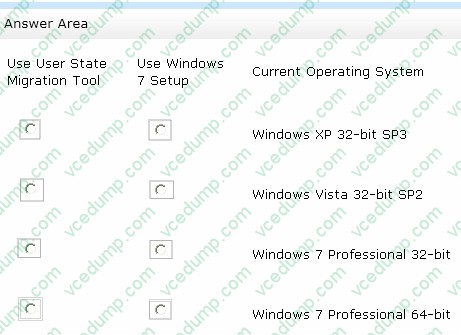
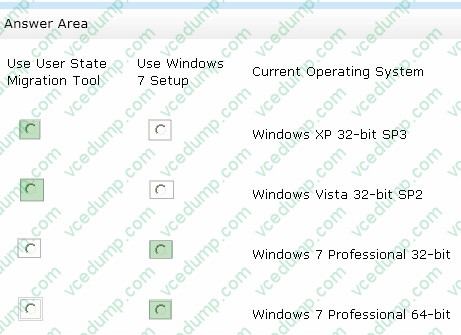
A manufacturing company has Windows Vista and Windows XP computers.
You are responsible for upgrading all computers to Windows 7.
You test the Windows 7 installation on a Windows Vista computer. Early in the installation process, you are prompted to choose the "Upgrade" option or the "Custom (Advanced)" installation option.
You need to determine which installation option is appropriate for the different computers in your company.
In the table below, identify the characteristics of the Upgrade and Custom installation options. (Make only one selection in each column. This question is worth two points. )
Hot Area:
Related Exams:
-
62-193
Technology Literacy for Educators -
70-243
Administering and Deploying System Center 2012 Configuration Manager -
70-355
Universal Windows Platform – App Data, Services, and Coding Patterns -
77-420
Excel 2013 -
77-427
Excel 2013 Expert Part One -
77-725
Word 2016 Core Document Creation, Collaboration and Communication -
77-726
Word 2016 Expert Creating Documents for Effective Communication -
77-727
Excel 2016 Core Data Analysis, Manipulation, and Presentation -
77-728
Excel 2016 Expert: Interpreting Data for Insights -
77-731
Outlook 2016 Core Communication, Collaboration and Email Skills
Tips on How to Prepare for the Exams
Nowadays, the certification exams become more and more important and required by more and more enterprises when applying for a job. But how to prepare for the exam effectively? How to prepare for the exam in a short time with less efforts? How to get a ideal result and how to find the most reliable resources? Here on Vcedump.com, you will find all the answers. Vcedump.com provide not only Microsoft exam questions, answers and explanations but also complete assistance on your exam preparation and certification application. If you are confused on your 70-680 exam preparations and Microsoft certification application, do not hesitate to visit our Vcedump.com to find your solutions here.