70-680 Exam Details
-
Exam Code
:70-680 -
Exam Name
:Windows 7 Configuring -
Certification
:Microsoft Certifications -
Vendor
:Microsoft -
Total Questions
:565 Q&As -
Last Updated
:Dec 13, 2021
Microsoft 70-680 Online Questions & Answers
-
Question 411:
You have a computer that runs Windows 7. You install a third-party Web browser.
You discover that HTML files are no longer associated with Windows Internet Explorer.
You need to ensure that Internet Explorer starts whenever a HTML file is opened.
What should you do from Internet Options?
A. Open the Connections tab and click Setup.
B. Open the General tab and click Use default.
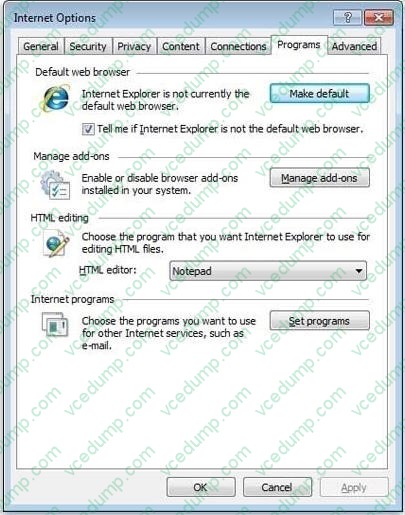
C. Open the Programs tab and click Make default.
D. Open the Programs tab and click Manage add-ons. -
Question 412:
You have a computer that runs Windows 7. The computers hard disks are configured as shown in the following table.

You need to ensure that you can recover the operating system and all the files on the computer if both hard disks fail. Which two actions should you perform? (Each correct answer presents part of the solution. Choose two.)
A. Create a system image.
B. Create a system repair disc.
C. Shrink C and then create a new partition.
D. Connect an external hard disk to the computer. -
Question 413:
You use a portable computer that has Windows 7 SP1 installed and is a member of an Active Directory domain. The computer is connected to your Home ork. You run the ipconfig.exe command as shown in the exhibit. (Click the Exhibit button.)
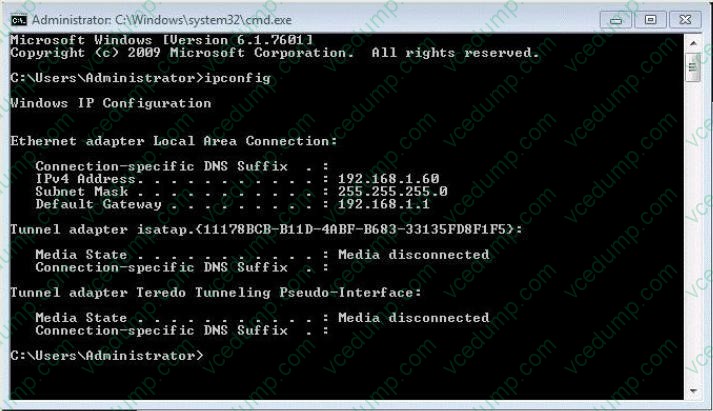
You need to establish a DirectAccess connection from the computer to a DirectAccess server. What should you do first?
A. Add the computer to a new HomeGroup.
B. Configure a static IPv4 address.
C. Create a new VPN connection.
D. Enable IPv6 on the network adapter. -
Question 414:
You have a computer named Computer1 that runs Windows 7 and Windows Internet Explorer 8. A user reports that Computer1 has a number of Internet Explorer configuration issues that cause instability when browsing the Internet.
You need to configure Internet Explorer to use all default settings.
What should you do from Internet Options?
A. From the Advanced tab, click Reset.
B. From the Programs tab, click Set programs.
C. From the Advanced tab, click Restore advanced settings.
D. From the Security tab, click Reset all zones to default level. -
Question 415:
A company has a server running Windows Server 2008 R2, with Windows Deployment Services (WDS), the Microsoft Deployment Toolkit (MDT), and the Windows Automated Installation Kit (WAIK) set up. The company also has client computers running Windows 7 Enterprise.
You need to remove some files from a virtual hard disk on a client computer.
What should you do first?
A. use Sysprep with an answer file and set the PersistAHDeviceinstalls option in the answer file to True.
B. Run the BCDEdit /delete command.
C. Run the Start/w ocsetup command.
D. Use Sysprep with an answer file and set the UpdateinstalledDriversoption in the answer file to Yes.
E. Run the Dism command with the /Add-Driver option.
F. Add a boot image and create a capture image in WDS.
G. Run the PEImg /Prepcommand.
H. Run the ImageX command with the /Mount parameter.
I. Run the Dism command with the /Mount-Wim option.
J. Use Sysprep with an answer file and set the UpdateInstalledDriversoption in the answer file to No. -
Question 416:
You need to identify the hardware failures that have occurred on your computer in the past six months. What should you do?
A. From the Control Panel, open Performance Information and Tools.
B. From the Control Panel, open Troubleshooting.
C. From the Action Center, under Maintenance, click the View reliability history.
D. From the Action Center, open Recovery. -
Question 417:
You have a computer that runs Windows 7.
You enable Advanced Audit Policy Configuration in the Local Computer Policy and discover that the policy is not applied.
You need to ensure that Advanced Audit Policy Configuration is applied on the computer.
What should you do?
A. Restart the computer.
B. Run Gpupdate /force.
C. Enable the Security Settings policy option.
D. Run Secedit /refreshpolicy machine_policy. -
Question 418:
You have a computer that is certified for Windows 7.
You need to install Windows 7 on the computer. The installation method must prevent you from being prompted for information during the installation.
What should you do?
A. Create an unattend.txt file on a removable drive. Start the computer from the Windows 7 installation media.
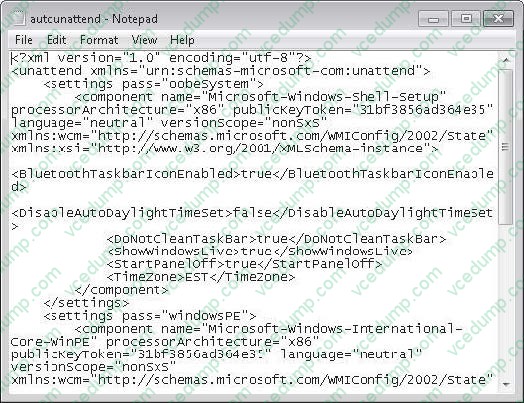
B. Create an autounattend.xml file on a removable drive. Start the computer from the Windows 7 installation media.
C. Start the computer from the Windows 7 installation media. At the command prompt, run Setup.exe and specify the /m parameter.
D. Start the computer from the Windows 7 installation media. At the command prompt, run Setup.exe and specify the /tempdrive. -
Question 419:
You have a Virtual Hard Disk (VHD) and a computer that runs Windows 7. The VHD has Windows 7 installed.
You need to start the computer from the VHD.
What should you do?
A. From Diskpart.exe, run Select vdisk.
B. From Disk Management, modify the active partition.
C. Run Bootcfg.exe and specify the /default parameter.
D. Run Bcdedit.exe and modify the Windows Boot Manager settings. -
Question 420:
You have a computer that runs Windows 7. Windows XP Mode and Windows Virtual PC are installed on the computer.
When running Windows XP Mode with Windows Virtual PC, you install a 16-bit application named App1.exe.
You need to ensure that you can start Appl.exe by using a shortcut on the Windows 7 Start menu.
What should you do?
A. From Windows 7, add a shortcut to the Start menu.
B. From the virtual PC, add a shortcut to the Start menu.
C. From Windows 7, run Start appl.exe /separate.
D. From the virtual PC, run Start appl.exe /separate.
Related Exams:
-
62-193
Technology Literacy for Educators -
70-243
Administering and Deploying System Center 2012 Configuration Manager -
70-355
Universal Windows Platform – App Data, Services, and Coding Patterns -
77-420
Excel 2013 -
77-427
Excel 2013 Expert Part One -
77-725
Word 2016 Core Document Creation, Collaboration and Communication -
77-726
Word 2016 Expert Creating Documents for Effective Communication -
77-727
Excel 2016 Core Data Analysis, Manipulation, and Presentation -
77-728
Excel 2016 Expert: Interpreting Data for Insights -
77-731
Outlook 2016 Core Communication, Collaboration and Email Skills
Tips on How to Prepare for the Exams
Nowadays, the certification exams become more and more important and required by more and more enterprises when applying for a job. But how to prepare for the exam effectively? How to prepare for the exam in a short time with less efforts? How to get a ideal result and how to find the most reliable resources? Here on Vcedump.com, you will find all the answers. Vcedump.com provide not only Microsoft exam questions, answers and explanations but also complete assistance on your exam preparation and certification application. If you are confused on your 70-680 exam preparations and Microsoft certification application, do not hesitate to visit our Vcedump.com to find your solutions here.