Microsoft 70-680 Online Practice
Questions and Exam Preparation
70-680 Exam Details
Exam Code
:70-680
Exam Name
:Windows 7 Configuring
Certification
:Microsoft Certifications
Vendor
:Microsoft
Total Questions
:565 Q&As
Last Updated
:Dec 13, 2021
Microsoft 70-680 Online Questions &
Answers
Question 401:
A company has client computers that run windows vista.
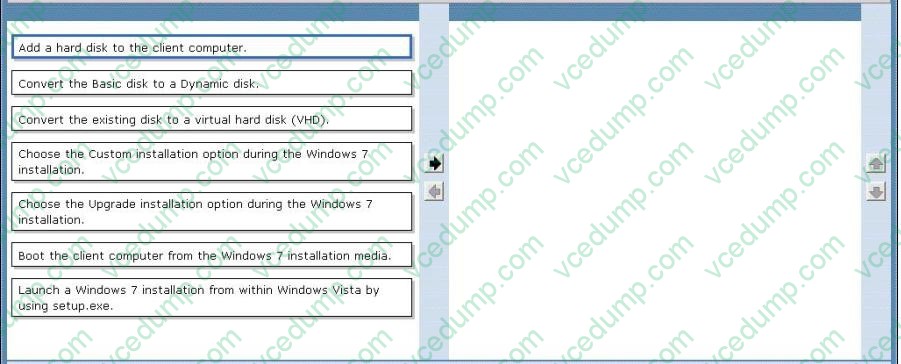
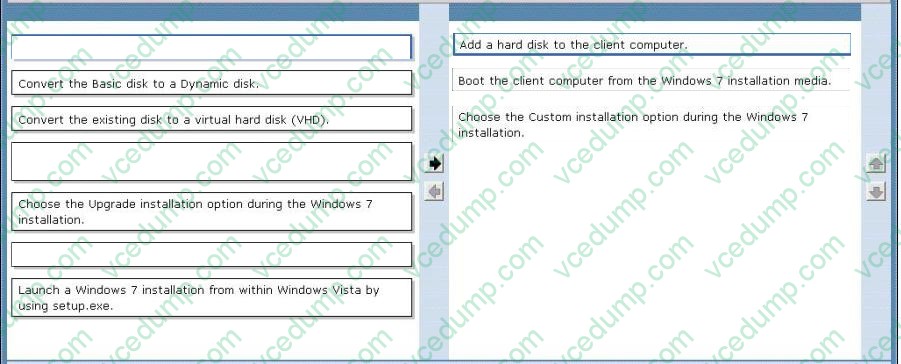
You need to install Windows 7 on a client computer in a dual-boot configuration with the existing Windows Vista installation, without reducing the size of the partition that contains ndows Vista.
Which actions should you perform in sequence? (To answer, move the appropriate actions from the list of actions to the answer area and arrange them in the correct order.)
Select and Place:
Install more than one operating system (multiboot)
When you install the new version of Windows, you can keep an older version of Windows on your computer.
This is often called a multiboot or dual-boot configuration.
Before you begin: Make sure that your hard disk has a separate partition for each operating system that you want to install, or that your computer has multiple hard disks. Otherwise, you ither have to reformat and repartition your hard disk or
install the new operating system on a separate hard disk. Also, make sure that the partition or disk where you plan to install the new version of Windows is formatted with the NTFS file system.
Turn on the computer running your current edition of Windows, and then insert the installation disc into the computer's CD or DVD drive.
On the Install Windows menu, click Install now.
On the Get important updates for installation page, we recommend getting the latest updates to help ensure a successful installation and to help protect your computer against security threats.
You must be connected to the Internet to receive installation updates. This page might not appear if your computer is not connected to the Internet.
On the Type your product key for activation page, we strongly recommend that you type your 25-character product key to help avoid problems during activation.
On the Please read the license terms page, if you accept the license terms, click I accept the license terms.
On the Which type of installation do you want page, click Custom.
On the Where do you want to install Windows page, select the partition or disk where you want to install the new Windows operating system.
Question 402:
You have a computer that runs Windows 7. You create an Encrypting File System (EFS) recovery key and certificate.
You need to ensure that your user account can decrypt all EFS files on the computer.
What should you do?
A. From Credential Manager, add a Windows credential. B. From Credential Manager, add a certificate-based credential. C. From the local computer policy, add a data recovery agent. D. From the local computer policy, modify the Restore files and directories setting.
C. From the local computer policy, add a data recovery agent.
EFS Recovery Recovery Agents are certificates that allow the restoration of EFS encrypted files. When a recovery agent has been specified using local policies, all EFS encrypted files can be recovered using the recovery agent private key. You should specify a recovery agent before you allow users to encrypt files on a client running Windows 7. You can recover all files that users encrypt after the creation of a recovery agent using the recovery agent's private key. You are not able to decrypt files that were encrypted before a recovery agent certificate was specified. You create an EFS recovery agent by performing the following steps:
1.
Log on to the client running Windows 7 using the first account created, which is the default administrator account.
2.
Open a command prompt and issue the command Cipher.exe /r:recoveryagent
3.
This creates two files: Recoveryagent.cer and Recoveryagent.pfx. Cipher.exe prompts you to specify a password when creating Recoveryagent.pfx.
4.
Open the Local Group Policy Editor and navigate to the \Computer Configuration\Windows Settings\Security Settings\Public Key Policies\Encrypting File System node. Right-click this node and then click Add Data Recovery Agent. Specify the location of Recoveryagent.cer to specify this certificate as the recovery agent.
5.
To recover files, use the certificates console to import Recoveryagent.pfx. This is the recovery agent's private key. Keep it safe because it can be used to open any encrypted file on the client running Windows 7.
Question 403:
Kim Akers has an administrator account on a computer running Windows 7 Enterprise.
Don Hall has a standard account on the same computer. Both users have Microsoft Office Word and Microsoft Office Excel files saved in their Documents library.
Don stores Microsoft Office PowerPoint presentations in a subfolder of his Documents library named Presentations. He also stores digital photographs in his Pictures library.
Don has created a folder called Secret in his Documents library and has encrypted the folder and its contents. He stores confidential files in that folder.
When Don last logged on, he deleted some personal files but did not empty his Recycle Bin.
Kim is logged on to the computer. She has plugged in a USB flash memory device that holds personal files but has not yet copied any of these files to the computer. She has never formatted the flash memory device.
The computer is configured to let Windows decide what files and folders to back up.
Kim opens the Backup And Restore console but does not change any settings. She clicks Backup Now.
Which files are backed up? (Choose all that apply.)
A. The Word and Excel files in Don's Documents library B. The Word and Excel files in Kim's Documents library C. The PowerPoint files in Don's Presentation folder D. The digital photographs in Don's Pictures library E. The files in Don's Secret folder F. The files in Don's Recycle Bin G. The files on Kim's USB flash memory device
A. The Word and Excel files in Don's Documents library B. The Word and Excel files in Kim's Documents library C. The PowerPoint files in Don's Presentation folder D. The digital photographs in Don's Pictures library
Question 404:
Your network has a main office and a branch office. The branch office has computers that run Windows 7. A network administrator enables BranchCache in the main office. You run Netsh on your computer as shown in the exhibit. (Click the Exhibit button.)
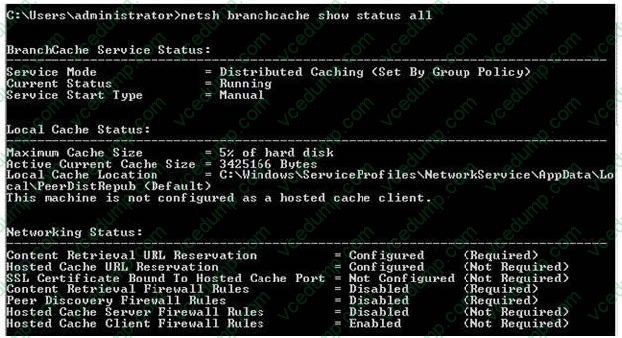
You need to ensure that other computers in the branch office can access the cached content on your computer. What should you do?
A. Turn on Internet Information Services (IIS). B. Configure the computer as a hosted cache client. C. Configure the BranchCache service to start automatically. D. Modify the Windows Firewall with Advanced Security rules.
D. Modify the Windows Firewall with Advanced Security rules.
Distributed Cache Mode Distributed Cache mode uses peer caching to host the branch office cache among clients running Windows 7 on the branch office network. This means that each Distributed Cache mode client hosts part of the cache, but no single client hosts all the cache. When a client running Windows 7 retrieves content over the WAN, it places that content into its own cache. If another BranchCache client running Windows 7 attempts to access the same content, it is able to access that content directly from the first client rather than having to retrieve it over the WAN link. When it accesses the file from its peer, it also copies that file into its own cache.
When you configure BranchCache in distributed cache mode, BranchCache client computers use the Hypertext Transfer Protocol (HTTP) for data transfer with other client computers. BranchCache client computers also use the Web Services Dynamic Discovery (WS-Discovery) protocol when they attempt to discover content on client cache servers. You can use this procedure to configure client firewall exceptions to allow incoming HTTP and WS-Discovery traffic on client computers that are configured for distributed cache mode.
You must select Allow the connection for the BranchCache client to be able to send traffic on this port.
Question 405:
You have a computer that runs Windows 7.
You have a system image backup of the computer.
You install a new application that is configured to run as a service.
You restart the computer and receive a STOP error message.
You need to successfully start Windows 7 in the minimum amount of time.
What should you do?
A. Start the computer from the Windows 7 installation media and select Startup Repair. B. Start the computer and select Last Known Good Configuration from the advanced startup options. C. Start the computer and select Safe Mode from the advanced startup options. Restore a restore point. D. Start the computer and select Safe Mode from the advanced startup options. Restore the system image.
B. Start the computer and select Last Known Good Configuration from the advanced startup options.
Last Known Good Configuration (Advanced) ) feature in Advanced Boot Options is a recovery option that you use to start your computer with the most recent settings that worked. Last Known Good Configuration (Advanced) restores registry information and driver settings that were in effect the last time the computer started successfully. You should use the Last Known Good Configuration (Advanced) feature when you cannot start Windows 7 after you make a change to your computer, or when you suspect that a change that you just made is causing a problem, for example, if you cannot start Windows after you install a new video driver. When you start your computer by using the Last Known Good Configuration (Advanced) feature, Windows 7 uses the configuration stored in the following registry key:
HKEY_LOCAL_MACHINE\System\CurrentControlSetXX (where by XX are numbers starting with 01 and rising in number to 02, 03, 04 and so on). This is the registry key that is used to store the configuration settings for the Drivers and Services on the system. Each time you boot the system, Windows will be assisted booting by using the registry key "HKEY_LOCAL_MACHINE\System\CurrentControlSet" which will point to another control set key, normally HKEY_LOCAL_MACHINE\System\CurrentControlSet01, (depending on how the system is configured) which contains the setting for the current boot process. Each time Windows boots there will also be a values created under the "HKEY_LOCAL_MACHINE\System\CurrentControlSet\Select" key. These contain REG_DWORD data that enable the Control Keys to operate the way they are designed to. These values tell the CurrentControlSet key which numbered CurrentControlSet to point to enable Windows to boot successfully. The data that tells Last Good Known Configuration which numbered CurrentControlSet to load is also stored under these values. They also contain the data that tells Windows which CurrentContolSet not to use, as there is information stored that lets Windows know what CurrentControlSet has failed to load when Windows was unable to boot.
The Last Known Good Configuration CurrentControlSet will change each time the system configuration for the control set changes. This means that each time you install or uninstall a driver or service, a new numbered CurrentControlSet will be created and stored. If you alter the system, and it is then unable to boot, the Last Known Good Configuration will point to the CurrentControlSet that was last used in a successful boot.
This happens each time that Windows boots and there should typically be only four control sets, although it is not uncommon to have five or six of these Control Sets contained in the registry. Windows will keep track of how many Control Sets are stored and should clear old ones once a certain amount is reached. If installing a new program or device should render the system unbootable, you may be able to use "Last Known Good Configuration" to restore the damaged Control Set registry key with an earlier key that enabled the system to boot. This will remove the registry key(s) that relates to the problem driver or service. It will not remove the actual driver or service but will render it unusable. This could result in any program or device the was installed after the last boot having to be reinstalled as their configuration setting will have been over written. When you perform a system restore following a normal boot or following a boot that uses the Last Known Good Configuration (Advanced) option, a restore point is created that enables you to undo the changes if they do not fix your problem. However, if you perform a system restore when the computer is in Safe Mode or by using the System Recovery options, you cannot undo the restore operation. In this case, if your problem is not resolved, you can run another system restore and choose a different restore point.
Question 406:
You have a computer joined to a domain that runs Windows 7. Your company network contains a Windows Server 2008 R2 remote access server. The server is configured as a Network Access Protection (NAP) enforcement point. You set
the startup type of the NAP Agent service to Automatic on the computer.
You need to complete the configuration of the computer as a NAP client.
What should you do?
A. From the command line of the computer, enable the DHCP Quarantine Enforcement Client by using the ipconfig command. B. From the command line of the computer, enable the DHCP Quarantine Enforcement Client by using the net command. C. From the command line of the computer, enable the DHCP Quarantine Enforcement Client by using the netsh command. D. From the NAP Client Configuration console, configure the Health Registration settings.
C. From the command line of the computer, enable the DHCP Quarantine Enforcement Client by using the netsh command.
Question 407:
You work as the Desktop support technician at Abc.com. The Abc.com network consists of a single Active Directory domain named Abc.com.
The Abc.com management has instructed you to install Microsoft Windows 7 on all the client computers at Abc.com. You need to create a Windows 7 image that includes the Office 2007 Microsoft Installer Package (MSI) package for the
installation.
What should you do?
A. You should consider installing the MSI package by using the update command with the /slipstream switch. B. You should consider installing the MSI package by using the Msiexec command with the /package /uninstall switches. C. You should consider installing the MSI package by using the Msiexec command with the /package switch. D. You should consider installing the MSI package by using the Install command with the /package switch.
C. You should consider installing the MSI package by using the Msiexec command with the /package switch.
Question 408:
You have a computer that runs Windows 7.
You need to configure the computer to download updates from a local Windows Server Update Services (WSUS) server. What should you do?
A. From Windows Update, modify the Windows Update settings. B. From the local Group Policy, modify the Windows Update settings. C. From the System settings, modify the System Protection settings. D. From the local Group Policy, modify the Location and Sensors settings.
B. From the local Group Policy, modify the Windows Update settings.
Question 409:
You administer computers that have Windows 7 and Internet Explorer 8 installed. You want to log on to one of the computers and access a web-based management application that runs on a server by using Internet Explorer.
You need to ensure that any data about your browser session is not saved on the computer.
What should you do?
A. From Internet Options, modify the security settings for the Internet zone. B. Start the Microsoft Network Access Protection service. C. From the Safety drop-down menu, configure InPrivate Filtering. D. From Internet Options, select Delete browsing history on exit.
B. Start the Microsoft Network Access Protection service.
Question 410:
You have a computer that runs Windows 7. Multiple users log on to the computer. The computer has five removable devices.
You need to ensure that users can only access removable devices that have been previously installed on the computer.
What should you modify in the Local Group Policy?
A. Enable the Prevent redirection of USB devices setting. B. Enable the Prevent installation of removable devices setting. C. Disable the WPD Devices: Deny read access setting. D. Disable the Allow administrators to override Device Installation Restriction policies setting.
B. Enable the Prevent installation of removable devices setting.
Prevent installation of removable devices This policy setting allows you to prevent Windows from installing removable devices. A device is considered removable when the driver for the device to which it is connected indicates that the device is removable. For example, a Universal Serial Bus (USB) device is reported to be removable by the drivers for the USB hub to which the device is connected. This policy setting takes precedence over any other policy setting that allows Windows to install a device. If you enable this policy setting, Windows is prevented from installing removable devices and existing removable devices cannot have their drivers updated. If you enable this policy setting on a remote desktop server, the policy setting affects redirection of removable devices from a remote desktop client to the remote desktop server. If you disable or do not configure this policy setting, Windows can install and update device drivers for removable devices as allowed or prevented by other policy settings.
NOT Prevent redirection of USB devices
This policy setting prevents redirection of USB devices. If you enable this setting, an alternate driver for USB devices cannot be loaded. If you disable or do not configure this setting, an alternate driver for USB devices can be loaded.
Nowadays, the certification exams become more and more important and required by more and more
enterprises when applying for a job. But how to prepare for the exam effectively? How to prepare
for the exam in a short time with less efforts? How to get a ideal result and how to find the
most reliable resources? Here on Vcedump.com, you will find all the answers.
Vcedump.com provide not only Microsoft exam questions,
answers and explanations but also complete assistance on your exam preparation and certification
application. If you are confused on your 70-680 exam preparations
and Microsoft certification application, do not hesitate to visit our
Vcedump.com to find your solutions here.