70-680 Exam Details
-
Exam Code
:70-680 -
Exam Name
:Windows 7 Configuring -
Certification
:Microsoft Certifications -
Vendor
:Microsoft -
Total Questions
:565 Q&As -
Last Updated
:Dec 13, 2021
Microsoft 70-680 Online Questions & Answers
-
Question 421:
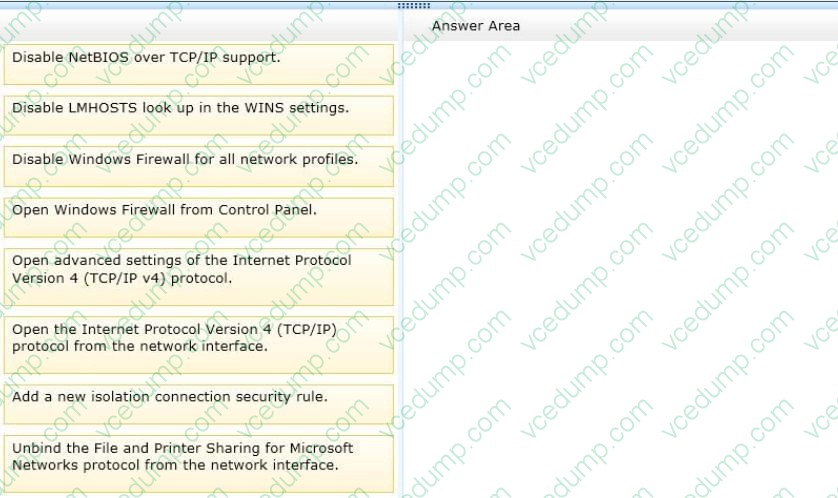
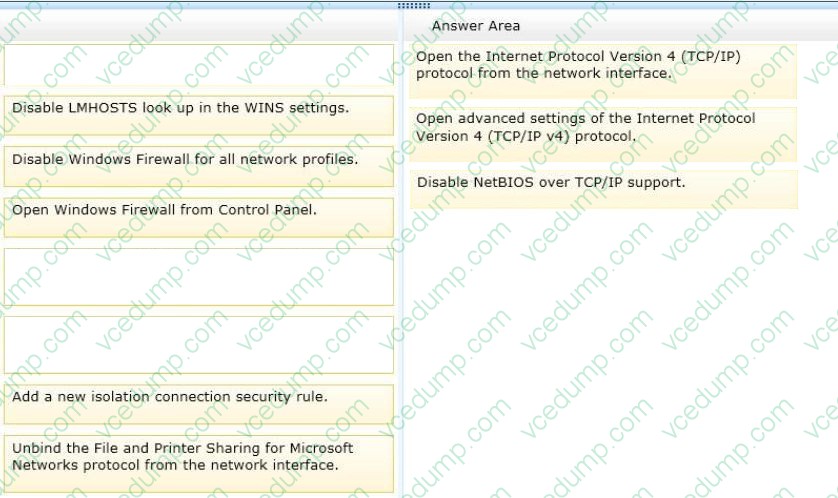
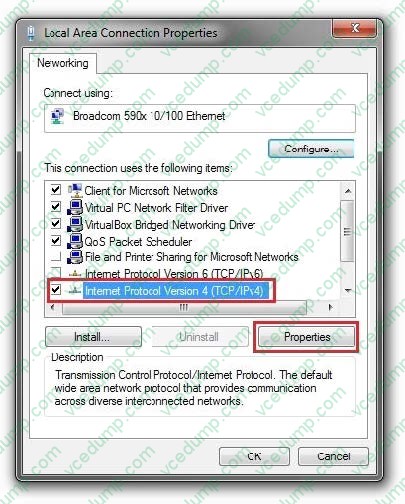
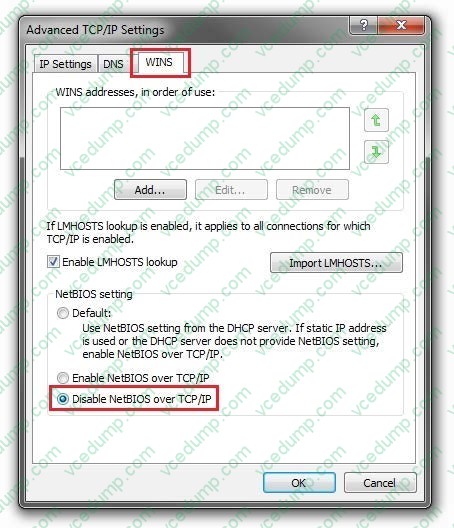
You use a computer that has Windows 7 Professional SP1 installed. The computer has a single network interface.
You need to prevent the computer from using NetBIOS applications.
What should you do? (To answer, move the appropriate actions from the list of actions to the answer area and arrange them in the correct order.)
Select and Place:
-
Question 422:
You have a computer that contains the folders shows in the following table.

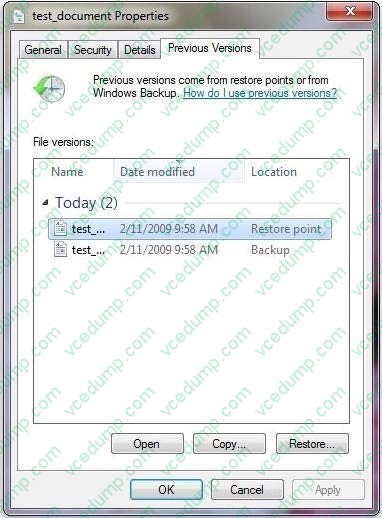
You accidentally delete the Data1 folder.
You need to restore the contents of the Data1 folder. The solution must not overwrite any changes to the Data2 folder.
What should you do?
A. From Recovery, restore a system restore point.
B. From the Previous Versions tab of the User1 folder, click Copy.
C. From the Sharing tab of the User1 folder, modify the Caching settings.
D. Start the computer and then press F8. Restore the Last Known Good Configuration. -
Question 423:
You administer client computers that have Windows 7 Professional 64-bit installed. All the computers are members of a single Active Directory Domain.
You need to prevent users from installing non-trusted device drivers.
What should you do?
A. Enable the Code signing for device drivers in a domain Group Policy.
B. Disable the Code signing for device drivers in a domain Group Policy.
C. Add each user to the Domain Admins group.
D. Run the SigVerif.exe command on each computer. -
Question 424:
You have a computer that runs Windows 7.
Your network contains a VPN server that runs Windows Server 2008.
You need to authenticate to the VPN server by using a smart card.
Which authentication setting should you choose?
A. CHAP
B. EAP
C. MS-CHAP v2
D. PAP -
Question 425:
You work in an international company which is named Wiikigo. Before entering this company, you have two years of experience in the IT field, as well as experience implementing and administering any Windows client operating system in a networked environment. You are professional in installing, upgrading and migrating to Windows 7, deploying Windows 7, and configuring Hardware and Applications and son on. You are in charge of two computers that are respectively named C01 and C02. C01 runs Windows 7 and C02 runs Windows XP Professional. On C01, you enable Remote Desktop as shown in the Remote Desktop exhibit. What action should you perform?
A. You should enable the Allow connections from computers running any version of Remote Desktop setting on C01.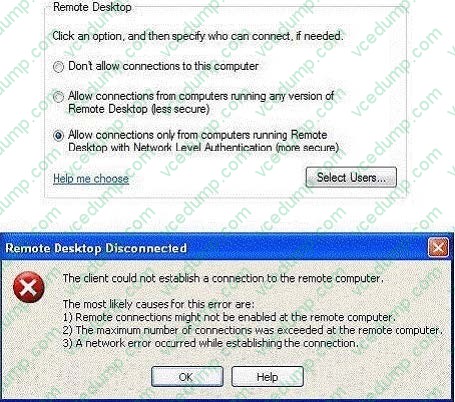
B. The Client (Respond Only) IPSec policy should be assigned on C02.
C. Your user account should be added to the Remote Desktop Users group on C01.
D. A firewall exception should be created for the Remote Desktop Protocol (RDP) should be assigned on C02. -
Question 426:
Your network contains an Active Directory domain. All servers run Windows Server 2008 R2 and are members of the domain. All servers are located in the main office.
You have a portable computer named Computer1 that runs Windows 7. Computer1 is joined to the domain and is located in a branch office.
A file server named Server1 contains a shared folder named Share1.
You need to configure Computer1 to meet the following requirements:

Minimize network traffic between the main office and the branch office
Ensure that Computer1 can only access resources in Share1 while it is connected to the network.
What should you do?
A. On Computer1, enable offline files.
B. On Computer1, enable transparent caching.
C. On Server1, configure DirectAccess.
D. On Server1, configure Share1 to be available offline. -
Question 427:
Your company network includes portable computers that have Windows 7 Ultimate and Windows 7 Professional installed.
You want to standardize all portable computers to Windows 7 Professional for Key Management Server (KMS) licensing purposes.
You need to install Windows 7 Professional on all Windows 7 Ultimate portable computers.
What should you do?
A. Supply the Windows 7 Professional KMS key.
B. Launch Windows Anytime Upgrade.
C. Launch Windows Update.
D. Perform a clean installation over the existing system partition.
E. Perform a clean installation on a non-system partition. -
Question 428:
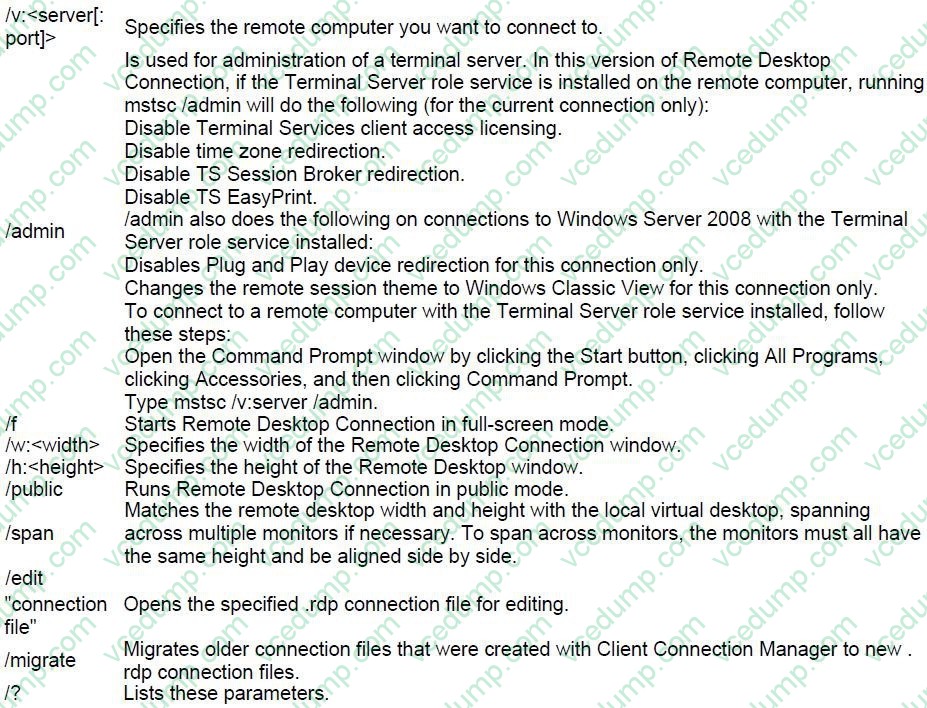
You administer client computers that have Windows 7 Enterprise installed. A server names Server1 has an IP address of 10.10.4.46. The server accepts Remote Desktop connections at a custom port 10876.
You need to connect to the server from a client computer by using Remote Desktop.
What should you do?
A. From an elevated command prompt, run mstsc.exe /v:server1:10876
B. From an elevated command prompt, run msts.exe 10.10.4.56 port:10876
C. From an elevated command prompt, run msts.exe Server1 port:10876
D. From the Advanced tab of your remote Desktop connection, configure the IP address and port of Server1 as the RD Gateway Server -
Question 429:
You have a computer that runs windows 7.
You have a system image of the computer.
You need to restore a single file from the system image. You must achieve the goal using minimum administrative effort.
What should you do?
A. From Disk Management, select Attach VHD.
B. From the Backup and Restore, select restore my files.
C. Restart the computer and run system restore.
D. Restart the computer and run system image recovery. -
Question 430:
You have a computer that runs Windows 7. You connect to your company's network by using a VPN connection.
You discover that when you establish the VPN connection, you are unable to access Internet Web sites.
When you disconnect the VPN connection, you can access Internet Web sites.
You need to access Internet Web sites while you are connected to the VPN.
What should you do?
A. Configure the VPN connection to use only PPTP.
B. Configure the VPN connection to use only L2TP/IPSec.
C. From the Internet Protocol Version 4 (TCP/IPv4) properties of the local area connection, disable the Automatic metric setting.
D. From the Internet Protocol Version 4 (TCP/IPv4) properties of the VPN connection, disable the Use default gateway on remote network setting.
Related Exams:
-
62-193
Technology Literacy for Educators -
70-243
Administering and Deploying System Center 2012 Configuration Manager -
70-355
Universal Windows Platform – App Data, Services, and Coding Patterns -
77-420
Excel 2013 -
77-427
Excel 2013 Expert Part One -
77-725
Word 2016 Core Document Creation, Collaboration and Communication -
77-726
Word 2016 Expert Creating Documents for Effective Communication -
77-727
Excel 2016 Core Data Analysis, Manipulation, and Presentation -
77-728
Excel 2016 Expert: Interpreting Data for Insights -
77-731
Outlook 2016 Core Communication, Collaboration and Email Skills
Tips on How to Prepare for the Exams
Nowadays, the certification exams become more and more important and required by more and more enterprises when applying for a job. But how to prepare for the exam effectively? How to prepare for the exam in a short time with less efforts? How to get a ideal result and how to find the most reliable resources? Here on Vcedump.com, you will find all the answers. Vcedump.com provide not only Microsoft exam questions, answers and explanations but also complete assistance on your exam preparation and certification application. If you are confused on your 70-680 exam preparations and Microsoft certification application, do not hesitate to visit our Vcedump.com to find your solutions here.