70-680 Exam Details
-
Exam Code
:70-680 -
Exam Name
:Windows 7 Configuring -
Certification
:Microsoft Certifications -
Vendor
:Microsoft -
Total Questions
:565 Q&As -
Last Updated
:Dec 13, 2021
Microsoft 70-680 Online Questions & Answers
-
Question 361:
You have two computers named Computer1 and Computer2 that run Windows 7. Computer2 is configured for remote management.
From Computer1, you need to remotely execute a third-party command line tool named disk.exe on Computer2.
Which command should you run?
A. Start disk.exe /d \\computer2
B. Tscon disk.exe /DEST:computer2
C. Winrm e disk.exe Cr:computer2
D. Winrs r:computer2 disk.exe -
Question 362:
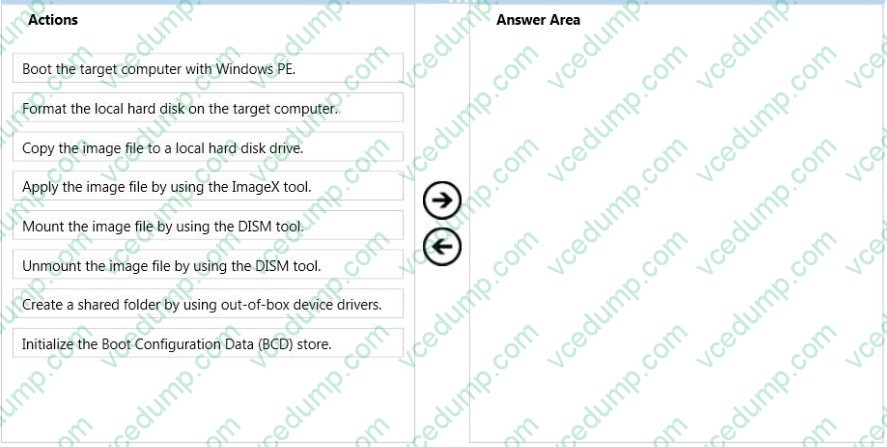
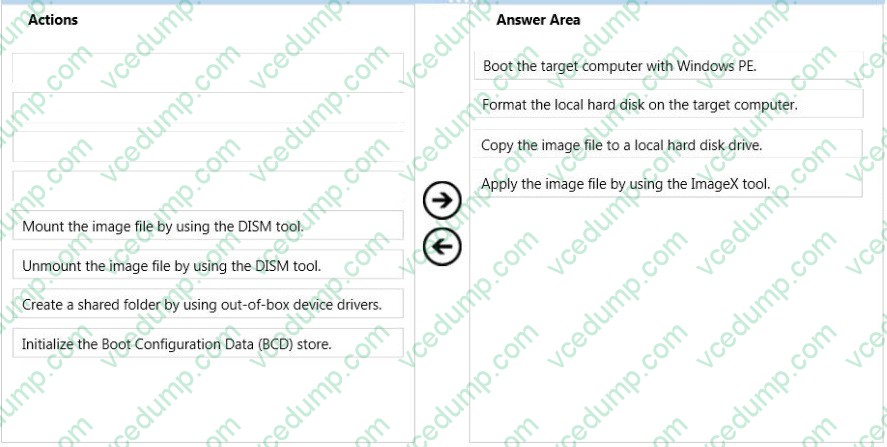
You capture a Windows Image (.wim) file from a reference computer.
You place the image file into a shared folder.
You need to deploy the image to a computer without an operating system.
What should you do? (To answer, move the appropriate actions from the list of actions to the answer area and arrange them in the correct order.)
Select and Place:
-
Question 363:
You have a computer that runs a 32-bit version of Windows 7 Home Premium. The computer has a single partition on a single hard disk drive.
You want to test a 64-bit version of Windows 7 Ultimate. You configure the computer for a dual boot with previously installed Windows 7 Home Premium. You need to configure the computer to support the dual boot.
What should you do?
A. Start Windows 7 Home Premium. Add a new entry to the boot menu.
B. Start Windows 7 Home Premium. Create a Virtual Hard Disk (VHD) file to start Windows 7 Ultimate.
C. Reinstall Windows 7 Home Premium 32 bit as a 64-bit version.
D. Start Windows 7 Home Premium. Create and mount a new Windows Imaging Format (WIM) file with Windows 7 Ultimate files. -
Question 364:
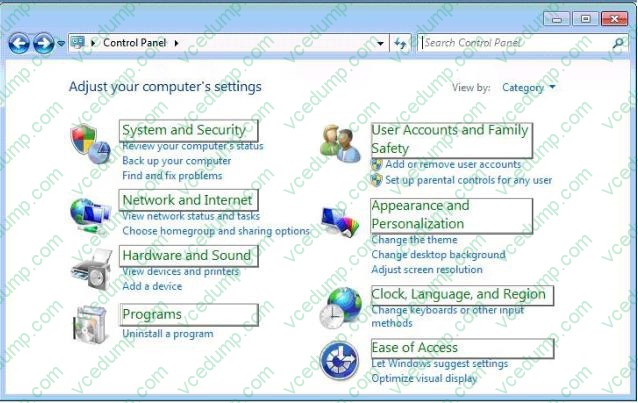
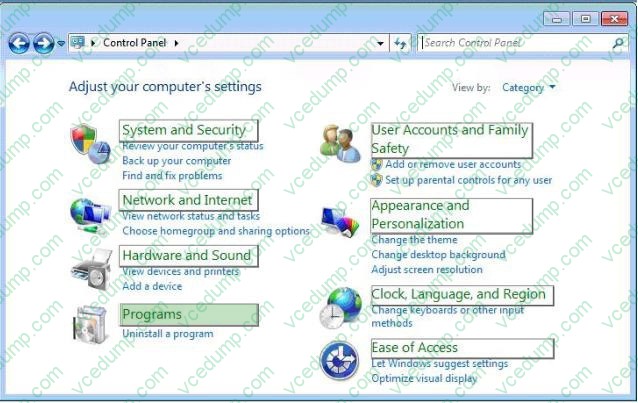
A user-installed Windows update for Windows 7 has caused an error in software that is critical to the user.
You need to find and uninstall the update to restore functionality to the software.
Which settings categories should you choose? (To answer, select the appropriate settings in the work area.)
Hot Area:
-
Question 365:
You have a computer that runs Windows 7.
You need to capture the operating system and all the computer configurations to a Windows image (WIM) file.
What should you do before you capture the image?
A. Run Oscdimg.exe.
B. Run Windows System Image Manager (Windows SIM).
C. Open a command prompt that has elevated privileges.
D. Start the computer by using Windows Preinstallation Environment (Windows PE). -
Question 366:
You have 20 client computers. The computers run Windows XP. The computers are joined to a domain.
You plan to perform installation of Windows 7 on the computers.
You need to transfer all users' documents and settings. You must exclude music and video files. You need to use the minimum amount of administration effort.
What should you do first?
A. Create a config.xml file. Configure a logon script for windows XP computers to launch Windows 7 installations.
B. Modify the migapp.xml file. Configure a logon script for the Windows XP computer to launch Windows 7 installation.
C. Modify the miguser.xml file. Configure a logon script for the Windows XP computer to launch Windows 7 installation.
D. Modify the migdocs.xml file. Configure a logon script for the Windows XP computer to launch Windows 7 installation. -
Question 367:
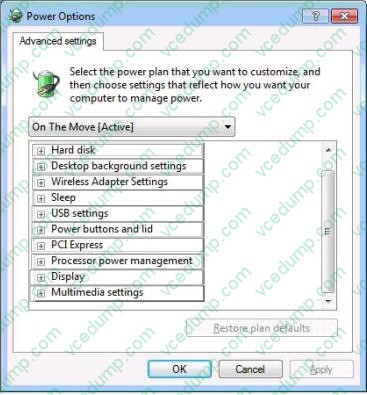
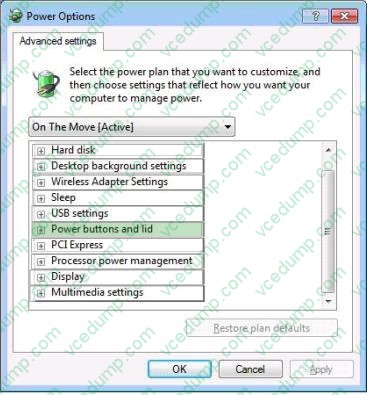
You are running windows 7 on a portable computer. A custom power plan named "On The Move" is optimized for battery life.
The computer enters sleep mode when the portable computer is closed.
You need to change a setting so that when you close the portable computer, nothing happens.
Which setting should you change? (To answer, select the appropriate setting in the work area.)
Hot Area:
-
Question 368:
You have a standalone computer that runs Windows 7. Multiple users share the computer. You need to ensure that you can read the content of all encrypted files on the computer.
What should you do?
A. Run the Certificates Enrollment wizard and then run Certutil.exe -importpfx.
B. Run the Certificates Enrollment wizard and then run Certutil.exe -installcert.
C. Run Cipher.exe /r and then add a data recovery agent from the local security policy.
D. Run Cipher.exe /rekey and then import a security template from the local security policy. -
Question 369:
You have a computer that runs Windows 7. You need to prevent users from copying unencrypted files to removable drives. What should you do?
A. From the Trusted Platform Module (TPM) snap-in, initialize TPM.
B. From Control Panel, modify the BitLocker Drive Encryption settings.
C. From a local Group Policy, modify the BitLocker Drive Encryption settings.
D. From a local Group Policy, modify the Trusted Platform Module (TPM) settings -
Question 370:
You use a computer that has Windows SP1 installed. The computer has a shared folder named c:\Software.
User1 is a local user account on the computer. The account is a member of several groups that have access to the C:\Software folders. You need to verify whether User1 can save files to C:\Software.
What should you do?
A. Download the Sysinternals Suite bundle from the Microsoft site. Run the AccessEnum tool against the C: \Software folder.
B. Run the Net Share command.
C. Run the Net View command.
D. View the Share permissions on C:\Software.
Related Exams:
-
62-193
Technology Literacy for Educators -
70-243
Administering and Deploying System Center 2012 Configuration Manager -
70-355
Universal Windows Platform – App Data, Services, and Coding Patterns -
77-420
Excel 2013 -
77-427
Excel 2013 Expert Part One -
77-725
Word 2016 Core Document Creation, Collaboration and Communication -
77-726
Word 2016 Expert Creating Documents for Effective Communication -
77-727
Excel 2016 Core Data Analysis, Manipulation, and Presentation -
77-728
Excel 2016 Expert: Interpreting Data for Insights -
77-731
Outlook 2016 Core Communication, Collaboration and Email Skills
Tips on How to Prepare for the Exams
Nowadays, the certification exams become more and more important and required by more and more enterprises when applying for a job. But how to prepare for the exam effectively? How to prepare for the exam in a short time with less efforts? How to get a ideal result and how to find the most reliable resources? Here on Vcedump.com, you will find all the answers. Vcedump.com provide not only Microsoft exam questions, answers and explanations but also complete assistance on your exam preparation and certification application. If you are confused on your 70-680 exam preparations and Microsoft certification application, do not hesitate to visit our Vcedump.com to find your solutions here.