70-680 Exam Details
-
Exam Code
:70-680 -
Exam Name
:Windows 7 Configuring -
Certification
:Microsoft Certifications -
Vendor
:Microsoft -
Total Questions
:565 Q&As -
Last Updated
:Dec 13, 2021
Microsoft 70-680 Online Questions & Answers
-
Question 381:
You have a computer that runs windows vista. The computer has one partition and 1 GB of RAM.
You need to upgrade the computer to windows 7.
What should you do?
A. Add 1 GB of RAM.
B. Create a second partition.
C. Disable User Account Control (UAC).
D. Install windows Vista Service pack 2 (SP2) -
Question 382:
You have a portable computer that runs Windows 7. The computer is joined to a domain. Multiple users log on to the computer.
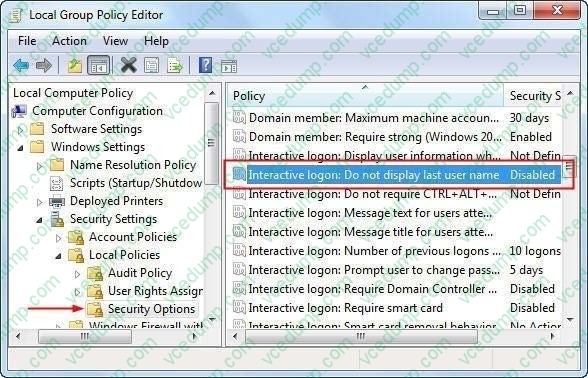
You need to prevent the computer from displaying the username of the last user who logged on.
What should you do?
A. From Control Panel, modify the User Profiles settings.
B. From Control Panel, modify the Personalization settings.
C. From the local computer policy, add a policy template.
D. From the local computer policy, modify the local security policy. -
Question 383:
You have a computer that runs Windows 7. The computer has two drives named C and D. Windows Backup is scheduled to run every day. The scheduled backup backs up a system image, all user, files, and drive D. Drive D fails. You replace the drive with a new drive. You need to recover the data on drive D by using the minimum amount of administrative effort. The solution must minimize downtime.
What should you do?
A. From Backup and Restore, click Restore all users files.
B. From the properties of drive D, restore all previous versions.
C. Open System Restore and apply the latest restore point.
D. Start the computer from a system repair disc and restore a system image. -
Question 384:
You create a new virtual hard disk (VND) on a Windows 7 Enterprise computer. Then you install Windows 7 on the VHD.
After you reboot the computer, the Windows 7 boot menu shows two different Windows 7 installations titled "Windows 7".
What should you do?
A. Add a boot image in WDS.
B. Run the BCDEdit command.
C. User Sysprep with an answer file and set the PersistAllDeviceInstalls option in the file to true.
D. Run the PEImg /Prep command
E. Create a capture image in WDS.
F. Run the DiskPart command and the Attach command option.
G. Run the Start /w ocsetup command.
H. Use Sysprep with an answer file and set the PersistAllDeviceInstalls option in the answer file to False.
I. Run the Dism command with the /Add-Package option.
J. Use Sysprep with an answer file and set the UpdateInstalledDrivers option in the answer file to Yes. -
Question 385:
A company has client computers that run Windows Vista.
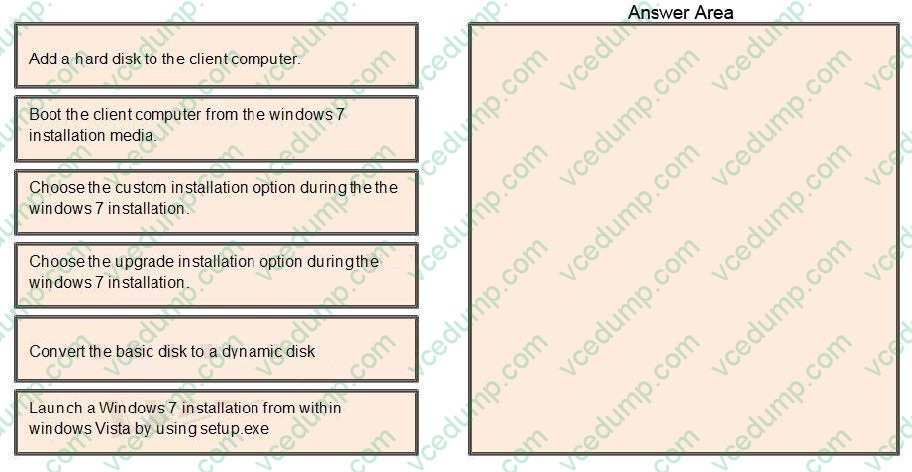
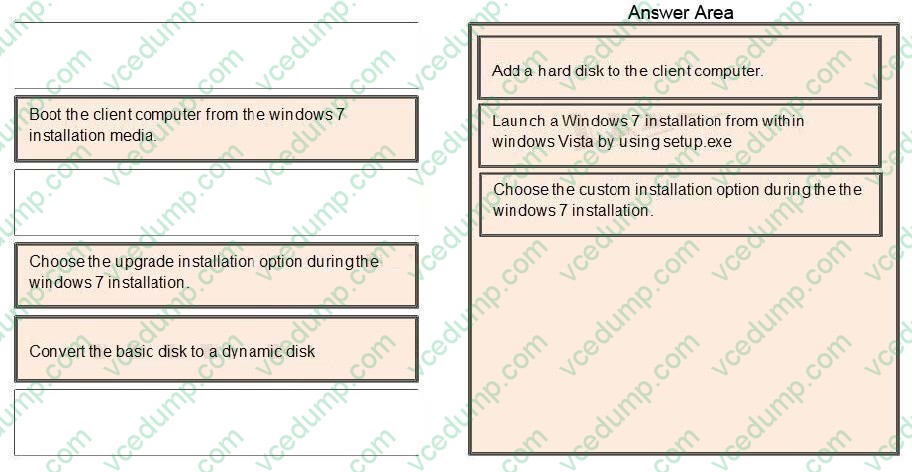
You need to install Windows 7 on a client computer in a dual-boot configuration with the existing Windows Vista installation, without reducing the size of the partition that contains Windows Vista.
Which actions should you perform in sequence? (To answer, move the appropriate actions from the list of actions to the answer area and arrange them in the correct order.)
Select and Place:
-
Question 386:
In Windows 7 you can control when users such as kids can login to Windows 7.
Which of the following best describes where to configure this option?
A. You cannot choose this feature unless you are connected to a domain.
B. Go to the Start, Control Panel, User Accounts and Family Safety, Setup Parental Controls, and then choose Time Restrictions.
C. Go to Start, Control Panel. User Profiles, and then Time Restriction Settings.
D. Go to the Homegroup settings and choose Offline Time Settings. -
Question 387:
You are installing a 64bit edition of Windows 7. During the installation, you receive an error message when you attempt to add mass storage driver. You need to complete the installation of Windows 7. You start the computer from the Windows 7 installation media.
What should you do next?
A. From the Install Windows dialog box, click RESCAN.
B. From the Install Windows dialog box, click DRIVE OPTIONS (ADVANCED)
C. From the Advanced Boot options menu, select SAFE MODE.
D. From the Advanced Boot options menu, select DISABLE DRIVER SIGNATURE ENFORCEMENT. -
Question 388:
You have two computers named Computer1 and Computer2 that run Windows 7.
You need to ensure that Computer2 has exactly the same firewall rules as Computer1.
What should you do on Computer1?
A. Run Winrm.exe quickconfig.
B. From Windows Firewall with Advanced Security, select Export Policy.
C. From Windows Firewall with Advanced Security, click Inbound Rules and then click Export List.
D. Open Local Security Policy. Right-click IP Security Policies on Local Computer and then click Export List. -
Question 389:
You are a network administrator for a global company that has Windows Server 2008 R2 servers and Windows 7 Enterprise computers.
Management wants to decrease VPN costs by implementing DirectAccess for remote network access.
They assign you to evaluate the current network infrastructure, which includes the following elements:

Active Directory
IPv6 network and applications
Server for DirectAccess service
You need to ensure that all critical infrastructure components are present.
What should you add to the infrastructure?
A. Windows Internet Name Service (WINS) server
B. Public key infrastructure
C. NAT-PT devices
D. Windows Software Update Services (WSUS) server -
Question 390:
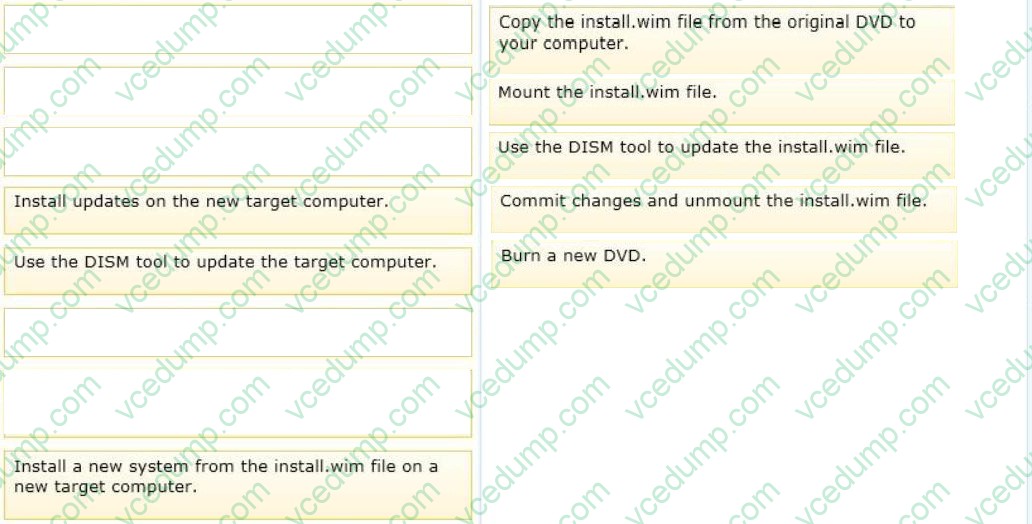
You administer Windows 7 computers in your company network. You want to deploy Windows 7 to newly purchased computers by using customized DVD installation media.
You download the latest updates' package files to your computer from the Microsoft website.
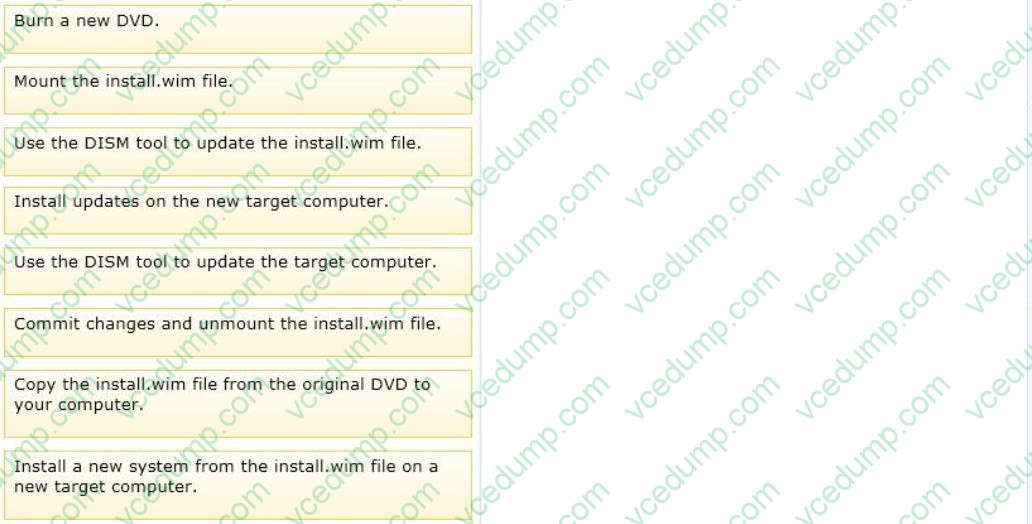
You need to prepare a new Windows 7 installation DVD that includes the updates.
What should you do? (To answer, move the appropriate actions from the list of actions to the answer area and arrange them in the correct order.)
Select and Place:
Related Exams:
-
62-193
Technology Literacy for Educators -
70-243
Administering and Deploying System Center 2012 Configuration Manager -
70-355
Universal Windows Platform – App Data, Services, and Coding Patterns -
77-420
Excel 2013 -
77-427
Excel 2013 Expert Part One -
77-725
Word 2016 Core Document Creation, Collaboration and Communication -
77-726
Word 2016 Expert Creating Documents for Effective Communication -
77-727
Excel 2016 Core Data Analysis, Manipulation, and Presentation -
77-728
Excel 2016 Expert: Interpreting Data for Insights -
77-731
Outlook 2016 Core Communication, Collaboration and Email Skills
Tips on How to Prepare for the Exams
Nowadays, the certification exams become more and more important and required by more and more enterprises when applying for a job. But how to prepare for the exam effectively? How to prepare for the exam in a short time with less efforts? How to get a ideal result and how to find the most reliable resources? Here on Vcedump.com, you will find all the answers. Vcedump.com provide not only Microsoft exam questions, answers and explanations but also complete assistance on your exam preparation and certification application. If you are confused on your 70-680 exam preparations and Microsoft certification application, do not hesitate to visit our Vcedump.com to find your solutions here.