70-680 Exam Details
-
Exam Code
:70-680 -
Exam Name
:Windows 7 Configuring -
Certification
:Microsoft Certifications -
Vendor
:Microsoft -
Total Questions
:565 Q&As -
Last Updated
:Dec 13, 2021
Microsoft 70-680 Online Questions & Answers
-
Question 351:
You are performing a native VHD boot from Windows Vista to Windows 7 Professional. Windows 7 Professional is installed on F: \Windows7Pro.vhd.
You run the bcdedit /copy {current} /d "Windows 7 VHD" command. The boot configuration data is enumerated as shown in the exhibit. (Click the Exhibit button.)
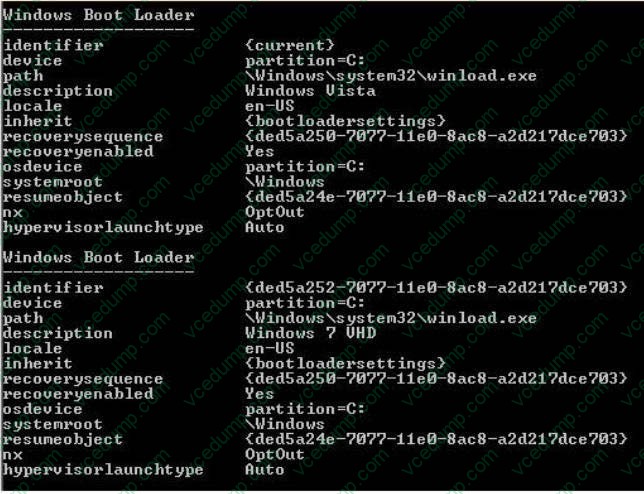
You need to ensure that the following requirements are met:
Both operating systems are bootable after the Power On Self-Test (POST).
Windows 7 VHD is selected as the default boot entry.
Which three commands should you run? (Each correct answer presents part of the solution. Choose three.)
A. Bcdedit /default {ded5a252-7077-11e0-8ac8-a2d217dce703}
B. Bcdedit /set {ded5a24e-7077-11e0-8ac8-a2d217dce703} osdevice vhd=[f:]\Windows7Pro.vhd
C. Bcdboot C:\windows /s E:
D. Bcdedit /set {ded5a24e-7077-11e0-8ac8-a2d217dce703} device vhd=[f:]\Windows7Pro.vhd
E. Bcdedit /set {ded5a252-7077-11e0-8ac8-a2d217dce703} device vhd=[f:]\Windows7Pro.vhd
F. Bcdedit /default {current}
G. Bcdedit /set {ded5a252-7077-11e0-8ac8-a2d217dce703} osdevice vhd=[f:]\Windows7Pro.vhd -
Question 352:
You have a computer that runs Windows 7.
You need to connect to a network projector from the computer.
What should you use?
A. Run Netproj.exe and provide the path to the projector.
B. From Network and Sharing Center, create an ad hoc network and run the DisplaySwitch.exe.
C. Run DisplaySwitch.exe and select Projector only.
D. From Device Manager, click Add Legacy hardware. -
Question 353:
You have a windows 7 computer connected to a local subnet.
From the command prompt, you ping an IP address on the local network, but you get no response.
You need to configure your computer to ping the IP address.
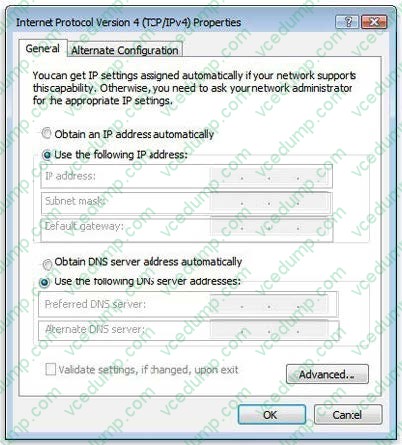
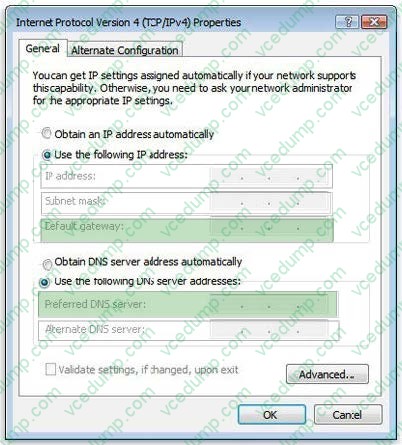
Which two fields of TCF/IPV4 Properties should you configure? (To answer, select the appropriate two fields in the TCP/IPv4 Properties in the answer area.)
Hot Area:
-
Question 354:
You are evaluating the purchase a notebook computer that has the following hardware:

1.6-gigahertz (GHz) 32-bit processor
1024-MB RAM
1 video card that uses shared memory
4-GB solid state drive
You need to ensure that you can install Windows 7 Enterprise on the notebook computer.
Which hardware component should you change?
A. hard disk
B. processor
C. RAM
D. video card -
Question 355:
You have a computer that runs Windows 7.
You open Windows Internet Explorer and access a Web site as shown in the exhibit. (Click the Exhibit button.)
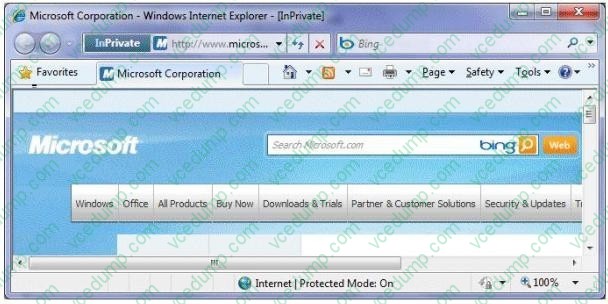
You click the Suggested Sites button, but the suggestions fail to display.
You need to obtain suggested sites.
What should you do?
A. From the Page menu, enable Caret Browsing.
B. From the Safety menu, disable the SmartScreen Filter.
C. From the Start menu, open a new Internet Explorer window.
D. From the Microsoft Corporation Web site, refresh the Suggested Sites Web Slice. -
Question 356:
You have a computer that runs Windows 7.
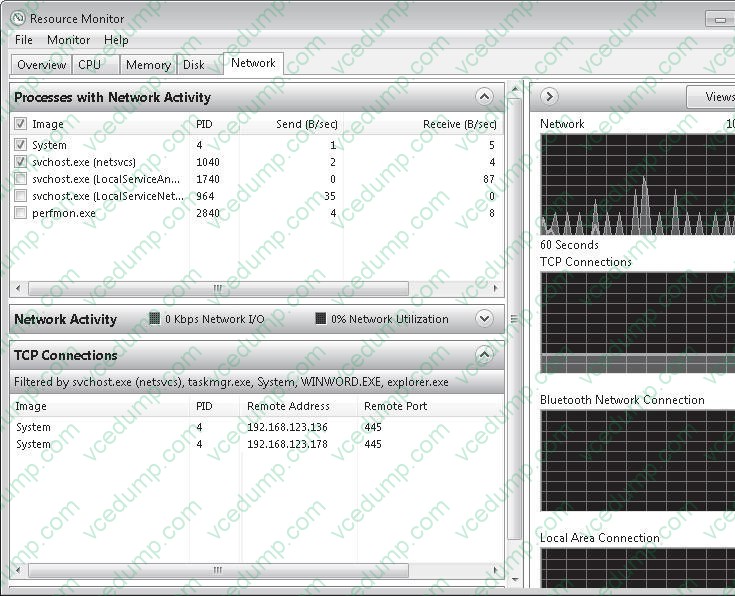
You need to view the processes that currently generate network activity.
What should you do?
A. Open Resource Monitor and click the Network tab.
B. Open Windows Task Manager and click the Networking tab.
C. Open Event Viewer and examine the NetworkProfile Operational log.
D. Open Performance Monitor and add all the counters for network interface. -
Question 357:
You are running windows 7 on a portable computer. A custom power plan named "On The Move" is optimized for battery life.
The computer remains running when the portable computer is closed.
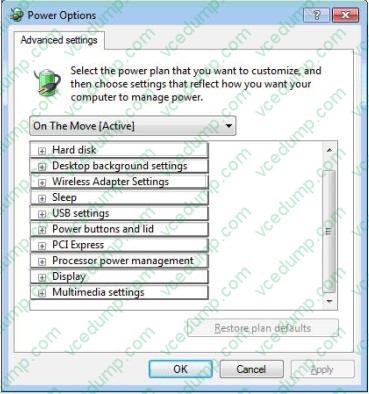
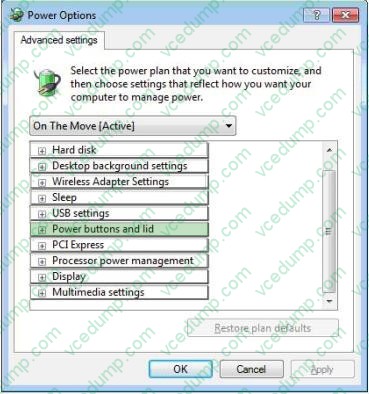
You need to change a setting so that when you close the portable computer, it enters sleep mode.
Which setting should you change? (To answer, select the appropriate setting in the work area.)
Hot Area:
-
Question 358:
You have a workgroup that contains five computers. The computers run Windows 7. A computer named Computer1 has video and audio files.
You need to share Computer1's video and audio files on the network.
Which two actions should you perform? (Each correct answer presents part of the solution. Choose two.)
A. Create a HomeGroup.
B. Move the files to a Media Library.
C. Enable all BranchCache rules in Windows Firewall.
D. Connect a removable drive and enable BitLocker To Go. -
Question 359:
You use a portable computer that has Windows 7 Ultimate installed. The computer has a single 1-terabyte local drive C. 400 GB of the drive space is used by Windows and your documents libraries.
You configure a backup task by using default settings to back up data to an empty 500-GB external USB drive. After two hours, the backup task stops, indicating that no free space is available on the USB drive.
You need to be able to back up your libraries to the USB drive.
You reformat a partition on the USB drive.
What should you do next?
A. Exclude the system image from the backup.
B. Enable the NTFS file system compression on the USB drive,
C. Enable the NTFS file system compression on drive C.
D. Exclude folders located on remote computers from your libraries, -
Question 360:
You have a computer that runs Windows 7.
The computer's hard disks are configured as shown in the following table.
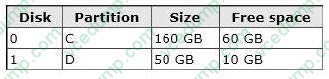
You need to ensure that you can recover the operating system and all the files on the computer if hard disk 0 experiences hardware failure. What should you do?
A. Create a restore point for both hard disks.
B. Use the Backup and Restore tool to back up data files for all users.
C. Create a system repair disk.
D. Use the Backup and Restore tool to create a system image on an external hard disk.
Related Exams:
-
62-193
Technology Literacy for Educators -
70-243
Administering and Deploying System Center 2012 Configuration Manager -
70-355
Universal Windows Platform – App Data, Services, and Coding Patterns -
77-420
Excel 2013 -
77-427
Excel 2013 Expert Part One -
77-725
Word 2016 Core Document Creation, Collaboration and Communication -
77-726
Word 2016 Expert Creating Documents for Effective Communication -
77-727
Excel 2016 Core Data Analysis, Manipulation, and Presentation -
77-728
Excel 2016 Expert: Interpreting Data for Insights -
77-731
Outlook 2016 Core Communication, Collaboration and Email Skills
Tips on How to Prepare for the Exams
Nowadays, the certification exams become more and more important and required by more and more enterprises when applying for a job. But how to prepare for the exam effectively? How to prepare for the exam in a short time with less efforts? How to get a ideal result and how to find the most reliable resources? Here on Vcedump.com, you will find all the answers. Vcedump.com provide not only Microsoft exam questions, answers and explanations but also complete assistance on your exam preparation and certification application. If you are confused on your 70-680 exam preparations and Microsoft certification application, do not hesitate to visit our Vcedump.com to find your solutions here.