70-680 Exam Details
-
Exam Code
:70-680 -
Exam Name
:Windows 7 Configuring -
Certification
:Microsoft Certifications -
Vendor
:Microsoft -
Total Questions
:565 Q&As -
Last Updated
:Dec 13, 2021
Microsoft 70-680 Online Questions & Answers
-
Question 331:
You administer desktops that have 32-bit and 64-bit versions of Windows 7 Enterprise SP1 installed. All desktops have a single CD-RW drive.
You need to be able to restore the missing Windows boot files on any of the desktops when the boot files become corrupted.
Which two actions should you perform? (Each correct answer presents part of the solution. Choose two.)
A. Create a System Restore point on alt Windows 7 Enterprise 32-bit desktops.
B. Run the recdisc.exe command on a Windows 7 Enterprise 64-bit desktop.
C. Restart all desktops. Select the Last Known Good Configuration (Advanced) option from the Advanced Boot Options menu.
D. Create a System Restore point on all Windows 7 Enterprise 64-bit desktops.
E. Run the resdis.exe command on a Windows 7 Enterprise 32-bit desktop.
F. Restart Windows 7 64-bit desktops. Select the Disable Driver Signature Enforcement option from the Advanced Boot Options Menu. -
Question 332:
You work in an international company which is named Wiikigo. Before entering this company, you have two years of experience in the IT field, as well as experience implementing and administering any Windows client operating system in a networked environment. You are professional in installing, upgrading and migrating to Windows 7, deploying Windows 7, and configuring Hardware and Applications and son on. You manage a stand-alone computer which has only one partition. Windows 7 is run by this computer. The computer is shared by two users that are respectively named User1 and User2. User01 uses Encrypting File System (EFS) to encrypt a file. User01 tries to grant User2 access to the file as shown in the exhibit. You have to make sure that User1 are able to grant User2 access to the file. So what action should you perform to make sure of this?
A. User02 should be instructed to log on to the computer and take ownership of the file.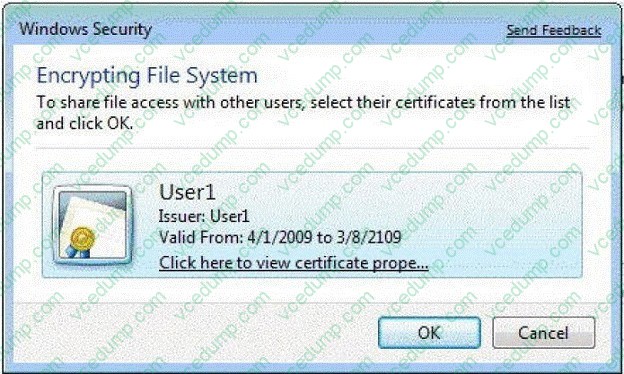
B. User02 should be instructed to log on to the computer and encrypt a file.
C. User1 should be instructed to export his certificate to a certificate (.cer) file.
D. User01 should be instructed to move the file to a shared folder on the computer. -
Question 333:
You have two computers that run Windows 7. Both computers are connected to a network and have IP addresses within the 172.16.10.0/24 subnet. You need to ensure that both computers can join a HomeGroup.
What should you do?
A. Enable network discovery.
B. Set the network location to Home network.
C. Configure Windows Firewall to allow the Netlogon service.
D. Change the IP addresses to be within the 192.168.1.0/24 subnet. -
Question 334:
A Remote Assistance session is established with a user's computer that runs Windows 7 Enterprise.
You need to verify that a local file is encrypted with the Encrypting File System (EFS).
What should you do to accomplish this goal?
A. the netsh command
B. the folder Properties window
C. Device Manager
D. share permissions
E. the Services management console
F. the Group Policy management console
G. the icacls command
H. the User Account Control Settings Control Panel window
I. Local Users and Groups -
Question 335:
A company has client computers that run Windows 7 Enterprise. The company also has a file server running Windows Server 2008 R2 that is configured to use BranchCache. You need to configure the client computers to be BranchCache clients.
Which two choices should you use to achieve this goal? (Each correct answer presents a complete solution. Choose two.)
A. Device Manager
B. Local Users and Groups
C. the User Account Control Settings Control Panel window
D. the Group Policy management console
E. the Services management console
F. the folder Properties window
G. the netsh command
H. the icacls command
I. share permissions -
Question 336:
You use a computer that has Windows 7 SP1 installed to access your company's internal website. The website requires a secure connection. The certificate is a self-signed Secure Socket Layer (SSL).
You attempt to connect to the internal website. You receive the following error message:
"There is a problem with this website's security certificate." You need to be able to connect to the internal website successfully.
What should you do?
A. From Internet Explorer, add the website to the Local Intranet zone.
B. From Certificate Manager, import the website's certificate into the computer's Trusted Publishers store.
C. From Certificate Manager, import the website's certificate into your Trusted Root Certification Authorities store.
D. From Certificate Manager, import the website's certificate into your Personal store. -
Question 337:
You have a stand-alone computer that runs Windows 7.
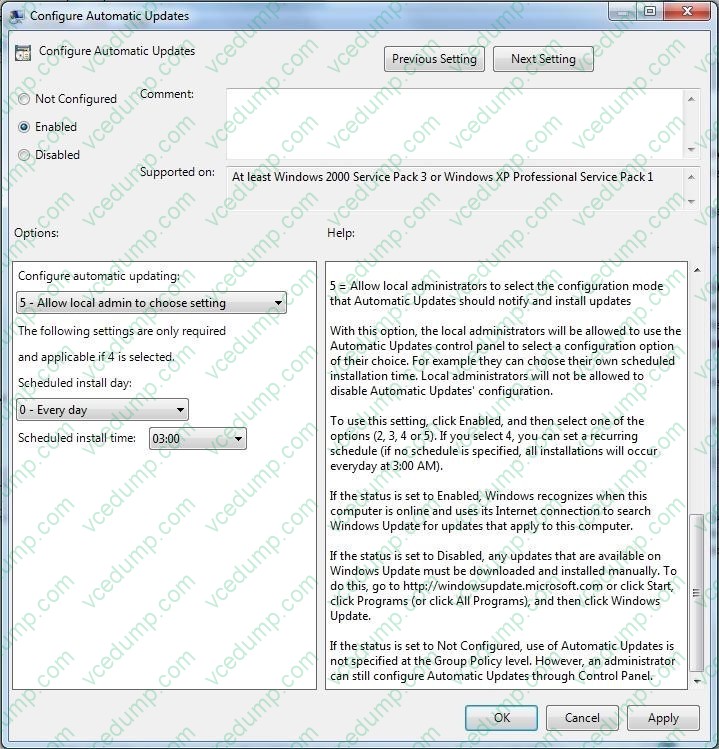
You open Windows Update as shown in the exhibit. (Click the Exhibit button.)
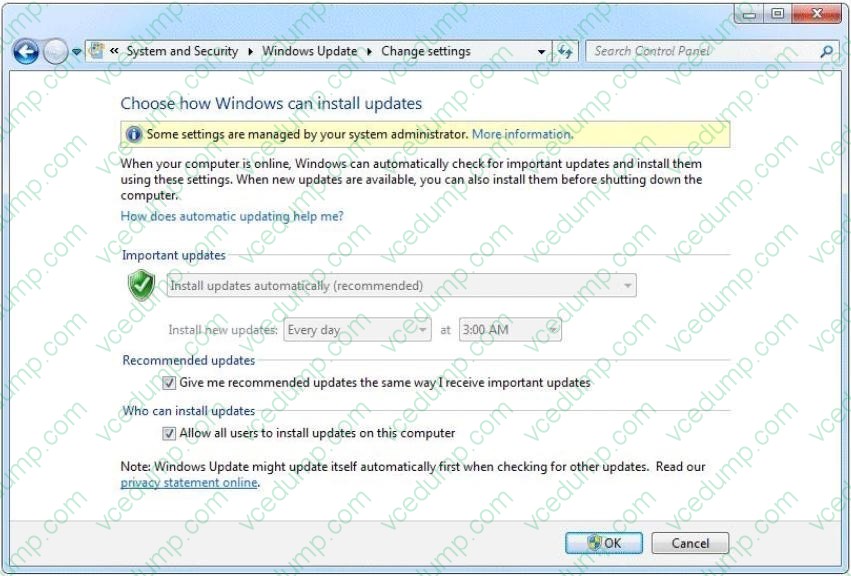
You need to ensure that you can manually change the Windows Update settings on the computer.
What should you do?
A. Log on to Windows 7 as member of the Administrators group.
B. From the local Group Policy, modify the Windows Update settings.
C. Right-click Windows Update and select Run as administrator.
D. Right-click the command prompt, select Run as administrator, and then run Wuapp.exe. -
Question 338:
Your network has a main office and a branch office.
The branch office has five client computers that run Windows 7 and a server that runs Windows Server 2008 R2. The branch office server is enabled for BranchCache.
You need to configure Windows Firewall on each client computer so that cached content can be retrieved from the branch office server.
Which firewall rule should you enable on the client computers?
A. BranchCache - Content Retrieval (Uses HTTP)
B. BranchCache - Hosted Cache Server (Uses HTTPS)
C. BranchCache - Peer Discovery (Uses WSD)
D. File and Printer Sharing -
Question 339:
You have a computer that runs Windows Vista.
You install Windows 7 on a new partition on the computer.
You need to ensure that the computer always starts Windows Vista by default.
What should you do?
A. Run Bcdedit.exe and specify the /default parameter.
B. Run Bcdedit.exe and specify the /bootems parameter.
C. Create a boot.ini file in the root of the Windows 7 partition.
D. Create a boot.ini file in the root of the Windows Vista partition. -
Question 340:
Your company Research department includes client computers that have Windows 7 and Windows Vista installed on separate partitions in a dual-boot configuration. The computers boot into Windows 7 by default or users can choose to boot
into Windows Vista during startup.
The company management has decided that the Windows Vista partition must be deleted from all the computers.
You need to ensure that the staff of the Research department are not prompted to select a boot option during startup and that Windows 7 is chosen automatically.
What should you do?
A. In Windows Vista, from an elevated command prompt, run bcdedit /delete {current}.
B. Select the Selective startup option button by using msconfig.exe.
C. In Windows Vista, from an elevated command prompt, run bcdedit /delete {default}.
D. In Windows 7, from an elevated command prompt, run bcdedit /delete {default}.
Related Exams:
-
62-193
Technology Literacy for Educators -
70-243
Administering and Deploying System Center 2012 Configuration Manager -
70-355
Universal Windows Platform – App Data, Services, and Coding Patterns -
77-420
Excel 2013 -
77-427
Excel 2013 Expert Part One -
77-725
Word 2016 Core Document Creation, Collaboration and Communication -
77-726
Word 2016 Expert Creating Documents for Effective Communication -
77-727
Excel 2016 Core Data Analysis, Manipulation, and Presentation -
77-728
Excel 2016 Expert: Interpreting Data for Insights -
77-731
Outlook 2016 Core Communication, Collaboration and Email Skills
Tips on How to Prepare for the Exams
Nowadays, the certification exams become more and more important and required by more and more enterprises when applying for a job. But how to prepare for the exam effectively? How to prepare for the exam in a short time with less efforts? How to get a ideal result and how to find the most reliable resources? Here on Vcedump.com, you will find all the answers. Vcedump.com provide not only Microsoft exam questions, answers and explanations but also complete assistance on your exam preparation and certification application. If you are confused on your 70-680 exam preparations and Microsoft certification application, do not hesitate to visit our Vcedump.com to find your solutions here.