70-680 Exam Details
-
Exam Code
:70-680 -
Exam Name
:Windows 7 Configuring -
Certification
:Microsoft Certifications -
Vendor
:Microsoft -
Total Questions
:565 Q&As -
Last Updated
:Dec 13, 2021
Microsoft 70-680 Online Questions & Answers
-
Question 261:
You have a computer that runs Windows 7.
You have a system image of the computer.
You need to restore a single file from the system image. You must achieve this goal in the minimum amount of time.
What should you do first?
A. Restart the computer and run System Restore.
B. Restart the computer and run System Image Recovery.
C. From Backup and Restore, select Restore my files.
D. From Disk Management, select Attach VHD. -
Question 262:
You install Windows 7 on a new computer.
Every time you start the computer, you receive a STOP error message. You suspect that the RAM on the computer has a problem.
You need verify the RAM on the computer.
What should you do first?
A. Start the computer, press F8, and then select Repair Your Computer.
B. Start the computer, press F8, and then select Last Known Good Configuration.
C. From a computer that runs Windows 7, copy the %systemroot%\system32\recover.exe to a bootable USB disk. Start the computer from the USB disk.
D. From a computer that runs Windows 7, copy the %systemroot%\system32\repair-bde.exe to a bootable USB disk. Start the computer from the USB disk. -
Question 263:
You need to create a virtual hard disk (VHD) file that will be used to deploy Windows 7. The solution must minimize the performance impact caused by using a VHD.
Which type of VHD should you create?
A. differencing disk
B. dynamically expanding disk
C. fixed-size disk
D. snapshot -
Question 264:
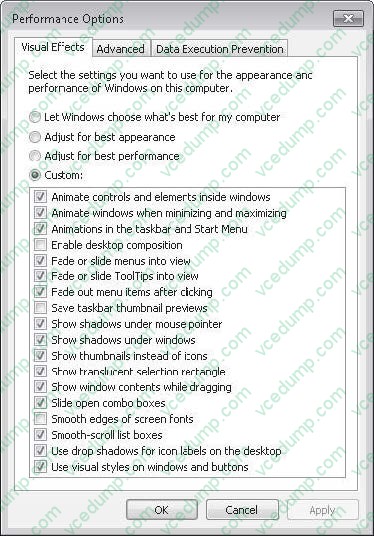
You have a computer that runs Windows 7. You generate a System Diagnostic Report and receive the following warning message: The Graphics rating for the system is poor and may be the cause of performance problems.
You need to increase the graphics performance of the computer without modifying the current hardware or drivers.
What should you do?
A. From Personalization, modify the screen saver.
B. From Indexing Options, modify the Advanced options.
C. From Performance Options, modify the visual effects.
D. From Performance Options, modify the processor scheduling. -
Question 265:
You have a computer that runs Windows 7.
A user installs a third-party media player on the computer. You discover that all media files automatically open by using the third-party media player. You need to ensure that all media files open automatically by using Windows Media Player.
You must achieve this goal by using the minimum amount of administrative effort.
What should you do?
A. Select a media file. Right-click the file and select open with.
B. Select a media file. Right-click the file and select Restore previous versions.
C. From Control Panel, modify the Set your default programs settings.
D. From Control Panel, modify the Set program access and computer defaults settings. -
Question 266:
You plan to deploy Windows 7 images. You need ensure that you can deploy images by using the WindowsPreinstallation Environment (Windows PE).
What should you do add to the Windows PE image?
A. Imagex.exe
B. Loadstate.exe
C. Mighost.exe
D. Usmtutils.exe -
Question 267:
You have a computer that runs Windows 7. The computer has two volumes named volume C and volume D.
You create a document on volume D.
You manually create a restore point and modify the document.
You view the properties of the document as shown in the exhibit. (Click the Exhibit button.)
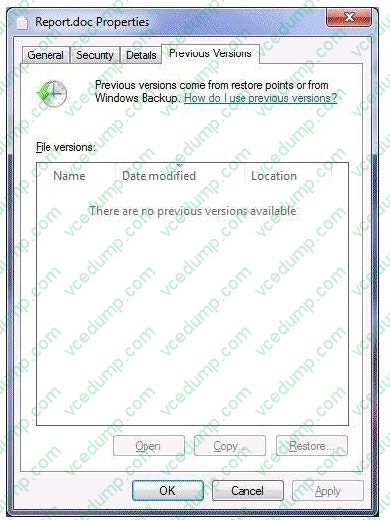
You need to ensure that you can restore the current version of the document if the document is modified. What should you do first?
A. Run Disk Cleanup on volume D.
B. Enable auditing on the document.
C. Turn on System Protection for volume D.
D. Start the Volume Shadow Copy Service (VSS). -
Question 268:
You use a portable computer that has Windows 7 Enterprise SP1 installed. A conference room at your company has a network projector installed on a server within the company network.
You need to connect to the projector from your computer.
What should you do?
A. From Accessories, click Connect to a Network Projector.
B. From PowerShell, run the Net Config command.
C. From Display, click Connect to a projector.
D. Run the Displayswitch.exe command and select Projector only. -
Question 269:
Which of the following is true of Windows 7?
A. MailCentral is included as the new default mail client with Windows 7.
B. Outlook Express is included with Windows 7.
C. Microsoft Outlook is included with Windows 7.
D. There is no preinstalled mail client included with Windows 7. -
Question 270:
You attach a mobile device that runs Windows Mobile Professional 6.1 to a computer. You encounter that windows is unable to install the necessary device drivers for the mobile device. You need to ensure that you can synchronize file to the mobile device.
What should you do?
A. From Windows Mobility Center, click Sync settings.
B. From Sync Center, click set up new sync partnerships.
C. From Device Manager, click scan for hardware changes.
D. From Devices and Printers, right-click the device and click troubleshoot.
Related Exams:
-
62-193
Technology Literacy for Educators -
70-243
Administering and Deploying System Center 2012 Configuration Manager -
70-355
Universal Windows Platform – App Data, Services, and Coding Patterns -
77-420
Excel 2013 -
77-427
Excel 2013 Expert Part One -
77-725
Word 2016 Core Document Creation, Collaboration and Communication -
77-726
Word 2016 Expert Creating Documents for Effective Communication -
77-727
Excel 2016 Core Data Analysis, Manipulation, and Presentation -
77-728
Excel 2016 Expert: Interpreting Data for Insights -
77-731
Outlook 2016 Core Communication, Collaboration and Email Skills
Tips on How to Prepare for the Exams
Nowadays, the certification exams become more and more important and required by more and more enterprises when applying for a job. But how to prepare for the exam effectively? How to prepare for the exam in a short time with less efforts? How to get a ideal result and how to find the most reliable resources? Here on Vcedump.com, you will find all the answers. Vcedump.com provide not only Microsoft exam questions, answers and explanations but also complete assistance on your exam preparation and certification application. If you are confused on your 70-680 exam preparations and Microsoft certification application, do not hesitate to visit our Vcedump.com to find your solutions here.