70-680 Exam Details
-
Exam Code
:70-680 -
Exam Name
:Windows 7 Configuring -
Certification
:Microsoft Certifications -
Vendor
:Microsoft -
Total Questions
:565 Q&As -
Last Updated
:Dec 13, 2021
Microsoft 70-680 Online Questions & Answers
-
Question 141:
Your company has Windows 7 Enterprise computers that do not have a Trusted Platform Module (TPM) installed. You need to enable BitLocker drive encryption on the operating system drives.
Which two actions should you perform? (Each correct answer presents part of the solution. Choose two.)
A. Create a USB startup key.
B. Configure the Require additional authentication at startup group policy setting.
C. Create a network key location.
D. Configure the Allow enhanced PINs for startup group policy setting. -
Question 142:
You have a computer named Computer1 that runs Windows 7.
You need to ensure that Computer1 can connect to File Transfer Protocol (FTP) servers only while it is connected to a private network.
What should you do?
A. From Windows Firewall with Advanced Security, create a new rule.
B. From the local Group Policy, modify the application control policies.
C. From Windows Firewall, modify the Allowed Programs and Features list.
D. From Network and Sharing Center, modify the Advanced Sharing settings. -
Question 143:
You have recently installed Windows 7 Ultimate on a laptop computer, installed applications such as Office, and downloaded and installed all outstanding updates.
The computer has two internal hard disks, both formatted with the NTFS file system. You also have an external USB hard disk that you have plugged into the laptop. You used the convert fs/ntfs command to convert the external hard drive to
the NTFS file system. You have an 8-GB USB flash memory device and the laptop contains a DVD-ROM writer. In your workplace, you can plug in to the corporate network and connect to a network share on a file server running Windows
Server 2008 R2.
On what devices can you create a full System Image backup of the laptop's system volume? (Choose all that apply.)
A. The second internal hard disk
B. The external hard disk
C. The USB flash drive
D. Multiple DVD-ROMs
E. The network share -
Question 144:
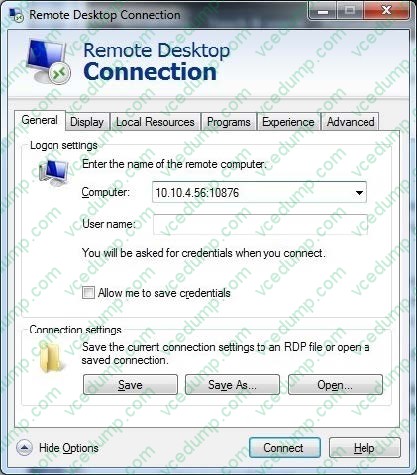
You administer client computers that have Windows 7 Enterprise installed. A server named Server1 has an IP address of 10.10.4.56. The server accepts Remote Desktop connections at a custom port 10876.
You need to connect to the server from a client computer by using Remote Desktop.
What should you do?
A. From an elevated command prompt, run mstsc.exe 10.10.4.56 port: 10876.
B. From the Advanced tab of your Remote Desktop connection, configure the port of Server1 in the Connect from anywhere option.
C. From the General tab of your Remote Desktop connection, type 10.10.4.56:10876 in the Computer field.
D. From the Advanced tab of your Remote Desktop connection, configure the IP address and port of Server1 as the RD Gateway Server. -
Question 145:
Your network consists of one Active Directory domain. You have two computers named Computer1 and Computer2 that run Windows 7. Both computers are members of the domain.
From Computer1, you can recover all Encrypting File System (EFS) encrypted files for users in the domain.
You need to ensure that you can recover all EFS encrypted files from Computer2.
What should you do?
A. On Computer1, back up %systemroot%\DigitalLocker. On Computer2, restore %systemroot %\DigitalLocker.
B. On Computer1, export the data recovery agent certificate. On Computer2, import the data recovery agent certificate.
C. On Computer1, run Secedit.exe and specify the /export parameter. On Computer2, run Secedit.exe and specify the /import parameter.
D. On Computer1, run Cipher.exe and specify the /removeuser parameter. On Computer2, run Cipher.exe and specify the /adduser parameter. -
Question 146:
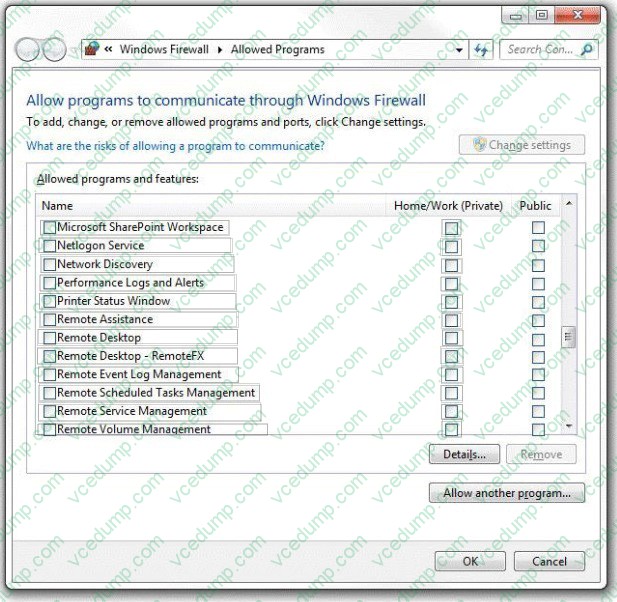
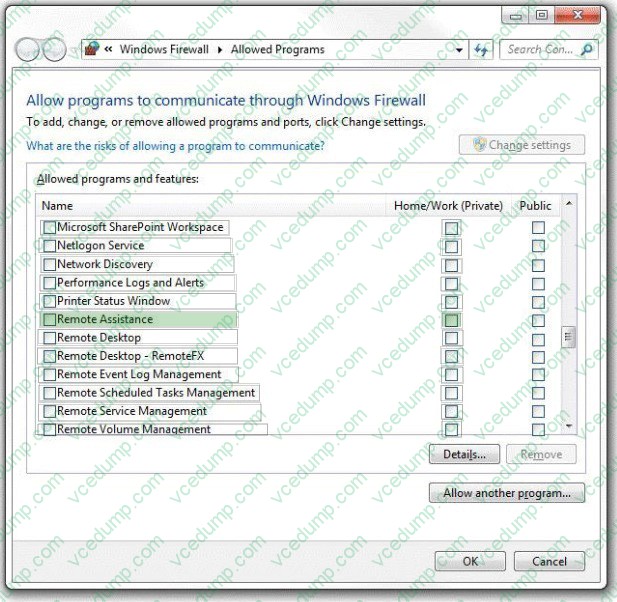
You administer portable computers in your company network. All the computers have Windows 7 Enterprise installed. You need to configure Windows Firewall on computers used by engineer employees to meet the following requirements:
1. Engineer employees must receive remote support from desktop support employees while they are at the corporate main office.
2. Engineer employees' remote support is prevented when they are working from home.
What should you do? (To answer, configure the appropriate option or options in the dialog box in the answer area.)
Hot Area:
-
Question 147:
You have a computer running Windows 7. You create a VHD and install Windows 7 in it.
You reboot your system and notice that the boot menu now shows two installations of Windows 7.
How do you fix it?
A. Use Sysprep with an answer file to disable one installation.
B. Run the BCDEdit command.
C. Run the Start/w ocsetup command.
D. Run the Dism command
E. Add a boot image and create a capture image in WDS.
F. Run the PEImg /Prepcommand.
G. Run the ImageX command with the /Mount parameter.
H. Run the Dism command with the /Mount-Wim option.
I. Run the Dism command with the /Add-Package option.
J. Run the DiskPart command and the Attach command option. -
Question 148:
You use a portable computer that has Windows 7 SP1 Ultimate installed.
You update the driver for the computer's video card and the computer becomes unresponsive.
You need to be able to roll back the video card driver.
What should you do?
A. Restart the computer in safe mode.
B. Start the computer, press F8, and then select Repair Your Computer.
C. Boot the computer from a Windows Recovery Environment (Windows RE) disk, and then restore the system image.
D. Start the computer, press F8, and then select Debugging Mode. -
Question 149:
You have two computers named Computer1 and Computer2 that run Windows 7.
You need to ensure that you can remotely execute commands on Computer2 from Computer1.
What should you do?
A. Run Winrm quickconfig on Computer1
B. Run Winrm quickconfig on Computer2
C. Enable Windows Remote Management (WinRM) through Windows Firewall on Computer1
D. Enable Windows Remote Management (WinRM) through Windows Firewall on Computer2 -
Question 150:
To establish a DirectAccess connection to the network, what is the first requirement?
A. Install a certificate
B. Create a VPN connection
C. A static IPv4 address
D. A static IPv6 address
Related Exams:
-
62-193
Technology Literacy for Educators -
70-243
Administering and Deploying System Center 2012 Configuration Manager -
70-355
Universal Windows Platform – App Data, Services, and Coding Patterns -
77-420
Excel 2013 -
77-427
Excel 2013 Expert Part One -
77-725
Word 2016 Core Document Creation, Collaboration and Communication -
77-726
Word 2016 Expert Creating Documents for Effective Communication -
77-727
Excel 2016 Core Data Analysis, Manipulation, and Presentation -
77-728
Excel 2016 Expert: Interpreting Data for Insights -
77-731
Outlook 2016 Core Communication, Collaboration and Email Skills
Tips on How to Prepare for the Exams
Nowadays, the certification exams become more and more important and required by more and more enterprises when applying for a job. But how to prepare for the exam effectively? How to prepare for the exam in a short time with less efforts? How to get a ideal result and how to find the most reliable resources? Here on Vcedump.com, you will find all the answers. Vcedump.com provide not only Microsoft exam questions, answers and explanations but also complete assistance on your exam preparation and certification application. If you are confused on your 70-680 exam preparations and Microsoft certification application, do not hesitate to visit our Vcedump.com to find your solutions here.