70-680 Exam Details
-
Exam Code
:70-680 -
Exam Name
:Windows 7 Configuring -
Certification
:Microsoft Certifications -
Vendor
:Microsoft -
Total Questions
:565 Q&As -
Last Updated
:Dec 13, 2021
Microsoft 70-680 Online Questions & Answers
-
Question 161:
You have a computer that runs a 32-bit version of Windows 7 Home Premium. The computer has a single partition on a single hard disk drive.
You want to test a 64-bit version of Windows 7 Ultimate. You configure the computer for a dual boot with previously installed Windows 7 Home Premium.
You need to configure the computer to support the dual boot.
What should you do?
A. Start Windows 7 Home Premium. Create a Virtual Hard Disk (VHD) file to start Windows 7 Ultimate.
B. Attach Windows 7 Ultimate media as an ISO image into Windows 7 Home Premium.
C. Start Windows 7 Home Premium. Create and mount a new Windows Imaging Format (WIM) file with Windows 7 Ultimate files.
D. Install Virtual PC into Windows 7 Home Premium. -
Question 162:
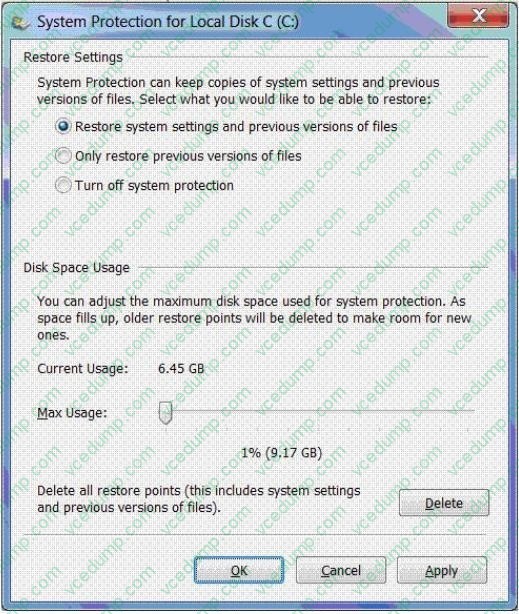
You use a desktop computer that has Windows 7 Ultimate SP1. The relevant portions of the computer configuration are shown in the following exhibits: The Disk Management console (Click the Exhibit button.)
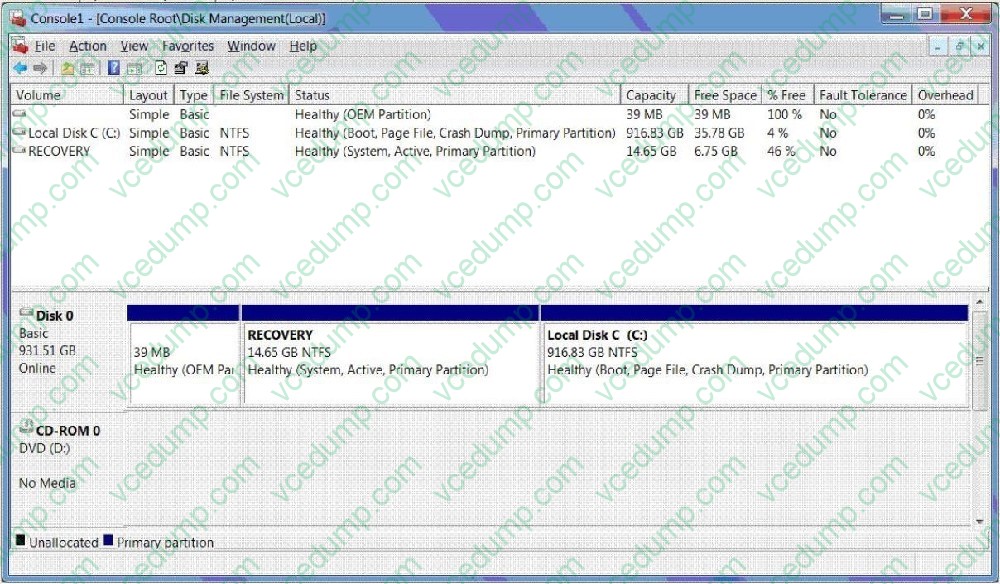
?The System Properties window (Click the Exhibit button.)
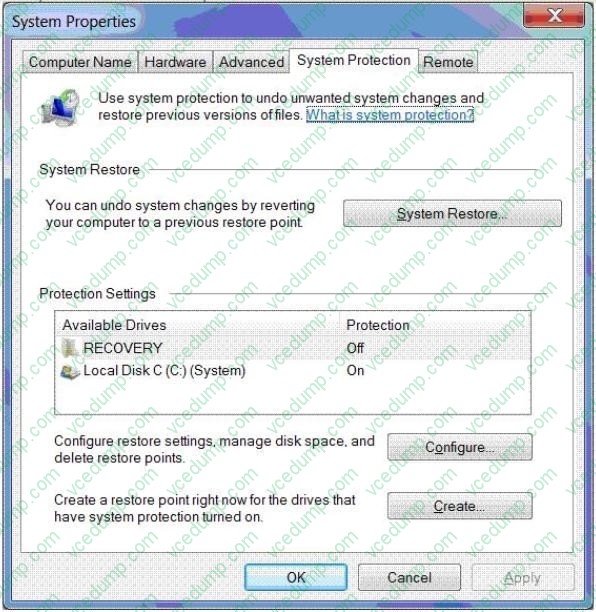
?The System protection for Local Disk C window (Click the Exhibit button.)
You share the Pictures library over a network.
You discover that a JPEG image file located in the library was moved by a network user into a ZIP archive and is protected by using a password.
You need to open the image file.
What should you do?
A. Delete restore points.
B. Create a restore point.
C. Perform a system restore.
D. Search for the file in the Recycle Bin.
E. Increase disk space used for system protection.
F. Copy the file from a previous version of a folder.
G. Set restore settings to only restore previous versions of files.
H. Run the cipher /x command from the elevated command prompt,
I. Run the vssadmin list volumes command from the elevated command prompt.
J. Run the vssadmin list shadows command from the elevated command prompt, -
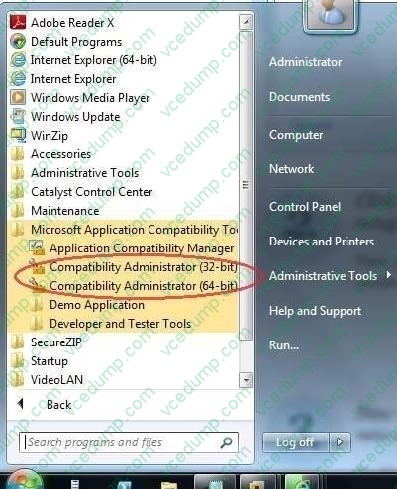
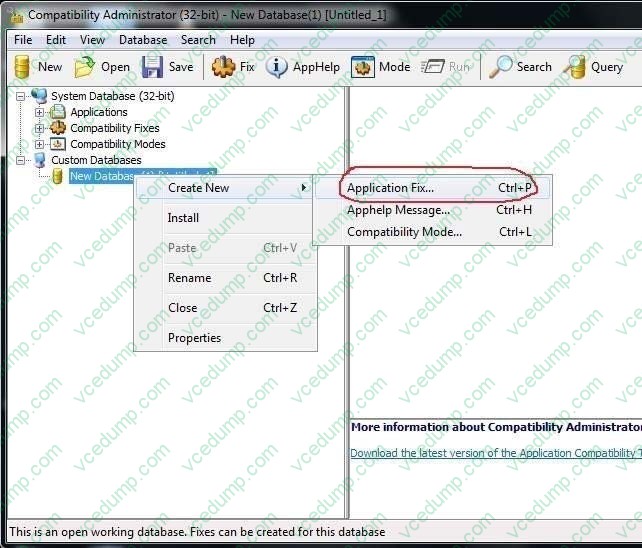
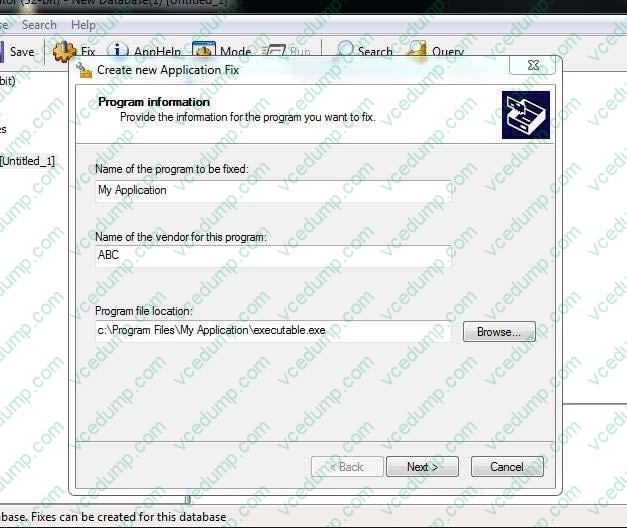
Question 163:
You have a computer that runs Windows 7.
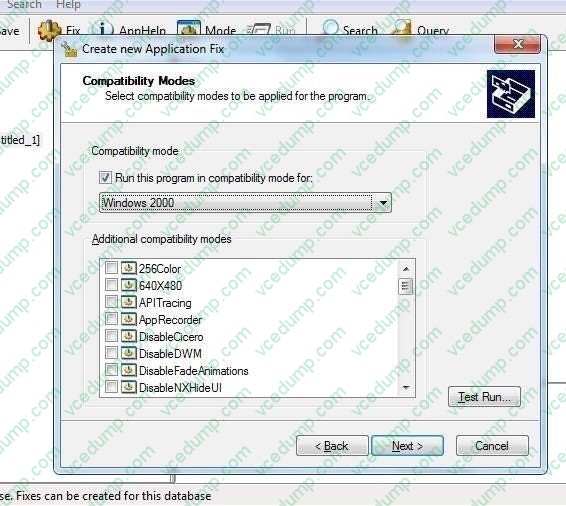
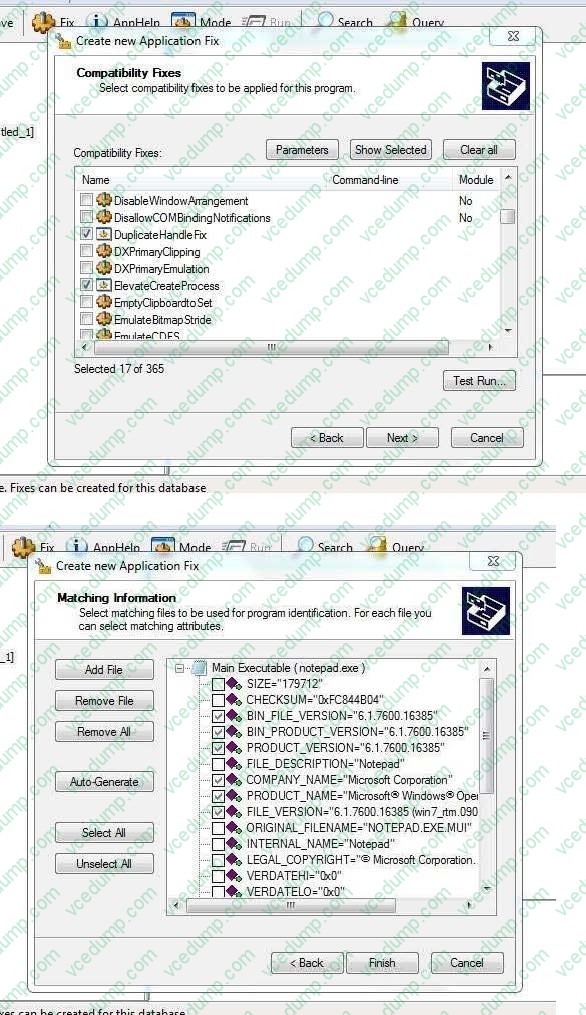
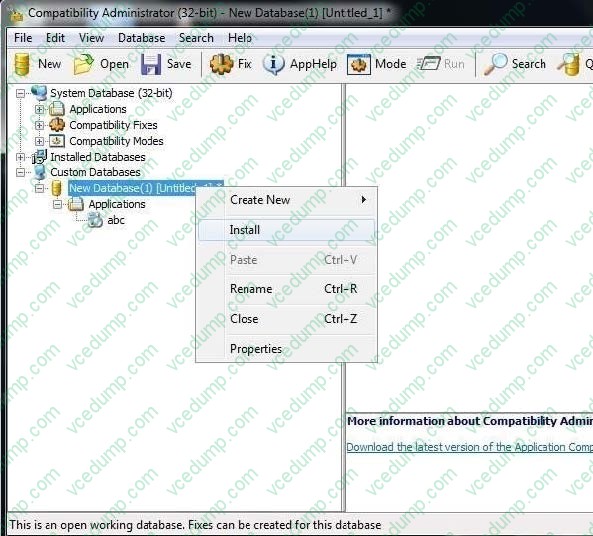
You create an application shim for a third-party application by using the Microsoft Application Compatibility Toolkit (ACT).
You need to ensure that the application shim is applied the next time you run the application.
What should you do first?
A. Run Sdbinst.exe.
B. Run Msiexec.exe.
C. Right-click the application executable file and modify the compatibility settings.
D. Right-click the application executable file and modify the advanced security settings. -
Question 164:
Which of the following is not a rating for games in Windows 7?
A. General Audience (G)
B. Everyone (E)
C. Teen (T)
D. Adults Only (AO) -
Question 165:
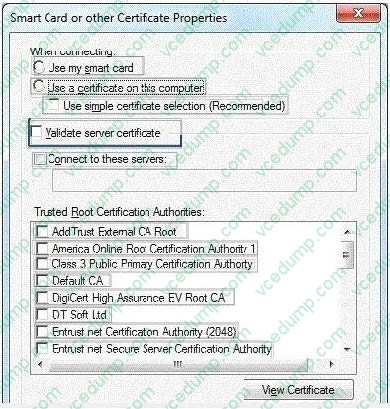
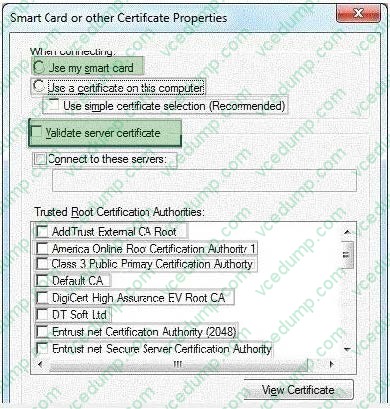
You administer portable computers that have Windows 7 installed. The computers connect to a wireless network that uses WPA2-Enterprise Security.
The company's security policy requires multifactor authentication for the portable computers.
You need to manually configure each portable computer to meet the following requirements:
1. Users must provide multifactor authentication.
2. The Server certificate held on the portable computers must mach the certificate held on the server. What should you do? (To answer, configure the appropriate option or options in the dialog box in the answer area.)
Hot Area:
-
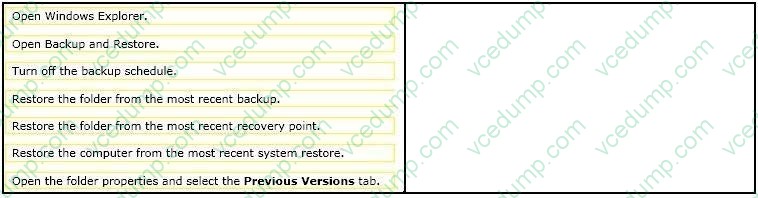
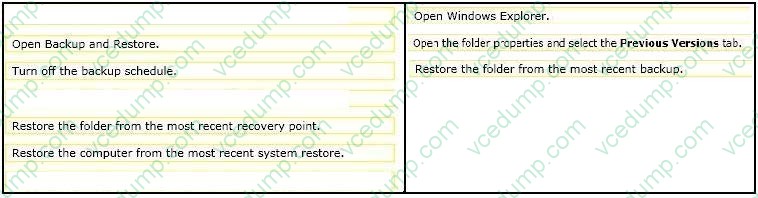
Question 166:
You support desktop computers that have Windows 7 Enterprise installed. All computers are configured with system protection on drive C and with a backup task that runs daily at midnight.
One of the users reports that in the morning she has installed a new version of a browser. After the installation, a follower that has favorite shortcuts was replaced with new content.
You need to restore the most recent version of the folder that contains the user data.
What should you do? (To answer, move the appropriate actions from the list of actions to the answer area and arrange them in the correct order).
Select and Place:
-
Question 167:
You use a computer that has Windows 7 Enterprise installed.
You install Windows Vista Enterprise to a different partition. You discover that the computer boots to Windows Vista by default.
You need to ensure that the computer boots to Windows 7 Enterprise by default.
What should you do?
A. On the Boot tab in the msconfig tool, highlight the Windows 7 boot entry and select the Set as default button.
B. From an elevated command prompt in Windows Vista, run the bcdedit /default {current} command.
C. On the Boot tab in the msconfig tool, highlight the Windows 7 boot entry and select the Advanced options button.
D. From an elevated command prompt in Windows Vista, run the bcdedit /default {default} command. -
Question 168:
You manage a network device by using a web interface.
You perform all critical Windows updates so that the computer now runs Internet Explorer 10. After performing these updates, the layout of the network device web page displays incorrectly.
Other web pages display correctly.
You need to resolve this issue.
What should you do?
A. Clear Internet Explorer's browsing history.
B. Enable Compatibly Mode for the network device web page.
C. Set the local Intranet security zone to Low.
D. Add the network device web page to the trusted sites zone. -
Question 169:
A network has a main office and a branch office.
The branch office has five client computers that run Windows 7. All servers are located in the main office. All servers have BranchCache enabled.
Users at the branch office report that it takes several minutes to open large files located in the main office.
You need to minimize the amount of time it takes for branch office users to open files located in the main office.
What should you do?
A. At the main office, configure the servers to use Distributed File System Replication (DFSR).
B. At the main office, configure the Quality of Service (QoS) Packet Scheduler on all servers.
C. At the branch office, configure the client computers to use BranchCache Hosted Cache mode.
D. At the branch office, configure the client computers to use BranchCache Distributed Cache mode. -
Question 170:
You have a computer that runs Windows 7.
You need to identify which hardware is required to create a system repair disc.
What hardware should you indentify?
A. CD/DVD burner.
B. Floppy disk.
C. Tape drive.
D. USB disk.




Related Exams:
-
62-193
Technology Literacy for Educators -
70-243
Administering and Deploying System Center 2012 Configuration Manager -
70-355
Universal Windows Platform – App Data, Services, and Coding Patterns -
77-420
Excel 2013 -
77-427
Excel 2013 Expert Part One -
77-725
Word 2016 Core Document Creation, Collaboration and Communication -
77-726
Word 2016 Expert Creating Documents for Effective Communication -
77-727
Excel 2016 Core Data Analysis, Manipulation, and Presentation -
77-728
Excel 2016 Expert: Interpreting Data for Insights -
77-731
Outlook 2016 Core Communication, Collaboration and Email Skills
Tips on How to Prepare for the Exams
Nowadays, the certification exams become more and more important and required by more and more enterprises when applying for a job. But how to prepare for the exam effectively? How to prepare for the exam in a short time with less efforts? How to get a ideal result and how to find the most reliable resources? Here on Vcedump.com, you will find all the answers. Vcedump.com provide not only Microsoft exam questions, answers and explanations but also complete assistance on your exam preparation and certification application. If you are confused on your 70-680 exam preparations and Microsoft certification application, do not hesitate to visit our Vcedump.com to find your solutions here.