70-680 Exam Details
-
Exam Code
:70-680 -
Exam Name
:Windows 7 Configuring -
Certification
:Microsoft Certifications -
Vendor
:Microsoft -
Total Questions
:565 Q&As -
Last Updated
:Dec 13, 2021
Microsoft 70-680 Online Questions & Answers
-
Question 131:
You administer computers that have Windows 7 and Internet Explorer 8 installed. You want to log on to one of the computers and access a web-based management application that runs on a server by using Internet Explorer.
You need to ensure that any data about your browser session is not saved on the computer.
What should you do?
A. Start the Microsoft Network Access Protection service.
B. From the Safety drop-down menu, open an InPrivate Browsing session.
C. From Internet Options, on the Advanced tab, clear Enable DOM Storage.
D. From Internet Options, modify the security settings for the Internet zone. -
Question 132:
You have a computer that runs Windows 7. You create a HomeGroup. You need to secure the HomeGroup to meet the following requirements: Allow

access to the Home Group when you are connec ted to private networ ks Block
access to the Home Group when you are connec ted to public networ ks
What should you do?
A. From Network and Sharing Center, modify the advanced sharing settings.
B. From the HomeGroup settings in Control Panel, modify the advanced sharing settings.
C. Configure the HomeGroup exception in Windows Firewall to include Home or work (private) networks and block Public networks.
D. Configure the File and Printer Sharing exception in Windows Firewall to include Home or work (private) networks and block Public networks. -
Question 133:
You use a client computer named accounting that has Windows 7 SP1 installed. The computer allows connections from other computers that have any version of Remote Desktop installed. The computer has a locally attached printer shared
as printer1.
An accounting user group is a member of the local Remote Desktop Users group on the computer. Only the Accounting Users group has access to printer1. A user named User1 is a member of the accounting users.
You need to configure the computer to meet the following requirements:
Prevent User1 from establishing Remote Desktop sessions to the Accounting computer.
Allow other members of the Accounting Users to connect to the accounting computer by using remote desktop.
Ensure that User1 can access printer1. What should you do?
A. Remove the Accounting Users group from the Remote Desktop Users group.
B. Remove User1 from the Accounting Users group.
C. Assign the Deny access to this computer from the network user right to User1
D. Assign the Deny log on through Remote Desktop Services user right to User1. -
Question 134:
You administer computers that have Windows 7 and Internet Explorer 8 installed. You want to log on to one of the computers and access a web-based management application that runs on a server by using Internet Explorer.
You need to ensure that any data about your browser session is not saved on the computer.
What should you do?
A. From the Safety drop-down menu, open an InPrivate Browsing session.
B. Start the Microsoft Network Access Protection service.
C. From the Local Group Policy, enable the InPrivate Filtering Threshold setting.
D. From Internet Options, on the Advanced tab, clear Enable DOM Storage. -
Question 135:
Your company office network includes a file server that has Windows Server 2008 R2 installed and client computers that have Windows 7 Enterprise installed. The computers are members of an Active Directory domain. The file server has the BrachCache features installed.
All client computers have Windows Firewall along with Advanced Security enabled for all network profiles.
You need to ensure that client computers can access cached files stored on the file server.
What should you do?
A. Run the Netsh branchcache set service mode=HOSTEDSERVER client authentication=NONE command
B. Configure firewall exception rules for multicast traffic, inbound and outbound traffic for local UDP port 3702, and inbound and outbound trafficfor local TCP port 80.
C. Create a Group Policy that sets Hash Publication for BranchCache as disabled.
D. Run the netsh branchcache set service mode=DISTRIBUTED command.
E. Create a Group Policy object and configure the Set percentage of disk space used for client computer cache option.
F. Check permisions.
G. Run the netsh branchcache set service mode=HOSTEDCLIENT command.
H. Create a Group Policy object and enable the Set BranchCache Hosted Cache mode policy.
I. Configure firewall exception rules for inbound and outbound traffic for local TCP port 80 and for inbound and outbound traffic for local TCP port 8443. -
Question 136:
You have a computer that runs windows 7.
You have an application installation package named app1.msi.
You need to perform a customized installation of app1.msi.
What should you do?
A. Create a transform file named app1.mst and then run Msiexec.exe /i app1.msi /t app1.mst.
B. Create a transform file named app1.mst and then run Msinfo.exe /I app1.msi /t.
C. Create a transform file named app1.msp and then run Msiexec.exe /I app1.msi /app1.
D. Create a transform file named app1.msp and then run Msinfo32.exe /I app1.mst /. -
Question 137:
Your network contains computers that run Windows 7 and Windows Vista. All computers are members of the same domain. You have a computer named Computer1 that runs Windows 7.
You need to ensure that users can remotely log on to Computer1 from any computer on the network.
What should you do on Computer1?
A. Select the Allow Remote Assistance connections to this computer check box. Add the Domain Users group to the Power Users group.
B. Select the Allow Remote Assistance connections to this computer check box. Add the Domain Users group to the Administrators group.
C. Select the Allow connections from computers running any version of Remote Desktop (less secure) check box. Add the Domain Computers group to the Remote Desktop Users group.
D. Select the Allow connections only from computers running Remote Desktop with Network Level Authentication (more secure) check box. Add the Domain Users group to the Remote Desktop Users group. -
Question 138:
You have a computer that runs Windows 7. You open the Disk Management snap-in as shown in the exhibit. (Click the Exhibit button.)?
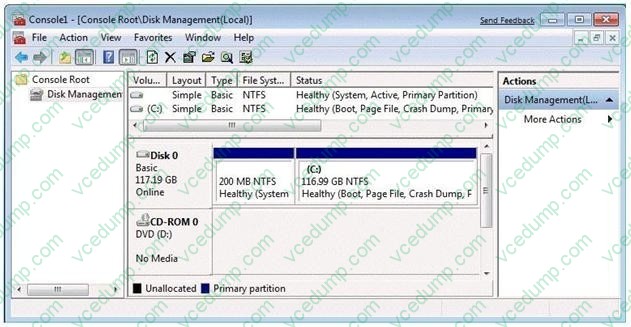
You need to ensure that you can create a new partition on Disk 0. What should you do?
A. Shrink volume C.
B. Compress volume C.
C. Convert Disk 0 into a dynamic disk.
D. Create and initialize a Virtual Hard Disk (VHD). -
Question 139:
You have two computers named Computer1 and Computer2. Computer1 runs Windows Vista. Computer2 runs Windows 7.
You plan to use User State Migration Tool (USMT) 4.0 to migrate user profiles and data from Computer1 to Computer2.
You need to prevent some system settings from being migrated. You must achieve this goal by using the minimum amount of administrative effort.
Which file should you modify?
A. config.xml
B. migapp.xml
C. migdocs.xml
D. miguser.xml -
Question 140:
You have a computer that runs Windows 7. The network contains a monitoring server named Server1. The computer runs a monitoring service named Service1. Service1 uses Remote Procedure Calls (RPCs). You need to ensure that Service1 can receive requests from Server1.
What should you do?
A. From Windows Firewall with Advanced Security, create a predefined rule.
B. From Windows Firewall with Advanced Security, create a custom rule.
C. From Network and Sharing Center, modify the network location settings.
D. From Network and Sharing Center, modify the advanced sharing settings.
Related Exams:
-
62-193
Technology Literacy for Educators -
70-243
Administering and Deploying System Center 2012 Configuration Manager -
70-355
Universal Windows Platform – App Data, Services, and Coding Patterns -
77-420
Excel 2013 -
77-427
Excel 2013 Expert Part One -
77-725
Word 2016 Core Document Creation, Collaboration and Communication -
77-726
Word 2016 Expert Creating Documents for Effective Communication -
77-727
Excel 2016 Core Data Analysis, Manipulation, and Presentation -
77-728
Excel 2016 Expert: Interpreting Data for Insights -
77-731
Outlook 2016 Core Communication, Collaboration and Email Skills
Tips on How to Prepare for the Exams
Nowadays, the certification exams become more and more important and required by more and more enterprises when applying for a job. But how to prepare for the exam effectively? How to prepare for the exam in a short time with less efforts? How to get a ideal result and how to find the most reliable resources? Here on Vcedump.com, you will find all the answers. Vcedump.com provide not only Microsoft exam questions, answers and explanations but also complete assistance on your exam preparation and certification application. If you are confused on your 70-680 exam preparations and Microsoft certification application, do not hesitate to visit our Vcedump.com to find your solutions here.