70-680 Exam Details
-
Exam Code
:70-680 -
Exam Name
:Windows 7 Configuring -
Certification
:Microsoft Certifications -
Vendor
:Microsoft -
Total Questions
:565 Q&As -
Last Updated
:Dec 13, 2021
Microsoft 70-680 Online Questions & Answers
-
Question 121:
You have a computer that has the following configurations: Operating system: Windows 7 Professional Processor:

2.2 gigahertz (GHz) (x86)
RAM: 2 GB
Hardware virtualization: Disabled
TPM chip: Disabled
You need to ensure that you can run Windows XP Mode on the computer.
What should you do?
A. Upgrade to a 64-bit processor.
B. Enable hardware virtualization.
C. Enable the Trusted Platform Module (TPM) chip.
D. Upgrade the operating system to Windows 7 Ultimate. -
Question 122:
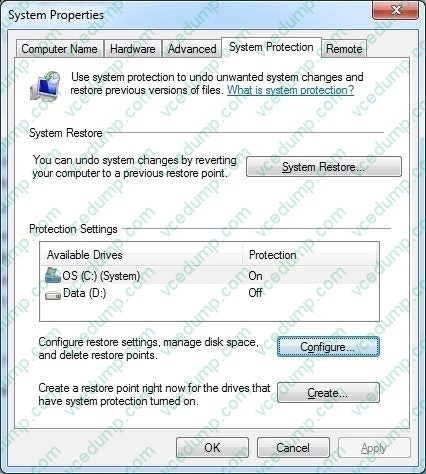
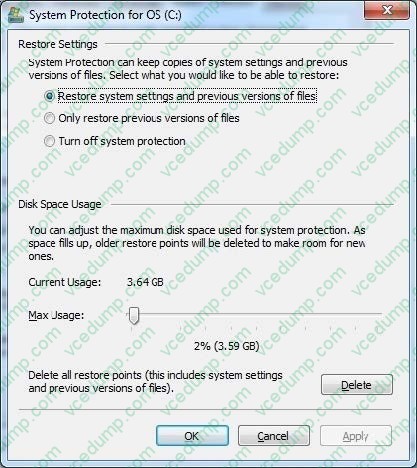
Your laptop has a 400 GB drive and currently reserves, by default, 2% (8 GB) for shadow copies.
You need to reserve more space for previous versions of files.
What should you do?
A. From System Properties, System Protection, expand the Max Usage to 20 GB.
B. From System Properties, System Protection, turn off system protection.
C. From Disk Properties, change the Quota Settings from 8 GB to 20 GB.
D. From an elevated command prompt, run vssadmin add shadowstorage /for=c: /on = c: /maxsize = 20gb. -
Question 123:
You are installing a custom Windows 7 system image to a new computer. Perform the following tasks"
Start the new computer by using the Windows preinstallation Environment (WPE) ?Connect to a shared network location that contains the Windows 7 image file.
You need to apply the Windows 7 image to the computer.
What should you do before you apply the image?
A. Mount the image.
B. Configure Windows Firewall.
C. Configure and format the haard disk drive.
D. Initializa the Boot Configuration data (BCD) store. -
Question 124:
You have a computer that runs Windows 7.
Your company has a corporate intranet Web site.
You open Windows Internet Explorer as shown in the exhibit. (Click the Exhibit button.)
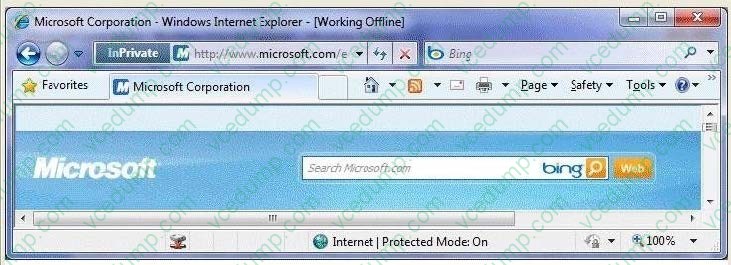
You need to ensure that you can access Web pages on both the Internet and the intranet. From the Tools menu, what should you do?
A. Click ActiveX Filtering.
B. Click Work Offline.
C. Click Compatibility View.
D. Point to SmartScreen Filter and then click Turn off SmartScreen Filter. -
Question 125:
A network contains computers that run Windows 7 and Windows Vista. A computer named Computer1 runs Windows 7.
You need to ensure that only users running Windows 7 and Windows Vista can connect to Computer1 using remote desktop.
In the System Properties window, on the Remote tab, what should you do?
A. Click the Advanced button. Select the Allow this computer to be controlled remotely check box on Computer1.
B. Select the Allow connections only from computers running Remote Desktop with Network Level Authentication (more secure) check box on Computer1.
C. Select the Allow connections from computers running any version of Remote Desktop (less secure) check box on Computer1.
D. Select Allow Remote Assistance connections to this computer check box on Computer1. -
Question 126:
You have 20 client computers. The computers run Windows XP. They are joined in a domain.
You plan to perform a clean installation of Windows 7 on the computers.
You need to transfer all users documents and settings. You must exclude music and video files. You must achieve this goal by using the minimum amount of administrative effort.
What should you do first?
A. Create a config.xml file. Configure a logon script for the Windows XP computers to launch Loadstate.exe
B. Modify the migapp.xml file. Configure a logon script for the Windows XP computers to launch Scanstate.exe
C. Modify the miguser.xml file. Configure a logon script for the Windows XP computers to launch Migwiz.exe
D. Modify the migdocs.xml file. Configure a logon script for the Windows XP computers to launch Scanstate.exe -
Question 127:
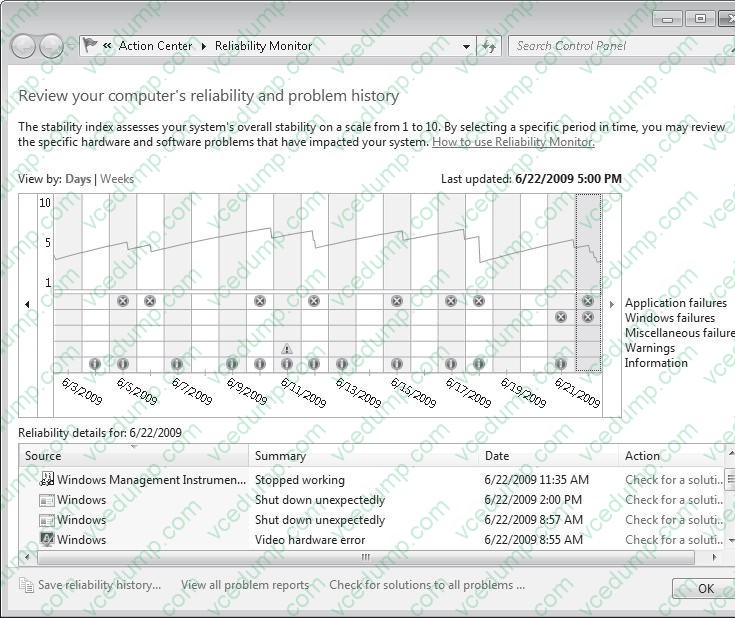
You need to identify the hardware failures have occurred on your computer in the past six months.
What should you do?
A. Open Device Manager.
B. Open Reliability Monitor.
C. Create a User Defined Data Collector Set.
D. Create a new Event Trace Sessions Data Collector Set. -
Question 128:
You have a computer that runs Windows 7.
You install Windows XP in a new partition on the computer and discover that you can no longer start Windows 7.
You need to start Windows 7 in the minimum amount of time.
What should you do?
A. From Windows XP, modify the default path in the boot.ini file.
B. From Windows XP Recovery Console, run the Fixboot command.
C. Start the computer from the Windows 7 installation media and select Install now.
D. Start the computer from the Windows 7 installation media and run Startup Repair. -
Question 129:
You have a computer that runs Windows 7.
You manually create a system restore point.
You need to restore a copy of a file stored on a drive C from two days ago.
You must act with minimum administrative effort.
What should you do?
A. From recovery, select System Restore.
B. From Backup and restore, select Rrestore my files.
C. From the command prompt, run Wbadmin get items.
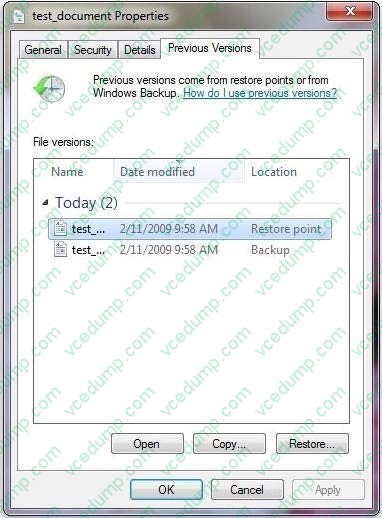
D. From the properties of the file, select Previous Versions. -
Question 130:
You have a computer named Computer1 that runs Windows Vista and a computer named Computer2 that runs Windows 7. You plan to migrate all profiles and user files from Computer1 to Computer2.
You need to identify how much space is required to complete the migration.
What should you do?
A. On Computer1 run Loadstate c:\store /nocompress
B. On Computer1 run Scanstate c:\store /nocompress /p
C. On Computer2 run Loadstate \\computer1\store /nocompress
D. On Computer2 run Scanstate \\computer1\store /nocompress /p
Related Exams:
-
62-193
Technology Literacy for Educators -
70-243
Administering and Deploying System Center 2012 Configuration Manager -
70-355
Universal Windows Platform – App Data, Services, and Coding Patterns -
77-420
Excel 2013 -
77-427
Excel 2013 Expert Part One -
77-725
Word 2016 Core Document Creation, Collaboration and Communication -
77-726
Word 2016 Expert Creating Documents for Effective Communication -
77-727
Excel 2016 Core Data Analysis, Manipulation, and Presentation -
77-728
Excel 2016 Expert: Interpreting Data for Insights -
77-731
Outlook 2016 Core Communication, Collaboration and Email Skills
Tips on How to Prepare for the Exams
Nowadays, the certification exams become more and more important and required by more and more enterprises when applying for a job. But how to prepare for the exam effectively? How to prepare for the exam in a short time with less efforts? How to get a ideal result and how to find the most reliable resources? Here on Vcedump.com, you will find all the answers. Vcedump.com provide not only Microsoft exam questions, answers and explanations but also complete assistance on your exam preparation and certification application. If you are confused on your 70-680 exam preparations and Microsoft certification application, do not hesitate to visit our Vcedump.com to find your solutions here.