70-680 Exam Details
-
Exam Code
:70-680 -
Exam Name
:Windows 7 Configuring -
Certification
:Microsoft Certifications -
Vendor
:Microsoft -
Total Questions
:565 Q&As -
Last Updated
:Dec 13, 2021
Microsoft 70-680 Online Questions & Answers
-
Question 101:
You have a computer joined to a domain that runs Windows 7. Your company network contains a Windows Server 2008 R2 remote access server. The server is configured as a Network Access Protection (NAP) enforcement point.
You set the startup type of the NAP Agent service to Automatic on the computer. You need to complete the configuration of the computer as a NAP client.
What should you do?
A. From the command line of the computer, enable the DHCP Quarantine Enforcement Client by using the netsh command.
B. From the command line of the computer, enable the DHCP Quarantine Enforcement Client by using the ipconfig command.
C. From the NAP Client Configuration console, configure the user interface settings.
D. From the NAP Client Configuration console, configure the Health Registration settings. -
Question 102:
You have a computer that runs Windows Vista Service Pack 2 (SP2). You need to upgrade the computer to Windows 7.
What should you do?
A. Start the computer from the Windows 7 installation media and select the Upgrade option.
B. Start the computer from the Windows 7 installation media and select the Custom (advanced) option.
C. From Windows Vista, run Setup.exe from the Windows 7 installation media and select the Upgrade option.
D. From Windows Vista, run Setup.exe from the Windows 7 installation media and select the Custom (advanced) option. -
Question 103:
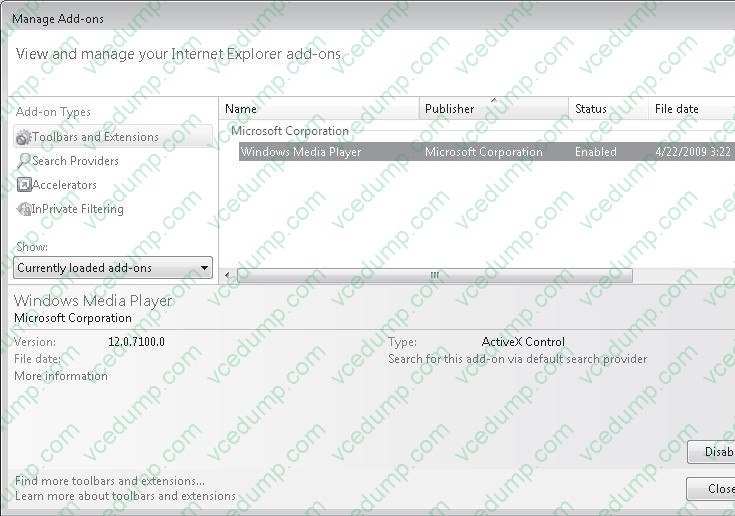
You have a computer that runs Windows 7 and Windows Internet Explorer 8. You have a third- party Internet Explorer toolbar installed on the computer.
You need to temporarily disable the toolbar. The solution must not affect any other installed toolbars.
What should you do?
A. Start an Inprivate Browsing session.
B. Run Msconfig.exe and enable Selective Startup.
C. From the Tools menu, select Compatibility View Settings.
D. From the Tools menu, open Manage Add-ons and modify the add-on settings. -
Question 104:
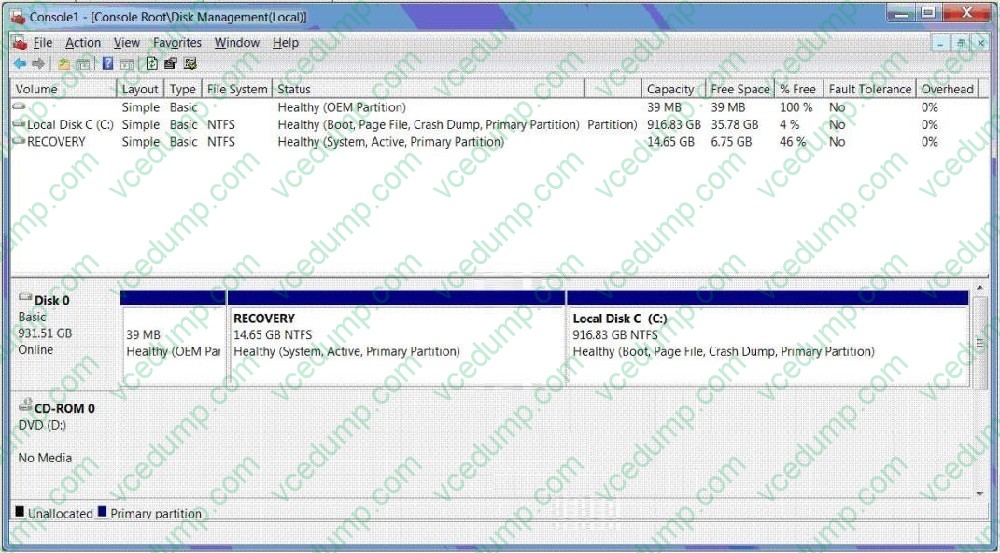
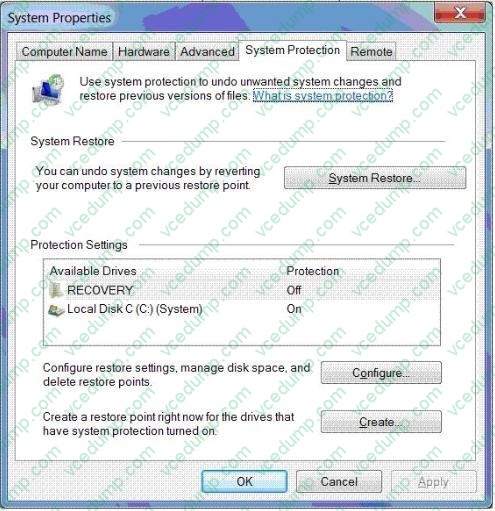
You use a desktop computer that has Windows 7 Ultimate SP1. The relevant portions of the computer configuration are shown in the following exhibits:
The Disk Management console (Click the Exhibit button.)
The System Properties window (Click the Exhibit button.)
The System protection for Local Disk C window (Click the Exhibit button.)
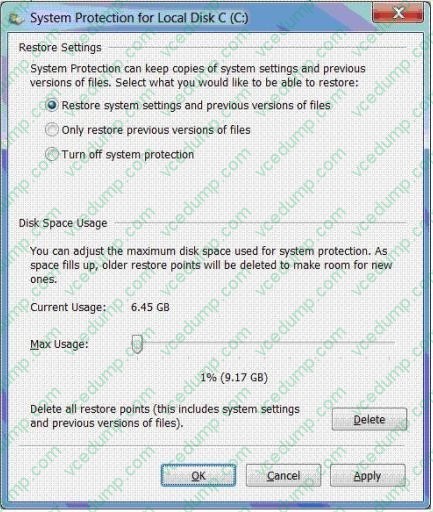
You need to create a backup copy of a 40-GB Virtual Hard Disk (VHD) file in a local folder on drive C.
What should you do?
A. Delete restore points.
B. Create a restore point.
C. Perform a system restore.
D. Search for the file in the Recycle Bin.
E. Increase disk space used for system protection.
F. Copy the file from a previous version of a folder.
G. Set restore settings to Only restore previous versions of files.
H. Run the cipher /x command from the elevated command prompt.
I. Run the vssadmin list volumes command from the elevated command prompt.
J. Run the vssadmin list shadows command from the elevated command prompt. -
Question 105:
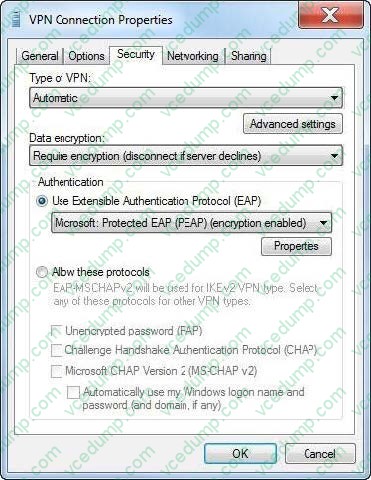
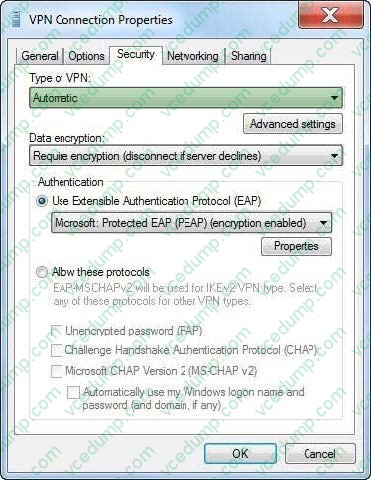
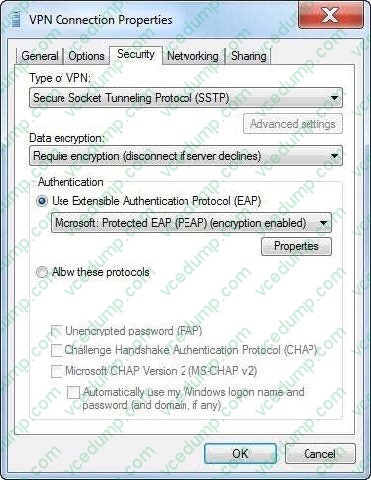
You have a computer running Windows 7 Enterprise. You need to set up a VPN connection using PPP protocol over SSL (Secure Socket Layer) using HTTPS channel. What type of VPN connection would you need?
Hot Area:
-
Question 106:
You plan to install Windows 7 by using a Windows 7 DVD. You need to perform an automated installation of Windows 7. What should you do?
A. Create an answer file named oobe.xml. Copy the file to a network share.
B. Create an answer file named winnt.sif. Place the file on a removable drive.
C. Create an answer file named sysprep.inf. Copy the file to a network share.
D. Create an answer file named autounattend.xml. Place the file on a removable drive. -
Question 107:
A company has client computers that run Windows 7 Enterprise.
You need to ensure that when Windows runs applications with elevated privileges, it enforces the Public Key Infrastructure (PKI) certification path validation for a given executable file.
What should you use to accomplish this goal?
A. the User Account Control Settings Control Panel window
B. the Services management console
C. Device Manager
D. Local Users and Groups
E. the icacls command
F. the Group Policy management console
G. the folder Properties window
H. share permissions
I. the netsh command -
Question 108:
Your company network has a single-domain Active Directory forest. The forest functionality level is set to Windows Server 2008 R2. All computers are members of the domain.
You plan to deploy Windows Bitlocker Encryption (BitLocker) on the portable computers that have Window 7 Enterprise installed.
You need to be able to automatically back up recovery passwords for BitLocker-protected disk volumes on the portable computers.
What should you do before you start encrypting the disk on volumes with BitLocker?
A. Run the cscript Add-TPMSelfWriteACE.vbs script on the portable computers
B. Run the cscript List-ACEs.vbs script on the portable computers.
C. Run the cscript Get-TPMOwnerInfo.vbs script on the client computers.
D. Select the Turn on BitLocker backup to Active Directory option in local policy on the portable computers. -
Question 109:
You use a computer that has Windows 7 SP1 installed. The computer has a shared folder named C:\Software.
User1 is a local user account on the computer. The account is a member of several groups that have access to the C:\Software folder.
You need to verify whether User1 can save files to C:\Software.
What should you do?
A. View the User Account Control Settings Control Panel window.
B. Run the Net Share command.
C. View the Share permissions on C:\Software.
D. In the Advanced Security Settings for the Documents folder, select the Effective Permissions tab. -
Question 110:
Which Windows Setup configuration pass applies settings to Windows 7 before Windows Welcome starts?
A. oobeSystem
B. auditSystem
C. specialize
D. offlineServicing
Related Exams:
-
62-193
Technology Literacy for Educators -
70-243
Administering and Deploying System Center 2012 Configuration Manager -
70-355
Universal Windows Platform – App Data, Services, and Coding Patterns -
77-420
Excel 2013 -
77-427
Excel 2013 Expert Part One -
77-725
Word 2016 Core Document Creation, Collaboration and Communication -
77-726
Word 2016 Expert Creating Documents for Effective Communication -
77-727
Excel 2016 Core Data Analysis, Manipulation, and Presentation -
77-728
Excel 2016 Expert: Interpreting Data for Insights -
77-731
Outlook 2016 Core Communication, Collaboration and Email Skills
Tips on How to Prepare for the Exams
Nowadays, the certification exams become more and more important and required by more and more enterprises when applying for a job. But how to prepare for the exam effectively? How to prepare for the exam in a short time with less efforts? How to get a ideal result and how to find the most reliable resources? Here on Vcedump.com, you will find all the answers. Vcedump.com provide not only Microsoft exam questions, answers and explanations but also complete assistance on your exam preparation and certification application. If you are confused on your 70-680 exam preparations and Microsoft certification application, do not hesitate to visit our Vcedump.com to find your solutions here.