70-643 Exam Details
-
Exam Code
:70-643 -
Exam Name
:Windows Server 2008 Applications Infrastructure, Configuring -
Certification
:Microsoft Certifications -
Vendor
:Microsoft -
Total Questions
:419 Q&As -
Last Updated
:Dec 14, 2021
Microsoft 70-643 Online Questions & Answers
-
Question 51:
Your network contains a server named Server1 that has Microsoft SharePoint Foundation 2010 installed. Server1 contains a SharePoint site named Site1. Several users add Site1 to the SharePoint lists in Microsoft Outlook 2010. The users
report that every time they open Outlook 2010, they are prompted for authentication for Server1.
You need to prevent the users from being prompted for authentication when they open Outlook 2010.
What should you do?
A. From Internet Explorer, add the site to the Trusted sites zone.
B. From Central Administration, configure the site to use Basic authentication.
C. From Outlook 2010, open the Trust Center and configure the Privacy Options.
D. From Outlook 2010, open the Trust Center and configure the Trusted Publishers. -
Question 52:
You have two servers that run Windows Server 2008 named Server1 and Server2. You install Windows SharePoint Services (WSS) 3.0 on Server1. You install the SMTP feature on Server2. You configure the outgoing email settings on Server1 to use the SMTP service on Server2. You need to ensure that email messages from Server1 are forwarded to users.
What should you do?
A. On Server2, create a new application pool, and then associate the application pool with a new Web site.
B. On Server2, configure the SMTP service to accept anonymous connections and to relay email messages.
C. On Server1, create a new application pool. On an internal DNS server, create a new MX record for Server1.
D. On Server1, create a new application pool. On an internal DNS server, create a new MX record for Server2. -
Question 53:
Your network contains a Web server that runs Windows Server 2008 R2. The server has a Web site named Site1.
You need to ensure that Web developers can update the Web content on Site1 by using HTTP.
What should you do first?
A. Modify the Feature Delegation settings.
B. Install the ASP Web Server (IIS) role service.
C. Install the WebDAV Publishing Web Server (IIS) role service.
D. Modify the Microsoft ASP.NET pages and control settings for the Web site. -
Question 54:
Your company has an Active Directory domain. All the servers in the company run either Windows Server 2008 R2 or Windows Server 2003. A Windows Server 2003 server named Server1 runs Microsoft SQL Server 2005 SP2 and Microsoft
Windows SharePoint Services (WSS) 2.0.
The company plans to migrate to WSS 3.0 SP2 on a Windows Server 2008 R2 server named Server2.
You need to migrate the configuration and content from Server1 to Server2.
What should you do?
A. Back up the SharePoint configuration and content from Server1. Install WSS 3.0 SP2 on Server2. Restore the backup from Server1 to Server2.
B. Upgrade Server1 to Windows Server 2008 R2. Back up the SharePoint configuration and content from Server1. Install WSS 3.0 SP2 on Server2. Restore the backup from Server1 to Server2.
C. Back up the SQL Server 2005 configuration and the WSS 2.0 databases from Server1. Install SQL Server 2005 on Server2. Restore the SQL Server 2005 backup from Server1 to Server2.
D. Back up the WSS 2.0 configuration and content from Server1. Install WSS 2.0 on Server2. Restore the backup from Server1 to Server2. Perform an in-place upgrade of WSS 2.0 to WSS 3.0 SP2 on Server2. -
Question 55:
Your network contains a server named Server1 that runs Windows Server 2008 R2. Server1 has the Streaming Media Services role and the Web Server (IIS) role installed.
You have a confidential media file.
You need to ensure that the media file streams are encrypted.
Which protocol should you configure?
A. HTTPS
B. IPSec
C. Microsoft Media Server (MMS)
D. real-time streaming protocol (RTSP) -
Question 56:
Your network contains 10 servers that have the Remote Desktop Session Host (RD Session Host) role service installed.
You install the Remote Desktop Gateway (RD Gateway) role service on a new server.
You need to ensure that users can access the RD Session Host servers by using the RD Gateway.
Which two actions should you perform? (Each correct answer presents part of the solution. Choose two.)
A. Create a Remote Desktop resource authorization policy (RD RAP).
B. Create a Remote Desktop connection authorization policy (RD CAP).
C. Install the RD Session Broker role service.
D. Install the Remote Desktop Web Access (RD Web Access) role service. -
Question 57:
Your company has a server that runs Windows Server 2008 R2. The server has the Web Server (IIS) role installed.
You need to activate SSL for the default Web site.
Which two actions should you perform? (Each correct answer presents part of the solution. Choose two.)
A. Obtain and import a server certificate by using the IIS Manager console.
B. Select the Generate Key option in the Machine Key dialog box for the default Web site.
C. Add bindings for the HTTPS protocol to the default Web site by using the IIS Manager console.
D. Install the Digest Authentication component for the Web server role by using the Server Manager console. -
Question 58:
Your network contains a server named Web1 that runs Windows Server 2008 R2. Web1 has the Web Server (IIS) role installed.
Web1 hosts a Web site that is accessed by using the URL http://itweb.contoso.com. The server certificates for Web1 are shown in the exhibit. (Click the Exhibit tton.)
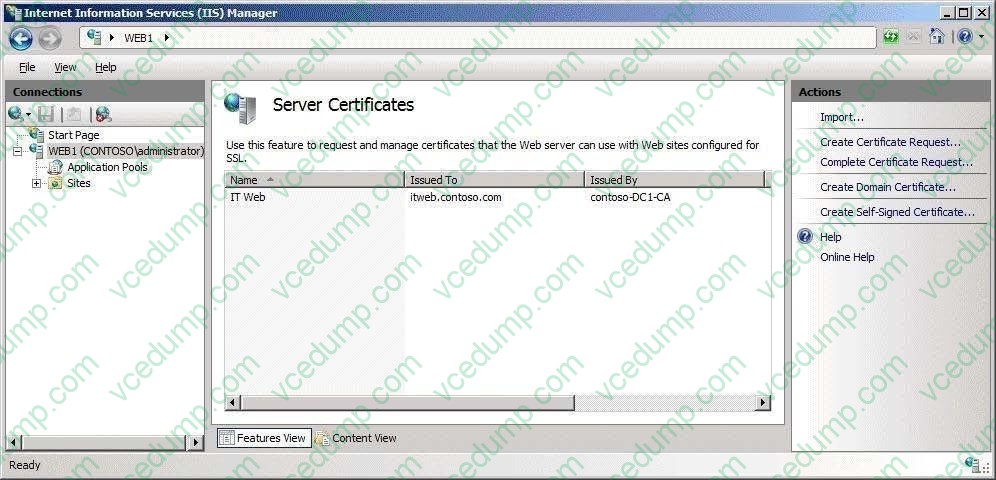
When you attempt to configure the SSL Settings for the Web site, you discover that the Require SSL option is unavailable. You need to ensure that you can require SSL for the Web site. What should you do?
A. Run iisreset.exe /force.
B. Configure the bindings for the Web site.
C. Request a new domain certificate and specify Web1 as the common name.
D. Request a self-signed certificate and specify itweb.contoso.com as the friendly name. -
Question 59:
Your network contains an Active Directory forest. Microsoft Exchange Server 2010 is deployed in the forest.
You have a server named Server1 that has Microsoft SharePoint Foundation installed.
You need to ensure that users can receive e-mail notifications when the SharePoint content is modified.
What should you do?
A. Install the SMTP Server feature.
B. Configure the Send To Connections.
C. Configure the outgoing e-mail settings.
D. Configure the incoming e-mail settings. -
Question 60:
Your company named Contoso, Ltd. runs Windows Server 2008 R2. You manage a Web server named web.contoso.com. The Web server hosts two Web sites named www.contoso.com and webmail.contoso.com. Users connect to both the
sites from the Internet by using HTTP. The new company security policy has the following requirements:
-The webmail.contoso.com site must be available for Internet users only through Secure HTTP (HTTPS).
-Two folders named Order and History on www.contoso.com must be available only through HTTPS.
-All users must be able to connect to both sites without receiving any security warnings.
You need to add SSL certificates on web.contoso.com. You must meet the company security policy requirements.
What should you do first?
A. Generate a self-signed certificate for web.contoso.com.
B. Generate separate domain certificates for www.contoso.com and webmail.contoso.com.
C. Request one certificate from the public trusted certification authority for web.contoso.com.
D. Request separate certificates from the public trusted certification authority for www.contoso.com and webmail.contoso.com.
Related Exams:
-
62-193
Technology Literacy for Educators -
70-243
Administering and Deploying System Center 2012 Configuration Manager -
70-355
Universal Windows Platform – App Data, Services, and Coding Patterns -
77-420
Excel 2013 -
77-427
Excel 2013 Expert Part One -
77-725
Word 2016 Core Document Creation, Collaboration and Communication -
77-726
Word 2016 Expert Creating Documents for Effective Communication -
77-727
Excel 2016 Core Data Analysis, Manipulation, and Presentation -
77-728
Excel 2016 Expert: Interpreting Data for Insights -
77-731
Outlook 2016 Core Communication, Collaboration and Email Skills
Tips on How to Prepare for the Exams
Nowadays, the certification exams become more and more important and required by more and more enterprises when applying for a job. But how to prepare for the exam effectively? How to prepare for the exam in a short time with less efforts? How to get a ideal result and how to find the most reliable resources? Here on Vcedump.com, you will find all the answers. Vcedump.com provide not only Microsoft exam questions, answers and explanations but also complete assistance on your exam preparation and certification application. If you are confused on your 70-643 exam preparations and Microsoft certification application, do not hesitate to visit our Vcedump.com to find your solutions here.