70-643 Exam Details
-
Exam Code
:70-643 -
Exam Name
:Windows Server 2008 Applications Infrastructure, Configuring -
Certification
:Microsoft Certifications -
Vendor
:Microsoft -
Total Questions
:419 Q&As -
Last Updated
:Dec 14, 2021
Microsoft 70-643 Online Questions & Answers
-
Question 121:
Your network contains a server that has the Streaming Media Services role installed. The server contains a publishing point. You need to configure the publishing point to meet the following requirements:
Authenticate users by using Kerberos authentication.
Only allow users from a virtual local area network (VLAN) named VLAN1 to access the publishing point.
What should you configure?
A. WMS Digest Authentication and WMS IP Address Authorization
B. WMS Digest Authentication and WMS Publishing Points ACL Authorization
C. WMS Negotiate Authentication and WMS IP Address Authorization
D. WMS Negotiate Authentication and WMS Publishing Points ACL Authorization -
Question 122:
Your network contains a server named Server1 that runs Windows Server 2008 R2. Server1 has the Windows Deployment Services (WDS) server role and the Windows Automated Installation Kit (Windows AIK) installed.
You create a new x86 Microsoft Windows Preinstallation Environment (Windows PE) image and add it as a boot image to Server1.
You run the Create Capture Image wizard and receive the following error message: "The Windows Deployment Services Image Capture Wizard could not be located in the specified Windows PE image."
You need to ensure that you can create a capture image by using the Create Capture Image wizard.
What should you do first?
A. Create an x64 Windows PE image and add the image to Server1 as a boot image.
B. Add a new boot image to Server1 and specify the Sources\Boot.wim file from the Windows Server 2008 R2 installation media.
C. Mount the Windows PE boot image and add the contents of the %programFiles%\Windows AIK\Tools \amd64 folder to the image.
D. Mount the Windows PE boot image and add the contents of the %programFiles%\Windows AIK\Tools\PETools folder to the image. -
Question 123:
Your network contains a server named Server1 that runs Windows Server 2008 R2. Server1 has the Remote Desktop Session Host (RD Session Host) role ervice and the Windows System Resource Manager (WSRM) feature installed.
Users from two Active Directory groups named Group1 and Group2 connect to Server1 and run the same RemoteApp program.
You need to ensure that when Server1 experiences high CPU usage, Group1 users have priority over Group2 users regarding the use of CPU resources. You ant to achieve this goal by using the minimum amount of administrative effort. What should you do from the WSRM console?
A. Add a new Conditional Policy.
B. Create a new Calendar Schedule.
C. Create a new Process Matching criteria.
D. Implement Weighted_Remote_Sessions. -
Question 124:
You have a Terminal Server that runs Windows Server 2008. You need to configure the server to end any sessions that are inactive for more than one hour. What should you do?
A. From Terminal Services Manager, create a new group.
B. From Terminal Services Manager, delete the inactive sessions.
C. From Terminal Services Configuration, modify the RDP-Tcp settings.
D. From Terminal Services Configuration, modify the User logon mode setting. -
Question 125:
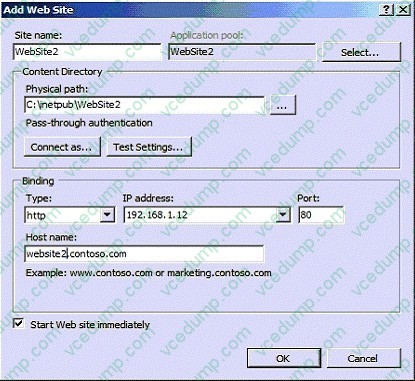
Your network contains a Web server that runs Windows Server 2008 R2.
The server has a single IP address.
You plan to create several Web sites.
You need to ensure that each Web site is accessible over TCP port 80.
What should you configure?
A. the application pools for the server
B. the bindings for each site
C. the ISAPI Filters for each site
D. the Request Filtering settings for the server -
Question 126:
Your network contains an SMTP server.
You discover that the server has two SMTP Virtual Servers named SMTP1 and SMTP2.
SMTP1 starts and SMTP2 stops.
You attempt to start SMTP2 and receive the following error message.
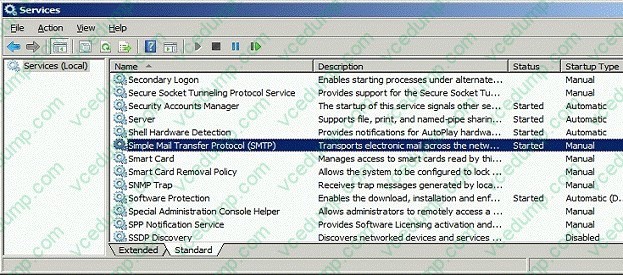
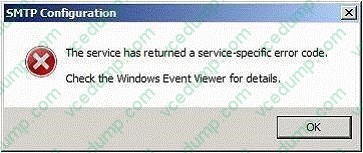
You need to ensure that you can start SMTP2. Which settings should you modify on SMTP2?
A. Access control
B. Advanced Delivery
C. Connection Control
D. IP address and TCP port -
Question 127:
Your company has four regional offices. You install the Windows Deployment Services (WDS) role on the network.
Your company creates three images for each office. There are a total of 12 images for the company. The images will be used as standard images for workstations.
You deploy the images by using WDS.
You need to ensure that each administrator can view only the images for his or her regional office.
What should you do?
A. Create a global group for each regional office and place the computers in the appropriate global group.
B. Create an organizational unit (OU) for each regional office and place the computers in the appropriate OU.
C. Place all images into a single image group on the WDS server. Grant each administrator permissions to the image group.
D. Place each regional office into a separate image group on the WDS server. Grant each administrator permissions to his or her regional offices image group. -
Question 128:
Your company has a server named VS1 that runs Windows Server 2008 and Microsoft Hyper-V. VS1 hosts 10 virtual machines. You need to configure VS1 to shut down each virtual machine before the server shuts down. What should you do?
A. Create a shutdown script on each virtual machine.
B. Install Integration Services on each virtual machine.
C. Enable the Turn off the virtual machine option in the Automatic stop action properties on each virtual machine.
D. Enable the Shut down the guest operating system option in the Automatic stop action properties on each virtual machine. -
Question 129:
Your network contains a server named Server1 that has the Remote Desktop Licensing (RD Licensing) role service installed.
You install the RD Licensing role service on a server named Server2. You need to move all Remote Desktop Services client access licenses (RDS CALs) from Server1 to Server2.
What should you do?
A. From the Remote Desktop Session Hosts console on Server1, modify the licensing settings.
B. From the Remote Desktop Session Hosts console on Server2, modify the licensing settings.
C. From the Remote Desktop Licensing Manager console on Server2, run the Manage RDS CALs Wizard.
D. From the Remote Desktop Licensing Manager console on Server2, run the Repeat Last Installation action. -
Question 130:
You have a Remote Desktop Services farm that contains several Remote Desktop Session Host Servers.
You need to configure one of the Remote Desktop Session Host Servers as a dedicated redirector.
You configure the appropriate DNS records.
What should you do next?
A. From Remote Desktop Session Host Configuration, set the licensing mode to per user.
B. From Remote Desktop Session Host Configuration, set the licensing mode to per device.
C. From Remote Desktop Session Host Configuration, change the relative weight of the server to 50.
D. From Remote Desktop Session Host Configuration, configure the server to deny new user logons.
Related Exams:
-
62-193
Technology Literacy for Educators -
70-243
Administering and Deploying System Center 2012 Configuration Manager -
70-355
Universal Windows Platform – App Data, Services, and Coding Patterns -
77-420
Excel 2013 -
77-427
Excel 2013 Expert Part One -
77-725
Word 2016 Core Document Creation, Collaboration and Communication -
77-726
Word 2016 Expert Creating Documents for Effective Communication -
77-727
Excel 2016 Core Data Analysis, Manipulation, and Presentation -
77-728
Excel 2016 Expert: Interpreting Data for Insights -
77-731
Outlook 2016 Core Communication, Collaboration and Email Skills
Tips on How to Prepare for the Exams
Nowadays, the certification exams become more and more important and required by more and more enterprises when applying for a job. But how to prepare for the exam effectively? How to prepare for the exam in a short time with less efforts? How to get a ideal result and how to find the most reliable resources? Here on Vcedump.com, you will find all the answers. Vcedump.com provide not only Microsoft exam questions, answers and explanations but also complete assistance on your exam preparation and certification application. If you are confused on your 70-643 exam preparations and Microsoft certification application, do not hesitate to visit our Vcedump.com to find your solutions here.