70-643 Exam Details
-
Exam Code
:70-643 -
Exam Name
:Windows Server 2008 Applications Infrastructure, Configuring -
Certification
:Microsoft Certifications -
Vendor
:Microsoft -
Total Questions
:419 Q&As -
Last Updated
:Dec 14, 2021
Microsoft 70-643 Online Questions & Answers
-
Question 131:
You are evaluating whether to purchase Windows Server 2008 R2 Service Pack 1 (SP1).
Several weeks ago, you installed Windows Server 2008 R2 SP1 on a server. During the installation, you did not enter a product key.
You need to identify how many days remain until the license status of the server will change to Unlicensed.
Which tool should you use?
A. System Configuration
B. Windows Activation
C. Action Center
D. Act.exe -
Question 132:
You manage a Web server named Server1 that runs Windows Server 2008 R2. Server1 has the SMTP Server feature installed.
You need to manage the SMTP server settings.
Which tool should you use?
A. Component Services
B. Iisreset
C. Internet Information Services (IIS) Manager
D. Internet Information Services (IIS) 6.0 Manager
E. Ftp
F. Local Security Policy
G. Performance Monitor
H. Security Configuration Wizard (SCW)
I. Services
J. System Configuration -
Question 133:
You install the Web Server (IIS) server role on a new server that runs Windows Server 2008 R2. You install a Microsoft .NET Framework application on a Web site on the Web server. The application launches a process that presents a real-
time graphical report to the Web browser and creates a text report file on the hard disk drive.
The company security policy states that the application must not perform any of the following tasks:
Write to the event log.
Access Open Database Connectivity (ODBC) data sources.
Make network or Web service calls.
You need to configure the Web site so that the application can be executed. You must ensure that the application meets the outlined security requirements.
What should you do?
A. Set the .NET Framework trust level to Full for the Web site.
B. Set the .NET Framework trust level to Low for the Web site.
C. Set the .NET Framework trust level to High for the Web site.
D. Set the .NET Framework trust level to Medium for the Web site. -
Question 134:
Your network contains a server named Server1. Server1 has the Streaming Media Services role installed.
The network contains two subnets named Subnet1 and Subnet2. You create an on-demand publishing point named Publishing1 on Server1. You need to ensure that only users from Subnet1 can access Publishing1.
What should you configure from the Windows Media Services console?
A. From the properties of Server1, configure the Limits settings.
B. From the properties of Server1, configure the Authentication settings.
C. From the properties of Publishing1, configure the Credentials settings.
D. From the properties of Publishing1, configure the Authorization settings. -
Question 135:
You deploy a server that has Microsoft SharePoint Foundation 2010 installed.
You create a Web application named WebApp1.
You need to enable anonymous access to WebApp1.
Which settings should you configure first?
A. Anonymous Policy
B. Authentication Providers
C. User Permissions
D. User Policy -
Question 136:
Your network contains a server named Server1 that runs Windows Server 2008 R2. Server1 has the Remote Desktop Session Host (RD Session Host) role service installed.
You need to ensure that Remote Desktop users can use the user interface elements of Windows Aero.
What should you do on Server1?
A. Change the display settings.
B. Add the Desktop Experience feature.
C. Install a DirectX 10 compliant video adapter.
D. Add the Quality Windows Audio Video Experience feature. -
Question 137:
You manage a server that runs Windows Server 2008. The server has the Web Server (IIS) role installed. The server hosts an Internet-accessible Web site that has a virtual directory named /orders/. A Web server certificate is installed and
an SSL listener has been configured for the Web site.
The /orders/ virtual directory must meet the following company policy requirements:
Be accessible to authenticated users only.
Allow authentication types to support all browsers.
Encrypt all authentication traffic by using HTTPS.
All other directories of the Web site must be accessible to anonymous users and be available without SSL
You need to configure the /orders/ virtual directory to meet the company policy requirements.
Which two actions should you perform? (Each correct answer presents part of the solution. Choose two.)
A. Configure the Web site to the Require SSL setting.
B. Configure the /orders/ virtual directory to the Require SSL setting.
C. Configure the Digest Authentication setting to Enabled for the /orders/ virtual directory.
D. Configure the Basic Authentication setting to Enabled and the Anonymous Authentication setting to Disabled for the Web site.
E. Configure the Basic Authentication setting to Enabled and the Anonymous Authentication setting to Disabled for the / orders/ virtual directory. -
Question 138:
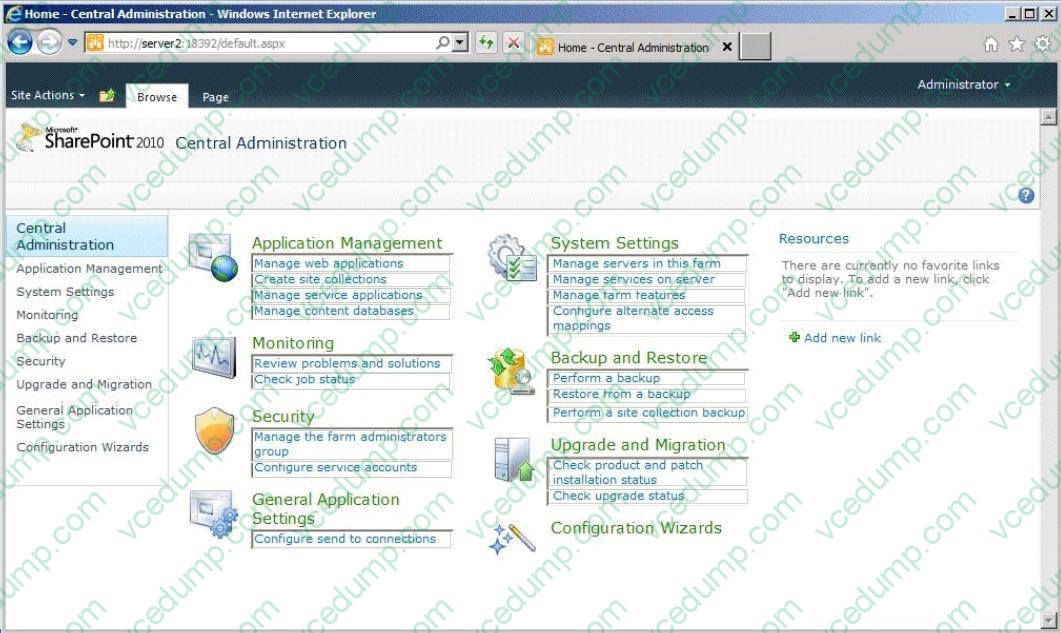
Your network contains a server named Server2 that has Microsoft SharePoint Foundation 2010 Service Pack 1 (SP1) installed.
Server2 has a web application named Web1.
Web1 contains a site collection named Site1.
Users access Site1 by using the URL http://server2.contoso.com.
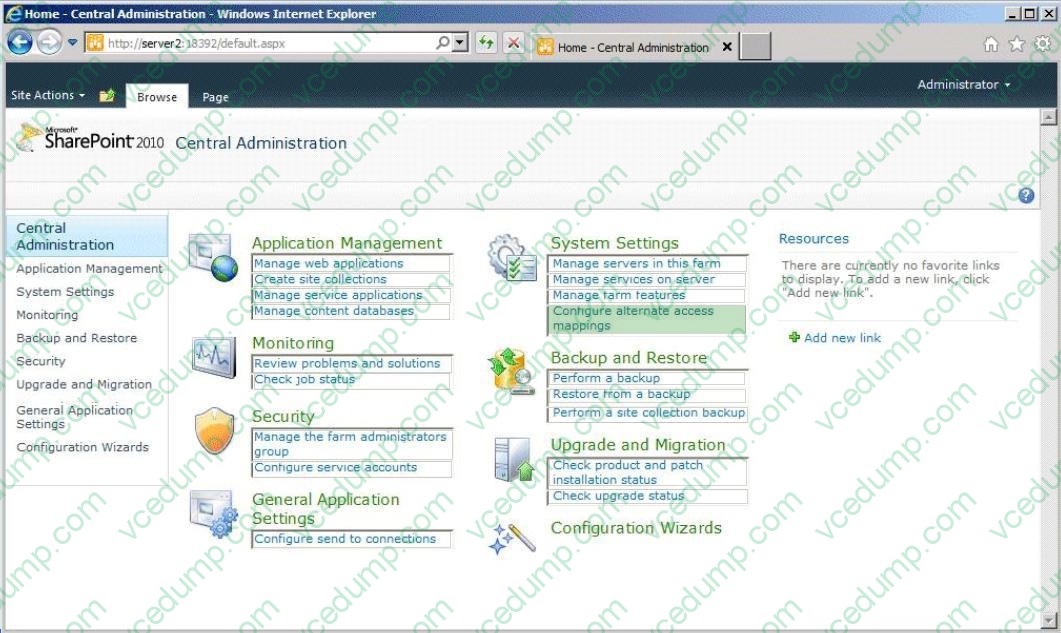
You need to ensure that the users can access Site1 by using the URL http://site1.contoso.com.
The solution must not create additional Internet Information Services (IIS) websites.
What should you configure?
To answer, select the appropriate link in the answer area.
Hot Area:
-
Question 139:
Your company has a single Active Directory domain. All servers run Windows Server 2008 R2. You install an iSCSI storage area network (SAN) for a group of file servers.
Corporate security policy requires that all data communication to and from the iSCSI SAN must be as secure as possible.
You need to implement the highest security available for communications to and from the iSCSI SAN.
What should you do?
A. Create a Group Policy object (GPO) to enable the System objects: Strengthen default permission of internal systems objects setting.
B. Create a Group Policy object (GPO) to enable the System cryptography: Use FIPS compliant algorithms for encryption, hashing, and signing setting.
C. Implement IPsec security in the iSCSI Initiator Properties. Set up inbound and outbound rules by using Windows Firewall.
D. Implement mutual Microsoft Challenge Handshake Authentication Protocol (MS-CHAPv2) authentication in the iSCSI Initiator Properties. Set up inbound and outbound rules by using Windows Firewall. -
Question 140:
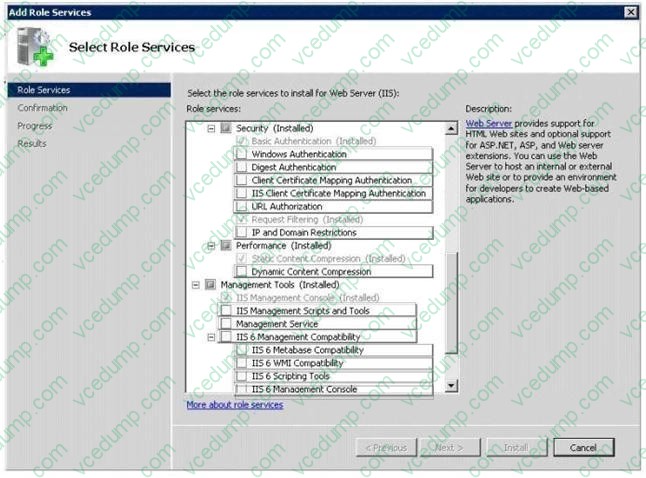
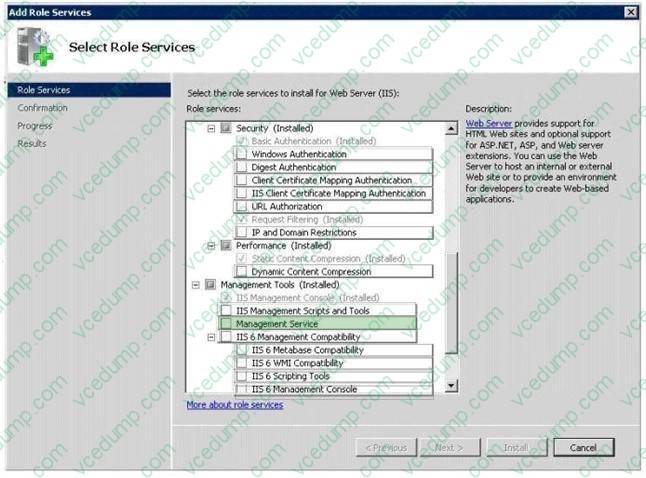
Your network contains two servers named Server1 and Server2 that have the Web Server (US) server role installed.
You need to ensure that you can administer Server2 from Server1 by using Internet Information Services (IIS) Manager. The solution must minimize the number of role services installed on Server2.
What should you install on Server2?
To answer, select the appropriate role service or role services from the Add Role Services dialog box in the answer area.
Hot Area:
Related Exams:
-
62-193
Technology Literacy for Educators -
70-243
Administering and Deploying System Center 2012 Configuration Manager -
70-355
Universal Windows Platform – App Data, Services, and Coding Patterns -
77-420
Excel 2013 -
77-427
Excel 2013 Expert Part One -
77-725
Word 2016 Core Document Creation, Collaboration and Communication -
77-726
Word 2016 Expert Creating Documents for Effective Communication -
77-727
Excel 2016 Core Data Analysis, Manipulation, and Presentation -
77-728
Excel 2016 Expert: Interpreting Data for Insights -
77-731
Outlook 2016 Core Communication, Collaboration and Email Skills
Tips on How to Prepare for the Exams
Nowadays, the certification exams become more and more important and required by more and more enterprises when applying for a job. But how to prepare for the exam effectively? How to prepare for the exam in a short time with less efforts? How to get a ideal result and how to find the most reliable resources? Here on Vcedump.com, you will find all the answers. Vcedump.com provide not only Microsoft exam questions, answers and explanations but also complete assistance on your exam preparation and certification application. If you are confused on your 70-643 exam preparations and Microsoft certification application, do not hesitate to visit our Vcedump.com to find your solutions here.