70-497 Exam Details
-
Exam Code
:70-497 -
Exam Name
:Software Testing with Visual Studio -
Certification
:Microsoft Certifications -
Vendor
:Microsoft -
Total Questions
:100 Q&As -
Last Updated
:Dec 06, 2021
Microsoft 70-497 Online Questions & Answers
-
Question 61:
You are using Microsoft Visual Studio 2012.
A requirement has been removed and you need to update the five corresponding test cases to reflect this by changing their state.
You need to simultaneously update the state of these five test cases.
What are two possible ways to accomplish this goal? (Each correct answer presents a complete solution. Choose two.)
A. In Team Explorer, run a query that returns the five test cases. In the Results pane, highlight all five test cases and click Refresh.
B. In MTM, run a query that returns the five test cases. In the Results pane, highlight all five test cases and click Run.
C. Navigate to Web Access, run the query that returns the five test cases, select the five test cases, and edit selected work items.
D. In Microsoft Excel, open a query that returns the five test cases. Update the State field of all of the work items. Click Publish.
E. In Team Explorer, run a query that returns the five test cases. In the Results pane, update the state and save each test case. -
Question 62:
You are a test developer using Microsoft Test Manager (MTM).
You have copied a test case that has five parameters.
You need to change the parameter names in the new test case and keep the parameter values intact.
What should you do?
A. For each parameter, click Rename parameter in the Parameter Values pane.
B. Replace the existing parameters with new, renamed parameters.
C. Edit each test step and rename the parameters.
D. Copy and paste the data values from the old parameters into new parameters. -
Question 63:
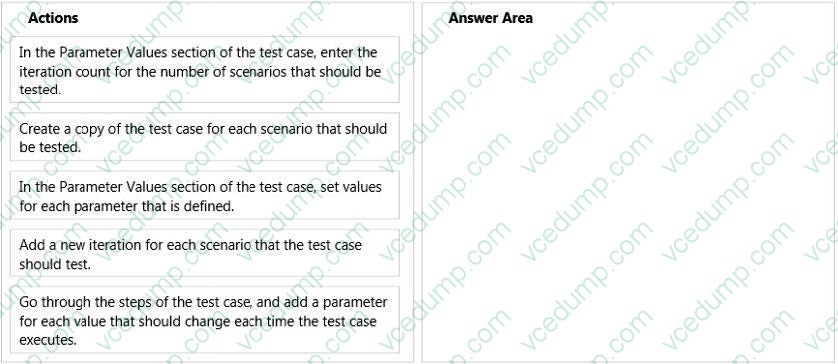
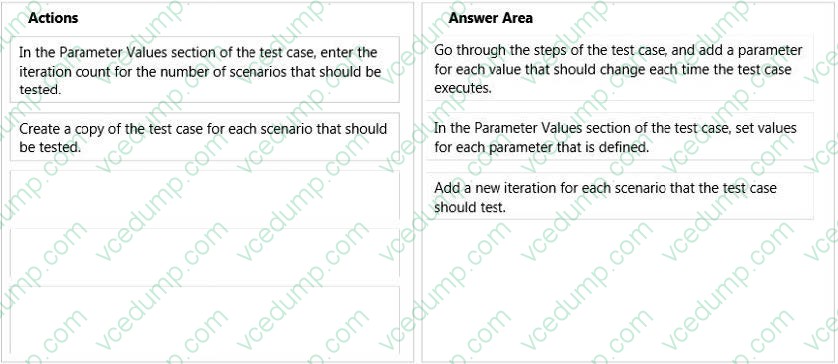
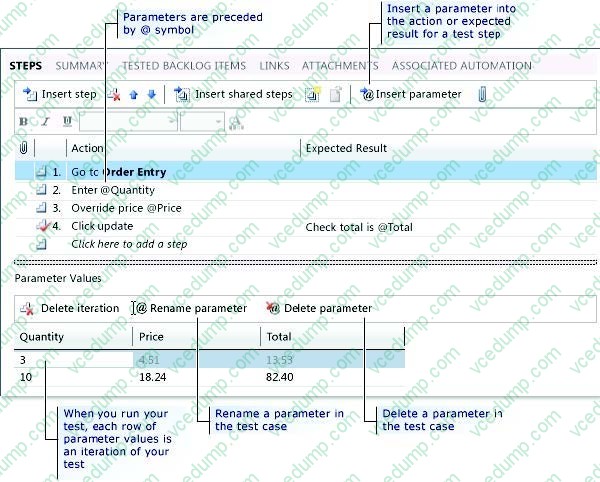
Your team uses Microsoft Test Manager (MTM) to manage your test cases.
You need to execute a test case multiple times. Each time, the test case will have a different data value.
Which three actions should you perform in sequence? To answer, move the appropriate actions from the list of actions to the answer area and arrange them in the correct order.
Select and Place:
-
Question 64:
You are using Microsoft Test Manager (MTM). You are using the Microsoft Solution Framework (MSF) for Agile Software Development process template.
You have created a test plan named Validate_User_Registration that contains test cases for validating new user registrations.
All the user stories for the new user registration feature have been stored as work items in 2012.
You need to associate the user registration user stories with the test cases in the Validate_User_Registration test plan.
What should you do?
A. Open the test plan. Use the Add requirements function to add the user registration requirements.
B. Open the test cases. Upload the user registration requirements document as an attachment.
C. Open the test cases. From the Tested User Stories tab, link the test case to the associated user stories.
D. Open the test plan. Link the user registration requirements document to the test plan. -
Question 65:
You are using Microsoft Test Manager (MTM).
Your company plans to support SQL Server and third-party databases for the application under test.
You need to test both the SQL Server and third-party databases using one test case to capture test results.
What are two possible ways to achieve this goal? (Each correct answer presents a complete solution. Choose two.)
A. Add new database run options.
B. Add new database test settings.
C. Add a new database test configuration.
D. Add new database test configuration variables. -
Question 66:
You are a managing test cases by using Microsoft Test Manager (MTM).
You create a new configuration.
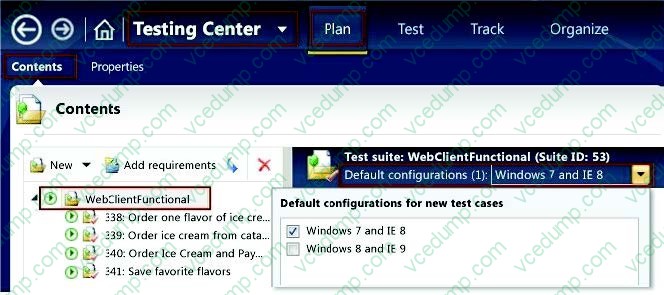
You need to select the new configuration for all test cases in a test suite.
What are two possible ways to achieve this goal? (Each correct answer presents a complete solution. Choose two.)
A. Select the new configuration as the default configuration for the test suite.
B. Select the test suite and use Configurations to select the new configuration for the test suite.
C. Select all of the test cases in the test suite and use Configurations to select the new configuration for the selected tests.
D. Select the test suite and use Select test configurations for all tests to select the new configuration. -
Question 67:
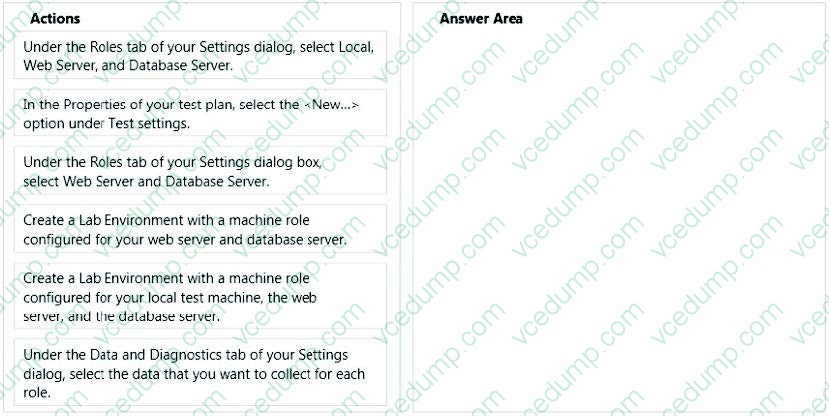
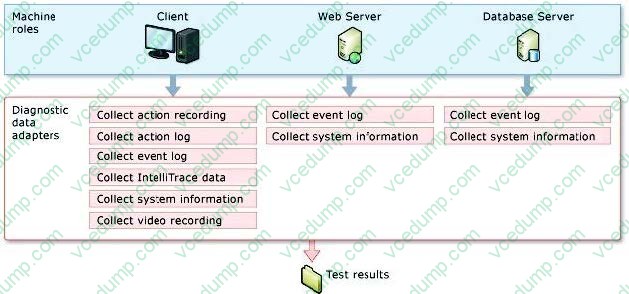
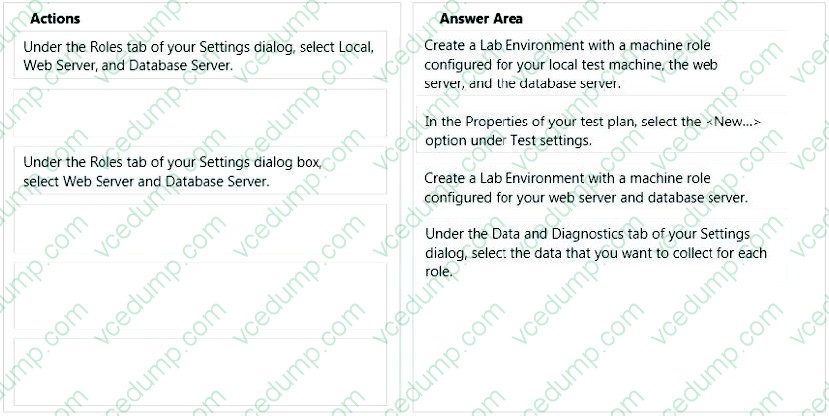
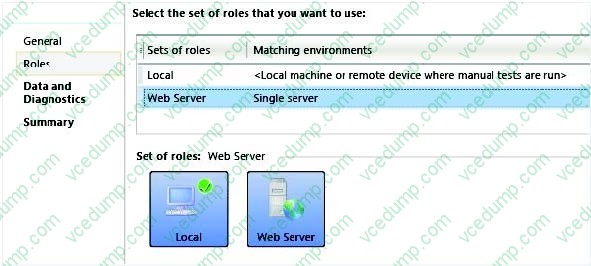
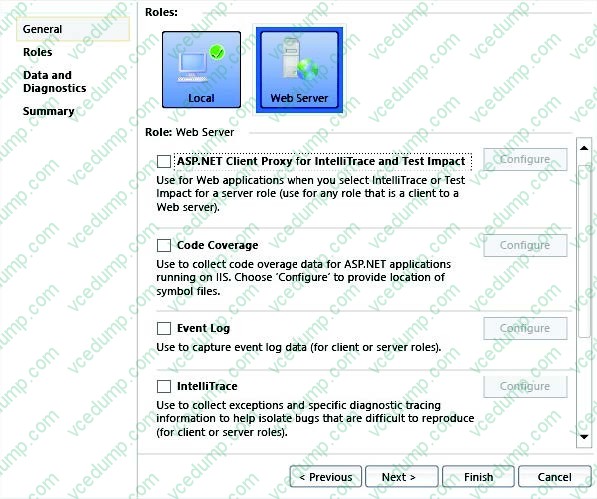
Your team uses Microsoft Test Manager to manage test cases. You are testing an ASP.NET MVC web application hosted on one of your internal servers, which is named WebSrv1. Your application connects to a SQL Server database hosted on a server named DBSrv1.
You want to configure your test plan so that it collects diagnostic data from your test machine and all servers used by your application.
Which four actions should you perform in sequence? To answer, move the appropriate actions from the list of actions to the answer area and arrange them in the correct order.
Select and Place:
-
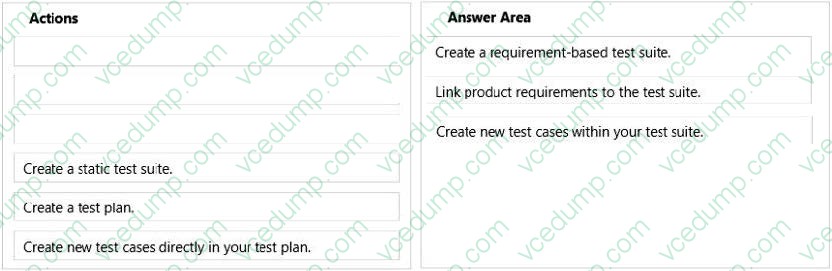
Question 68:
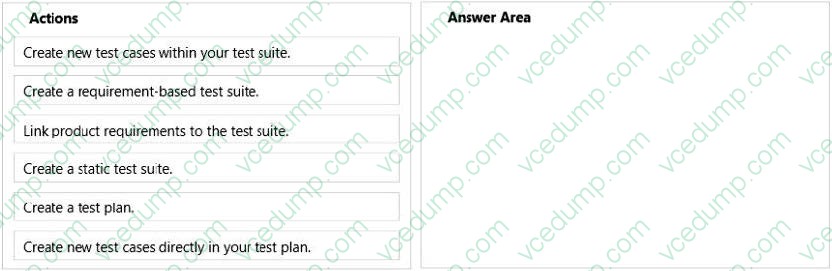
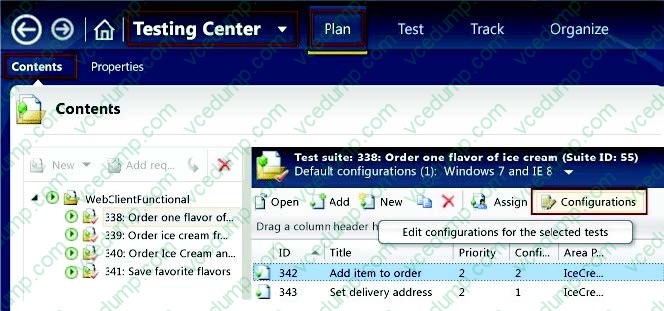
You are a software quality manager. Your company is using Microsoft Visual Studio to develop an application.
Your development team is almost finished with its first iteration. The testing team is preparing to verify that the product requirements are met.
You need to test the requirements.
Which three actions should you perform in sequence? To answer, move the correct actions from the list of actions to the answer area and arrange them in the correct order.
Select and Place:
-
Question 69:
You are running a manual test using Microsoft Test Manager (MTM). You have chosen to create an action recording.
You want to pause the test run and exit the test runner.
Before you exit the test runner, you need to mark the test case as being in progress.
Which action should you perform in the test runner?
A. Close
B. Return to Testing Center
C. Save
D. Save and Close -
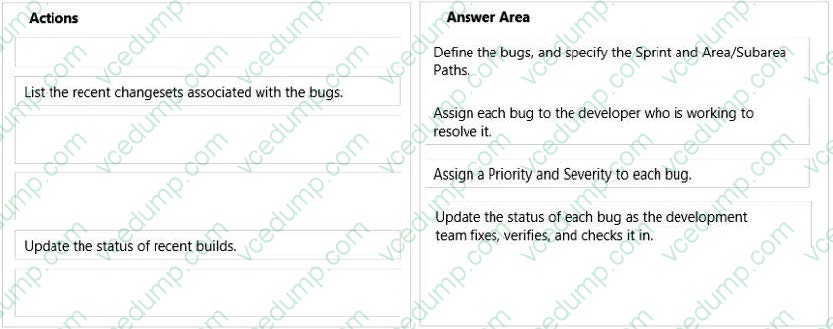
Question 70:
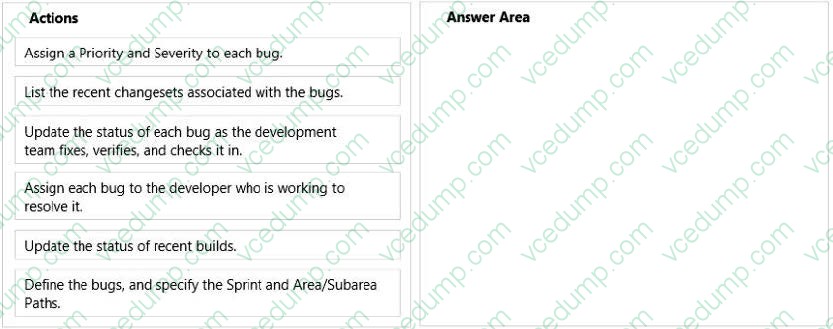
Your company's test team is working through their bug backlog and tracking their progress on the Bugs dashboard.
The bug backlog continues to grow, but the reports that appear on the Bugs dashboard are neither accurate nor useful.
You need to establish a best practice that will ensure the reports on the Bugs dashboard are accurate and useful.
Which four actions should you perform in sequence? To answer, move the appropriate actions from the list of actions to the answer area and arrange them in the correct order. More than one order of answer choices may be correct. You will receive credit for any of the correct orders you select.
Select and Place:
Related Exams:
-
62-193
Technology Literacy for Educators -
70-243
Administering and Deploying System Center 2012 Configuration Manager -
70-355
Universal Windows Platform – App Data, Services, and Coding Patterns -
77-420
Excel 2013 -
77-427
Excel 2013 Expert Part One -
77-725
Word 2016 Core Document Creation, Collaboration and Communication -
77-726
Word 2016 Expert Creating Documents for Effective Communication -
77-727
Excel 2016 Core Data Analysis, Manipulation, and Presentation -
77-728
Excel 2016 Expert: Interpreting Data for Insights -
77-731
Outlook 2016 Core Communication, Collaboration and Email Skills
Tips on How to Prepare for the Exams
Nowadays, the certification exams become more and more important and required by more and more enterprises when applying for a job. But how to prepare for the exam effectively? How to prepare for the exam in a short time with less efforts? How to get a ideal result and how to find the most reliable resources? Here on Vcedump.com, you will find all the answers. Vcedump.com provide not only Microsoft exam questions, answers and explanations but also complete assistance on your exam preparation and certification application. If you are confused on your 70-497 exam preparations and Microsoft certification application, do not hesitate to visit our Vcedump.com to find your solutions here.