70-497 Exam Details
-
Exam Code
:70-497 -
Exam Name
:Software Testing with Visual Studio -
Certification
:Microsoft Certifications -
Vendor
:Microsoft -
Total Questions
:100 Q&As -
Last Updated
:Dec 06, 2021
Microsoft 70-497 Online Questions & Answers
-
Question 1:
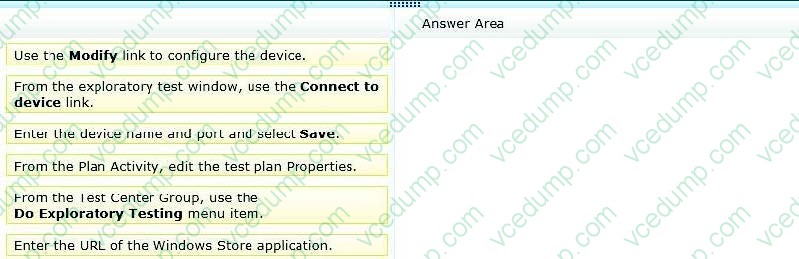
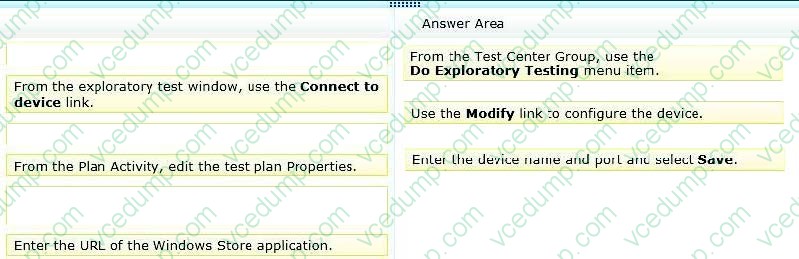
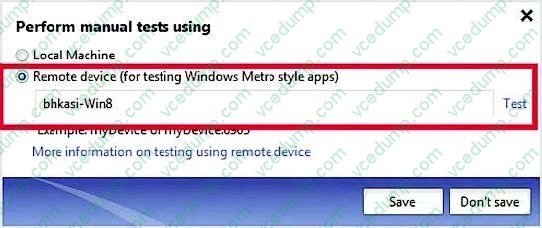
You are using Microsoft Test Manager (MTM) to perform exploratory testing.
You need to test a Windows Store application.
You need to configure the connection to the remote device running the Windows Store application.
What should you do? (To answer, move the three appropriate actions from the list of actions to the answer area and arrange them in the correct order.)
Select and Place:
-
Question 2:
You are the lead software tester for Contoso, Ltd. Your team uses Microsoft Visual Studio Premium 2012 to design and test all company software.
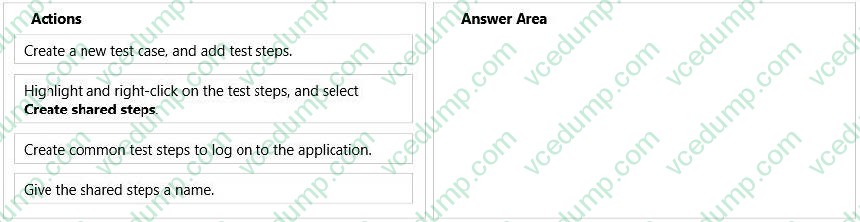
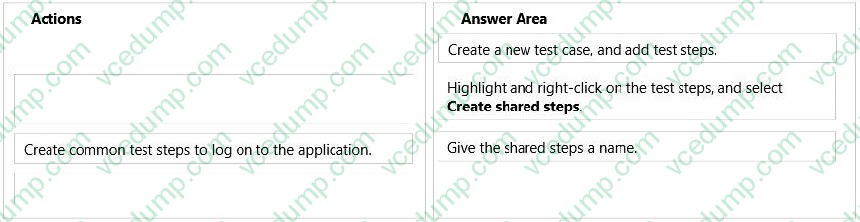
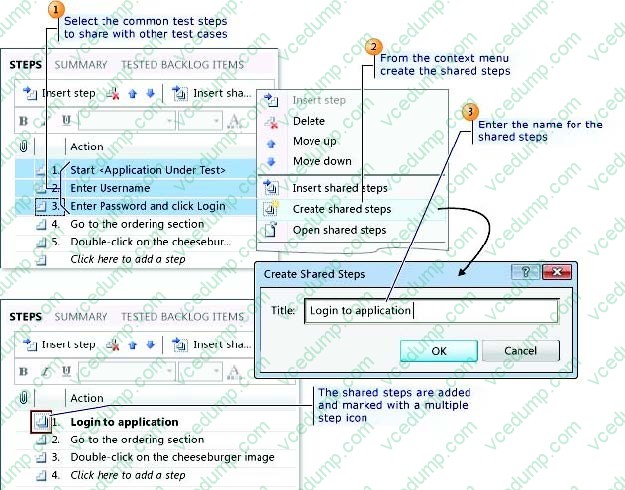
You are developing manual tests for a test plan for a new website. However, test steps that are used to log on to the application are being used by many test cases.
You need to create shared test steps.
Which three actions should you perform in sequence? To answer, move the appropriate actions from the list of actions to the answer area and arrange them in the correct order.
Select and Place:
-
Question 3:
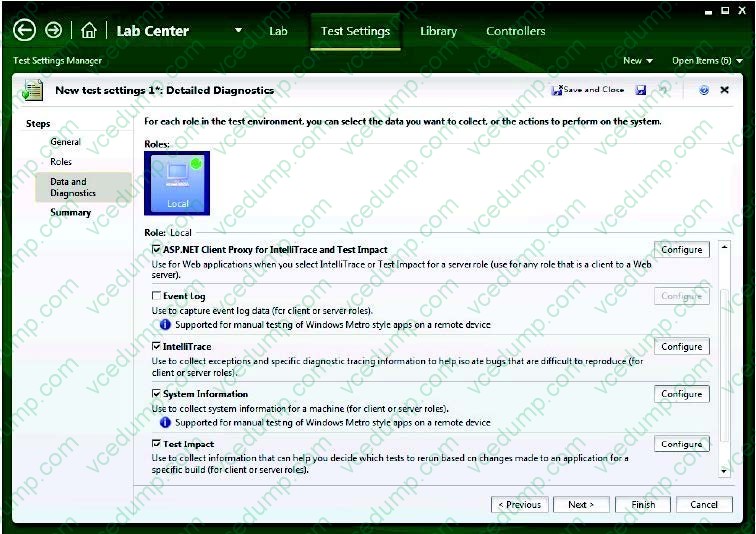
You use Microsoft Test Manager (MTM) to conduct a manual test for an ASP.NET web application. You have created a test plan named Release 2.0. The test plan needs to meet the following requirements:

Test runs should be able to capture event log data for the server role.
Test runs should be able to collect exceptions and specific diagnostic tracing information to isolate bugs that are difficult to reproduce.
You need to configure the Release 2.0 test plan by creating new test settings for the requirements and assigning the test settings to the test plan.
How should you configure the new test settings?
A. On the Data and Diagnostics page, select the Event Log and System Information options.
B. On the Data and Diagnostics page, select the Event Log, ASP.NET Client Proxy for IntelliTrace and Test Impact, and IntelliTrace options.
C. On the Data and Diagnostics page, select the Event Log and IntelliTrace options.
D. On the Data and Diagnostics page, select the Event Log and ASP.NET Client Proxy for IntelliTrace and Test Impact options. -
Question 4:
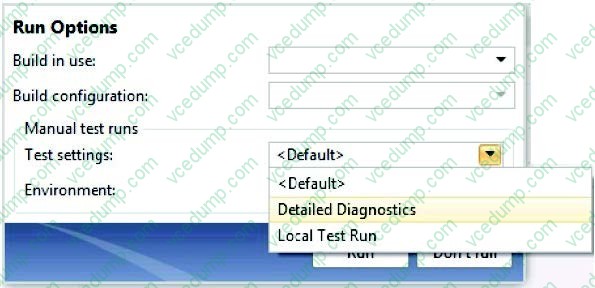
You are using Microsoft Test Manager (MTM) to run a test case. During the previous run of the same test case, a bug was filed. The developer could not reproduce the bug. The test settings assigned to the test plan do not include an adapter
to collect IntelliTrace data.
You have created a test setting that includes the IntelliTrace data adapter.
You need to re-run the test with the settings that have the IntelliTrace data adapter.
What should you do?
A. Select the test case. Select the Run with option. Select the test setting that collects IntelliTrace information.
B. Select the test suite that contains the test case. Click Settings, then right-click IntelliTrace to enable it.
C. Open the test case. Click Settings to select the settings that have the IntelliTrace data adapter.
D. Run the test case with its default settings. Click View Results and locate the IntelliTrace file that was created when the test case was executed. -
Question 5:
You are using Microsoft Test Manager (MTM). You are using the Microsoft Visual Studio Scrum 1.0 process template.
You are developing a test from an engineering document that has detailed verification information.
You need to ensure that the document is directly accessible whenever a tester runs a specific step.
What are two possible ways to accomplish this goal? (Each correct answer presents a complete solution. Choose two.)
A. Add a test step attachment.
B. Add a test case attachment.
C. Add a tested backlog items link.
D. Add a test case link. -
Question 6:
You are using Microsoft Test Manager (MTM).
You have test cases that use a shared steps work item. You plan to replace the shared steps work item with a new implementation.
You need to find the test cases that are using that shared steps work item.
What are two possible features you could use to achieve this goal? (Choose two. Each answer choice provides a complete solution.)
A. A Direct Links query
B. Shared Steps Manager
C. The TCM.exe utility
D. The WitAdmin.exe utility -
Question 7:
You are using Microsoft Test Manager (MTM). You are using the Microsoft Solution Framework (MSF) for Agile Software Development process template.
You plan to retest any test cases that have active bugs.
You need to review the requirements associated with the test cases prior to running the tests.
What should you do?
A. Create a query-based suite in MTM to select the matching test cases. Open each test case and validate the requirement on the Tested User Stories tab.
B. Use a work item query in Excel to list test cases and their associated requirements details.
C. Create a direct links query in MTM to select the matching test cases. Open each test case and validate the requirement on the Tested User Stories tab.
D. In the Test tab in MTM, filter the test cases that have associated bugs. Open each test case and validate the requirement on the Tested User Stories tab. -
Question 8:
You are using Microsoft Test Manager (MTM). You are using the Microsoft Solution Framework (MSF) for Capability Maturity Model Integration (CMMI) Process Improvement process template. Your Team Foundation Server (TFS) 2012 server is configured to support reporting.
You are tracking testing progress for the requirements in the iteration.
You need to identify the report that provides the following:
Verify that all requirements are covered by test cases.
Determine the number of hours of work remaining for each requirement.
Determine the percentage of completion for each requirement.
Determine the number of bugs for each requirement.
Which report should you use?
A. Requirements Overview
B. Test Case Readiness
C. Remaining Work
D. Test Plan Progress -
Question 9:
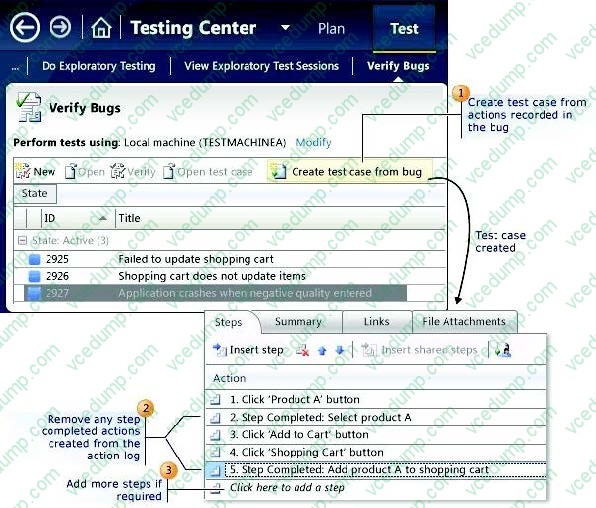
While reviewing a bug in Microsoft Test Manager (MTM), you realize there is no test case covering the bug.
You need to create a test case from the bug, including test steps, and associate it with the test case for future reference. What should you do?
A. In MTM, in the Verify Bugs activity, select the bug. Click Open test case.
B. Open a Visual Studio 2012 window. Select the bug and click Open test case.
C. In MTM, in the Verify Bugs activity, select the bug. Click Create test case from bug.
D. Open a Visual Studio 2012 window. Create a test case and associate it with the bug. -
Question 10:
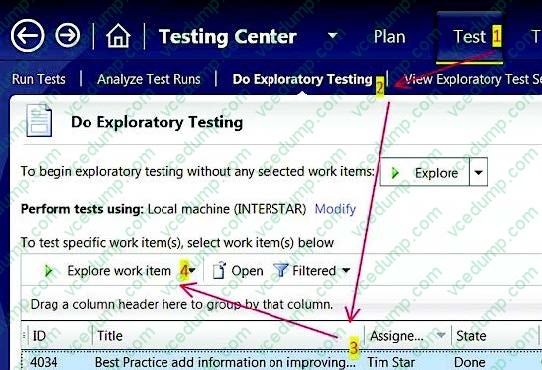
You are using Microsoft Test Manager (MTM) to perform exploratory testing.
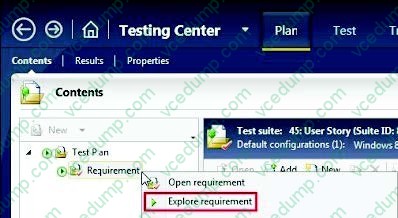
You need to ensure that any bugs or test cases created during an exploratory test session are associated with a specific requirement for the purposes of traceability.
What should you do?
A. From the Test activity, select View Exploratory Test Sessions. Open a session and click the Copy Link button.
B. From the Run Tests activity, select a test case that is a part of a requirement suite and select Run.
C. Create a requirement suite in the test plan, right-click on the suite, and select Explore Requirement.
D. From the Do Exploratory Testing activity, select Explore.
Related Exams:
-
62-193
Technology Literacy for Educators -
70-243
Administering and Deploying System Center 2012 Configuration Manager -
70-355
Universal Windows Platform – App Data, Services, and Coding Patterns -
77-420
Excel 2013 -
77-427
Excel 2013 Expert Part One -
77-725
Word 2016 Core Document Creation, Collaboration and Communication -
77-726
Word 2016 Expert Creating Documents for Effective Communication -
77-727
Excel 2016 Core Data Analysis, Manipulation, and Presentation -
77-728
Excel 2016 Expert: Interpreting Data for Insights -
77-731
Outlook 2016 Core Communication, Collaboration and Email Skills
Tips on How to Prepare for the Exams
Nowadays, the certification exams become more and more important and required by more and more enterprises when applying for a job. But how to prepare for the exam effectively? How to prepare for the exam in a short time with less efforts? How to get a ideal result and how to find the most reliable resources? Here on Vcedump.com, you will find all the answers. Vcedump.com provide not only Microsoft exam questions, answers and explanations but also complete assistance on your exam preparation and certification application. If you are confused on your 70-497 exam preparations and Microsoft certification application, do not hesitate to visit our Vcedump.com to find your solutions here.