70-497 Exam Details
-
Exam Code
:70-497 -
Exam Name
:Software Testing with Visual Studio -
Certification
:Microsoft Certifications -
Vendor
:Microsoft -
Total Questions
:100 Q&As -
Last Updated
:Dec 06, 2021
Microsoft 70-497 Online Questions & Answers
-
Question 41:
You are using Microsoft Test Manager (MTM).
You plan to design a shared steps work item with the possibility that it will be used with multiple rows of test data.
You need to create a test case that contains the shared steps in multiple iterations. You also need to provide different test data for each iteration.
What should you do?
A. Create a copy of the shared steps work item and provide different values for the parameters in the original shared steps work item and its copy. Use the different shared steps work items in the test cases to get different test data.
B. Create an action recording of the shared steps work item and specify multiple parameter values while recording.
C. Provide default parameter values in the shared steps work item and provide different data in the test case for multiple iterations.
D. Provide multiple values for parameters in the shared steps. -
Question 42:
You are using Microsoft Test Manager (MTM) to manage your testing efforts.
You plan to use the Recommended tests feature to assist in identifying tests to run against a Windows Presentation Foundation rich client application. When you select a new build, no recommended tests are displayed.
You need to configure the data collectors to enable the feature.
Which data collector should you configure?
A. Action Log
B. Test Impact
C. IntelliTrace
D. ASP.NET Client Proxy for IntelliTrace and Test Impact -
Question 43:
You are using Microsoft Test Manager (MTM).
You have a shared steps work item that you want to hide in the Shared Steps Manager.
You need to ensure that only active shared steps work items are displayed.
What should you do?
A. Change the state of the shared steps work item to Closed, then customize the filter of the Shared Steps Manager view to display shared steps that have the status Active.
B. Delete the shared steps work item from all test cases where it is used, then delete the shared steps work item from the Shared Steps Manager.
C. For the shared steps work item, change the Show in Shared Step Manager setting to Do Not Show.
D. Change the state of the shared steps work item to Removed. -
Question 44:
You are using Microsoft Test Manager (MTM). You are using the Microsoft Solution Framework (MSF) for Agile Software Development process template. Your team has all required permissions to run the reports on the SharePoint project
portal.
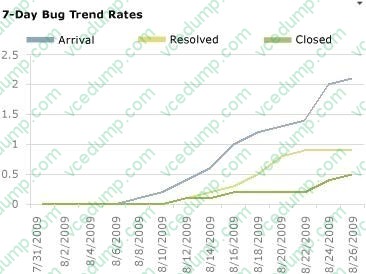
You need to track the progress on resolving bugs by your team for the past week.
Which Excel report should you run?
A. Bug Trends
B. Bugs by Assignment
C. Run the Team Trend report.
D. Bug Progress -
Question 45:
You are managing test cases by using Microsoft Test Manager (MTM).
You plan to test a part of your product on a specific configuration you create.
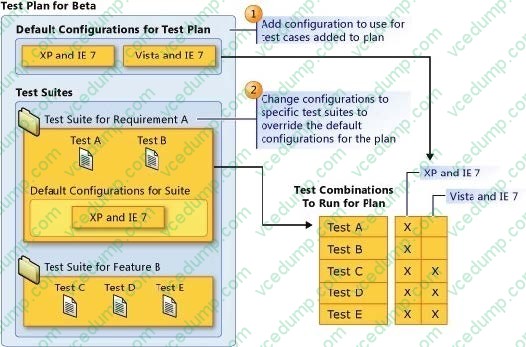
You need to ensure that new test cases in a specific test suite default to use this configuration without impacting other test suites.
What should you do?
A. Create a new test plan for testing with the specific configuration.
B. Select all test cases in the test suite and select the specific configuration.
C. Select the specific configuration as the default configuration for the test plan.
D. Select the specific configuration as the default configuration for the test suite. -
Question 46:
You are using Microsoft Test Manager (MTM).
You have a large list of existing test plans that are obsolete. These test plans should be kept for historical purposes. When testers click on the Home button to select a test plan, the list is too long to easily navigate.
You need to show only the test plans that are currently being used.
What should you do?
A. In the Test Plan Manager view, right-click each obsolete test plan and select Hide.
B. In the Test Plan Manager view, for each obsolete test plan select Delete test plan.
C. In the test plan Properties, change the State to Inactive for each obsolete test plan.
D. In the Test Plan Manager view, right-click each obsolete test plan and select Close.
E. In the test plan Properties, change the State to Closed for each obsolete test plan. -
Question 47:
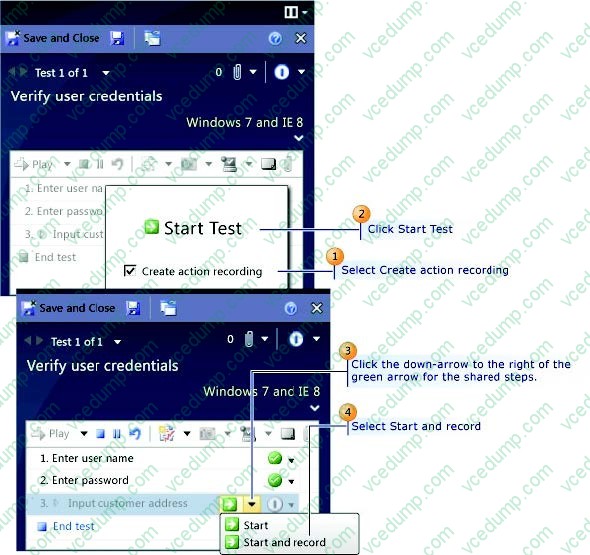
You are the lead product tester for your company. You use Microsoft Visual Studio Ultimate to design and test your flagship product.
You restructure some of the testing to use shared steps.
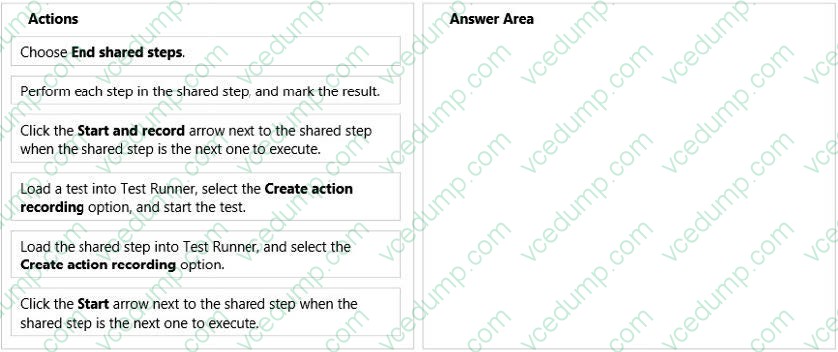
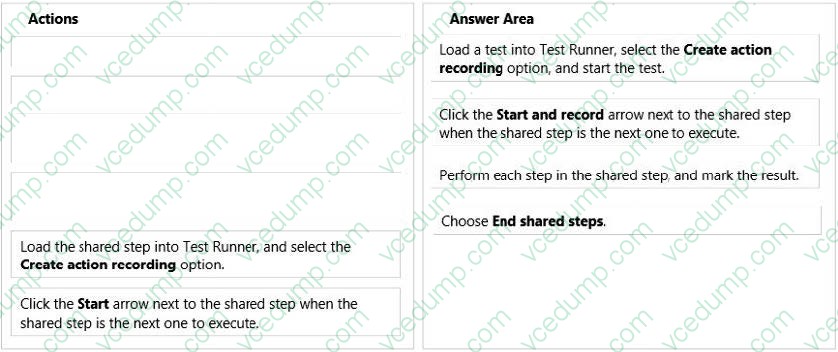
You need to create an action recording for a shared step.
Which four actions should you perform in sequence? To answer, move the appropriate actions from the list of actions to the answer area and arrange them in the correct order.
Select and Place:
-
Question 48:
Your company assigns you to a Scrum team. You are planning the release and sprint.
You have created global lists, which are pick lists that you can include in one or more fields and types of work items.
The product owner reviews the Product Backlog with the team and assigns each work item to a release and a sprint. One of the fields in the work item is using the global list as the pick list.
You need to assign the minimum permissions to export the work item type definition, including the global lists.
Which two permissions should you use? Each correct answer presents a complete solution.
A. View collection-level information permission set to Allow
B. Member of the Project Collection Valid Users
C. View system synchronization information permission set to Allow
D. Member of the Project Administrators -
Question 49:
You are a test developer using Microsoft Test Manager (MTM).
The test you are developing has a two validation steps that use a parameter named TotalPrice. The feature associated with TotalPrice has changed, making the parameter and the first validation step unnecessary. The second validation step
requires a new parameter named Price.
You need to delete the TotalPrice parameter, along with its data values, and add the Price parameter to the second validation step.
What should you do?
A. Delete the two validation steps and the TotalPrice parameter, and then delete the parameter values for TotalPrice.
B. Delete the first validation step and insert the Price parameter into the second validation step.
C. Delete the first validation step and rename TotalPrice to Price in the second validation step.
D. Delete the first validation step and insert the Price parameter into the Action column of the second validation step. -
Question 50:
You are using Microsoft Test Manager (MTM) to manually test for an ASP.NET website. You have previously created a test plan named QA Release 1.0 that contains 115 test cases, and you are now planning the testing for Release 2.0. The QA Release 2.0 test plan must meet the following requirements:

All the test cases in QA Release 1.0 should be available in QA Release 2.0.
Testers should be able to change, add, or remove test cases from either the QA Release 1.0 test plan or the QA Release 2.0 test plan as required, without affecting the other test plan.
Shared steps and test configuration from the QA Release 1.0 test plan need to be reflected in QA Release 2.0 test plan.
You need to facilitate simultaneous testing of the website by creating the QA Release 2.0 test plan according to the stated requirements.
What should you do?
A. Copy the root test suite from the QA Release 1.0 test plan into the QA Release 2.0 test plan.
B. Clone the root test suite from the QA Release 1.0 test plan into the QA Release 2.0 test plan.
C. Copy all the test cases from the QA Release 1.0 test plan into the QA Release 2.0 test plan by using the Create copy option in Test Case Manager.
D. Export all the test cases from the QA Release 1.0 test plan into Excel, then import them into the QA Release 2.0 test plan.
Related Exams:
-
62-193
Technology Literacy for Educators -
70-243
Administering and Deploying System Center 2012 Configuration Manager -
70-355
Universal Windows Platform – App Data, Services, and Coding Patterns -
77-420
Excel 2013 -
77-427
Excel 2013 Expert Part One -
77-725
Word 2016 Core Document Creation, Collaboration and Communication -
77-726
Word 2016 Expert Creating Documents for Effective Communication -
77-727
Excel 2016 Core Data Analysis, Manipulation, and Presentation -
77-728
Excel 2016 Expert: Interpreting Data for Insights -
77-731
Outlook 2016 Core Communication, Collaboration and Email Skills
Tips on How to Prepare for the Exams
Nowadays, the certification exams become more and more important and required by more and more enterprises when applying for a job. But how to prepare for the exam effectively? How to prepare for the exam in a short time with less efforts? How to get a ideal result and how to find the most reliable resources? Here on Vcedump.com, you will find all the answers. Vcedump.com provide not only Microsoft exam questions, answers and explanations but also complete assistance on your exam preparation and certification application. If you are confused on your 70-497 exam preparations and Microsoft certification application, do not hesitate to visit our Vcedump.com to find your solutions here.