70-210 Exam Details
-
Exam Code
:70-210 -
Exam Name
:Installing, Configuring and Administering Microsoft Windows 2000 Professional -
Certification
:Microsoft Certifications -
Vendor
:Microsoft -
Total Questions
:145 Q&As -
Last Updated
:Dec 13, 2021
Microsoft 70-210 Online Questions & Answers
-
Question 131:
You have implemented the Hisecws.inf security template on all the Windows 2000 Professional client computers in your network.A user has received a driver and utility software for an internal SCSI controller in his computer. He uses the manufacturer-provided CD to install the driver and the utility. He restarts the computer and reports that the internal SCSI controller is not working correctly. You discover that the driver is not installed correctly.What should you do?
A. Disable the security template. Reconfigure the Driver Signing option. Install the driver. Enable the security template.
B. Reconfigure the Driver Signing option. Disable the security template. Install the driver. Enable the security template.
C. Run the Sigverif command. Reconfigure the Driver Signing option. Install the driver.
D. Run the Sigverif command. Disable the security template. Install the driver. Enable the security template.
E. Run the Sfc /cancel command. Install the driver. Run the Sfc /enable command. -
Question 132:
You are the administrator of a Windows 2000 Professional portable computer that is shared by users in the sales department. You want to configure a roaming user profile for each user. You want each individual user profile setting to be available from any location, including by using a dial-up connection.You log on to the computer by using the local Administrator account. You create user accounts for the users in the sales department. When you attempt to configure each individual user account profile to be a roaming profile, you find that you cannot. You receive the Change Profile Type dialog box as shown in the exhibit. (Click the Exhibit button.)You want to be able to configure each user account to use a roaming user profile. What should you do?
A. From System in Control Panel, select the Change Type option, and then select the Roaming profile option.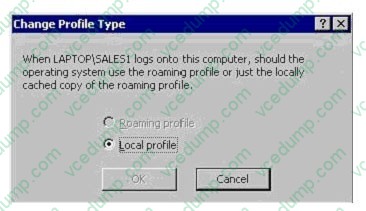
B. From Users and Passwords in Control Panel, select the Advanced tab, and then define the path for the profile location.
C. Use the Network Connection wizard to create a virtual private network (VPN) connection to the network, and define the mandatory profile path on each domain user account.
D. Connect the portable computer to the network, and configure the user accounts for a roaming user profile. -
Question 133:
You are the administrator of a Windows 2000 network that has 1,500 Windows 2000 Professional computers. Microsoft Office 2000 was assigned to all the computers on the network by using a Group Policy object (GPO).You deploy the Office 2000 service release to all of the Windows 2000 Professional computers on the network. The service release, in addition to other software that had been assigned, fails to install on only one of the computers.What should you do?
A. Redeploy the service release by using a .zap file.
B. Redeploy the service release by using an .mst file.
C. Restart Windows Installer on the domain controller.
D. Restart Windows Installer on the computer that failed to install the service release. -
Question 134:
You use Windows 2000 Professional on your desktop computer. You schedule a task to run an MMC snap-in to perform configuration tasks on other computers. You notice that the task is not completing correctly.You manually start MMC. You add the snap-in. You are then able to successfully run the task. You verify that all of your other tasks are working correctly.You want to enable your task to complete successfully. What should you do?
A. Use Scheduled Tasks to configure the task to run under the security context of your account.
B. Configure the Task Scheduler service account to use a local Administrator account and password.
C. Use Computer Management to start the Messenger service and to configure the Messenger service to start automatically.
D. Use Computer Management to start the Task Scheduler service and to configure the Task Scheduler service to start automatically. -
Question 135:
You are the administrator of a Windows 2000 Professional computer that has a shared printer. Several departments in your company use the shared printer.The sales department frequently prints multiple-page presentation graphics, which take a long time to print. Users in other departments who have short messages to print must wait an unnecessarily long time for their jobs to print.You want to improve the efficiency of printing for all users who use the shared printer. You want to accomplish this with the least amount of administrative effort.What should you do?
A. Configure the priority of the printer to 50. Add a new printer, and set the priority to 1. For the new printer, deny Print permission for users in the sales department.
B. Configure the priority of the printer to 50. Add a new printer, and set the priority to 95. For the new printer, deny Print permission for users in the sales department.
C. Monitor the print queue, and raise the priority of all the print jobs that are sent by users who are not members of the sales department.
D. Delete the old printer. Add a new printer, and set the priority to a higher value. Pause the print queue only when graphic-intensive print jobs are printing. -
Question 136:
You upgrade five computers in the Finance organizational unit (OU) from Windows NT Workstation 4.0 to Windows 2000 Professional. The computers are used by members of the Finance OU to run financial applications. All five computers are configured to have the default security settings.A user named Helene reports that she can no longer run the financial applications on her Windows 2000 Professional computer. Prior to the upgrade, Helene was able to run the financial applications on her computer. Helene is a member of the Local Users group.You want the financial applications to run on Helene's computer. What should you do?
A. Use Computer Management to configure separate memory spaces for each financial application on Helene's computer.
B. Use Security Templates to edit the Security Policy to include the financial applications on Helene's computer. Then add Helene's user account to the Power Users group on Helene's computer.
C. Use Security Configuration and Analysis to reconfigure the default security policy .inf file to allow the financial applications to run on Helene's computer.
D. Use Secedit.exe to apply the Compatws.inf security template to Helene's Security Policy to loosen the permissions for the Local Users group on Helene's computer. -
Question 137:
You are the administrator of your company's network. The network is configured as shown in the exhibit. (Click the Exhibit button.)You want to install Windows 2000 Professional on 10 non-PXE-compliant computers on the Marketing segment of your network. The 10 computers do not have operating systems installed.You attempt to load the computers by using an existing RIS image that is on the RIS server. You find that the 10 computers cannot connect to the RIS server.You verify that existing client computers on the network can connect to network servers, including the RIS server. You then check the network servers and find that the Windows NT Server 4.0 computer running WINS has stopped responding due to a hard disk failure. You want to enable the computers to connect to the RIS server.What should you do? (Choose two.)
A. Repair and restart the WINS server.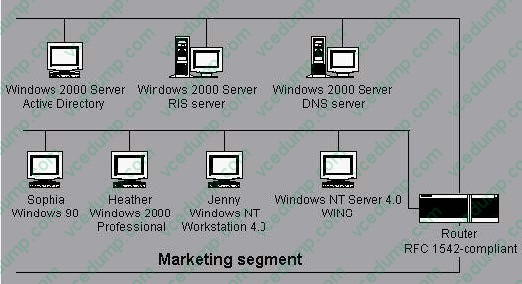
B. Repair the WINS server and upgrade the server to Windows 2000 Server.
C. Configure the Active Directory server to run DHCP.
D. Configure a static entry in WINS that points to the RIS server.
E. Create and use the RIS boot disk.
F. Run RIPrep.exe to create a non-PXE-compliant startup disk. -
Question 138:
You are the administrator of your company's network. Ten Windows 2000 Professional computers are located in the research department. The computers contain highly confidential information.You want the 10 computers to be able to communicate with other Windows 2000 computers on the network. However, you do not want the computers to communicate with computers that are not running Windows 2000, including those that are running Windows 95, Windows 98, and Windows NT.You want to configure a Security Policy on each computer to ensure that the confidential information is secure. What should you do?
A. Use Security Configuration and Analysis to import the Hisecws.inf security template file to modify the default security settings.
B. Use Security Templates to create a security template file and import the security settings to modify the default security settings.
C. Use the Local Computer Policy to disable the Access this computer from the network option.
D. Use Secedit.exe to reconfigure the computer default security settings to not allow anonymous access to the computers. -
Question 139:
You need to install Windows 2000 Professional on a new computer in your network. You use the Setup Manager wizard to configure a fully automated installation script file. You begin an unattended installation and leave the office.When you return, the installation has reached the GUI-mode Setup and you see the following error message: "Unattended Setup is unable to continue because a Setup parameter specified by your system administrator or computer manufacturer is missing or invalid."You need to complete the installation. What must you do?
A. In the Unattended section of the answer file, set the OemPreinstall property to Yes.
B. In the NetBinding section of the answer file, specify the Enable variable.
C. In the UserData section of the answer file, specify the ProductID variable.
D. In the GuiUnattended section of the answer file, set the OemSkipWelcome property to 1. -
Question 140:
You need to install Windows 2000 Professional on 35 new computers on the company LAN.First, you create a distribution folder on the network server. Then you create a network boot disk to install Windows 2000 Professional from the distribution folder.Now you need to create a batch file, which the network boot disk will execute to start the installation. You must specify a source path and temporary drive for the installation files. You also need to install the accessibility options within the batch file. The batch file must execute a hardware-specific application to run after the GUI-mode Setup has completed.Which command must you specify in the batch file?
A. Z:\i386\winnt /s:z:\i386 /t:d /a /e:z:\hardware\setup.exe
B. Z:\i386\winnt /s:z:\i386 /r:winnt.tmp /a /e:z:\hardware\setup.exe
C. Z:\i386\winnt32 /s:z:\i386 /tempdrive:d /cmd:z:\hardware\setup.exe
D. Z:\i386\winnt32 /s:z:\i386 /cmdcons:z:\hardware\setup /makelocalsource
Related Exams:
-
62-193
Technology Literacy for Educators -
70-243
Administering and Deploying System Center 2012 Configuration Manager -
70-355
Universal Windows Platform – App Data, Services, and Coding Patterns -
77-420
Excel 2013 -
77-427
Excel 2013 Expert Part One -
77-725
Word 2016 Core Document Creation, Collaboration and Communication -
77-726
Word 2016 Expert Creating Documents for Effective Communication -
77-727
Excel 2016 Core Data Analysis, Manipulation, and Presentation -
77-728
Excel 2016 Expert: Interpreting Data for Insights -
77-731
Outlook 2016 Core Communication, Collaboration and Email Skills
Tips on How to Prepare for the Exams
Nowadays, the certification exams become more and more important and required by more and more enterprises when applying for a job. But how to prepare for the exam effectively? How to prepare for the exam in a short time with less efforts? How to get a ideal result and how to find the most reliable resources? Here on Vcedump.com, you will find all the answers. Vcedump.com provide not only Microsoft exam questions, answers and explanations but also complete assistance on your exam preparation and certification application. If you are confused on your 70-210 exam preparations and Microsoft certification application, do not hesitate to visit our Vcedump.com to find your solutions here.