70-210 Exam Details
-
Exam Code
:70-210 -
Exam Name
:Installing, Configuring and Administering Microsoft Windows 2000 Professional -
Certification
:Microsoft Certifications -
Vendor
:Microsoft -
Total Questions
:145 Q&As -
Last Updated
:Dec 13, 2021
Microsoft 70-210 Online Questions & Answers
-
Question 101:
You install Windows 2000 Professional on your computer at home. You create a new dial-up connection to connect to your company's remote access server. You configure the connection to use both of your external modems and to use Multilink to bind the modems together.You start the dial-up connection and connect to the remote access server. You notice that only one of the modems is connected to the remote access server.What should you do?
A. Configure the dial-up connection to use a SLIP connection.
B. Configure the company's remote access server to accept Multilink connections.
C. Replace your modems with new modems that support Multilink.
D. Grant your user account Multilink permission on the company's remote access server. -
Question 102:
You install Windows 2000 Professional on a computer that has a non-Plug and Play video adapter. You want to configure the video adapter to use 16-bit color and 1024 x 768 resolution. The color setting for the video adapter is set to 16 colors, and you cannot change that setting.The video adapter properties are shown in the (Default Monitor) and VGA Properties dialog box in the exhibit. (Click the Exhibit button.)What should you do?
A. Change the adapter refresh rate to 60 MHz.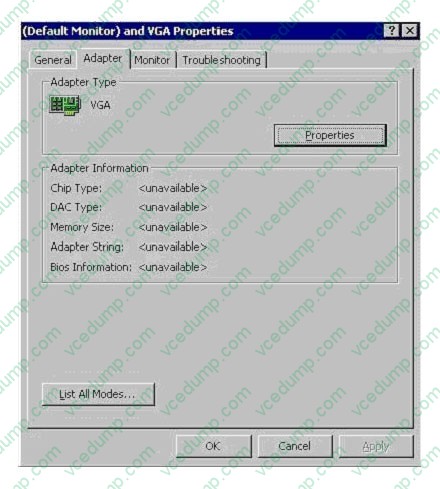
B. Change the monitor drivers to be WDM-compliant drivers.
C. Use List All Modes to select the adapter default mode.
D. Install the WDM-compliant video adapter and monitor drivers. -
Question 103:
You are the administrator of your company's network. The dial-up server on your network is configured to support certificate authentication.A user named Tom wants to use smart card authentication on his Windows 2000 Professional portable computer. You verify that Tom's computer has a PC Card smart card reader and the appropriate drivers installed. You give Tom a smart card to use.What else should you do to enable smart card authentication on Tom's computer?
A. Configure a dial-up connection to use EAP. Select the smart card device for authentication.
B. Configure a dial-up connection to use SPAP. Select the smart card device for authentication.
C. Configure a dial-up connection to use certificate authentication. Enable the user credentials for authentication.
D. Configure a dial-up connection to connect to a private network through the Internet. Enable L2TP to create a virtual private network (VPN) tunnel. -
Question 104:
You install Windows 2000 Professional on 10 computers that have video capture cards installed. A user named Lilly reports that her video capture card is not functioning correctly. She wants to use her video capturing software to capture
video frames, but she cannot view the video output.You use Device Manager to view the hardware settings on Lilly's computer as shown in the exhibit. (Click the Exhibit button.)You want Lilly to be able to capture video frames by using the
video capture card.
What should you do?
A. Use System in Control Panel to enable the device.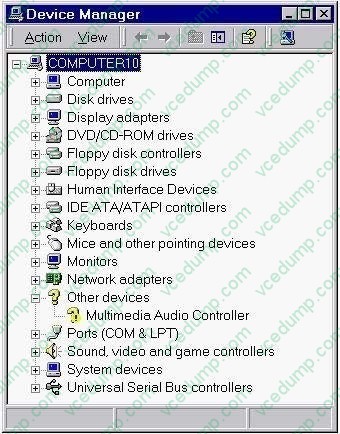
B. Use Device Manager to update the drivers for the device.
C. Move the video capture card to a different PCI slot.
D. Uninstall the device and disable Plug and Play detection for the device. -
Question 105:
You are configuring a Windows 2000 Professional portable computer to use a dial-up connection to connect to a Routing and Remote Access server. The computer has a smart card reader and the appropriate drivers installed.You use MMC to request a new certificate. You then install the certificate to the smart card. You now want to use your smart card for authentication when you connect to the Routing and Remote Access server. You want to use the Advanced Security Settings dialog box as shown in the exhibit. (Click the Exhibit button.)Which option or options should you enable in the Advanced Security Settings dialog box? (Choose all that apply.)
A. Use Extensible Authentication Protocol (EAP)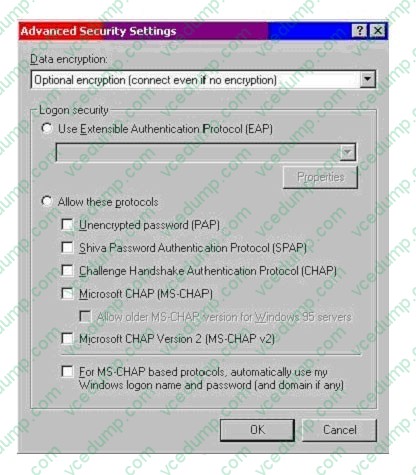
B. Unencrypted password (PAP)
C. Shiva Password Authentication Protocol (SPAP)
D. Challenge Handshake Authentication Protocol (CHAP)
E. Microsoft CHAP (MS-CHAP)
F. Microsoft CHAP Version 2 (MS-CHAP v2)
G. For MS-CHAP based protocols, automatically use my Windows logon name and password (and domain, if any) -
Question 106:
You upgrade 11 computers in the accounting department from Windows NT Workstation 4.0 to Windows 2000 Professional. All of the upgraded computers are configured to have the default security settings.After the upgrade, users in the accounting department report that they can no longer run any financial or credit applications on their computers.You want all accounting department users to be able to run these applications. You want to allow only the rights that allow users to run the applications.What should you do?
A. Add each user account to the Power Users group on that user's computer.
B. Configure the financial and credit applications to run as services on the computers in the accounting department.
C. Apply the Compatws.inf security template to the local security policy of the computers in the accounting department.
D. Use the Computer Management console to configure separate memory spaces for each financial and credit application on the accounting department computers. -
Question 107:
Your company has just upgraded its CAT 5 Ethernet network from 10 Mbps to 100 Mbps. After the upgrade, the 20 Windows 2000 Professional computers in the marketing department can no longer connect to the network. The remaining 80 Windows 2000 computers in the company can connect, however. Your company uses NWLink as the only network protocol.You need to connect the computers in the marketing department to the network. What must you do?
A. Configure the NWLink frame type of the network adapters to be Ethernet 802.3.
B. Configure the NWLink frame type of the network adapters to be Ethernet II.
C. Replace the network adapters with 10/100 BNC network adapters.
D. Replace the network adapters with 10/100 UTP network adapters. -
Question 108:
You are delegated administrative control of the Administration organizational unit (OU). The Administration OU has 12 Windows 2000 Professional computers that were recently purchased. Each computer has a fax modem. Each computer has the Fax service installed with the default values and settings.A user named Helene reports that she can use Microsoft Word 2000 to send faxes, but she cannot receive any faxes by using the fax printer. She also informs you that she cannot reconfigure the Fax service on her computer.You want to reconfigure the Fax service to work correctly. You want to accomplish this with the least amount of administrative effort.You log on to Helene's computer by using the local Administrator account. What should you do next?
A. Use Fax Service Management to start the Fax service, and configure the Fax service to start automatically.
B. Use Fax Service Management to select the Fax Management service, and enable the device to receive faxes.
C. Use Fax in Control Panel to reinstall the Fax service, and configure the Fax service to receive faxes.
D. Use Fax in Control Panel to add a fax printer, and configure the fax print device to receive faxes. -
Question 109:
Your Windows 2000 Professional computer contains a single hard disk configured as a single partition. You want to move a folder named Sales under a folder named Corp on your computer.You want the files in the Sales folder to remain compressed after moving the folder. You want the files in the Corp folder to remain uncompressed. You want to ensure that the files are recoverable in case of any disk problems. You also want to move the files with the least amount of administrative effort.What should you do?
A. Copy the Sales folder to the Corp folder. Do nothing further.
B. Back up the Sales folder. Move the Sales folder to the Corp folder.
C. Compress the Corp folder. Then copy the Sales folder to the Corp folder.
D. Move the Sales folder to a second computer. Then move the Sales folder to the Corp folder. -
Question 110:
You are the administrator of a Windows 2000 network. You purchase 25 new portable computers that have a preinstalled version of Windows 98. You upgrade the 25 new computers to Windows 2000 Professional.You want to remove the Logoff option from the Start menu on the 25 new computers.Which two methods can you use to accomplish your goal? (Choose two.)
A. On the Advanced tab of the Taskbar and Start Menu dialog box, clear the Display Logoff option.
B. On the Advanced tab of the Taskbar and Start Menu dialog box, clear the Administrative Tools option.
C. On the General tab of the Taskbar and Start Menu dialog box, clear the Personalized Menus option. Log off and then log on to the computers.
D. Use a Local Computer Policy that will not include the Logoff option on the Start menu.
E. Use the User Profiles tab within the properties of My Computer to change the profile from a local profile to a roaming user profile.
Related Exams:
-
62-193
Technology Literacy for Educators -
70-243
Administering and Deploying System Center 2012 Configuration Manager -
70-355
Universal Windows Platform – App Data, Services, and Coding Patterns -
77-420
Excel 2013 -
77-427
Excel 2013 Expert Part One -
77-725
Word 2016 Core Document Creation, Collaboration and Communication -
77-726
Word 2016 Expert Creating Documents for Effective Communication -
77-727
Excel 2016 Core Data Analysis, Manipulation, and Presentation -
77-728
Excel 2016 Expert: Interpreting Data for Insights -
77-731
Outlook 2016 Core Communication, Collaboration and Email Skills
Tips on How to Prepare for the Exams
Nowadays, the certification exams become more and more important and required by more and more enterprises when applying for a job. But how to prepare for the exam effectively? How to prepare for the exam in a short time with less efforts? How to get a ideal result and how to find the most reliable resources? Here on Vcedump.com, you will find all the answers. Vcedump.com provide not only Microsoft exam questions, answers and explanations but also complete assistance on your exam preparation and certification application. If you are confused on your 70-210 exam preparations and Microsoft certification application, do not hesitate to visit our Vcedump.com to find your solutions here.