70-210 Exam Details
-
Exam Code
:70-210 -
Exam Name
:Installing, Configuring and Administering Microsoft Windows 2000 Professional -
Certification
:Microsoft Certifications -
Vendor
:Microsoft -
Total Questions
:145 Q&As -
Last Updated
:Dec 13, 2021
Microsoft 70-210 Online Questions & Answers
-
Question 91:
You are the administrator of your company's network. A user named Lilly prints dozens of documents daily from her Windows 2000 Professional computer. Lilly reports that she receives a dialog box announcing that each print job she sends has printed successfully.Lilly's default printer is a shared printer that is connected to a Windows 2000 Server computer. She wants to have this notification turned off because she prints so many documents.What should you do?
A. In the server properties of the Printers system folder, clear the Notify when remote documents are printed option.
B. In the server properties of the Printers system folder, clear the Notify computer, not user, when remote documents are printed option.
C. In the default printer properties, select the Ports tab, and clear the Enable bidirectional support option.
D. In the default printer properties, select the Advanced tab, and clear the Advanced printing features option. -
Question 92:
You are administering a Windows 2000 Professional, single Pentium II 400-MHz processor computer. You need to install a new accounting software application. The software manufacturer recommends that you use a dual-processor
configuration. First, you install a second identical processor in your computer.You need to ensure that you will be able to install the new software.
What should you do next?
A. Update the HAL to support multiple processors.
B. In Device Manager, disable the Direct Memory Access Controller.
C. Use the Add/Remove Hardware wizard to detect and install the driver for the new processor.
D. Reinstall Windows 2000 Professional to support a multi-processor configuration. -
Question 93:
You are the administrator of your company's network. Your network consists of 20 Windows 2000 Professional computers. You want to configure all of the computers to allow access to the Internet.Your budget does not allow for installing a permanent Internet connection for the network. You do have a single dial-up account at a local Internet service provider (ISP) and a 56-Kbps modem. You want the computers to be able to access the Internet when Web resources are requested.What should you do? (Choose all that apply.)
A. Configure the shared modem to use software handshaking.
B. Configure the dial-up connection to enable on-demand dialing.
C. Configure the dial-up connection to enable Internet Connection Sharing.
D. Configure all of the other computers to have a dial-up connection that uses the shared modem.
E. Attach the modem to one of the Windows 2000 Professional computers, and create a dial-up connection to the ISP.
F. Attach the modem to one of the Windows 2000 Professional computers, and share the modem on the network. -
Question 94:
Your Windows 2000 Professional computer has a single Pentium II 400-MHz processor, 64 MB of RAM, and an E-IDE hard disk. You use your computer to design graphics ads for Web sites and newspapers.When you are working on
multiple ads simultaneously, you notice that your computer responds very slowly. You are also experiencing long delays when loading color palettes and importing graphics.You use System Monitor to view your computer's performance as
shown in the exhibit. (Click the Exhibit button.)You want to improve the performance of your computer based on the performance results.
What should you do?
A. Increase the physical RAM in the computer to 128 MB.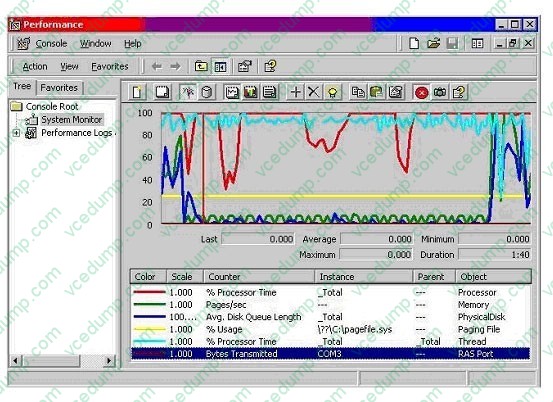
B. Increase the Processor Priority level for your development application.
C. Add a second Pentium II 400-MHz processor.
D. Upgrade the hard disk to a SCSI-based hard disk. -
Question 95:
Your desktop computer has Windows 2000 Professional installed. You create a new dial-up connection to connect to the Internet. You configure the Internet connection to enable Internet Connection Sharing.After you configure the connection, you cannot see or connect to any shared resources on your local network. You want your computer to be able to connect to shared resources.What should you do?
A. Configure the dial-up connection to disable shared access.
B. Configure the dial-up connection to disable on-demand dialing.
C. Disable data encryption in the new dial-up connection.
D. Use the ipconfig command to release and renew your network TCP/IP address. -
Question 96:
Your Windows 2000 Professional computer has a removable disk device installed. The device can use storage modules of varying sizes. You use these storage modules to transfer graphics files between your location and a printing company. The printing company uses Windows NT 4.0 Service Pack 3.You insert a new 20-MB disk device into your computer. When you attempt to format it as FAT32 with the default options, you receive the following error message: "Windows was unable to complete the format."You need to format the device so that you can use it to send a large graphic file to the printing company. How should you format the device?
A. as FAT16 with a 4-KB cluster size
B. as FAT32 with a 1-KB cluster size
C. as FAT32 with a 4-KB cluster size
D. as NTFS with a 4-KB cluster size -
Question 97:
A user in your company network needs to encrypt a folder that is on her Windows 2000 Professional computer. Her computer has two drives: drive C and drive D. The folder that needs to be encrypted is located on drive D. When the user attempts to encrypt the folder, no option for encryption can be found in the folder properties.What should you do to enable the user to encrypt the folder?
A. Log on to her computer as an Administrator, and then run the cipher /e command.
B. Instruct the user to run the cipher /e command.
C. Log on to her computer as an Administrator, and then run the Secedit /enforce command.
D. Instruct the user to run the Secedit /enforce command.
E. Log on to her computer as an Administrator, and then run the Convert d: /FS:NTFS command. -
Question 98:
You are the administrator of your company's network. A user named Andrew has limited dexterity, which prevents him from using the standard keyboard when completing his daily computing tasks.You configure his Windows 2000 Professional computer to use the on-screen keyboard and StickyKeys option. You save the accessibility option settings to a shared folder on the local hard disk of Andrew's computer.You want to configure the same options for another user named Peter. You log on to Peter's computer by using Peter's local user account. You access the shared folder over the network from Peter's computer. You select the .acw file from the shared folder to set up Peter's computer to use the accessibility options. You receive the error message shown in the exhibit. (Click the Exhibit button.)What should you do?
A. Copy the .acw file to the C:\Documents and Settings\Default User folder.
B. Save the accessibility options to a floppy disk and change the permissions to allow full control of the file.
C. Resave the settings for the options by using Utility Manager. Then copy the file to Peter's local profile folder.
D. Change the permissions of the .acw file in the shared network folder to allow read access for Peter's user account. -
Question 99:
Your Windows 2000 Professional computer is configured to support two monitors. You install a DOS- based application on your computer. The application uses the Windows 2000 Professional default settings Autoexec.nt and Config.nt.Your primary and secondary video adapters are both set to 16-bit color, 1024 x 768 resolution, and default refresh rates. You create a shortcut for the DOS-based application on the primary monitor's desktop and use the default PIF settings.You attempt to run the DOS-based application on the primary monitor. The application opens, but the display area is scrambled. You then attempt to run the DOS-based application on the secondary monitor. The application does not open. Both monitors function correctly when you run Windows-based applications.What should you do?
A. Change the color setting for both video adapters to 256 colors. Reconfigure the shortcut properties to run the DOS-based application in full-screen mode.
B. Change the refresh rate setting to optimal for both video adapters. Reconfigure the PIF settings of the DOS-based application to start in a window.
C. Change the drivers for the secondary video adapter from WDM-compliant drivers to DOS drivers.Reconfigure the PIF settings to run the DOS-based application in full-screen mode.
D. Update the drivers for the primary video adapter. Change the secondary video adapter to use 640 x 480 resolution and 256 colors. -
Question 100:
Users report that some shortcuts on the Start menu of their Windows 2000 Professional computers are hidden. They want to access their shortcuts without having to click a scroll arrow.How must you configure the client computers to always display all Start menu shortcuts?
A. In the Folder Options dialog box, clear the Enable Web content check box in My Desktop Properties.
B. In the Display Properties dialog box, clear the Transition effects for menus and tooltips check box.
C. In the Folder Options dialog box, clear the Hide file extensions for known file types check box.
D. In the Taskbar and Start Menu Properties dialog box, clear the Use Personalized Menus check box.
Related Exams:
-
62-193
Technology Literacy for Educators -
70-243
Administering and Deploying System Center 2012 Configuration Manager -
70-355
Universal Windows Platform – App Data, Services, and Coding Patterns -
77-420
Excel 2013 -
77-427
Excel 2013 Expert Part One -
77-725
Word 2016 Core Document Creation, Collaboration and Communication -
77-726
Word 2016 Expert Creating Documents for Effective Communication -
77-727
Excel 2016 Core Data Analysis, Manipulation, and Presentation -
77-728
Excel 2016 Expert: Interpreting Data for Insights -
77-731
Outlook 2016 Core Communication, Collaboration and Email Skills
Tips on How to Prepare for the Exams
Nowadays, the certification exams become more and more important and required by more and more enterprises when applying for a job. But how to prepare for the exam effectively? How to prepare for the exam in a short time with less efforts? How to get a ideal result and how to find the most reliable resources? Here on Vcedump.com, you will find all the answers. Vcedump.com provide not only Microsoft exam questions, answers and explanations but also complete assistance on your exam preparation and certification application. If you are confused on your 70-210 exam preparations and Microsoft certification application, do not hesitate to visit our Vcedump.com to find your solutions here.