70-210 Exam Details
-
Exam Code
:70-210 -
Exam Name
:Installing, Configuring and Administering Microsoft Windows 2000 Professional -
Certification
:Microsoft Certifications -
Vendor
:Microsoft -
Total Questions
:145 Q&As -
Last Updated
:Dec 13, 2021
Microsoft 70-210 Online Questions & Answers
-
Question 111:
Your Windows 2000 Professional computer has 50 MB of free disk space on drive C and 500 MB of free disk space on drive D. Print jobs are failing because the available space on drive C is inadequate. You want print jobs to be able to use the space on drive D.What should you do?
A. From the Print Server Properties dialog box, change the location of the spool folder to any existing file path on drive D.
B. From the Printer Properties dialog box, use Advanced settings to change the location of the spool folder to D:\Winnt\System32\Spool\Printers.
C. Copy the C:\Winnt\System32\Spool\Printers folder to the D:\Winnt\System32\Spool\Printers folder.
D. Mount drive C as a subdirectory on drive D. -
Question 112:
Your Windows 2000 Professional computer has 10 shared folders that are available to other network users. A user reports that he cannot access a shared folder named ShareA.You want to respond to the user's problem as quickly as possible by using an administrative tool. However, you cannot remember the server location of ShareA.What should you do?
A. Use Windows Explorer to display the file paths of your shared folders.
B. Use Storage in Computer Management to view logical drive properties.
C. Use Event Viewer in Computer Management to search for shared folder error messages.
D. Use System Tools in Computer Management to display the file paths of your shared folders. -
Question 113:
You want to install Windows 2000 Professional on 45 new computers on your company's network. You first install Windows 2000 Professional on one of the new computers.You log on to the computer by using the local Administrator account. You install Microsoft Office 97, a virus scanner, and other company-standard applications. You then create a RIS image of the computer you configured.You want to configure the RIS image so that the standard applications will be accessible to the user when the user first logs on to the network.What should you do?
A. Run Rbfg.exe before installing the standard applications.
B. Run RIPrep.exe before installing the standard applications.
C. Copy the All Users profile to the Default Users profile.
D. Copy the local Administrator account profile to the Default Users profile. -
Question 114:
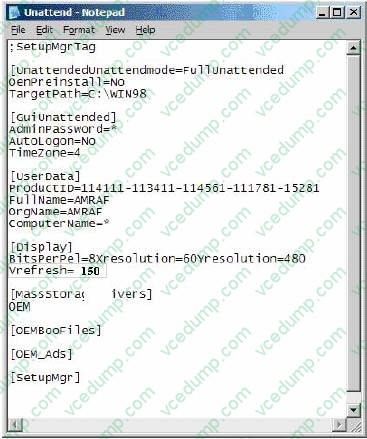
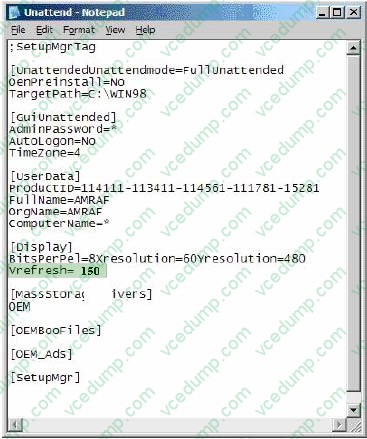
You want to upgrade 100 computers from Windows 98 to Windows 2000 Professional. You use setup manager to create the unattended.txt file. The hardware on each computer is configured
identically. You upgrade 10 of the computers. You notice that the monitors on the 10 computers go blank after Windows 2000 Professional loads. You restart one of the computers in Safe Mode,
and find that the monitor appears to be working. Which change should you make to unattend.txt to configure your video settings correctly? To answer, click the appropriate line on the Unattend.txt Notepad screen.
Hot Area:
-
Question 115:
You install Windows 2000 Professional on your portable computer. You use a docking station for your portable computer when you are in the office.You install an ISA-based SCSI adapter in your docking station. You insert your computer into the docking station and start the computer. The SCSI adapter is not detected during the startup process.You start the Add/Remove Hardware wizard. When the wizard process is finished, the SCSI adapter is not listed. You want to allow Windows 2000 Professional to detect the SCSI adapter.What should you do?
A. Restart the Add/Remove Hardware wizard. Manually add the SCSI adapter drivers.
B. Restart the computer in safe mode. Restart the Add/Remove Hardware wizard to detect the SCSI adapter.
C. Configure Windows 2000 Professional to use driver signing. Restart the Add/Remove Hardware wizard to detect the SCSI adapter.
D. Copy the SCSI adapter drivers to the Winnt\Driver Cache\i386 folder. Restart the Add/Remove Hardware wizard to detect the SCSI adapter. -
Question 116:
You want to configure your Windows 2000 Professional computer to remotely access your company's Windows 2000 Routing and Remote Access server. You configure a VPN connection. For security purposes, you configure the VPN
connection to use MS-CHAP v2 only and to require encryption. You also configure TCP/IP to obtain an IP address automatically, to enable IPSec, and to set IPSec to Secure Server. When you try to connect, you receive the following error
message:
"The encryption attempt failed because no valid certificate was found."What should you do to be able to connect to the server?
A. Enable the VPN connection to use MS-CHAP.
B. Change the data encryption setting to Optional Encryption.
C. Specify a TCP/IP address in the Network properties.
D. Change the IPSec policy setting to Client. -
Question 117:
You are creating a shared Internet connection on your Windows 2000 Professional computer. You want to enable other computers on the LAN to be able to access only HTTP and FTP sites on the Internet.What should you do? (Choose all that apply.)
A. Configure your shared Internet connection to disable LCP extensions.
B. Configure your shared Internet connection to disable on-demand dialing.
C. Create an Internet Connection Sharing application type for HTTP to use remote server port 25.
D. Create an Internet Connection Sharing application type for HTTP to use remote server port 80.
E. Create an Internet Connection Sharing application type for FTP to use remote server port 21.
F. Create an Internet Connection Sharing application type for FTP to use remote server port 72. -
Question 118:
You are the administrator of a Windows 2000 Professional computer. A user named Maria assists you in performing some administrative tasks. Maria is a member of the local Administrators group.Users report that Maria has been viewing and changing their files. You want Maria to be able to install programs, perform backups, and manage printers, but not to view or change other users' files for which permission has not been granted.You want to set up Maria's account to have minimal rights and permissions. You want to accomplish this with the least amount of administrative effort.What should you do?
A. Leave Maria in the local Administrators group. Limit her rights by using Local Policies.
B. Leave Maria in the local Administrators group. Change the NTFS permissions on other users' files to deny Maria access.
C. Remove Maria from the local Administrators group. Add her to both the Power Users group and the Backup Operators group.
D. Remove Maria from the local Administrators group. Add her to the Power Users group. Then grant her NTFS Read permission on the files to be backed up. -
Question 119:
You are the administrator of your company's network. You purchase 75 new Windows 2000 Professional computers that will be shared by users in the Graphics organizational unit (OU). All of the computers are configured identically.You want users to be able to maintain their individual desktop settings regardless of which computer they use. You want to accomplish this with the least amount of administrative effort.What should you do?
A. Configure each computer to join a workgroup. Create a user account and a local profile for each user.
B. Configure each computer to join a workgroup. Create a domain user account that uses roaming user profiles.
C. Configure each computer to join the domain. Create a user account for each user on a domain controller.
D. Configure each computer to join the domain. Create a domain user account that uses roaming user profiles. -
Question 120:
A folder on your Windows 2000 Professional computer contains bitmap files that have been compressed from 2 MB to 1 MB. You want to copy one of the compressed bitmap files from your hard disk to a 1.4-MB floppy disk.When you attempt to copy the file, you receive the following error message: "Destination drive is full."What should you do?
A. Move, rather than copy, the compressed bitmap file to the floppy disk.
B. Reformat the floppy disk. Then copy the compressed bitmap file to the floppy disk.
C. Use another program to compress the bitmap file before copying it to the floppy disk.
D. Copy an empty compressed folder to the floppy disk. Then copy the compressed bitmap file to a folder on the floppy disk.
Related Exams:
-
62-193
Technology Literacy for Educators -
70-243
Administering and Deploying System Center 2012 Configuration Manager -
70-355
Universal Windows Platform – App Data, Services, and Coding Patterns -
77-420
Excel 2013 -
77-427
Excel 2013 Expert Part One -
77-725
Word 2016 Core Document Creation, Collaboration and Communication -
77-726
Word 2016 Expert Creating Documents for Effective Communication -
77-727
Excel 2016 Core Data Analysis, Manipulation, and Presentation -
77-728
Excel 2016 Expert: Interpreting Data for Insights -
77-731
Outlook 2016 Core Communication, Collaboration and Email Skills
Tips on How to Prepare for the Exams
Nowadays, the certification exams become more and more important and required by more and more enterprises when applying for a job. But how to prepare for the exam effectively? How to prepare for the exam in a short time with less efforts? How to get a ideal result and how to find the most reliable resources? Here on Vcedump.com, you will find all the answers. Vcedump.com provide not only Microsoft exam questions, answers and explanations but also complete assistance on your exam preparation and certification application. If you are confused on your 70-210 exam preparations and Microsoft certification application, do not hesitate to visit our Vcedump.com to find your solutions here.