70-210 Exam Details
-
Exam Code
:70-210 -
Exam Name
:Installing, Configuring and Administering Microsoft Windows 2000 Professional -
Certification
:Microsoft Certifications -
Vendor
:Microsoft -
Total Questions
:145 Q&As -
Last Updated
:Dec 13, 2021
Microsoft 70-210 Online Questions & Answers
-
Question 11:
You are the administrator of your company's network. You attempt to install a printer driver on a Windows 2000 computer for a user named Linda. You receive the following error message: "Error 11 - Cannot install printer driver."The driver was originally downloaded from the printer manufacturer's Web site. You have successfully used the driver in the past on other Windows 2000 Professional computers.You want to configure Linda's computer to check for driver integrity and to allow you to install this printer driver.What should you do?
A. Configure driver signing to display a message before installing an unsigned driver.
B. Configure driver signing to ignore File Signature Verification. Create a Local Computer Policy to enable Windows File Protection.
C. Use the Add Printer Driver wizard to install the driver. Create a Local Computer Policy to enable Windows File Protection.
D. Use the Print troubleshooter. Configure the computer to prevent the installation of unsigned drivers. -
Question 12:
You want to connect to your company network from your Windows 2000 Professional computer at home. You have an ISDN line that is used for Internet connectivity. You create a VPN connection and are able to connect successfully to the company network. While connected to the company network, you are unable to access the Internet.What must you do so that you can access the Internet?
A. Configure the ISDN connection to use SLIP instead of PPP.
B. Select the Enable Internet Connection Sharing for this connection check box in the ISDN connection properties.
C. Clear the Use default gateway on remote network check box.
D. Install and configure the SAP Agent service. -
Question 13:
You configure your Windows 2000 Professional portable computer to redirect your My Documents folder to your home folder. You want to ensure that you can access all of your files in your My Documents folder when you are not connected to the network.What should you do? (Choose two.)
A. Use Windows Explorer to enable Offline Files.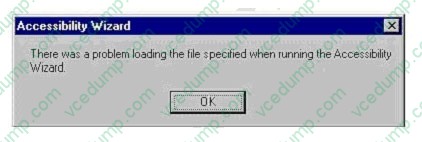
B. Use Windows Explorer to create a shortcut to access the Offline Files folder on the desktop.
C. Use Windows Explorer to configure the properties of your home folder to be available offline.
D. Use Synchronization Manager to configure your home folder to be available offline.
E. Create a shortcut in My Network Places to access your home folder. -
Question 14:
You want to configure your Windows 2000 Professional portable computer to use offline files. The files that you want to access offline include a large project file and some smaller personal files.Your portable computer is configured to connect to the network by using a dial-up connection at scheduled times during the day to automatically download your e-mail messages. You do not want to synchronize the project file when you connect to the network by using your dial-up connection.What should you do?
A. Configure Synchronization Settings to perform a quick synchronization.
B. Configure Synchronization Settings to ask you before synchronizing items.
C. Configure Synchronization Settings to synchronize the project file only when using the LAN connection. Set synchronization for the personal files for both the LAN connection and your dial-up connection.
D. Configure Synchronization Settings to synchronize the project file only when you log off the network. Set synchronization for the personal files for both the LAN connection and your dial-up connection for logging on and logging off. -
Question 15:
Your Windows 2000 Professional computer has 10 shared folders that are available to other network users. A user reports that he cannot access a shared folder named ShareA.You want to respond to the user's problem as quickly as possible by using an administrative tool. However, you cannot remember the server location of ShareA.What should you do?
A. Use Windows Explorer to display the file paths of your shared folders.
B. Use Storage in Computer Management to view logical drive properties.
C. Use Event Viewer in Computer Management to search for shared folder error messages.
D. Use System Tools in Computer Management to display the file paths of your shared folders. -
Question 16:
You are the network administrator for your company. An employee named Bruno uses a Windows 2000 Professional portable computer. When he starts the computer, Windows 2000 prompts him to select in either a docked or an undocked mode. Bruno primarily works out of the office and does not use a docking station when he is in the office. He asks you to configure his portable computer so that it will not prompt him to select a docked or an undocked mode.What should you do?
A. Modify the portable computers BIOS settings, and disable support for the docking station.
B. Modify the portable computers hardware profiles, and remove the Docked hardware profile.
C. Modify the portable computers device settings to disable the Unplug Devices icon in the system tray.
D. Modify the portable computers hardware profiles, and position the Docked hardware profile at the top of the list of hardware profiles. -
Question 17:
Your network administrator has assigned you an IP address of 192.168.0.20 with subnet mask of 255.255.255.0.Your network is running in pure Windows 2000 domain. What else should know in order to join your computer to the Windows 2000 domain.
A. Address of DHCP server.
B. Address of WINS server
C. Address of DNS server
D. Address of default gateway -
Question 18:
You want to connect your Windows 2000 Professional computer to a new color laser printer. The printer is Plug and Play compliant. The printer is included on the current Hardware Compatibility List (HCL).You are a member of the Sales organizational unit (OU). You want to share the printer with other users in the Sales OU.You plug the printer into the LPT port on the back of the computer. You then attempt to install the 32- bit application printer software that came with the printer. During the installation, you receive an error message as shown in the exhibit. (Click the Exhibit button.)What should you do before you share the printer with other users in the Sales OU?
A. Change the LPT port setting to enable legacy Plug and Play detection on your computer.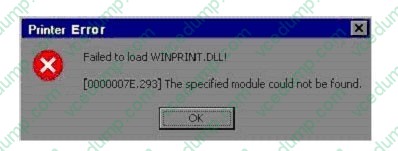
B. Change the LPT port setting to bidirectional in the BIOS on your computer. Then reinstall the printer software.
C. Connect the printer to another computer in the Sales OU. Then install the device drivers for the printer.
D. Obtain and install the WDM-compliant device drivers and printing software for the printer. -
Question 19:
You are the administrator of your company's network. A user named Peter runs Windows 2000 Professional on his portable computer. Peter wants to be able to work at home on files that were created in the office on the company network. Prior to logging off the network and leaving the office, Peter enables Offline Files.Peter calls you from home and reports that copies of his folders and files on the network are not available on his portable computer. What should you instruct Peter to do?
A. Enable file and print sharing. Peter will be able to access his files at home immediately.
B. Synchronize all offline files. Peter will be able to access his files at home immediately.
C. At the office, make all files available offline. Peter will be able to access his files the next time he logs off the network.
D. At the office, create a shortcut to the Offline Files folder. Peter will be able to access his files the next time he logs off the network. -
Question 20:
You are the administrator of a Windows 2000 network. You install Windows 2000 Professional on a new computer and configure the TCP/IP settings to have a static IP address.While testing network connectivity from the new computer, you discover an error in the DNS server address that is configured in the TCP/IP settings. You configure the correct DNS server address, which is 10.1.1.5. However, you are still unable to successfully connect to network resources by name.You run the IPconfig /all command. The results indicate that the DNS server address is now configured as 0.0.0.0.You need to ensure that the computer can connect to network resources by name. What should you do?
A. Stop and restart the DNS Client service.
B. Add 10.1.1.5 to the DNS server list on the TCP/IP Advanced Properties tab.
C. Add an A (host) record for the computer to the DNS servers zone file.
D. Configure your DHCP server to have a DNS server address of 10.1.1.5.
Related Exams:
-
62-193
Technology Literacy for Educators -
70-243
Administering and Deploying System Center 2012 Configuration Manager -
70-355
Universal Windows Platform – App Data, Services, and Coding Patterns -
77-420
Excel 2013 -
77-427
Excel 2013 Expert Part One -
77-725
Word 2016 Core Document Creation, Collaboration and Communication -
77-726
Word 2016 Expert Creating Documents for Effective Communication -
77-727
Excel 2016 Core Data Analysis, Manipulation, and Presentation -
77-728
Excel 2016 Expert: Interpreting Data for Insights -
77-731
Outlook 2016 Core Communication, Collaboration and Email Skills
Tips on How to Prepare for the Exams
Nowadays, the certification exams become more and more important and required by more and more enterprises when applying for a job. But how to prepare for the exam effectively? How to prepare for the exam in a short time with less efforts? How to get a ideal result and how to find the most reliable resources? Here on Vcedump.com, you will find all the answers. Vcedump.com provide not only Microsoft exam questions, answers and explanations but also complete assistance on your exam preparation and certification application. If you are confused on your 70-210 exam preparations and Microsoft certification application, do not hesitate to visit our Vcedump.com to find your solutions here.