70-210 Exam Details
-
Exam Code
:70-210 -
Exam Name
:Installing, Configuring and Administering Microsoft Windows 2000 Professional -
Certification
:Microsoft Certifications -
Vendor
:Microsoft -
Total Questions
:145 Q&As -
Last Updated
:Dec 13, 2021
Microsoft 70-210 Online Questions & Answers
-
Question 121:
From your Windows 2000 Professional computer, you need to map drive G to the default administrative share on drive C of a server named AppSrv.What can you do to map the drive?
A. Run the net share C$=G:\ command.
B. Run the net use G: \\AppSrv\C$ command.
C. Browse to AppSrv in Windows Explorer, and map drive G to the C$ share.
D. Browse to AppSrv in My Network Places, and map drive G to the C$ share. -
Question 122:
From your Windows 2000 Professional computer, you need to map drive G to the default administrative share on drive C of a server named AppSrv.What can you do to map the drive?
A. Run the net share C$=G:\ command.
B. Run the net use G: \\AppSrv\C$ command.
C. Browse to AppSrv in Windows Explorer, and map drive G to the C$ share.
D. Browse to AppSrv in My Network Places, and map drive G to the C$ share. -
Question 123:
You recently upgraded all Windows NT Workstation 4.0 computers to Windows 2000 Professional. You want to give a new employee named Maria the ability to back up files, share resources, and install programs on a client computer that she shares with other users. You do not want Maria to be able to read other users' files.What should you do to accomplish these goals? (Choose all that apply.)
A. Add Maria's user account to the System group.
B. Add Maria's user account to the Interactive group.
C. Add Maria's user account to the Power Users group.
D. Add Maria's user account to the Administrators group.
E. Add Maria's user account to the Backup Operators group. -
Question 124:
You are preparing to install Windows 2000 Professional on 100 MPS-compliant computers. Each computer has two 550-MHz processors. The computers are configured identically.You want to use one of the computers as a reference computer for deploying Windows 2000 Professional to the remaining computers. You install Windows 2000 Professional on the reference computer. You view Device Manager and notice that the drivers for the second processor are not installed.You want to add support for the second processor on the remaining 99 computers. You want to accomplish this with the least amount of administrative effort.What should you do?
A. Use Setup Manager to configure the reference computer, and then create a disk image.
B. Use the System Preparation Tool with the -pnp parameter to set up the reference disk, and then create a disk image.
C. Use Device Manager to add the appropriate hardware abstraction layer (HAL) to the reference computer to support the second processor, and then create a disk image.
D. After imaging the reference computer, restart the reference computer in safe mode and add the driver for the second processor. -
Question 125:
You install an updated device driver for the Zip drive on your Windows 2000 Professional computer. You restart the computer. During the startup process, the computer stops responding.You then restart the computer in safe mode. During the startup process, the computer stops responding again. You suspect the new device driver is causing the problem. You want to resolve the problem so that the computer starts successfully.What should you do? (Choose three.)
A. Use the listsvc command to disable the Zip device driver.
B. Use the disable command to disable the Zip device driver.
C. Select Recovery Console from the Repair menu.
D. Select debug mode from the Windows 2000 Advanced Options menu.
E. Insert the Emergency Repair Disk.
F. Specify the path to the recovery files on the hard disk.
G. Start the computer by using the Windows 2000 Professional CD-ROM. -
Question 126:
You are preparing to install Windows 2000 Professional on 75 new computers. You want to create a standard installation image to use on all of the new computers. The computers have several different configurations of hard disks and other hardware components.You install Windows 2000 Professional and the other standard software on one of the computers. You log on to the computer by using the local Administrator account. You configure the standard applications and customize the desktop settings you intend to deploy.You run Setup Manager and create the Sysprep.inf file. You copy Sysprep.exe and Setupcl.exe to the C:\Sysprep folder. You run Sysprep.exe and then run your third-party disk imaging software.You copy the image to several test computers and restart the computers. When the installation is complete, you find that some of the computers do not function at all. You also find that the desktop settings do not appear as you had configured them on the original computer.You want to correct the imaging process and ensure that all computers have the same standard desktop. What should you do? (Choose two.)
A. Copy Sysprep.inf to the C:\Sysprep folder.
B. Copy the Administrator profile to the Default User profile. Then grant permissions to the Everyone group to use the profile.
C. Include the -pnp parameter for Sysprep.exe when you rerun that utility.
D. Include the -nosidgen parameter for Sysprep.exe when you rerun that utility. -
Question 127:
You are the administrator of your company's network. You use your Windows 2000 Professional computer to transfer 20 large files. Each file is 100 MB in size. You want to copy the files from a UNIX server in your branch office to a computer running Microsoft SQL Server at the main office.When you copy the files by using Windows Explorer, the connection appears to time out and the file copy is aborted. You suspect that you are encountering a TCP/IP performance problem. Your network connection is shown in the Xircom LAN Properties dialog box in the exhibit. (Click the Exhibit button.)You want to monitor the performance of TCP/IP of your computer. What should you do?
A. Install the Network Monitor Agent. Use the Performance console to view all the counters of the TCP object.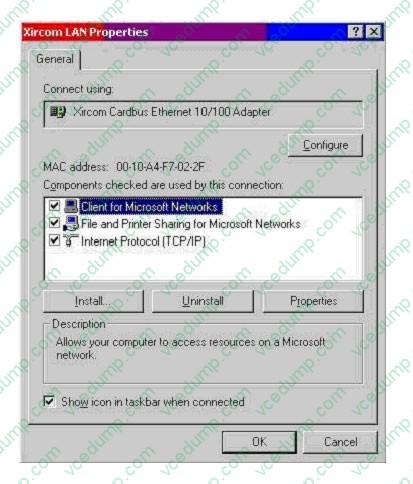
B. Install the Network Monitor Agent. Use the Performance console to view the Fragmented Datagrams/ sec counter.
C. Install SNMP. Use the Performance console to view all the counters of the TCP object.
D. Install Simple TCP/IP Services. Use the Performance console to view the Fragmentation Failures counter. -
Question 128:
You are the administrator of your company's network. Your network has 200 Windows 2000 Professional computers and 15 Windows 2000 Server computers. Users on the network save their work files in home folders on a network server. The NTFS partition that contains the home folders has Encrypting File System (EFS) enabled.A user named John leaves the company. You move all of the files from John's home folder to his manager's folder. When the manager attempts to open any of the files, she receives the following error message: "Access denied."You want the manager to be able to access the files. What should you do?
A. Grant the manager NTFS Full Control permission to the files.
B. Grant the manager NTFS Take Ownership permission to the files.
C. Log on to the network as a Recovery Agent. Decrypt the files for the manager.
D. Log on to the network as a member of the Backup Operators group. Decrypt the files for the manager. -
Question 129:
Your Windows 2000 Professional computer has a removable disk device installed. The device can use storage modules of varying sizes. You use these storage modules to transfer graphics files between your location and a printing company. The printing company uses Windows NT 4.0 Service Pack 3.You insert a new 20-MB disk device into your computer. When you attempt to format it as FAT32 with the default options, you receive the following error message: "Windows was unable to complete the format."You need to format the device so that you can use it to send a large graphic file to the printing company. How should you format the device?
A. as FAT16 with a 4-KB cluster size
B. as FAT32 with a 1-KB cluster size
C. as FAT32 with a 4-KB cluster size
D. as NTFS with a 4-KB cluster size -
Question 130:
You copy the contents of the Windows 2000 Professional CD to a shared network folder named \\Server1 \Win2000p. You use the shared folder to perform over-the-network installations of Windows 2000 Professional on new computers
purchased by your company. You receive a Windows 2000 Service Pack CD. You apply the Service Pack to Server1 and to the \\Server1\Win2000p folder.You discover that the Service Pack contains several files that are incompatible with
the new computers. You want to make sure that the Service Pack files are not installed on any new computers until the problem has been corrected.
What can you do?
A. Use Update.exe from the Service Pack CD on Server1. Select the Uninstall option.
B. Copy the contents of the Windows 2000 Professional CD to \\Server1\Win2000p again, allowing the operating system to overwrite newer files while copying.
C. Run \\Server1\Win2000p\WinNT32.exe /u on the new computers.
D. Run Update.exe /s:\\Server1\Win2000p /u from the Service Pack CD on Server1.
Related Exams:
-
62-193
Technology Literacy for Educators -
70-243
Administering and Deploying System Center 2012 Configuration Manager -
70-355
Universal Windows Platform – App Data, Services, and Coding Patterns -
77-420
Excel 2013 -
77-427
Excel 2013 Expert Part One -
77-725
Word 2016 Core Document Creation, Collaboration and Communication -
77-726
Word 2016 Expert Creating Documents for Effective Communication -
77-727
Excel 2016 Core Data Analysis, Manipulation, and Presentation -
77-728
Excel 2016 Expert: Interpreting Data for Insights -
77-731
Outlook 2016 Core Communication, Collaboration and Email Skills
Tips on How to Prepare for the Exams
Nowadays, the certification exams become more and more important and required by more and more enterprises when applying for a job. But how to prepare for the exam effectively? How to prepare for the exam in a short time with less efforts? How to get a ideal result and how to find the most reliable resources? Here on Vcedump.com, you will find all the answers. Vcedump.com provide not only Microsoft exam questions, answers and explanations but also complete assistance on your exam preparation and certification application. If you are confused on your 70-210 exam preparations and Microsoft certification application, do not hesitate to visit our Vcedump.com to find your solutions here.