70-178 Exam Details
-
Exam Code
:70-178 -
Exam Name
:Microsoft Project 2010, Managing Projects -
Certification
:Microsoft Certifications -
Vendor
:Microsoft -
Total Questions
:65 Q&As -
Last Updated
:Dec 07, 2021
Microsoft 70-178 Online Questions & Answers
-
Question 11:
You use bottom-up scheduling. You need to group four consecutive tasks in a major phase. You highlight the four tasks. Which command should you use?
A. Outdent
B. Fill Down
C. Insert Summary
D. Move Task -
Question 12:
You use Project Professional 2010 to manage a project. John, a team member, is over-allocated.
You need to identify the dates on which the over-allocation occurs.
What should you do?
A. Use the default Leveling Gantt view.
B. Use the Team Planner view.
C. Use the Timeline view.
D. Use the Task Information dialog box.
E. Use the Task Details Form. -
Question 13:
You have a project schedule in progress.
You need to view only the tasks that currently affect the overall completion date.
What should you do in the Gantt Chart view?
A. Apply the Priority group.
B. Apply the Incomplete Tasks filter.
C. Apply the Late Tasks filter.
D. Apply the Critical Tasks filter.
E. Apply the Status group. -
Question 14:
You receive an e-mail message that contains a list of tasks. You need to create a new project schedule from the list of tasks. What should you do first?
A. Open a previously saved Project 2010 file and save it as a blank template.
B. Create a list of tasks in Microsoft Excel, and save the file by using the .mpt file extension.
C. Create a new file in Project 2010 and paste the list of tasks.
D. Create a new template file in Project 2010. -
Question 15:
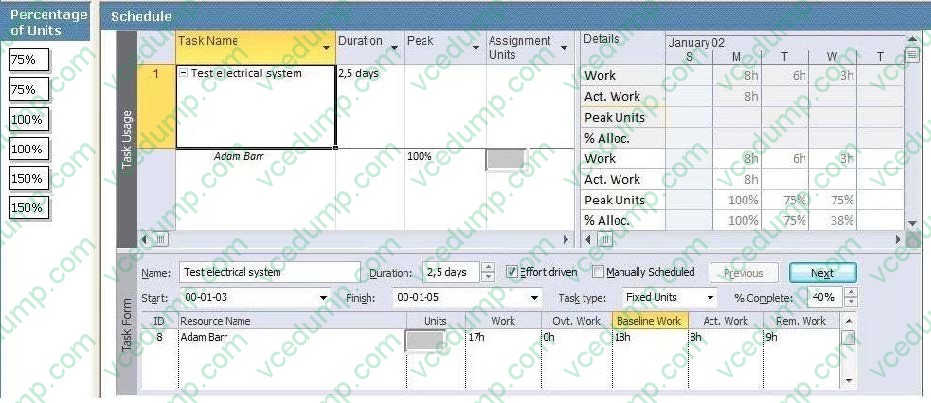
You use Microsoft Project Professional 2010 to manage an engineering project according to the schedule as shown in the exhibit. (Click the Exhibit button.)
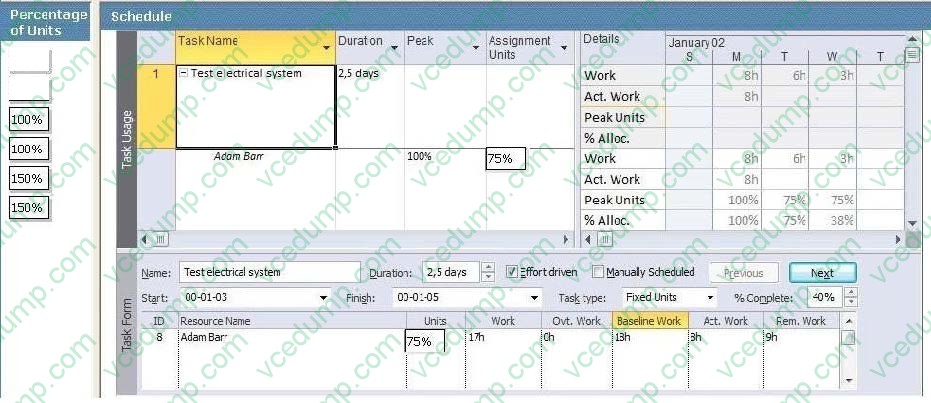
Originally, Adam Barr was assigned 75 percent units for 3 days. Adam worked for 8 hours on the first day and informed you that he needs an additional 9 hours of work to finish.
You update the schedule. What percentage of units should be reflected in the schedule by Adam's workload? (To answer, drag the appropriate units to the correct locations in the answer area.)
Select and Place:
-
Question 16:
John, a team member, will be absent from the team. A new team member, Mary, will take over Johns remaining work. You need to update the project schedule to reflect the change. You also need to retain John's actual work. What should you do?
A. In the Assign Resources dialog box, use the Replace feature.
B. In the Resource Sheet view, delete John and add Mary.
C. In the Multiple Task Information dialog box, change the resource assignment from John to Mary.
D. In the Resource Usage view, rename John to Mary. -
Question 17:
You receive a Microsoft Outlook e-mail message that contains the following task outline:
1.
Establish corporate internal communications process.
2.
Find out the regional and country divisions' communications process.
3.
Plan communication methods, logistics, and timings.
4.
Establish regional and country communications to sales, marketing, and management. Find out the internal systems that must respond to the campaign.
5.
Create communications plan.
6.
Identify internal training requirements.
7.
Develop internal training.
Organization of internal communications and training completion. You need to incorporate the task outline into your project plan.
What should you do?
A. Use the Bulk Import tool from the Project 2010 Solution Starters toolkit.
B. Copy and paste the task outline into the Task Sheet view of Project 2010.
C. Use the Task Inspector feature from Outlook.
D. Use the Import Outlook Tasks option. -
Question 18:
You have an unscheduled, unassigned task in your Project Professional 2010 schedule. You identify an available resource.
You need to assign the task to the resource without scheduling the task.
What should you do?
A. Use the Replace feature in the Assign Resources dialog box.
B. Use the Add Resources function.
C. Use the Team Planner view.
D. Use the Calendar view. -
Question 19:
You attempt to print the task table and Gantt chart horizontally. However, the task names do not appear on each printed page. You need to ensure that the task names are printed on each page. What should you do?
A. Modify the settings in the Column Settings dialog box of the Task Name column.
B. Select the Task Name column and click Print.
C. Select the Task Name column and click Add to Timeline.
D. Modify the settings in the Field Settings dialog box of the Task Name column.
E. Modify the settings in the Page Setup dialog box. -
Question 20:
You enter the finish date for a task, and then assign a resource. You discover that the task is automatically scheduled for two weeks past the finish date you have entered. You need to identify the problem. What should you do?
A. Click Calculate project
B. Use the Task Inspector tool and view the start and finish dates
C. Use the Task Inspector tool and view the resource calendar
D. View the deadline date for the task
Related Exams:
-
62-193
Technology Literacy for Educators -
70-243
Administering and Deploying System Center 2012 Configuration Manager -
70-355
Universal Windows Platform – App Data, Services, and Coding Patterns -
77-420
Excel 2013 -
77-427
Excel 2013 Expert Part One -
77-725
Word 2016 Core Document Creation, Collaboration and Communication -
77-726
Word 2016 Expert Creating Documents for Effective Communication -
77-727
Excel 2016 Core Data Analysis, Manipulation, and Presentation -
77-728
Excel 2016 Expert: Interpreting Data for Insights -
77-731
Outlook 2016 Core Communication, Collaboration and Email Skills
Tips on How to Prepare for the Exams
Nowadays, the certification exams become more and more important and required by more and more enterprises when applying for a job. But how to prepare for the exam effectively? How to prepare for the exam in a short time with less efforts? How to get a ideal result and how to find the most reliable resources? Here on Vcedump.com, you will find all the answers. Vcedump.com provide not only Microsoft exam questions, answers and explanations but also complete assistance on your exam preparation and certification application. If you are confused on your 70-178 exam preparations and Microsoft certification application, do not hesitate to visit our Vcedump.com to find your solutions here.