MD-102 Exam Details
-
Exam Code
:MD-102 -
Exam Name
:Endpoint Administrator -
Certification
:Microsoft Certifications -
Vendor
:Microsoft -
Total Questions
:431 Q&As -
Last Updated
:May 25, 2026
Microsoft MD-102 Online Questions & Answers
-
Question 111:
Your network contains an Active Directory domain. The domain contains 2,000 computers that run Windows 10.
You implement hybrid Azure AD and Microsoft Intune.
You need to automatically register all the existing computers to Azure AD and enroll the computers in Intune. The solution must minimize administrative effort.
What should you use?
A. an Autodiscover address record
B. a Group Policy object (GPO)
C. an Autodiscover service connection point (SCP)
D. a Windows Autopilot deployment profile -
Question 112:
Which user can enroll Device6 in Intune?
A. User4 and User1 only
B. User4 and User2 only
C. User4, User1, and User2 only
D. User1, User2, User3, and User4 -
Question 113:
HOTSPOT
You have a Microsoft 365 subscription that uses Microsoft Intune and contains the users shown in the following table.

Group2 has been assigned in the Enrollment Status Page.
You have the devices shown in the following table.
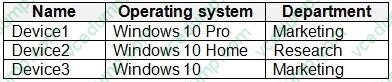
You capture and upload the hardware IDs of the devices in the marketing department.
You configure Windows Autopilot.
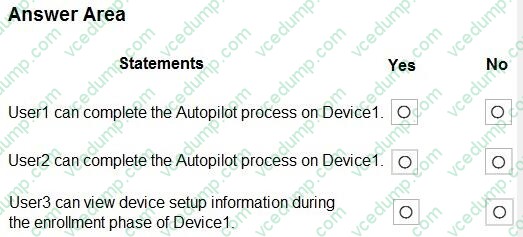
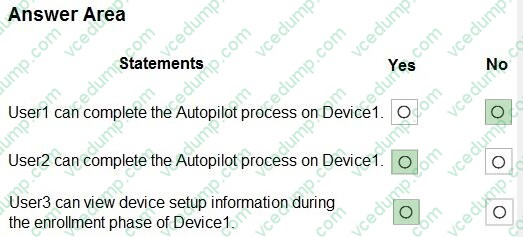
For each of the following statements, select Yes if the statement is true. Otherwise, select No.
NOTE: Each correct selection is worth one point.
-
Question 114:
You have an on-premises server named Server1 that hosts a Microsoft Deployment Toolkit (MDT) deployment share named MDT1.
You need to ensure that MDT1 supports multicast deployments.
What should you install on Server1?
A. Multipath I/O (MPIO)
B. Multipoint Connector
C. Windows Deployment Services (WDS)
D. Windows Server Update Services (WSUS) -
Question 115:
HOTSPOT
You have the devices shown in the following table.

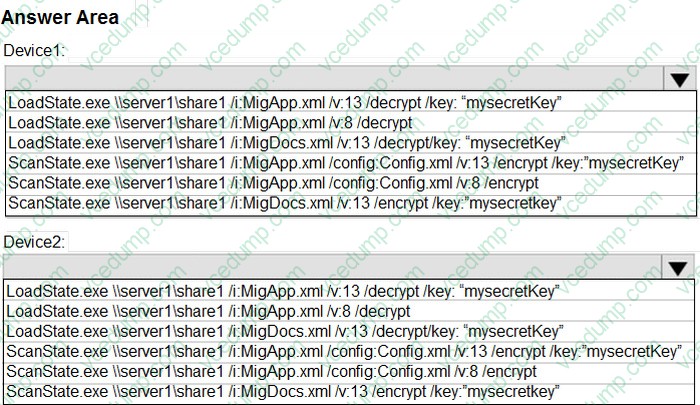
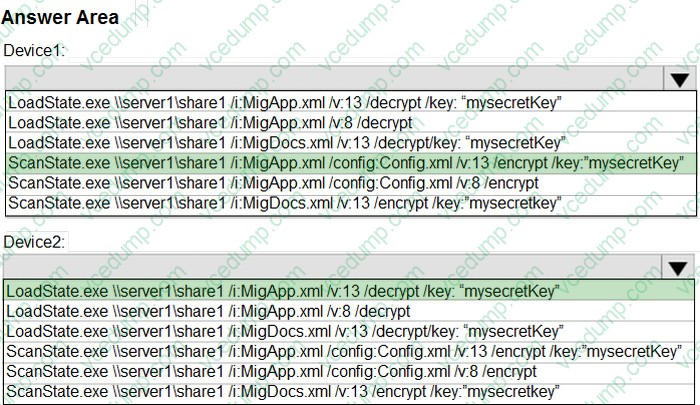
You need to migrate app data from Device1 to Device2. The data must be encrypted and stored on Server1 during the migration.
Which command should you run on each device? To answer, select the appropriate options in the answer area.
NOTE: Each correct selection is worth one point.
-
Question 116:
You have a Microsoft 365 E5 subscription.
You need to use Device query to gather information about all the devices that are managed by using Microsoft Intune.
What should you do first?
A. Enable Windows license verification.
B. Onboard the devices to Microsoft Defender for Endpoint.
C. Onboard the devices to Endpoint analytics.
D. Create a compliance policy for all the devices. -
Question 117:
SIMULATION
Username and password
Use the following login credentials as needed:
To enter your username, place your cursor in the Sign in box and select the username below.
To enter your password, place your cursor in the Enter password box and select the password below.
Microsoft 365 Username: [email protected]
Microsoft 365 Password: i7A4$3o^HGD3L~=c[9xuOhM%^4:s11Ai
If the Microsoft Edge browser or Microsoft 365 portal does not load successfully, select the Microsoft Edge browser icon from the task bar, type the URL "https://portal.office.com", and press Enter.
The following information is for technical support purposes only:
Lab Instance: 48262079
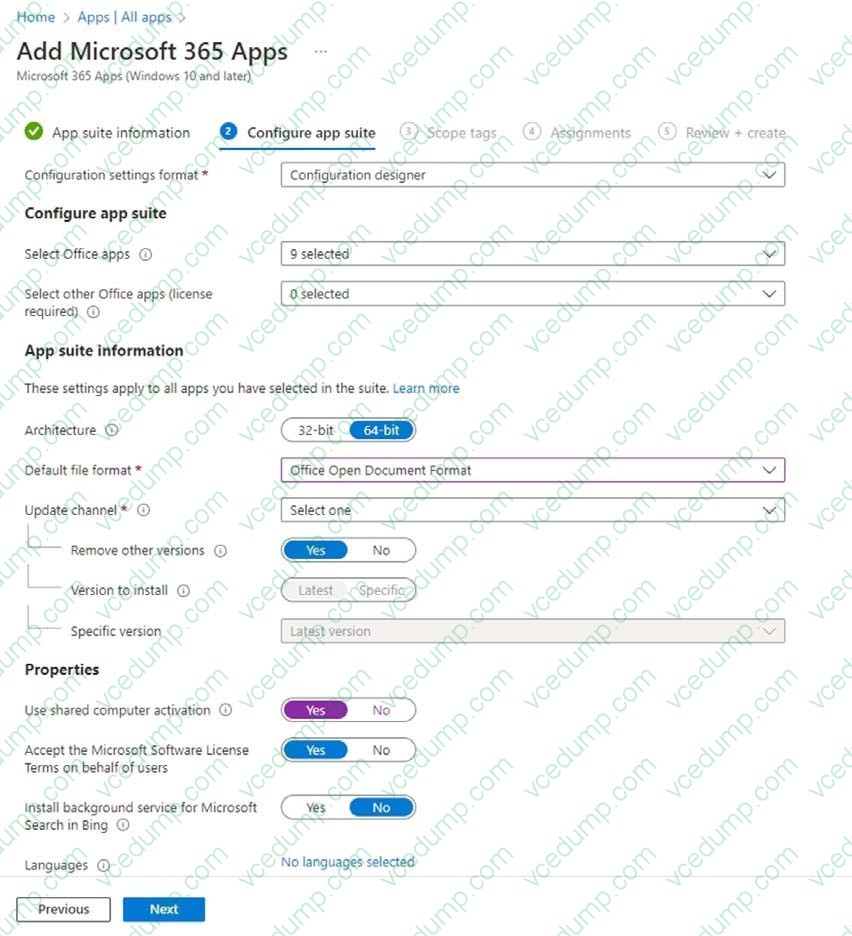
You need to deploy Microsoft 365 Apps for Windows 10 and later to Windows devices. The solution must ensure that the default file format is set to Office Open Document Format, and the update channel is set to Monthly Enterprise Channel.
All other settings must use the default settings.
A. See explanation below.
B. PlaceHolder
C. PlaceHolder
D. PlaceHolder -
Question 118:
You have a Microsoft Deployment Toolkit (MDT) deployment share named DS1.
In the Out-of-Box Drivers node, you create folders that contain drivers for different hardware models.
You need to configure the Inject Drivers MDT task to use PnP detection to install the drivers for one of the hardware models.
What should you do first?
A. Import an OS package.
B. Create a selection profile.
C. Add a Gather task to the task sequence.
D. Add a Validate task to the task sequence. -
Question 119:
HOTSPOT
You have a Microsoft 365 subscription that contains the devices shown in the following table.

All the devices will be reimaged and licensed by using subscription activation.
The devices are assigned to the users shown in the following table.

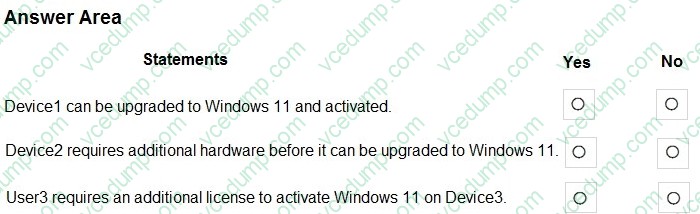
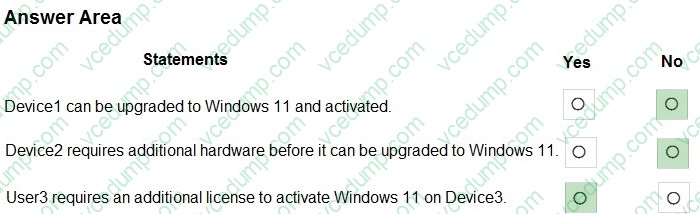
For each of the following statements, select Yes if the statement is true. Otherwise, select No.
NOTE: Each correct selection is worth one point.
-
Question 120:
You have a Microsoft 365 E5 subscription and use Microsoft Intune.
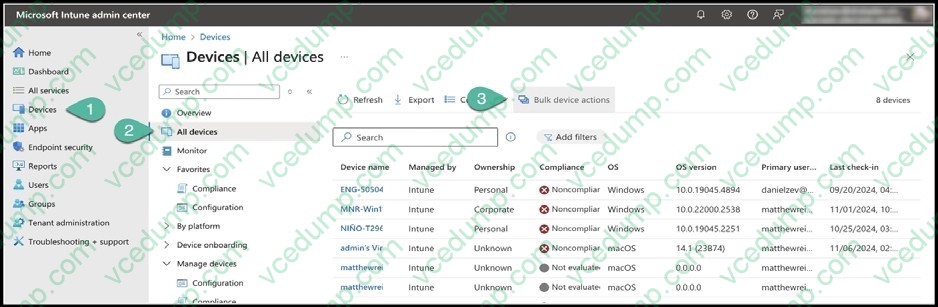
You need to use a Sync bulk device action on all corporate-owned Windows devices.
What is the maximum number of devices you can include the action?
A. 25
B. 50
C. 100
D. 500
E. 1000
Related Exams:
-
62-193
Technology Literacy for Educators -
70-243
Administering and Deploying System Center 2012 Configuration Manager -
70-355
Universal Windows Platform – App Data, Services, and Coding Patterns -
77-420
Excel 2013 -
77-427
Excel 2013 Expert Part One -
77-725
Word 2016 Core Document Creation, Collaboration and Communication -
77-726
Word 2016 Expert Creating Documents for Effective Communication -
77-727
Excel 2016 Core Data Analysis, Manipulation, and Presentation -
77-728
Excel 2016 Expert: Interpreting Data for Insights -
77-731
Outlook 2016 Core Communication, Collaboration and Email Skills
Tips on How to Prepare for the Exams
Nowadays, the certification exams become more and more important and required by more and more enterprises when applying for a job. But how to prepare for the exam effectively? How to prepare for the exam in a short time with less efforts? How to get a ideal result and how to find the most reliable resources? Here on Vcedump.com, you will find all the answers. Vcedump.com provide not only Microsoft exam questions, answers and explanations but also complete assistance on your exam preparation and certification application. If you are confused on your MD-102 exam preparations and Microsoft certification application, do not hesitate to visit our Vcedump.com to find your solutions here.