MD-102 Exam Details
-
Exam Code
:MD-102 -
Exam Name
:Endpoint Administrator -
Certification
:Microsoft Certifications -
Vendor
:Microsoft -
Total Questions
:431 Q&As -
Last Updated
:May 25, 2026
Microsoft MD-102 Online Questions & Answers
-
Question 121:
HOTSPOT
You have a Microsoft 365 subscription.
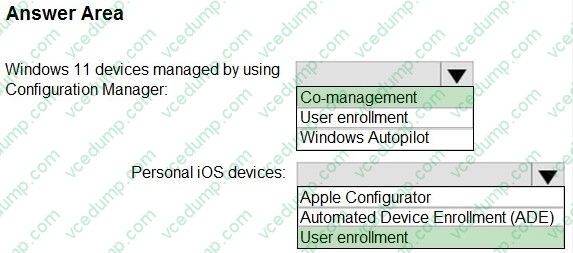
You plan to enable Microsoft Intune enrollment for the following types of devices:
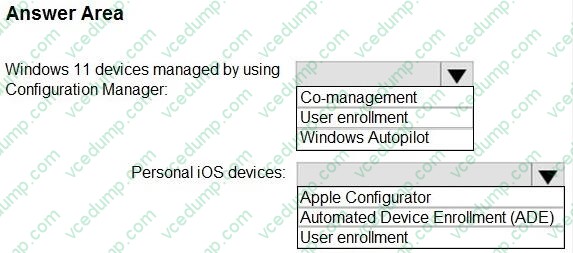
1. Existing Windows 11 devices managed by using Configuration Manager
2. Personal iOS devices
The solution must minimize user disruption.
Which enrollment method should you use for each device type? To answer, select the appropriate options in the answer area.
NOTE: Each correct selection is worth one point.
-
Question 122:
You have 25 computers that run Windows 10 Pro.
You have a Microsoft 365 E5 subscription that uses Microsoft Intune.
You need to upgrade the computers to Windows 11 Enterprise by using an in-place upgrade. The solution must minimize administrative effort.
What should you use?
A. Microsoft Deployment Toolkit (MDT) and a default image of Windows 11 Enterprise
B. Microsoft Configuration Manager and a custom image of Windows 11 Enterprise
C. Windows Autopilot
D. Subscription Activation -
Question 123:
HOTSPOT
You have groups that use the Dynamic Device membership type as shown in the following table.

You are deploying Microsoft 365 apps.
You have devices enrolled in Microsoft Intune as shown in the following table.

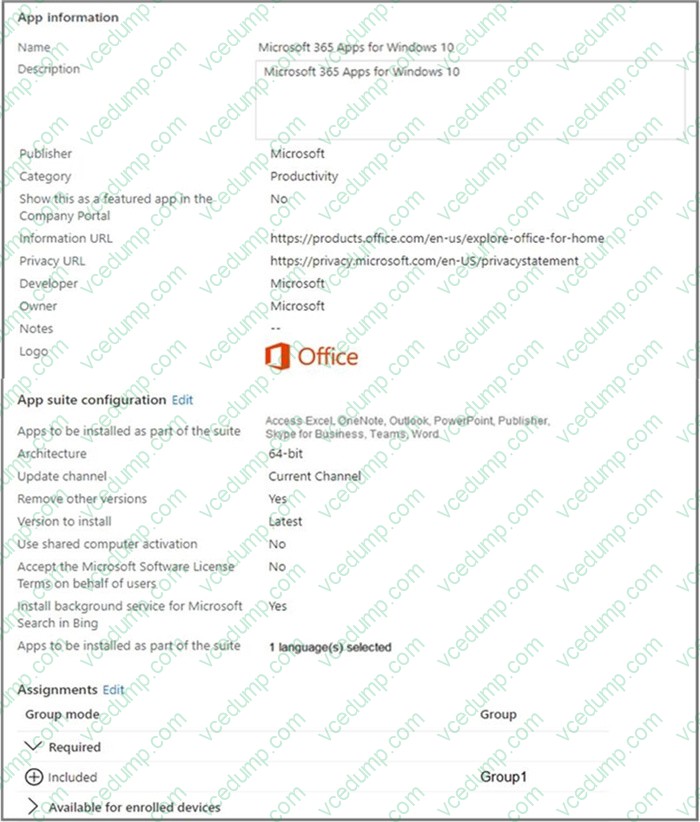
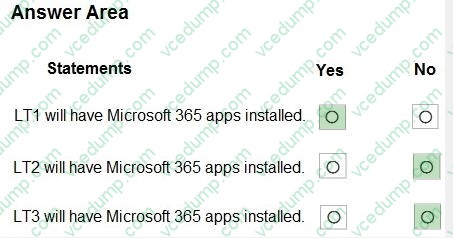
In the Microsoft Intune admin center, you create a Microsoft 365 Apps app as shown in the exhibit. (Click the Exhibit tab.)
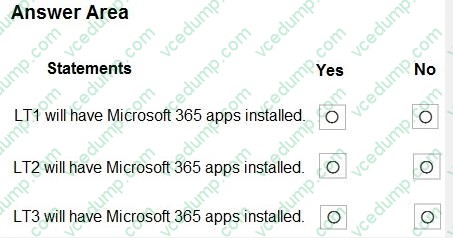
For each of the following statements, select Yes if the statement is true. Otherwise, select No.
NOTE: Each correct selection is worth one point.
-
Question 124:
Your company has a wireless access point that uses WPA2-Enterprise.
You need to configure a computer to connect to the wireless access point.
What should you do first?
A. Create a provisioning package in Windows Configuration Designer.
B. Request a passphrase.
C. Request and install a certificate.
D. Create a Connection Manager Administration Kit (CMAK) package. -
Question 125:
DRAG DROP
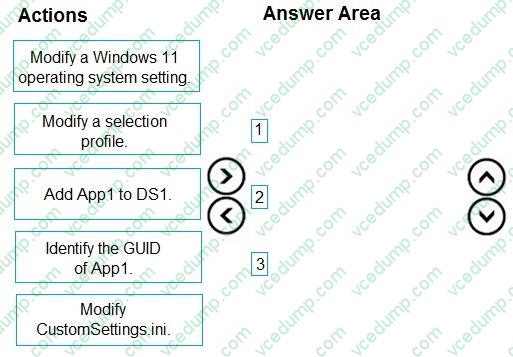
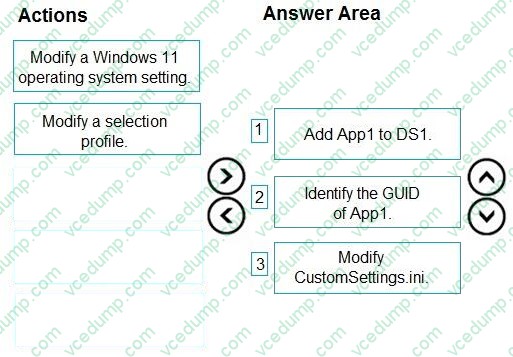
You have a Microsoft Deployment Toolkit (MDT) deployment share named DS1.
You import a Windows 11 image to DS1.
You have an executable installer for an application named App1.
You need to ensure that App1 will be installed for all the task sequences that deploy the image.
Which three actions should you perform in sequence? To answer, move the appropriate actions from the list of actions to the answer area and arrange them in the correct order.
Select and Place:
-
Question 126:
You have a Microsoft 365 subscription.
You need to provide a user the ability Security defaults and create Conditional Access policies. The solution must use the principle of least privilege.
Which role should you assign to the user?
A. Global Administrator
B. Conditional Access Administrator
C. Security Administrator
D. Intune Administrator -
Question 127:
You need to recommend a solution to monitor update deployments.
What should you include in the recommendation?
A. Windows Server Update (WSUS)
B. the Update Management solution in Azure Automation
C. the Update Compliance solution in Azure Log Analytics
D. the Azure Security Center -
Question 128:
HOTSPOT
You have a Microsoft 365 subscription that includes Microsoft Intune and Microsoft Defender for Endpoint.
Users have devices that run Windows 11.
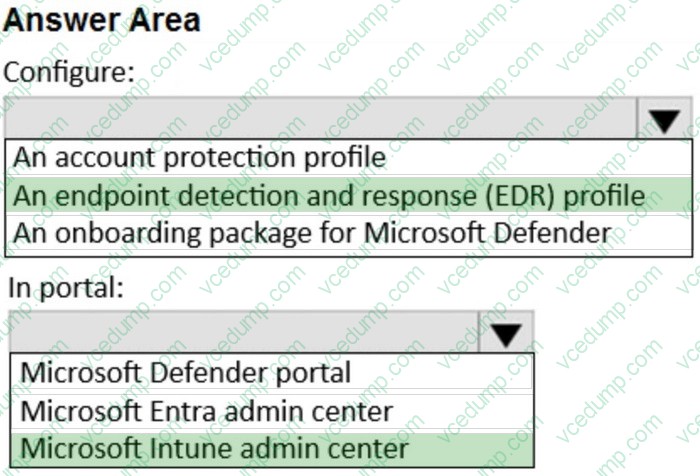
You deploy a connection from Defender for Endpoint to Intune.
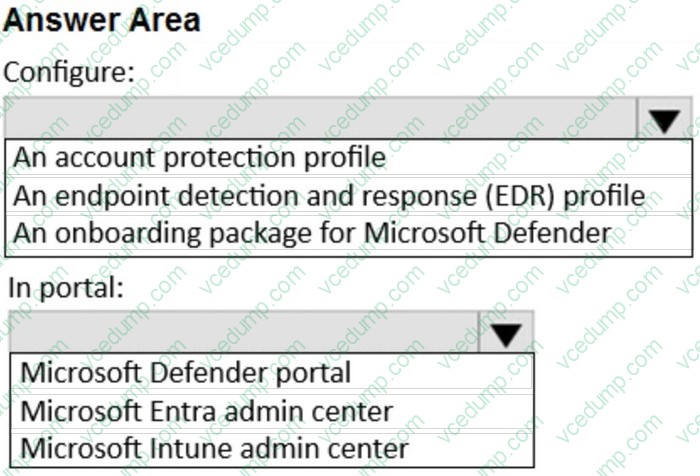
You need to ensure that when a device is enrolled in Intune, the device is onboarded automatically to Defender for Endpoint
What should you configure, and which portal should you use? To answer, select the appropriate options in the answer area
NOTE: Each correct selection is worth one point.
-
Question 129:
You have a Microsoft 365 subscription that includes Microsoft Intune.
You have an update ring named UpdateRing1 that contains the following settings:
1. Automatic update behavior: Auto install and restart at a scheduled time
2. Automatic behavior frequency: First week of the month
3. Scheduled install day: Tuesday
4. Scheduled install time: 3 AM
From the Microsoft Intune admin center, you select Uninstall for the feature updates of UpdateRing1.
When will devices start to remove the feature updates?
A. when a user approves the uninstall
B. as soon as the policy is received
C. next Tuesday
D. the first Tuesday of the next month -
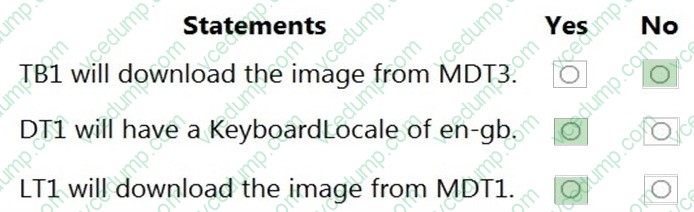
Question 130:
HOTSPOT
You have the Microsoft Deployment Toolkit (MDT) installed in three sites as shown in the following table.

You use Distributed File System (DFS) Replication to replicate images in a share named Production.
You configure the following settings in the Bootstrap.ini file.
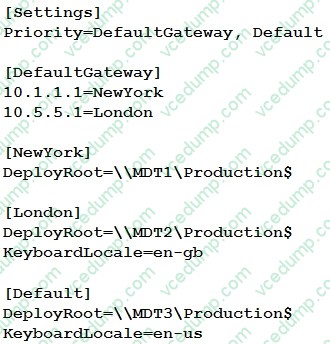
You plan to deploy Windows 10 to the computers shown in the following table.
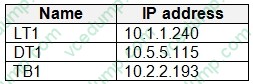
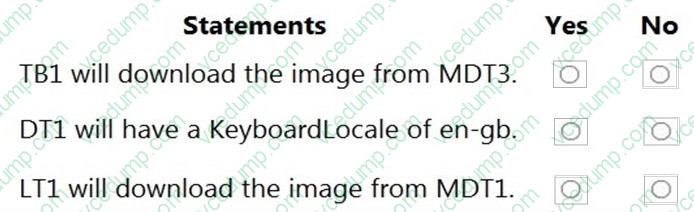
For each of the following statements, select Yes if the statement is true. Otherwise, select No.
NOTE: Each correct selection is worth one point.
Related Exams:
-
62-193
Technology Literacy for Educators -
70-243
Administering and Deploying System Center 2012 Configuration Manager -
70-355
Universal Windows Platform – App Data, Services, and Coding Patterns -
77-420
Excel 2013 -
77-427
Excel 2013 Expert Part One -
77-725
Word 2016 Core Document Creation, Collaboration and Communication -
77-726
Word 2016 Expert Creating Documents for Effective Communication -
77-727
Excel 2016 Core Data Analysis, Manipulation, and Presentation -
77-728
Excel 2016 Expert: Interpreting Data for Insights -
77-731
Outlook 2016 Core Communication, Collaboration and Email Skills
Tips on How to Prepare for the Exams
Nowadays, the certification exams become more and more important and required by more and more enterprises when applying for a job. But how to prepare for the exam effectively? How to prepare for the exam in a short time with less efforts? How to get a ideal result and how to find the most reliable resources? Here on Vcedump.com, you will find all the answers. Vcedump.com provide not only Microsoft exam questions, answers and explanations but also complete assistance on your exam preparation and certification application. If you are confused on your MD-102 exam preparations and Microsoft certification application, do not hesitate to visit our Vcedump.com to find your solutions here.