MD-102 Exam Details
-
Exam Code
:MD-102 -
Exam Name
:Endpoint Administrator -
Certification
:Microsoft Certifications -
Vendor
:Microsoft -
Total Questions
:431 Q&As -
Last Updated
:May 25, 2026
Microsoft MD-102 Online Questions & Answers
-
Question 101:
You have a Microsoft 365 subscription that includes Microsoft Intune.
You create a new Android app protection policy named Policy1 that prevents screen captures in all Microsoft apps.
You discover that an unmanaged email client installed on Android devices can still capture screens.
You need to ensure that users can only use Microsoft apps to access email.
What should you do?
A. Create a Conditional Access policy.
B. Create a compliance policy.
C. Modify the Data protection settings of Policy1.
D. Modify the assignments of Policy1. -
Question 102:
HOTSPOT
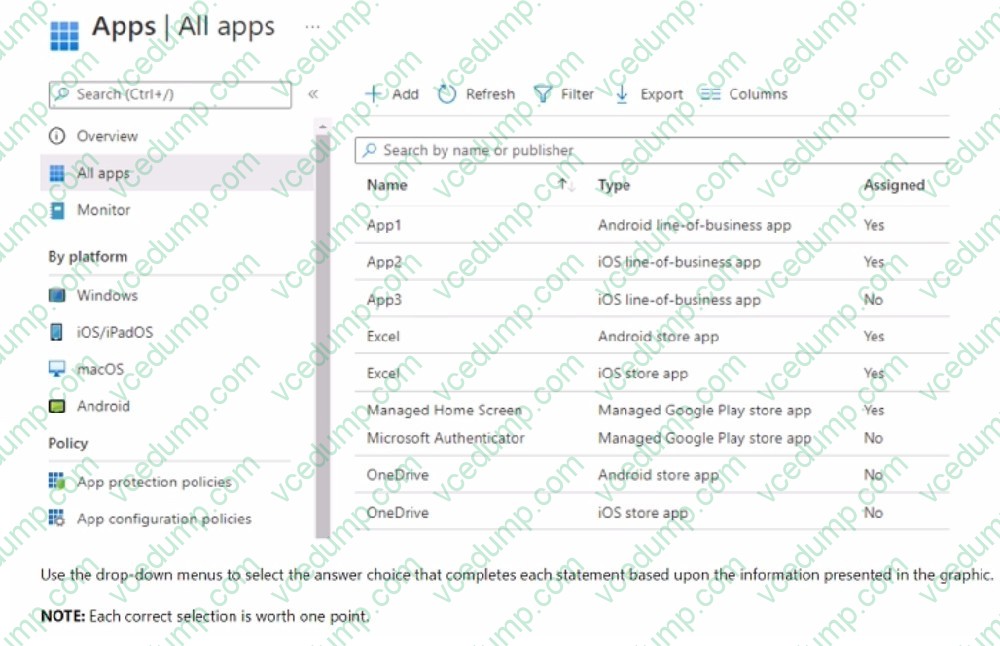
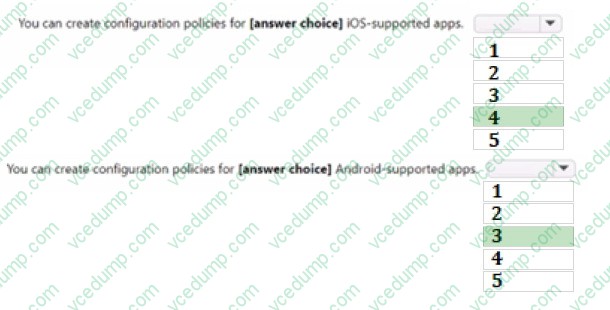
You have a Microsoft 365 ES subscription that uses Microsoft Intune.
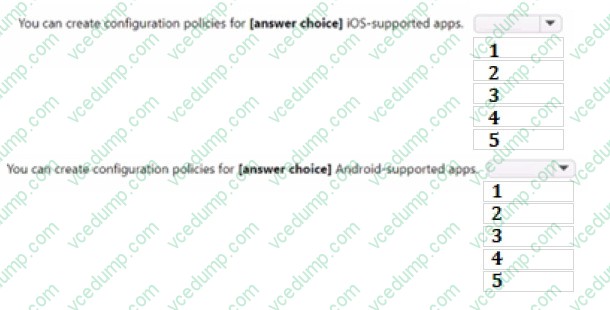
You have the apps shown in the following exhibit.
-
Question 103:
You have a Microsoft 365 subscription that uses Microsoft Intune Suite.
You use Microsoft Intune to manage devices. All devices are in the same time zone.
You create an update rings policy and assign the policy to all Windows devices.
On the November 1, you pause the update rings policy.
All devices remain online.
Without further modification to the policy, on which date will the devices next attempt to update?
A. December 1
B. December 6
C. November 15
D. November 22 -
Question 104:
HOTSPOT
You have a Microsoft 365 subscription that uses Microsoft Intune Suite.
You use Microsoft Intune to manage devices.
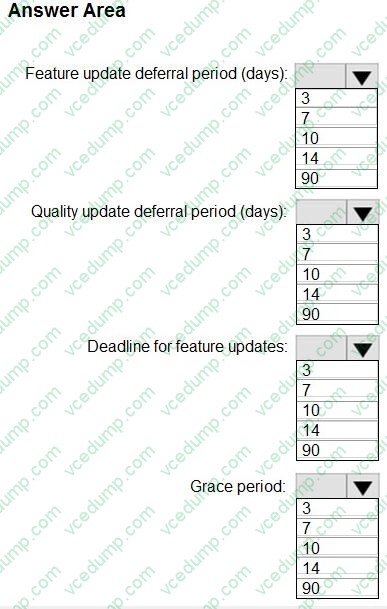
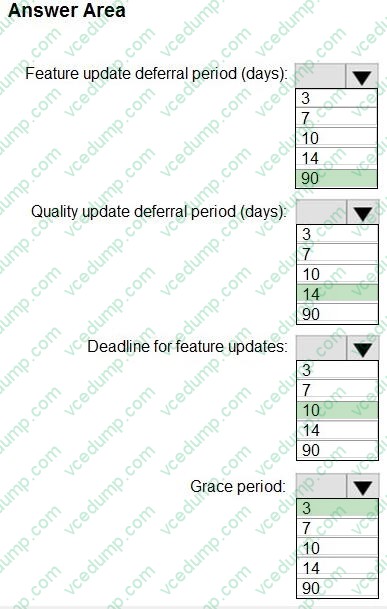
You need to configure an update ring that meets the following requirements:
1. Fixes and improvements to existing Windows functionality can be deferred for 14 days but will install automatically seven days after that date.
2. The installation of new Windows features can be deferred for 90 days but will install automatically 10 days after that date.
3. Devices must restart automatically three days after an update is installed.
How should you configure the update ring? To answer, select the appropriate options in the answer area.
NOTE: Each correct selection is worth one point.
-
Question 105:
You have computers that run Windows 11 Pro. The computers are joined to Azure AD and enrolled in Microsoft Intune.
You need to upgrade the computers to Windows 11 Enterprise.
What should you configure in Intune?
A. a device compliance policy
B. a device cleanup rule
C. a device enrollment policy
D. a device configuration profile -
Question 106:
HOTSPOT
You have a Microsoft 365 subscription that uses Microsoft Intune.
You plan to manage Windows updates by using Intune.
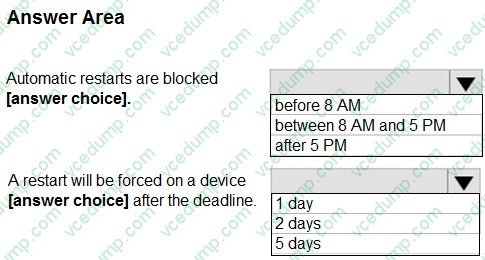
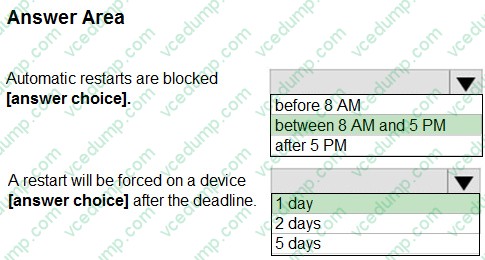
You create an update ring for Windows 10 and later and configure the User experience settings for the ring as shown in the following exhibit.
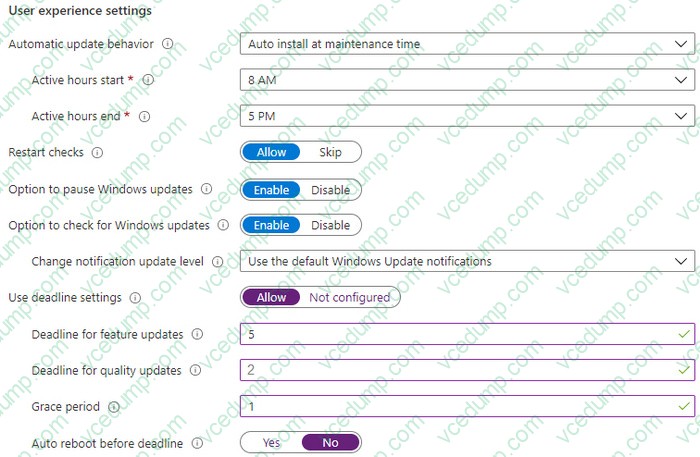
Use the drop-down menus to select the answer choice that completes each statement based on the information presented in the graphic.
NOTE: Each correct selection is worth one point.
-
Question 107:
You have a Microsoft 365 subscription. The subscription contains 500 computers that run Windows 11 and are enrolled in Microsoft Intune. You need to manage the deployment of monthly security updates. The solution must meet the following requirements:
Updates must be deployed to a group of test computers for quality assurance.
Updates must be deployed automatically 15 days after the quality assurance testing.
What should you create in the Microsoft Intune admin center?
A. a device Configuration profile
B. an update ring
C. a feature update policy
D. a security baseline -
Question 108:
HOTSPOT
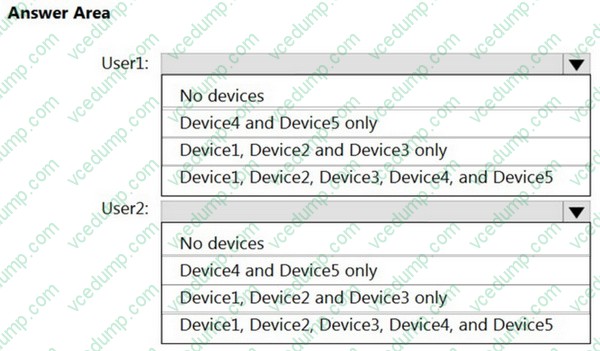
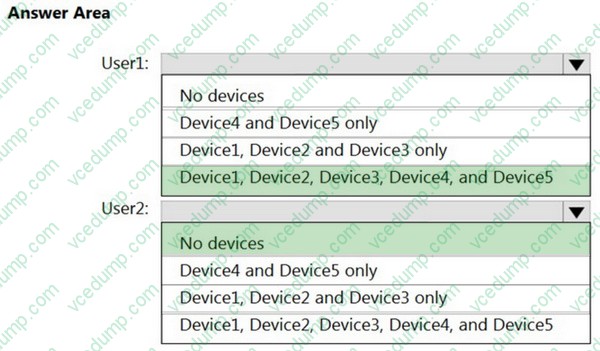
User1 and User2 plan to use Sync your settings.
On which devices can the users use Sync your settings? To answer, select the appropriate options in the answer area.
Note: Each correct selection is worth one point.
-
Question 109:
Note: This question is part of a series of questions that present the same scenario. Each question in the series contains a unique solution that might meet the stated goals. Some question sets might have more than one correct solution, while others might not have a correct solution.
After you answer a question in this section, you will NOT be able to return to it. As a result, these questions will not appear in the review screen.
Your company has an Azure AD tenant named contoso.com that contains several Windows 10 devices.
When you join new Windows 10 devices to contoso.com, users are prompted to set up a four-digit pin.
You need to ensure that the users are prompted to set up a six-digit pin when they join the Windows 10 devices to contoso.com.
Solution: From the Microsoft Entra admin center, you configure automatic mobile device management (MDM) enrollment. From the Microsoft Intune admin center, you create and assign a device restrictions profile.
Does this meet the goal?
A. Yes
B. No -
Question 110:
DRAG DROP
Your company has a computer named Computer1 that runs Windows 10.
Computer1 was used by a user who left the company.
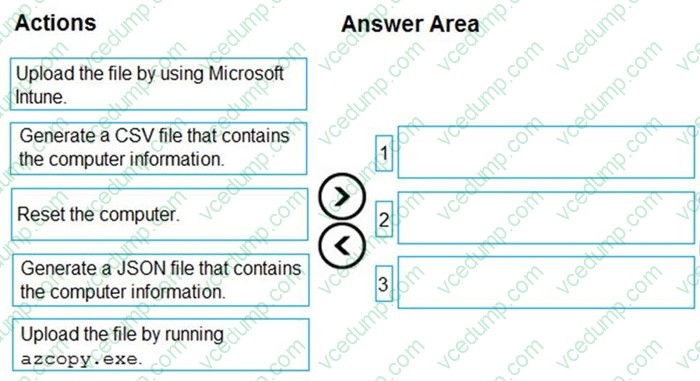
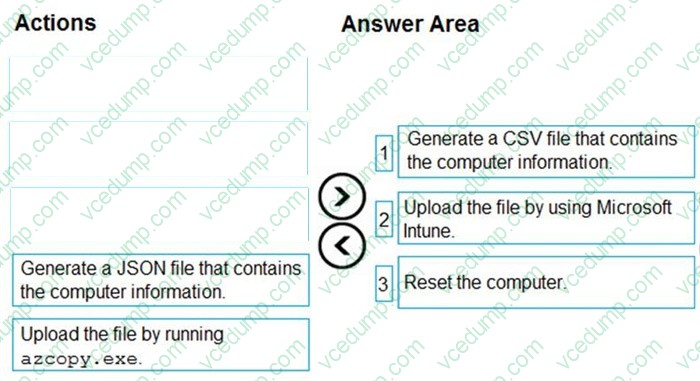
You plan to repurpose Computer1 and assign the computer to a new user.
You need to redeploy Computer1 by using Windows Autopilot.
Which three actions should you perform in sequence? To answer, move the appropriate actions from the list of actions to the answer area and arrange them in the correct order.
Select and Place:
Related Exams:
-
62-193
Technology Literacy for Educators -
70-243
Administering and Deploying System Center 2012 Configuration Manager -
70-355
Universal Windows Platform – App Data, Services, and Coding Patterns -
77-420
Excel 2013 -
77-427
Excel 2013 Expert Part One -
77-725
Word 2016 Core Document Creation, Collaboration and Communication -
77-726
Word 2016 Expert Creating Documents for Effective Communication -
77-727
Excel 2016 Core Data Analysis, Manipulation, and Presentation -
77-728
Excel 2016 Expert: Interpreting Data for Insights -
77-731
Outlook 2016 Core Communication, Collaboration and Email Skills
Tips on How to Prepare for the Exams
Nowadays, the certification exams become more and more important and required by more and more enterprises when applying for a job. But how to prepare for the exam effectively? How to prepare for the exam in a short time with less efforts? How to get a ideal result and how to find the most reliable resources? Here on Vcedump.com, you will find all the answers. Vcedump.com provide not only Microsoft exam questions, answers and explanations but also complete assistance on your exam preparation and certification application. If you are confused on your MD-102 exam preparations and Microsoft certification application, do not hesitate to visit our Vcedump.com to find your solutions here.