FCP_FGT_AD-7.4 Exam Details
-
Exam Code
:FCP_FGT_AD-7.4 -
Exam Name
:FCP - FortiGate 7.4 Administrator -
Certification
:Fortinet Certifications -
Vendor
:Fortinet -
Total Questions
:89 Q&As -
Last Updated
:Jul 12, 2026
Fortinet FCP_FGT_AD-7.4 Online Questions & Answers
-
Question 81:
Which three statements about SD-WAN zones are true? (Choose three.)
A. An SD-WAN zone can contain physical and logical interfaces
B. You can use an SD-WAN zone in static route definitions
C. You can define up to three SD-WAN zones per FortiGate device
D. An SD-WAN zone must contains at least two members
E. An SD-WAN zone is a logical grouping of members -
Question 82:
Refer to the exhibit which contains a RADIUS server configuration.
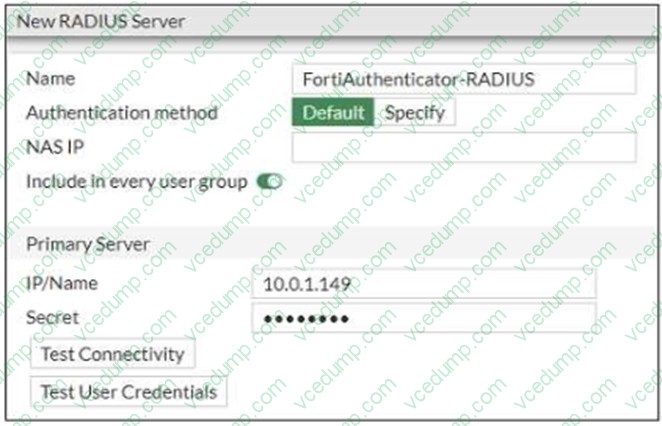
An administrator added a configuration for a new RADIUS server. While configuring, the administrator selected theInclude in every user groupoption. What is the impact of using theInclude in every user groupoption in a RADIUS configuration?
A. This option places the RADIUS server, and all users who can authenticate against that server, into every FortiGate user group
B. This option places all users into even/ RADIUS user group, including groups that are used for the LDAP server on FortiGate
C. This option places all FortiGate users and groups required to authenticate into the RADIUS server, which, in this case is FortiAuthenticator
D. This option places the RADIUS server, and all users who can authenticate against that server, into every RADIUS group -
Question 83:
An administrator configures FortiGuard servers as DNS servers on FortiGate using default settings. What is true about the DNS connection to a FortiGuard server?
A. It uses UDP 8888.
B. It uses DNS over HTTPS.
C. It uses DNS over TLS.
D. It uses UDP 53. -
Question 84:
Which three pieces of information does FortiGate use to identify the hostname of the SSL server when SSL certificate inspection is enabled? (Choose three.)
A. The host field in the HTTP header.
B. The server name indication (SNI) extension in the client hello message.
C. The subject alternative name (SAN) field in the server certificate.
D. The subject field in the server certificate.
E. The serial number in the server certificate. -
Question 85:
Refer to the exhibits.
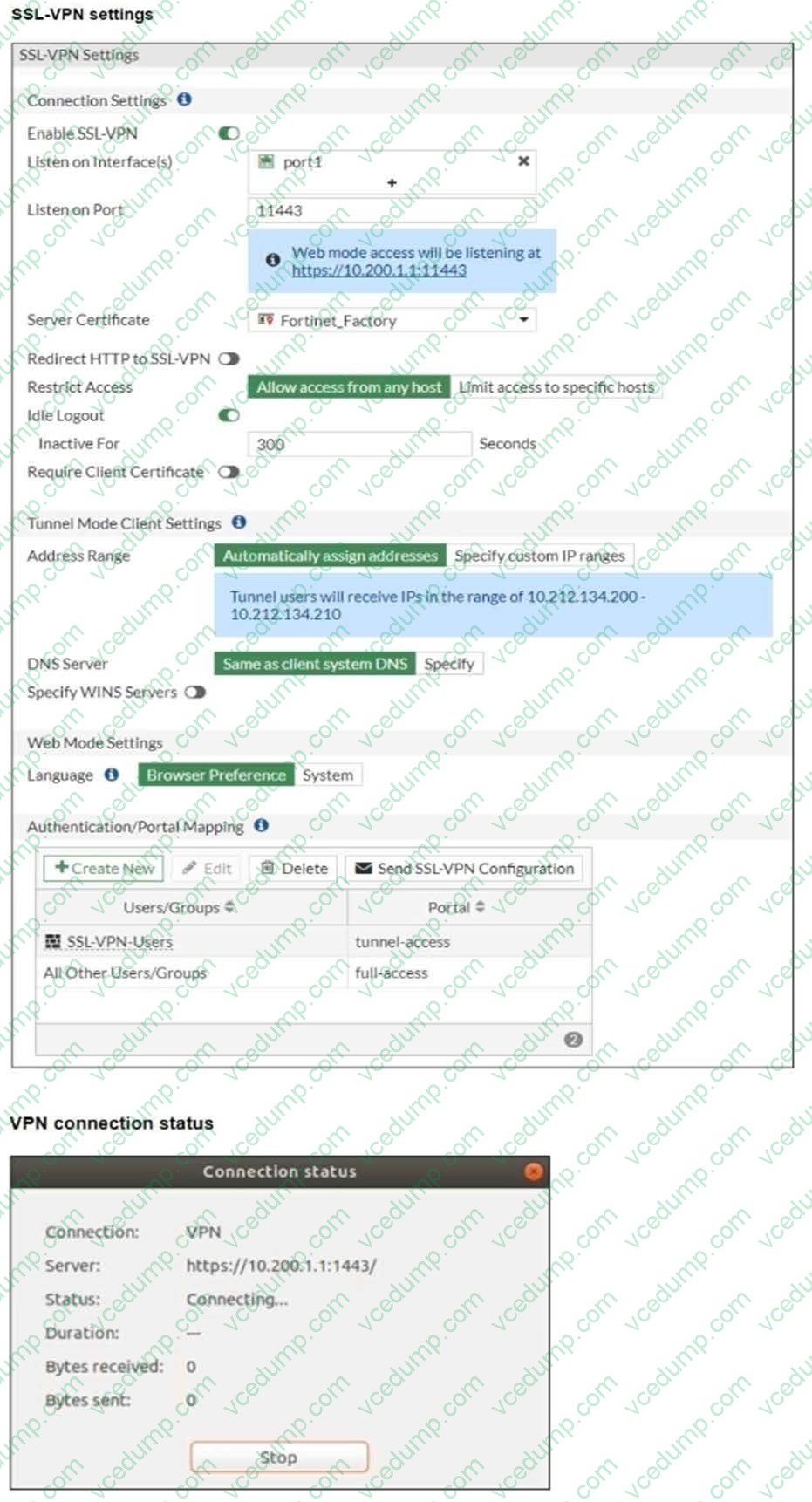
The SSL VPN connection fails when a user attempts to connect to it. What should the user do to successfully connect to the SSL VPN?
A. Change the SSL VPN portal to the tunnel.
B. Change the idle timeout.
C. Change the server IP address.
D. Change the SSL VPN port on the client. -
Question 86:
Refer to the exhibit.
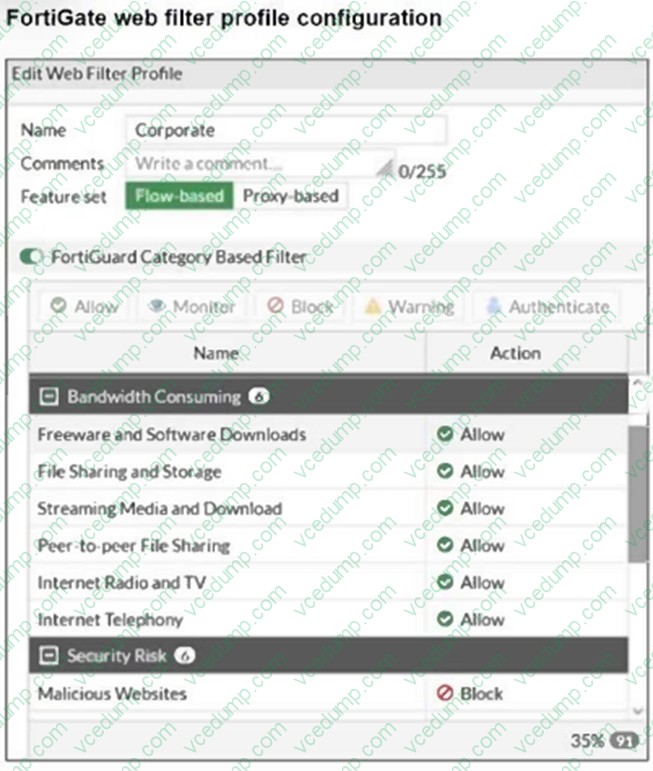
The exhibit shows theFortiGuard Category Based Filtersection of a corporate web filter profile.
An administrator must block access todownload.com, which belongs to theFreeware and Software Downloadscategory. The administrator must also allow other websites in the same category.
What are two solutions for satisfying the requirement? (Choose two.)
A. Configure a separate firewall policy with action Deny and an FQDN address object for *. download, com as destination address.
B. Set the Freeware and Software Downloads category Action to Warning
C. Configure a web override rating for download, com and select Malicious Websites as the subcategory.
D. Configure a static URL filter entry for download, com with Type and Action set to Wildcard and Block, respectively. -
Question 87:
There are multiple dial-up IPsec VPNs configured in aggressive mode on the HQ FortiGate. The requirement is to connect dial-up users to their respective department VPN tunnels. Which phase 1 setting you can configure to match the user to the tunnel?
A. Peer ID
B. Local Gateway
C. Dead Peer Detection
D. IKE Mode Config -
Question 88:
Refer to the exhibit.
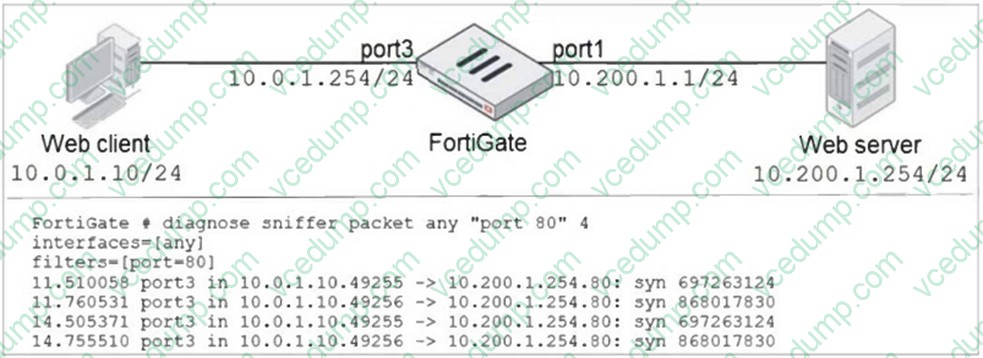
In the network shown in the exhibit, the web client cannot connect to the HTTP web server. The administrator runs the FortiGate built-in sniffer and gets the output shown in the exhibit. What should the administrator do next, to troubleshoot the problem?
A. Execute a debug flow.
B. Capture the traffic using an external sniffer connected to part1.
C. Execute another sniffer on FortiGate, this time with the filter "hose 10.o.1.10".
D. Run a sniffer on the web server. -
Question 89:
Which statement is a characteristic of automation stitches?
A. They can be run only on devices in the Security Fabric.
B. They can be created only on downstream devices in the fabric.
C. They can have one or more triggers.
D. They can run multiple actions at the same time.
Related Exams:
-
EMEA-ADVANCED-SUPPORT
Fortinet EMEA Advanced Support -
FCP_FAC_AD-6.5
FCP - FortiAuthenticator 6.5 Administrator -
FCP_FAZ_AD-7.4
FCP - FortiAnalyzer 7.4 Administrator -
FCP_FAZ_AN-7.4
FCP - FortiAnalyzer 7.4 Analyst -
FCP_FAZ_AN-7.6
Fortinet NSE 5 - FortiAnalyzer 7.6 Analyst -
FCP_FCT_AD-7.2
FCP - Forti Client EMS 7.2 Administrator -
FCP_FCT_AD-7.4
Fortinet NSE 6 - FortiClient EMS 7.4 Administrator -
FCP_FGT_AD-7.4
FCP - FortiGate 7.4 Administrator -
FCP_FGT_AD-7.6
FortiGate 7.6 Administrator FCP_FGT_AD-7.6 -
FCP_FMG_AD-7.4
FCP - FortiManager 7.4 Administrator
Tips on How to Prepare for the Exams
Nowadays, the certification exams become more and more important and required by more and more enterprises when applying for a job. But how to prepare for the exam effectively? How to prepare for the exam in a short time with less efforts? How to get a ideal result and how to find the most reliable resources? Here on Vcedump.com, you will find all the answers. Vcedump.com provide not only Fortinet exam questions, answers and explanations but also complete assistance on your exam preparation and certification application. If you are confused on your FCP_FGT_AD-7.4 exam preparations and Fortinet certification application, do not hesitate to visit our Vcedump.com to find your solutions here.