FCP_FGT_AD-7.4 Exam Details
-
Exam Code
:FCP_FGT_AD-7.4 -
Exam Name
:FCP - FortiGate 7.4 Administrator -
Certification
:Fortinet Certifications -
Vendor
:Fortinet -
Total Questions
:89 Q&As -
Last Updated
:Jul 12, 2026
Fortinet FCP_FGT_AD-7.4 Online Questions & Answers
-
Question 31:
Refer to the exhibit.
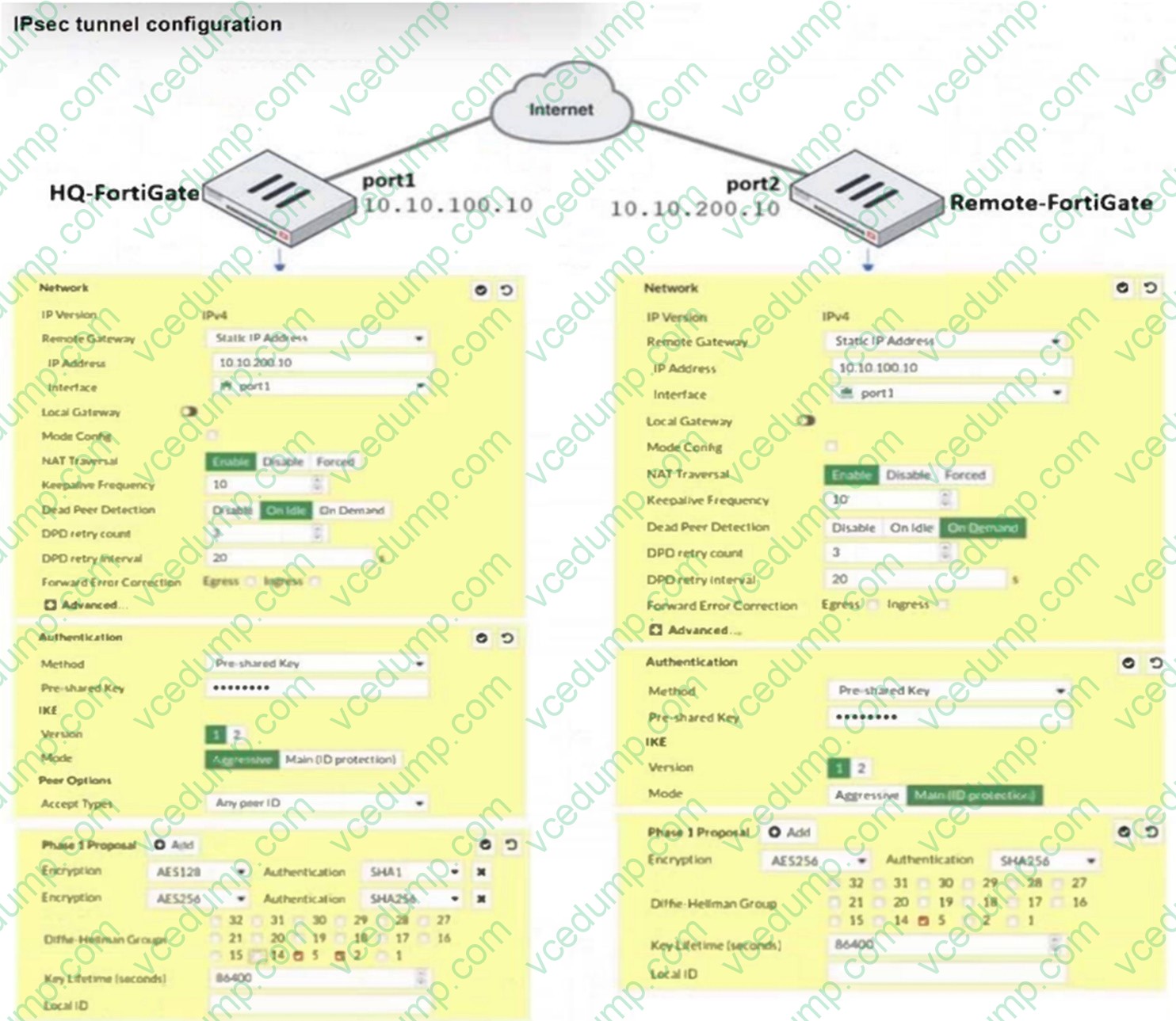
A network administrator is troubleshooting an IPsec tunnel between two FortiGate devices. The administrator has determined that phase 1 failed to come up. The administrator has also re-entered the pre-shared key on both FortiGate devices to make sure they match.
Based on the phase 1 configuration and the diagram shown in the exhibit, which two configuration changes can the administrator make to bring phase 1 up? (Choose two.)
A. On HQ-FortiGate, disable Diffie-Helman group 2.
B. On Remote-FortiGate, set port2 as Interface.
C. On both FortiGate devices, set Dead Peer Detection to On Demand.
D. On HQ-FortiGate, set IKE mode to Main (ID protection). -
Question 32:
Which method allows management access to the FortiGate CLI without network connectivity?
A. SSH console
B. CLI console widget
C. Serial console
D. Telnet console -
Question 33:
An administrator is configuring an IPsec VPN between site A and site . The Remote Gateway setting in both sites has been configured as Static IP Address.
For site A, the local quick mode selector is 192.168.1.0/24 and the remote quick mode selector is 192.168.2.0/24.
Which subnet must the administrator configure for the local quick mode selector for site B?
A. 192.168.3.0/24
B. 192.168.0.0/8
C. 192.168.2.0/24
D. 192.168.1.0/24 -
Question 34:
FortiGate is integrated with FortiAnalyzer and FortiManager.
When a firewall policy is created, which attribute is added to the policy to improve functionality and to support recording logs to FortiAnalyzer or FortiManager?
A. Log ID
B. Policy ID
C. Sequence ID
D. Universally Unique Identifier -
Question 35:
FortiGuard categories can be overridden and defined in different categories. To create a web rating override for the example.com home page the override must be configured using a specific syntax.
Which two syntaxes are correct to configure a web rating override for the home page? (Choose two.)
A. www.example.com:443
B. www.example.com
C. www.example.com/index.hrml
D. example.com -
Question 36:
A network administrator is configuring an IPsec VPN tunnel for a sales employee travelling abroad. Which IPsec Wizard template must the administrator apply?
A. Remote Access
B. Site to Site
C. Dial up User
D. iHub-and-Spoke -
Question 37:
Refer to the exhibit.
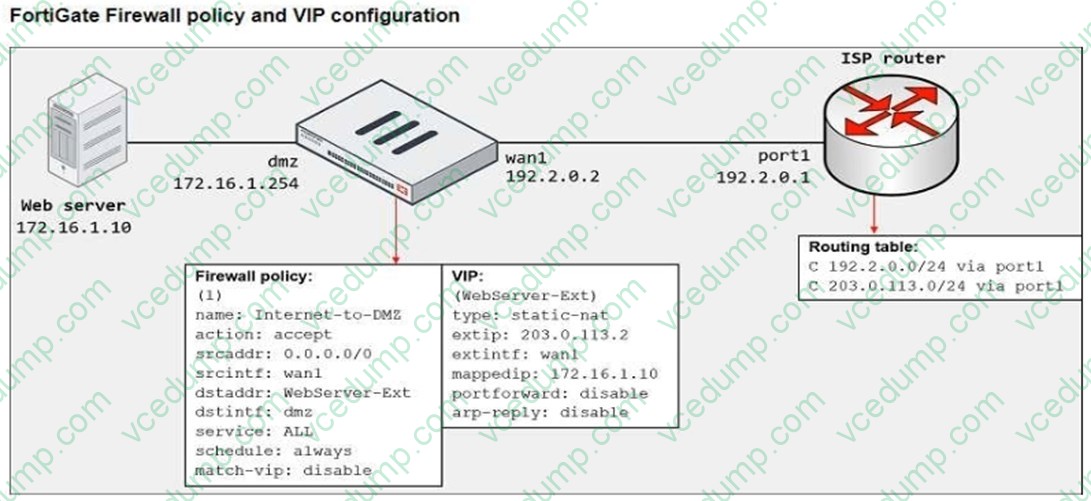
The exhibit shows a diagram of a FortiGate device connected to the network, the firewall policy and VIP configuration on the FortiGate device, and the routing table on the ISP router.
When the administrator tries to access the web server public address (203.0.113.2) from the internet, the connection times out. At the same time the administrator runs a sniffer on FortiGate to capture incoming web traffic to the server and does not see any output.
Based on the information shown in the exhibit, what configuration change must the administrator make to fix the connectivity issue?
A. Configure a loopback interface with address 203.0.113.2/32.
B. In the VIP configuration, enable arp-reply.
C. In the firewall policy configuration, enable match-vip.
D. Enable port forwarding on the server to map the external service port to the internal service port. -
Question 38:
Which three statements explain a flow-based antivirus profile? (Choose three.)
A. Flow-based inspection uses a hybrid of the scanning modes available in proxy-based inspection
B. Flow-based inspection optimizes performance compared to proxy-based inspection
C. FortiGate buffers the whole file but transmits to the client at the same time.
D. If a virus is detected, the last packet is delivered to the client.
E. The IPS engine handles the process as a standalone. -
Question 39:
Refer to the exhibit.
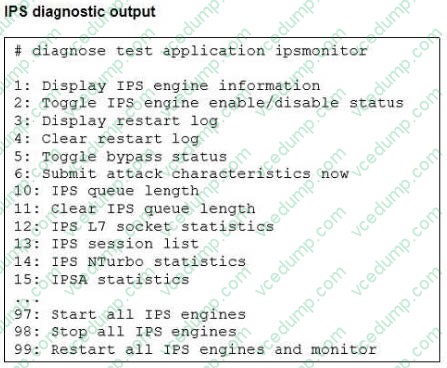
Examine the intrusion prevention system (IPS) diagnostic command shown in the exhibit. If option 5 is used with the IPS diagnostic command and the outcome is a decrease in the CPU usage, what is the correct conclusion?
A. The IPS engine is blocking all traffic.
B. The IPS engine is inspecting a high volume of traffic.
C. The IPS engine is unable to prevent an intrusion attack.
D. The IPS engine will continue to run in a normal state. -
Question 40:
When FortiGate performs SSL/SSH full inspection, you can decide how it should react when it detects an invalid certificate.
Which three actions are valid actions that FortiGate can perform when it detects an invalid certificate? (Choose three.)
A. Allow and Warning
B. Trust and Allow
C. Allow
D. Block and Warning
E. Block
Related Exams:
-
EMEA-ADVANCED-SUPPORT
Fortinet EMEA Advanced Support -
FCP_FAC_AD-6.5
FCP - FortiAuthenticator 6.5 Administrator -
FCP_FAZ_AD-7.4
FCP - FortiAnalyzer 7.4 Administrator -
FCP_FAZ_AN-7.4
FCP - FortiAnalyzer 7.4 Analyst -
FCP_FAZ_AN-7.6
Fortinet NSE 5 - FortiAnalyzer 7.6 Analyst -
FCP_FCT_AD-7.2
FCP - Forti Client EMS 7.2 Administrator -
FCP_FCT_AD-7.4
Fortinet NSE 6 - FortiClient EMS 7.4 Administrator -
FCP_FGT_AD-7.4
FCP - FortiGate 7.4 Administrator -
FCP_FGT_AD-7.6
FortiGate 7.6 Administrator FCP_FGT_AD-7.6 -
FCP_FMG_AD-7.4
FCP - FortiManager 7.4 Administrator
Tips on How to Prepare for the Exams
Nowadays, the certification exams become more and more important and required by more and more enterprises when applying for a job. But how to prepare for the exam effectively? How to prepare for the exam in a short time with less efforts? How to get a ideal result and how to find the most reliable resources? Here on Vcedump.com, you will find all the answers. Vcedump.com provide not only Fortinet exam questions, answers and explanations but also complete assistance on your exam preparation and certification application. If you are confused on your FCP_FGT_AD-7.4 exam preparations and Fortinet certification application, do not hesitate to visit our Vcedump.com to find your solutions here.