FCP_FGT_AD-7.4 Exam Details
-
Exam Code
:FCP_FGT_AD-7.4 -
Exam Name
:FCP - FortiGate 7.4 Administrator -
Certification
:Fortinet Certifications -
Vendor
:Fortinet -
Total Questions
:89 Q&As -
Last Updated
:Jul 12, 2026
Fortinet FCP_FGT_AD-7.4 Online Questions & Answers
-
Question 61:
Refer to the exhibits.
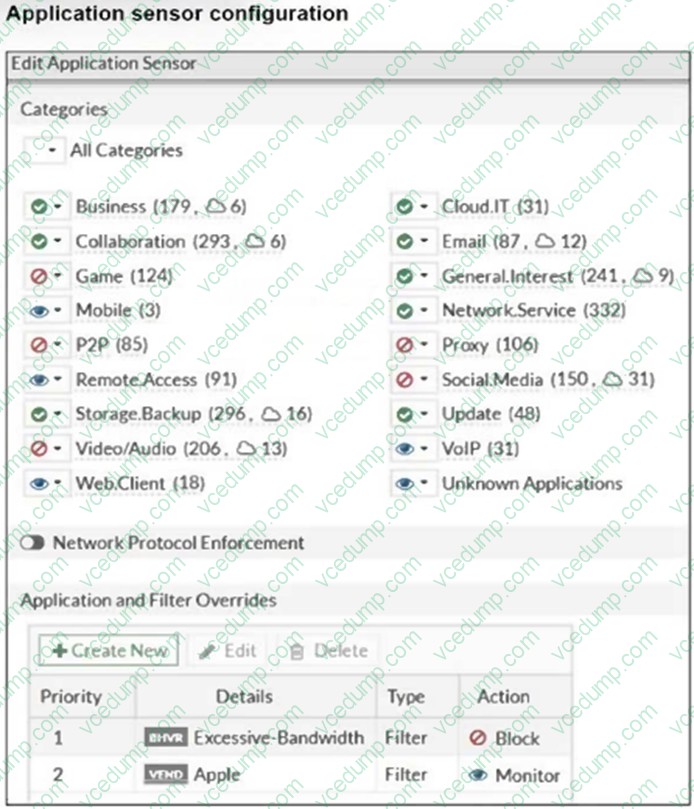
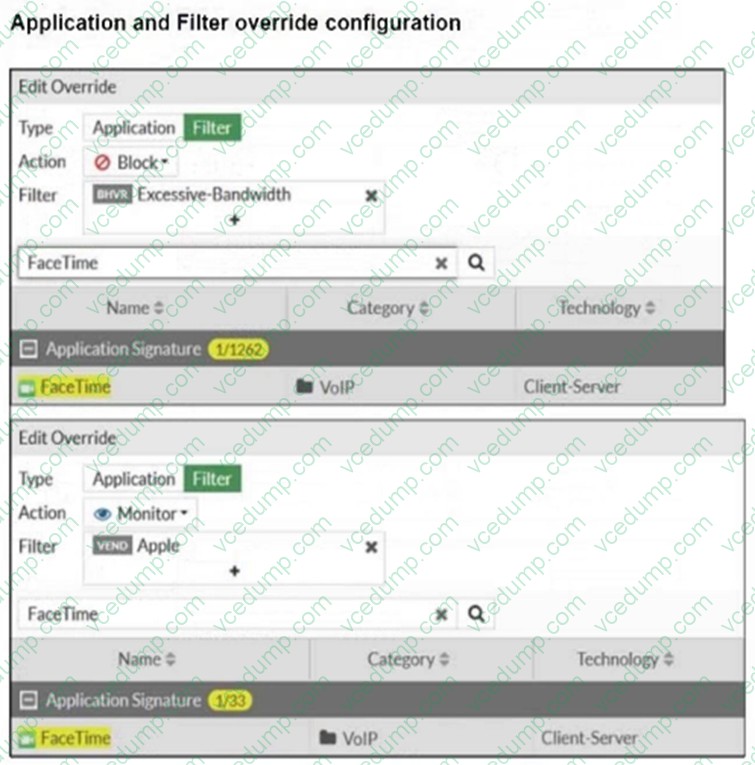
The exhibits show the application sensor configuration and theExcessive- BandwidthandApplefilter details.
Based on the configuration, what will happen to Apple FaceTime if there are only a few calls originating or incoming?
A. Apple FaceTime will be allowed, based on the Video/Audio category configuration.
B. Apple FaceTime will be allowed, based on the Apple filter configuration.
C. Apple FaceTime will be allowed only if the Apple filter in Application and Filter Overrides is set to Allow.
D. Apple FaceTime will be blocked, based on the Excessive-Bandwidth filter configuration. -
Question 62:
What are three key routing principles in SD-WAN? (Choose three.)
A. By default. SD-WAN members are skipped if they do not have a valid route to the destination
B. By default. SD-WAN rules are skipped if only one route to the destination is available
C. By default. SD-WAN rules are skipped if the best route to the destination is not an SD- WAN member
D. SD-WAN rules have precedence over any other type of routes
E. Regular policy routes have precedence over SD-WAN rules -
Question 63:
Refer to the exhibit.
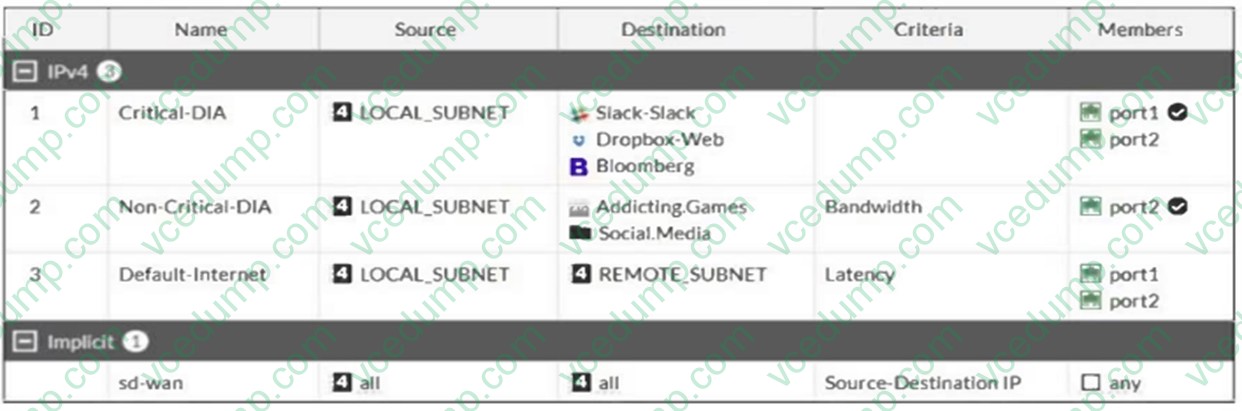
Which algorithm does SD-WAN use to distribute traffic that does not match any of the SD- WAN rules?
A. All traffic from a source IP to a destination IP is sent to the same interface.
B. Traffic is sent to the link with the lowest latency.
C. Traffic is distributed based on the number of sessions through each interface.
D. All traffic from a source IP is sent to the same interface -
Question 64:
An administrator wants to configure dead peer detection (DPD) on IPsec VPN for detecting dead tunnels. The requirement is that FortiGate sends DPD probes only when there is outbound traffic but no response from the peer. Which DPD mode on FortiGate meets this requirement?
A. On Demand
B. On Idle
C. Disabled
D. Enabled -
Question 65:
What are two features of collector agent advanced mode? (Choose two.)
A. In advanced mode, FortiGate can be configured as an LDAP client and group filters can be configured on FortiGate.
B. Advanced mode supports nested or inherited groups.
C. In advanced mode, security profiles can be applied only to user groups, not individual users.
D. Advanced mode uses the Windows convention --NetBios: Domain\Username. -
Question 66:
An administrator has configured the following settings:
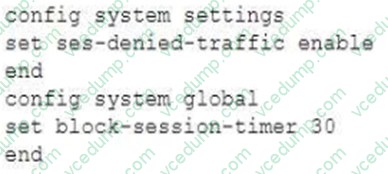
What are the two results of this configuration? (Choose two.)
A. Denied users are blocked for 30 minutes.
B. A session for denied traffic is created.
C. The number of logs generated by denied traffic is reduced.
D. Device detection on all interfaces is enforced for 30 minutes. -
Question 67:
Which statement about the deployment of the Security Fabric in a multi-VDOM environment is true?
A. Downstream devices can connect to the upstream device from any of their VDOMs
B. Each VDOM in the environment can be part of a different Security Fabric
C. VDOMs without ports with connected devices are not displayed in the topology
D. Security rating reports can be run individually for each configured VDOM -
Question 68:
Refer to the exhibit.

FortiGate is configured for firewall authentication. When attempting to access an external website, the user is not presented with a login prompt.
What is the most likely reason for this situation?
A. The Service DNS is required in the firewall policy.
B. The user is using an incorrect user name.
C. The Remote-users group is not added to the Destination.
D. No matching user account exists for this user. -
Question 69:
What are two features of FortiGate FSSO agentless polling mode? (Choose two.)
A. FortiGate directs the collector agent to use a remote LDAP server.
B. FortiGate uses the SMB protocol to read the event viewer logs from the DCs.
C. FortiGate does not support workstation check.
D. FortiGate uses the AD server as the collector agent. -
Question 70:
How can you disable RPF checking?
A. Disable src-check on the interface level settings
B. Unset fail-alert-interfaces on the interface level settings.
C. Disable fail-detect on the interface level settings.
D. Disable strict-src-check under system settings.
Related Exams:
-
EMEA-ADVANCED-SUPPORT
Fortinet EMEA Advanced Support -
FCP_FAC_AD-6.5
FCP - FortiAuthenticator 6.5 Administrator -
FCP_FAZ_AD-7.4
FCP - FortiAnalyzer 7.4 Administrator -
FCP_FAZ_AN-7.4
FCP - FortiAnalyzer 7.4 Analyst -
FCP_FAZ_AN-7.6
Fortinet NSE 5 - FortiAnalyzer 7.6 Analyst -
FCP_FCT_AD-7.2
FCP - Forti Client EMS 7.2 Administrator -
FCP_FCT_AD-7.4
Fortinet NSE 6 - FortiClient EMS 7.4 Administrator -
FCP_FGT_AD-7.4
FCP - FortiGate 7.4 Administrator -
FCP_FGT_AD-7.6
FortiGate 7.6 Administrator FCP_FGT_AD-7.6 -
FCP_FMG_AD-7.4
FCP - FortiManager 7.4 Administrator
Tips on How to Prepare for the Exams
Nowadays, the certification exams become more and more important and required by more and more enterprises when applying for a job. But how to prepare for the exam effectively? How to prepare for the exam in a short time with less efforts? How to get a ideal result and how to find the most reliable resources? Here on Vcedump.com, you will find all the answers. Vcedump.com provide not only Fortinet exam questions, answers and explanations but also complete assistance on your exam preparation and certification application. If you are confused on your FCP_FGT_AD-7.4 exam preparations and Fortinet certification application, do not hesitate to visit our Vcedump.com to find your solutions here.