9L0-415 Exam Details
-
Exam Code
:9L0-415 -
Exam Name
:OS X Support Essentials 10.9 -
Certification
:Apple Certifications -
Vendor
:Apple -
Total Questions
:218 Q&As -
Last Updated
:Jul 10, 2026
Apple 9L0-415 Online Questions & Answers
-
Question 141:
Review the screenshot from FileVault preferences, and then answer the question below.
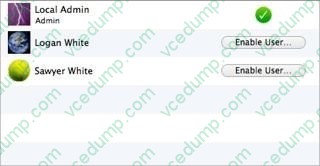
If you click Enable User for the Logan White account, what is the effect?
A. FileVault 2 is enabled immediately for the Logan White account, and FileVault begins encrypting the Logan White home folder.
B. You are prompted immediately to enter the login password for the Logan White account, after which, Logan White will be able to unlock and decrypt the system disk, and restart the computer.
C. You are prompted immediately to enter an administrator password, after which, the user of the Logan White account will be able to unlock and decrypt the system disk, and restart the computer.
D. At next login, the user of the Logan White account will be prompted to enter the login password, after which, the user will be able to unlock and decrypt the system disk, and restart the computer. -
Question 142:
Review the screenshot of the My Account pane of Users and Groups preferences, and then answer the question below.
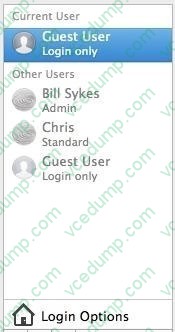
An OS X Mountain Lion computer has three local users configured as shown above. Bill Sykes has lost the password to his account. Which procedure will let you reset his password?
A. Log in as Bill Sykes using the root password, open Users and Groups preferences, and then reset his password.
B. Restart the Mac from the OS X Recovery partition, open Terminal from the Utilities menu, type resetpassword and press Return to open the Reset Password utility, and then reset his password.
C. Log in as Chris, open Directory preferences and enable the root user, then authenticate as the root user in Users and Groups preferences, and then reset Bill Sykes' password.
D. Log in as Chris, open Reset Password from the Utilities folder, and then reset Bill Sykes' password. -
Question 143:
The diagnostic reporting feature automatically creates a diagnostic report log any time an application crashes or hangs. The diagnostic report log can be viewed immediately, reported to Apple via the Internet, or viewed later in the / Applications/Utilities/Console application.
A. What does the Disk Utility Verify and Repair feature do?
B. What does OS X use bundles or packages for?
C. What does the diagnostic reporting feature do?
D. What happens during user logout? -
Question 144:
Which folder contains items that instruct the launchd process what to launch during OS X Mountain Lion startup?
A. /System/Library/LaunchDaemons/
B. /var/run/launchd/
C. /etc/launchd/
D. /Library/Extensions/ -
Question 145:
What's AirDrop, and how do you know if a specific Mac supports it?
A. AirDrop provides a quick and easy method to share files locally via Wi-Fi. AirDrop creates a secure peer-to-peer network between local devices. You can verify that a Mac supports AirDrop from the Finder Go menu.
B. Archive files are much simpler to create in the Finder and are compatible with third-party operating systems. Disk images are more difficult to create and manage, but they offer greater flexibility. Primarily, disk images can be easily modified and converted. However, OS X style disk images aren't compatible with third-party operating systems.
C. The DNS service is used to translate host names to IP addresses via forward lookups and translate IP addresses to host names via reverse lookups. DNS is architected as a hierarchy of worldwide domain servers. Local DNS servers provide name resolution and possibly host names for local clients. These local DNS servers connect to DNS servers higher in the DNS hierarchy to resolve both unknown host names and host local domain names.
D. Any account password reset process won't change any keychain passwords. Therefore, the user's keychains won't automatically open when the user logs in with her new password. The user will have to manually change her keychain passwords using the Keychain Access utility. -
Question 146:
How can you encrypt a disk without losing its contents?
A. The Archive option in the Finder creates compressed zip archive files.
B. From the Finder, you can encrypt a disk without losing its contents by secondary (or Control-) clicking the disk and then choosing Encrypt from the shortcut menu.
C. Though Spotlight indexes file and folder permissions, it allows other users to search the contents of locally attached nonsystem volumes when ownership is ignored on those volumes.
D. From the "Connect to Server" dialog in the Finder, you can connect to: Apple File Protocol (AFP) Server Message Blocks/Common Internet File System (SMB/CIFS) ?SMB2 Network File System (NFS) Web-based Distributed Authoring and Versioning (WebDAV) File Transfer Protocol (FTP) network file services -
Question 147:
In OS X Mountain Lion, which TWO types of file service hosts can you browse in the Network folder? (Select 2)
A. WebDAV
B. FTP
C. DFS
D. SMB
E. AFP -
Question 148:
System Preferences is divided into five categories, from top to bottom; Personal, Hardware, Internet and Wireless, System, and Other.
A. How does file system journaling work?
B. What does the diagnostic reporting feature do?
C. What are the advantages of application sandboxing?
D. What are the five System Preference categories? -
Question 149:
Which dynamic service discovery protocol does OS X use to discover devices on a network?
A. SLP
B. AppleTalk
C. Bonjour
D. DynDNS -
Question 150:
You enable Stealth Mode on an OS X Mountain Lion computer's firewall. How does this affect the computer's behavior?
A. The Mac will not register any services that are offered via Bonjour.
B. The Mac will not allow outgoing connections for non-approved applications.
C. The Mac will not respond to incoming connection requests.
D. The Mac will not respond to diagnostic probes such as ping.
Related Exams:
-
9L0-004
Apple Desktop Service Exam -
9L0-005
Apple Desktop Service Certification Exam -
9L0-006
Apple Macintosh Service Exam -
9L0-007
Macintosh Service Certification Exam -
9L0-009
Macintosh Service Certification Exam -
9L0-011
Mac Service Certification Exam -
9L0-012
Mac Service Certification -
9L0-060
Mac OS X 10.4 Service and Support Exam -
9L0-061
MAC OS X 10.5 Troubleshooting Exam -
9L0-062
Mac OS X v10.6 Troubleshooting Exam
Tips on How to Prepare for the Exams
Nowadays, the certification exams become more and more important and required by more and more enterprises when applying for a job. But how to prepare for the exam effectively? How to prepare for the exam in a short time with less efforts? How to get a ideal result and how to find the most reliable resources? Here on Vcedump.com, you will find all the answers. Vcedump.com provide not only Apple exam questions, answers and explanations but also complete assistance on your exam preparation and certification application. If you are confused on your 9L0-415 exam preparations and Apple certification application, do not hesitate to visit our Vcedump.com to find your solutions here.