9L0-415 Exam Details
-
Exam Code
:9L0-415 -
Exam Name
:OS X Support Essentials 10.9 -
Certification
:Apple Certifications -
Vendor
:Apple -
Total Questions
:218 Q&As -
Last Updated
:Jul 10, 2026
Apple 9L0-415 Online Questions & Answers
-
Question 131:
A Safe Boot performs the following permanent actions: attempting to repair the system volume structure, deleting system KEXT caches, and deleting font caches.
A. How can you acquire the OS X Mavericks installer?
B. Where are the keychain files stored?
C. Which changes are made when OS X Safe Boots?
D. What does the master password do? -
Question 132:
File system journaling records what file operations are in progress at any given moment. This way, if a power failure or system crash occurs, after the system restarts, it will be able to quickly verify the integrity of the volume by "replaying" the journal.
A. What does the master password do?
B. What are PPD files responsible for?
C. How does file system journaling work?
D. What are the five System Preference categories? -
Question 133:
What's used to identify a Wi-Fi network?
A. OS X sharing services include DVD or CD sharing, Screen Sharing, File Sharing, Printer Sharing, Scanner Sharing, Remote Login, Remote Management (ARD), Apple Events, Internet Sharing, and Bluetooth Sharing.
B. The network service order list is used to determine the primary network service interface if there is more than one active service. All network traffic that isn't better handled via local connection to an active network service interface is sent to the primary network service interface. So in most cases all WAN traffic, Internet traffic, and DNS resolution is sent through the primary network service interface.
C. A Service Set Identifier, or SSID, is used to identify a Wi-Fi network name and associated configuration.
D. AirDrop provides a quick and easy method to share files locally via Wi-Fi. AirDrop creates a secure peer-to-peer network between local devices. You can verify that a Mac supports AirDrop from the Finder Go menu. -
Question 134:
You have a Mac OS X v10.6.8 computer that has several user accounts. If you install OS X Mountain Lion without first erasing the target volume, what will happen to the 10.6.8 operating system and the existing user accounts?
A. The Installer archives the 10.6.8 OS and installs Mountain Lion. It maintains the user accounts.
B. The Installer upgrades the 10.6.8 OS to Mountain Lion. It maintains the user accounts.
C. The Installer replaces the 10.6.8 OS with Mountain Lion. It archives the user accounts, but they can be restored manually.
D. The Installer erases the 10.6.8 OS and installs Mountain Lion. It archives the user accounts, but they can be restored manually. -
Question 135:
How is Quick Look able to preview so many file types?
A. Quick Look uses a number of plug-ins that give it the capability to preview documents. These plug-ins live in Quick Look folders in any Library folder on OS X.
B. During installation of OS X Mavericks, the only optional choice is to define an installation destination other than the Mac computer's current default system disk.
C. The Finder doesn't show items with periods at the beginning of their filenames or items with the hidden file flag enabled. Both methods for hiding items can only be managed from the command line interface.
D. Any application that supports Auto Save and the Finder can manage document locking. -
Question 136:
OS X software updates can be downloaded from the Apple Support website using any modern web browser. Updates take the form of installation packages that are installed via the Installer application.
A. How can you prevent a user from installing software updates?
B. What four methods can be used to eject a volume or disk from the Finder?
C. Which applications are used to manually acquire and install OS X software updates?
D. Which items aren't loaded when OS X Safe Boots? -
Question 137:
Review the screenshot, and then answer the question below.
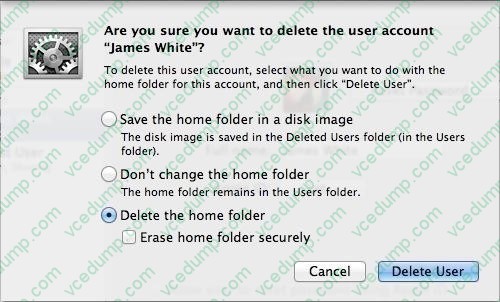
If you click Delete User in the dialog shown above, what will happen to James White's home folder?
A. It will be moved to the Trash.
B. "Deleted" will be appended to the home folder name, and it will be archived in Time Machine in a compressed and encrypted file.
C. "Deleted" will be appended to the home folder name, and its permissions will be changed to allow administrator user access only.
D. It will be deleted immediately, without being moved to the Trash. -
Question 138:
How does the OS X built-in firewall work?
A. The Disk Utility Repair Permissions feature repairs only the ownership and permissions for items installed by Apple. However, this may resolve issues with third-party products.
B. The Ping tab of Network Utility allows you to test basic connectivity to another network host by sending and then waiting for the return of a ping packet.
C. The OS X built-in firewall inspects each incoming network connection to determine if it's allowed. Connections are allowed or denied on a per-application basis.
D. Network services are established using a common network protocol. The protocol specifies which TCP or UDP port number is used for communications. -
Question 139:
How do you start up an OS X Mountain Lion computer in Safe Mode?
A. Hold down Shift during startup.
B. Open Terminal, type safe_boot, press Return, and then restart the Mac.
C. Hold down Command-Option-P-R during startup.
D. Start up from the OS X Recovery partition, and then choose Safe Boot from the Startup Disk menu. -
Question 140:
What are four common issues that can interrupt network services on a Mac computer?
A. To verify a specific service is available from a service provider, first use the Network Utility Ping tab to verify basic connectivity. Then use the Network Utility Port Scan tab to verify the specific service port(s) are open. You should always limit the port scan to the specific ports required for the network service you're testing.
B. Four common issues that can interrupt network services on a Mac are: Ethernet connectivity issues, which can cause the hardware network interface to become inactive or introduce excessive packet errors Wi-Fi connectivity issues caused by the selection of an improper Wi-Fi network or excessive wireless interference DHCP service issues, which prevent proper TCP/IP configuration ?DNS service issues, which prevent host name resolution
C. Migration Assistant can migrate information from other OS X systems, Windows systems, and other disks, including Time Machine backups.
D. Review Network preferences, review the Network Utility statistics, and attempt to connect to different network services.
Related Exams:
-
9L0-004
Apple Desktop Service Exam -
9L0-005
Apple Desktop Service Certification Exam -
9L0-006
Apple Macintosh Service Exam -
9L0-007
Macintosh Service Certification Exam -
9L0-009
Macintosh Service Certification Exam -
9L0-011
Mac Service Certification Exam -
9L0-012
Mac Service Certification -
9L0-060
Mac OS X 10.4 Service and Support Exam -
9L0-061
MAC OS X 10.5 Troubleshooting Exam -
9L0-062
Mac OS X v10.6 Troubleshooting Exam
Tips on How to Prepare for the Exams
Nowadays, the certification exams become more and more important and required by more and more enterprises when applying for a job. But how to prepare for the exam effectively? How to prepare for the exam in a short time with less efforts? How to get a ideal result and how to find the most reliable resources? Here on Vcedump.com, you will find all the answers. Vcedump.com provide not only Apple exam questions, answers and explanations but also complete assistance on your exam preparation and certification application. If you are confused on your 9L0-415 exam preparations and Apple certification application, do not hesitate to visit our Vcedump.com to find your solutions here.