9L0-415 Exam Details
-
Exam Code
:9L0-415 -
Exam Name
:OS X Support Essentials 10.9 -
Certification
:Apple Certifications -
Vendor
:Apple -
Total Questions
:218 Q&As -
Last Updated
:Jul 10, 2026
Apple 9L0-415 Online Questions & Answers
-
Question 121:
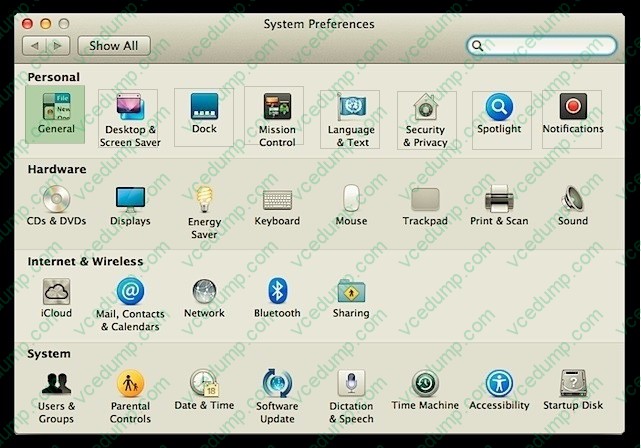
You can deselect the option to "Reopen windows when logging back in" from the logout verification dialog. You can deselect the option to "Close windows when quitting an application" from General preferences. Also from General preferences, you can select the option to "Ask to keep changes when closing documents," which turns off the Auto Save feature.
A. Where can you adjust application Auto Save and Resume options?
B. How can you identify which applications are installed on your Mac?
C. How can you identify if a Mac requires a firmware update?
D. How can you prevent a user from installing software updates? -
Question 122:
What's Auto Save? How can you identify an application that supports Auto Save?
A. Auto Save allows compatible OS X applications to automatically save changes to users' documents. A user just saves a document once, then never has to think about saving changes again. Applications that support Auto Save feature a Duplicate function in the File menu as opposed to a default Save As function.
B. The master password is used to reset local account passwords.
C. You can use the System Information application to easily scan all the appropriate application locations and return a list of installed applications.
D. Disk Utility is the primary application for creating and managing disk images. -
Question 123:
Migration Assistant is open on a Mac with OS X Mountain Lion installed. It CANNOT migrate user files from ________.
A. a Time Machine backup on a connected USB hard disk
B. an archive stored on iCloud
C. another volume on the same computer
D. a Windows XP computer with Service Pack 3 or later installed -
Question 124:
Each primary stage of system initialization can be indicated by the following: firmware, startup chime or bright flash of the power-on light, followed by a light gray screen on the primary display; booter, a dark gray Apple logo on the primary display; kernel, a small dark gray spinning gear or spinning earth icon below the Apple logo; and system launchd, a white screen on all displays followed by the login screen.
A. What are the primary system initialization stages in OS X? What are the visual and audible cues of these items?
B. What are some privacy and security concerns with the Spotlight service?
C. What are the advantages of code signing?
D. Why does the Finder hide certain folders at the root of the system volume? -
Question 125:
OS X uses built-in generic drivers based on each device class. For example, there are generic drivers for scanners and printers that can be used instead of official third-party drivers.
A. How does network service order affect network connectivity?
B. How does OS X support third-party devices without needing third-party device drivers?
C. What are some known issues that arise when connecting to network file services?
D. How does OS X use dynamic network service discovery protocols to access network services? -
Question 126:
You have a user account on an OS X Mountain Lion computer that has multiple user accounts. How can you interact with another user's Dropbox folder that has default permissions?
A. You can see its contents, but you cannot add files to it.
B. You can neither see its contents nor add files to it.
C. You cannot see its contents, but you can add files to it.
D. You can see its contents and you can add files to it. -
Question 127:
How do the four default System Preferences categories differ?
A. The easiest method to configure VPN settings is to use a configuration profile containing all the relevant VPN setup information.
B. During installation of OS X Mavericks, the only optional choice is to define an installation destination other than the Mac computer's current default system disk.
C. Archive files are much simpler to create in the Finder and are compatible with third-party operating systems. Disk images are more difficult to create and manage, but they offer greater flexibility. Primarily, disk images can be easily modified and converted. However, OS X style disk images aren't compatible with third-party operating systems.
D. Generally, Personal preferences affect only a single user; Hardware preferences adjust hardware and peripheral settings; Internet and Wireless preferences affect personal and system network settings; and System Preferences affect all users and often require administrative access. -
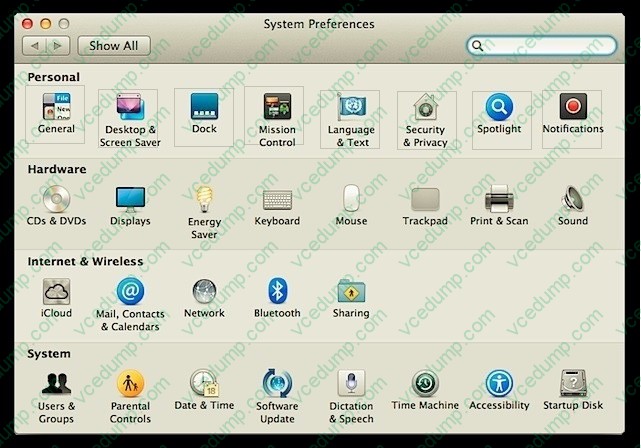
Question 128:
HOTSPOT
In the screenshot below, click the icon of the OS X Mountain Lion System Preferences pane where you can disable the feature that restores windows when apps are reopened.
Hot Area:
-
Question 129:
When a user chooses Shut Down from the Apple menu, what process quits all of the user's open applications and tells the kernel to power down the computer?
A. init
B. launchd
C. loginwindow
D. kernel_task -
Question 130:
Which statement best describes how Time Machine stores files from an OS X Mountain Lion computer, when backing up to a directlyconnected FireWire hard disk drive?
A. Each file is saved to the external hard disk once. Files that do not change between backups are represented by hard links to save space.
B. Each file is saved to the external hard disk once. Files that do not change between backups are represented by symbolic links to save space.
C. Each file is saved to the external hard disk once. File changes are stored in a database on the external hard disk.
D. Each file is rewritten to the external hard disk during each backup.
Related Exams:
-
9L0-004
Apple Desktop Service Exam -
9L0-005
Apple Desktop Service Certification Exam -
9L0-006
Apple Macintosh Service Exam -
9L0-007
Macintosh Service Certification Exam -
9L0-009
Macintosh Service Certification Exam -
9L0-011
Mac Service Certification Exam -
9L0-012
Mac Service Certification -
9L0-060
Mac OS X 10.4 Service and Support Exam -
9L0-061
MAC OS X 10.5 Troubleshooting Exam -
9L0-062
Mac OS X v10.6 Troubleshooting Exam
Tips on How to Prepare for the Exams
Nowadays, the certification exams become more and more important and required by more and more enterprises when applying for a job. But how to prepare for the exam effectively? How to prepare for the exam in a short time with less efforts? How to get a ideal result and how to find the most reliable resources? Here on Vcedump.com, you will find all the answers. Vcedump.com provide not only Apple exam questions, answers and explanations but also complete assistance on your exam preparation and certification application. If you are confused on your 9L0-415 exam preparations and Apple certification application, do not hesitate to visit our Vcedump.com to find your solutions here.