74-343 Exam Details
-
Exam Code
:74-343 -
Exam Name
:Managing Projects with Microsoft Project -
Certification
:Microsoft Certifications -
Vendor
:Microsoft -
Total Questions
:128 Q&As -
Last Updated
:Dec 02, 2021
Microsoft 74-343 Online Questions & Answers
-
Question 41:
You are a project manager in an organization that uses Microsoft Project.
You are managing a project, which involves the construction of a new shopping mall. The shopping mall is scheduled to finish by October 21. The mall needs to start operations by October 31. Your sponsor asks you to closely monitor your
schedule and informs you that missing the October 21 deadline could jeopardize the October 31 start date.
You are concerned about construction delays, and you want to reduce the time buffer. Your sponsor agrees with this decision.
You need to show the time between the End of Construction and the Grand Opening Day as a time buffer for delays.
Which two actions should you perform? (Each correct answer presents part of the solution. Choose two.)
A. Create a deadline for the Grand Opening Day task on October 31.
B. Create milestones tasks for End of Construction and Grand Opening Day, with a Finish to Start link and 10 elapsed days of lag time.
C. Create milestones tasks for End of Construction and Grand Opening Day, with a Start to Finish link and 10 elapsed days of lead time.
D. Enter a finish date of October 21 on the End of Construction task. -
Question 42:
A company is open for business Monday through Friday, 7:30 A.M. to 4:30 P.M. The company closes a total of eight full days and two half days for holidays each year. For the months of June, July, and August, the company closes at 1 P.M.
on Fridays.
You need to ensure that all projects show when employees can perform work.
Which three actions should you perform? Each correct answer presents part of the solution.
A. Edit the standard calendar.
B. On the Work Weeks tab, add a row named Summer. Enter the Start and Finish dates, and then edit the details to set specific working times for Friday.
C. Use the Exceptions tab to enter information for holidays.
D. In the Project Options dialog box, on the Schedule tab, change Hours per day to 4.
E. Open the Project Information dialog box for the project. -
Question 43:
Your organization uses Microsoft Project and records actual hours worked on the project.
You manage a small e-commerce website implementation project. One of your testers asks for assistance in completing a critical task, and you find two additional testing resources that can assist with executing the critical test cases.
The total estimated work for the effort-driven task is 100 hours. The original testing resource, Resource1, completes 25 hours of work on the task.
You need to add Resource2 and Resource3 to the task and split the remaining hours across all three resources now working on the task.
Which two actions should you perform? (Each correct answer presents part of the solution. Choose two.)
A. Open the Task Form and format it to show Work Details. Enter 25 hours of actual work for Resource1. Then save the changes.
B. Open the Task Form and format it to show Work Details. Enter 75 hours of remaining work for the assigned resource. Then save the changes.
C. Assign Resource2 and Resource3 to the task. Then save the changes.
D. Open the Task Form and format it to show Work Details. Enter 33.33 hours of work for each resource. Then save the changes. -
Question 44:
You are a project manager who uses Microsoft Project.
You work on a project that requires you to generate many documents. Each task in your project plan must have a document associated and stored in your Microsoft SharePoint Intranet Environment. These documents are 25 megabytes in
size.
You need to share this project plan by email with your team and ensure that they can easily access the documents.
What should you do?
A. In the Task Information notes, insert an object from a file. Uncheck the Link option and make sure that it is a document, not a link. Select your document and click on it. Project will automatically create the reference to this document.
B. Create a task custom field named Link to Document, and select the field type as Text Hyperlink. Copy the SharePoint URL of each document and paste it as a text into the Link to Document task custom field. Microsoft Project will convert this text to a clickable hyperlink.
C. Copy and paste the document into your Gantt chart, and create a link between your task and the document.
D. Go to backstage and use the feature Add and Link a SharePoint Document to My Tasks to select your document in your SharePoint Library. Select your task. Project will automatically create a clickable hyperlink.
E. Copy the SharePoint URL of each document and paste in the Hyperlink task standard field as a text. Project will convert this text to a clickable hyperlink. -
Question 45:
Your organization uses Microsoft Project.
A senior stakeholder informs you that your project start date is delayed and gives you a new start date.
You need to change the project start date without adding constraints.
What are three possible ways to achieve this goal? (Each correct answer presents a complete solution. Choose three.)
A. Modify the Start Date field in project information to the new date.
B. Use Move Project to move the project to the new start date.
C. Enter the new start date for all tasks without predecessors.
D. Use Update Project and set a new start date.
E. Set a new project status date and then set the baseline. -
Question 46:
Your company uses Microsoft Project to track project progress.
You need to accurately calculate cost performance index (CPI) as a health indicator.
Which three actions should you perform? (Each correct answer presents part of the solution. Choose three.)
A. Ensure there is a value in the Status Date field.
B. Ensure there is a value in the Standard Rate field.
C. Ensure Task Dependencies exist in the schedule.
D. Enter actual progress information.
E. Level resources within available slack. -
Question 47:
You are a project manager who uses Microsoft Project.
You manage a critical project, which involves many team members. You are the only team member who has Microsoft Project. You need to receive updates from team members directly from Microsoft SharePoint without having to reenter the
updates in your project.
What should you do?
A. Set up your project to sync with a SharePoint Task List.
B. Save your project as an mpp file to a SharePoint Shared Documents library.
C. Copy and paste all tasks into a Microsoft Excel file saved in SharePoint.
D. Copy and paste all tasks into a new SharePoint Task List. -
Question 48:
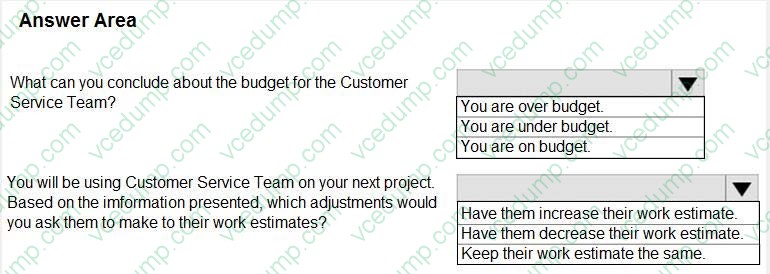
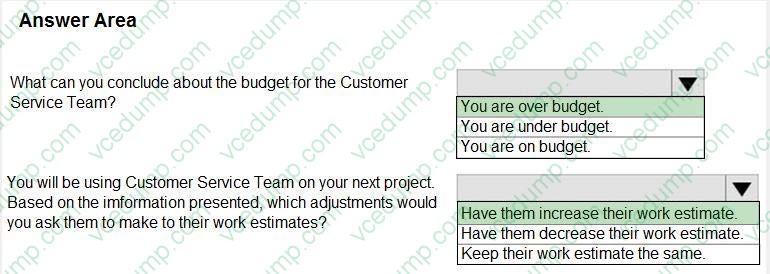
You are evaluating a completed project by using Microsoft PPM.
You have displayed the Resource Sheet view and selected the Work table. In this project, the Custom Service Team was responsible for 25 tasks.

Use the drop-down menus to select the answer choice that answer each question.
Hot Area:
-
Question 49:
You are a project manager, and your company uses Microsoft Project. You are setting up a preliminary schedule by using manually scheduled tasks.
You create two manually scheduled tasks and link them in a Finish to Start relationship. The project team member asks you to increase the duration of the predecessor task.
You notice that the successor task start date is now before the finish date of the predecessor task.
You want the successor task to start after the predecessor finishes.
What should you do?
A. Select both tasks and click Unlink.
B. Select the successor task and click Mark on Track.
C. Select the predecessor task and click Respect Links.
D. Select the successor task and click Respect Links. -
Question 50:
You use Microsoft Project to manage a project that has customer-required milestone completion dates. You need to see graphically that your milestones have slipped beyond your customer-required dates. What should you add to the project milestones?
A. a Must finish on constraint
B. a finish date
C. a deadline
D. a Finish no later than constraint
Related Exams:
-
62-193
Technology Literacy for Educators -
70-243
Administering and Deploying System Center 2012 Configuration Manager -
70-355
Universal Windows Platform – App Data, Services, and Coding Patterns -
77-420
Excel 2013 -
77-427
Excel 2013 Expert Part One -
77-725
Word 2016 Core Document Creation, Collaboration and Communication -
77-726
Word 2016 Expert Creating Documents for Effective Communication -
77-727
Excel 2016 Core Data Analysis, Manipulation, and Presentation -
77-728
Excel 2016 Expert: Interpreting Data for Insights -
77-731
Outlook 2016 Core Communication, Collaboration and Email Skills
Tips on How to Prepare for the Exams
Nowadays, the certification exams become more and more important and required by more and more enterprises when applying for a job. But how to prepare for the exam effectively? How to prepare for the exam in a short time with less efforts? How to get a ideal result and how to find the most reliable resources? Here on Vcedump.com, you will find all the answers. Vcedump.com provide not only Microsoft exam questions, answers and explanations but also complete assistance on your exam preparation and certification application. If you are confused on your 74-343 exam preparations and Microsoft certification application, do not hesitate to visit our Vcedump.com to find your solutions here.