74-343 Exam Details
-
Exam Code
:74-343 -
Exam Name
:Managing Projects with Microsoft Project -
Certification
:Microsoft Certifications -
Vendor
:Microsoft -
Total Questions
:128 Q&As -
Last Updated
:Dec 02, 2021
Microsoft 74-343 Online Questions & Answers
-
Question 31:
You are a project manager for a company that uses Microsoft Project.
You are developing a schedule and plan to use the leveling order of Priority, Standard.
You need to create a task which leveling will not change.
What should you do?
A. Set task priority to 100
B. Set task priority to 1000
C. Set task priority to 0
D. Set task priority to 1 -
Question 32:
You recently updated a schedule by using Microsoft Project.
The vice president of engineering has asked you to show progress only on project milestones and identify milestones falling behind.
You need to find a way to show milestone progress.
Which solution would you meet this objective?
A. Run the Late Tasks report.
B. Run the Milestone report.
C. Run the Slipping Tasks report.
D. Show Gantt Chart view and filter for Milestones. -
Question 33:
You are a project manager who uses Microsoft Excel.
Your company decides to migrate all of the current projects in Microsoft Excel to Microsoft Project. They allow all employees to spend 8 hours migrating each project plan. Your current and unique project plan has 462 tasks with duration in
days, and resources have been assigned and named. You have a status meeting in two days.
You need to provide your project's information by using Microsoft Project.
What should you do?
A. Create a new project plan in Microsoft Project and use the Gantt Chart Wizard to import from an Excel Workbook.
B. Rename the Excel file from .xlsx to .mpx, and open it by using Microsoft Project, activating the Mapping Excel Workbook feature. Map tasks, durations, and resources assigned into Microsoft Project fields.
C. Open the Excel File .xlsx directly from Microsoft Project, which will convert and map tasks, durations, and resources assigned into Project fields.
D. Create a VBA macro by using the Excel Record Macro feature to import all tasks, durations, and resources assigned from Excel into your new Microsoft Project project plan. -
Question 34:
You are a project manager, and you successfully complete a server consolidation project for one of your data centers. You use Microsoft Project to plan and track the work.
Your manager wants you to begin similar projects on two other data centers. You need to create a template based on the plan you used to manage the first data center consolidation project.
You need to ensure that the template has all baseline and actual data values removed.
What should you do?
A. Within Microsoft Windows Explorer, create a copy of the original project plan and rename the file type from .mpp to .mpt.
B. Open the plan and use the Move Project button to set the start date to the start of the new project. Save the project file as Template.mpp.
C. Open the plan and reset the percent complete for each task to 0. Save the file as Template.mpp.
D. Open the plan and save the plan as a Project Template.
E. Open the plan, and copy and paste all of the task information into a new plan. Save the plan as a Project Template. -
Question 35:
Your company uses Microsoft Project.
You are setting up a preliminary schedule by using manually scheduled tasks. You create a task with no duration, start, or finish date, and then you assign a resource. Later, you enter a duration of three days for that task.
You need to let the resource know how the Work will be affected.
What should you say?
A. Work will increase to 24 hours.
B. Work will remain at 0 hours.
C. Work will increase to 16 hours.
D. Work will remain at 8 hours. -
Question 36:
Your company uses Project Professional 2013.
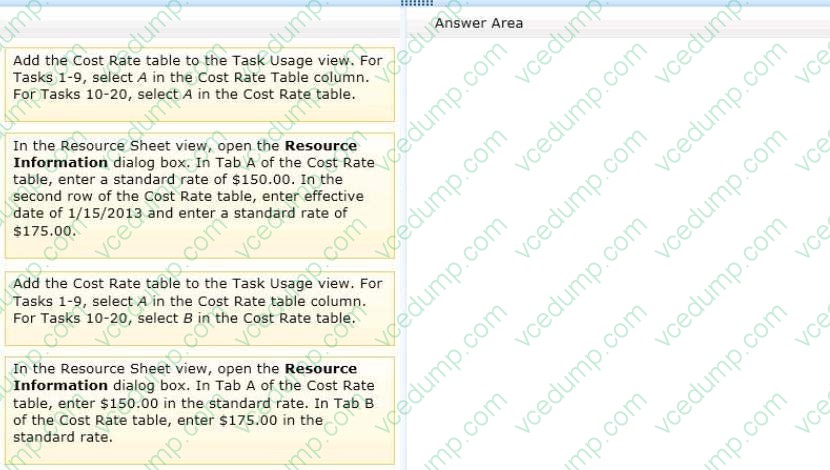
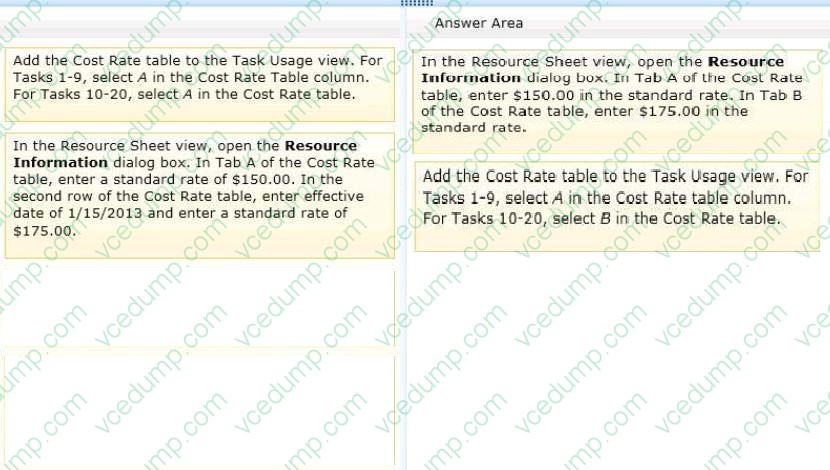
You are a program manager in charge of a multi-program software integration project. The project is scheduled from January 1, 2012-August 3, 2013. You have a consultant resource that charges a different rate based on each task
completed. Tasks 1 through 9 are billed at a rate of $150.00 per hour. Tasks 10 through 20 are billed at a rate of $175.00 per hour. You need to set up your schedule to ensure that the correct resource rate is associated with the correct tasks.
Which two actions should you perform in sequence? (To answer, move the appropriate two actions from the list of actions to the answer area and arrange them in the correct order.)
Select and Place:
-
Question 37:
Your organization uses Microsoft Project.
You are setting up a preliminary schedule by using manually scheduled tasks.
As you build the task breakdown, you notice a potential scheduling problem indicated by a wavy red line under the finish date of a detail task.
You need to determine the cause of the wavy red line.
What should you do?
A. Evaluate the task to determine if there is a deadline.
B. Insert the Constraint Type field and view the task constraints.
C. Evaluate the task by using the Task Inspector.
D. View the Resource Sheet to see if you have overallocated resources. -
Question 38:
You are tracking a project schedule by using Microsoft Project. The project schedule contains a baseline.
You need to display a view that displays the slippage of the current plan as compared to the baseline for the schedule.
Which two actions will achieve the goal? Each correct answer presents a complete solution.
A. Display the Leveling Gantt and format the chart to display the current plan schedule.
B. Display the Tracking Gantt view with the Usage table.
C. Display the Detail Gantt view.
D. Display any Gantt chart view and configure the view to display slippage. -
Question 39:
You create a new project by using Microsoft Project. You have a list of tasks and a list of resources. All tasks are manually scheduled.
You need to determine which action you can perform by using the Team Planner view.
Which actions can you perform?
A. You can move a task to the Unassigned Tasks pane, and work associated with the task is saved.
B. You can assign tasks to resources before you schedule the task.
C. You can move tasks to different resources in Team Planner view, and you can move a task earlier in the schedule.
D. You can use Team Planner view to assign automatically scheduled tasks to a non-working day. -
Question 40:
You manage a project schedule by using Microsoft Project.
You are concerned about project costs. After viewing the Cost Variance column, you realize that the project has a cost variance of 55,000.00.
You need to view graphically which tasks and resources are causing the $5,000.00 cost variance.
What should you do?
A. View the Resource Graph's Cumulative Cost view.
B. View the Task Cost Overview report.
C. View the Over Budget Tasks report.
D. View the Cost Overrun report.
Related Exams:
-
62-193
Technology Literacy for Educators -
70-243
Administering and Deploying System Center 2012 Configuration Manager -
70-355
Universal Windows Platform – App Data, Services, and Coding Patterns -
77-420
Excel 2013 -
77-427
Excel 2013 Expert Part One -
77-725
Word 2016 Core Document Creation, Collaboration and Communication -
77-726
Word 2016 Expert Creating Documents for Effective Communication -
77-727
Excel 2016 Core Data Analysis, Manipulation, and Presentation -
77-728
Excel 2016 Expert: Interpreting Data for Insights -
77-731
Outlook 2016 Core Communication, Collaboration and Email Skills
Tips on How to Prepare for the Exams
Nowadays, the certification exams become more and more important and required by more and more enterprises when applying for a job. But how to prepare for the exam effectively? How to prepare for the exam in a short time with less efforts? How to get a ideal result and how to find the most reliable resources? Here on Vcedump.com, you will find all the answers. Vcedump.com provide not only Microsoft exam questions, answers and explanations but also complete assistance on your exam preparation and certification application. If you are confused on your 74-343 exam preparations and Microsoft certification application, do not hesitate to visit our Vcedump.com to find your solutions here.