74-343 Exam Details
-
Exam Code
:74-343 -
Exam Name
:Managing Projects with Microsoft Project -
Certification
:Microsoft Certifications -
Vendor
:Microsoft -
Total Questions
:128 Q&As -
Last Updated
:Dec 02, 2021
Microsoft 74-343 Online Questions & Answers
-
Question 21:
Your company uses Microsoft Project.
You are building a schedule by using predecessors to help determine a logical duration. The following image shows a baselined list of tasks with predecessors:

You have been told that Task C is optional, and you recommend inactivating the task to keep it visible on the schedule.
You need to determine what the results are to the schedule when inactivating Task C.
How should you answer?
A. The finish date is reduced by four working days, cost remains unchanged, and baseline cost is reduced by $400.
B. The finish date is reduced by five working days, cost remains unchanged, and baseline cost is unchanged.
C. The finish date is reduced by six working days, cost is reduced by $400, and baseline cost is reduced by $400.
D. The finish date is reduced by four calendar days, cost is reduced by $400, and baseline cost is reduced by $400.
E. The finish date is reduced by six calendar days, cost is reduced by $400, and baseline cost is unchanged. -
Question 22:
Your company uses Microsoft Project, and you are setting up an initial planning schedule.
You need to set each task duration as estimated, until the estimate is confirmed by the assigned resource.
What should you do?
A. Select the estimated check box.
B. Use a task custom field and set the Roll task down to assignment check box.
C. Enter the duration suffixed with -ed for estimated days.
D. Set the task to manually scheduled.
E. Use an assignment custom field and set the Roll assignment up to task check box. -
Question 23:
You are a project manager who uses Microsoft Project.
Your organization migrates all project plans from Microsoft Excel to Microsoft Project. One of the directors of the company has several years of experience using Excel Pivot Tables to analyze and make decisions about projects.
You need to enable project managers to view relevant project information in Excel Pivot Tables.
What should you do?
A. Create a Report view by using the new Built-in Dashboards and Reports feature and export to Excel.
B. Download and install the Microsoft Project to Pivot Table Tool and generate a new Excel Pivot Table by selecting the current project.
C. Use the Excel Data From Other Sources feature to access your project file.
D. Create a report by using the Visual Reports feature. Select Microsoft Excel and choose relevant data to view in the report. -
Question 24:
Your company uses Microsoft Project.
You have two projects, Project 1 and Project 2, as well as a resource pool to contain all of the resources. You use resource leveling and want to prioritize the projects so that Project 1 is the highest priority project and gets all the required
resource availability first. Project 2 then gets resources as they become available from Project 1.
You need to maintain this priority throughout the execution of the project.
What should you do?
A. Set resource leveling to prioritize by project, priority, and standard.
B. Make sure the resource pool is configured to list Project 1 first.
C. Level Project 1 first, and then level Project 2.
D. Set Project Priority higher for Project 1, and then set resource leveling to level by priority, standard. -
Question 25:
You are a project manager who uses Microsoft Project.
A customer has sent you a project plan, which contains several custom fields that you want to use in your project. You have a custom field named CF1 in the Number1 field in your project, and you have a custom field named CF2 in the
Number1 field of your customer's project.
You need to copy the custom fields from your customer's project into your own. You do not want to overwrite your project custom field.
You open both projects.
What should you do next?
A. Use the Organizer to move the custom fields from one project to the other.
B. Cut and paste the custom fields from one project to the other.
C. Drag the custom fields from one project to the other.
D. Open the custom fields dialog box and use the Import Fields button. -
Question 26:
You are a project manager who uses Microsoft Project.
You manage a large project and are capturing actual work for the tasks as they are being worked.
You do not need to enter the time on the actual day worked; however, you need to capture the total amount of time spent on the task.
The fixed work task has a baseline of 20 hours, and the developer's timecard displays the following hours:
Monday = 2 hours Tuesday = 8 hours Wednesday = 4 hours Thursday = 2 hours Friday = 2 hours
The developer informs you that the task is now complete.
You need to update the actual work and mark the task complete.
What should you do?
A. Open the Task Form and format it to show Work Details. Enter 20 hours in the Actual Work for the resource. Enter 0 hours in the remaining work. Mark the task as 100% complete.
B. Open the Task Form and format it to show Schedule Details. Enter 18 hours in the Actual Work for the resource. Enter 2 hours in the remaining work. Mark the task as 100% complete.
C. Open the Task Form and format it to show Work Details. Enter 18 hours in the Actual Work for the resource. Enter 0 hours in the remaining work.
D. Open the Task Form and format it to show Schedule View. Enter 18 hours in the Work column for the resource. -
Question 27:
You are a project manager for an organization that uses Microsoft Project.
You are planning a project schedule that starts on March 1 and lasts four months. However, the sponsor now asks that the project be delayed to have a finish date of December 31.
A. Change all task constraint types to Start no later than.
B. Change the Schedule from field to Project Finish Date.
C. Change the project Start date so that the project will finish on December 31.
D. Change all task constraint types to As late as possible.
E. Change the project Finish date so that the project will finish on December 31. -
Question 28:
You manage a project by using Microsoft Project. The work variance for a task is 48 hours. The remaining work is 25 hours.
A resource completes work for the task.
You need the work variance to be adjusted to reflect what has occurred during the performance of the task.
What should you do?
A. Adjust the value in the Baseline Work column.
B. Enter a 0 in the remaining Duration column.
C. Adjust the value in the Work Variance column.
D. Mark the task as inactive. -
Question 29:
You work as a project manager for a construction company that uses Microsoft Project.
You have created your work breakdown structure (WBS) and are adding resources to your tasks. However, one of your tasks requires multiple resources. You have the name of the project's lead support individual, and you have been
provided with the equivalent of three full-time support resources. These three resources are not named individuals but are part of a group.
The actual individuals from this group will change based on coverage schedules.
The resources have the following cost structures:
The lead is billed out at S175/hour.
The group resources are billed out at $140/hour.
You need to add these resources to the schedule and track your project costs.
Which two actions should you perform? (Each correct answer presents part of the solution. Choose two.)
A. Add the named resource to the task with an allocation of 100% and a standard rate of $175/hour.
B. Add the named resource to the task with an allocation of 400% and a standard rate of $157.50/hour.
C. Add the group resource to the task with an allocation of 300% and a standard rate of $140/hour.
D. Add the group resource to the task with an allocation of 100% and a standard rate of $l40/hour. -
Question 30:
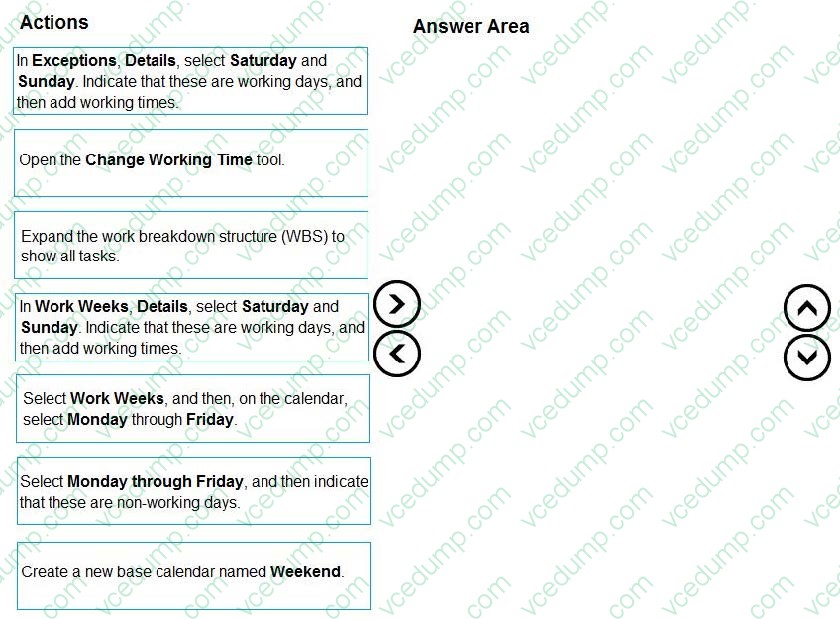
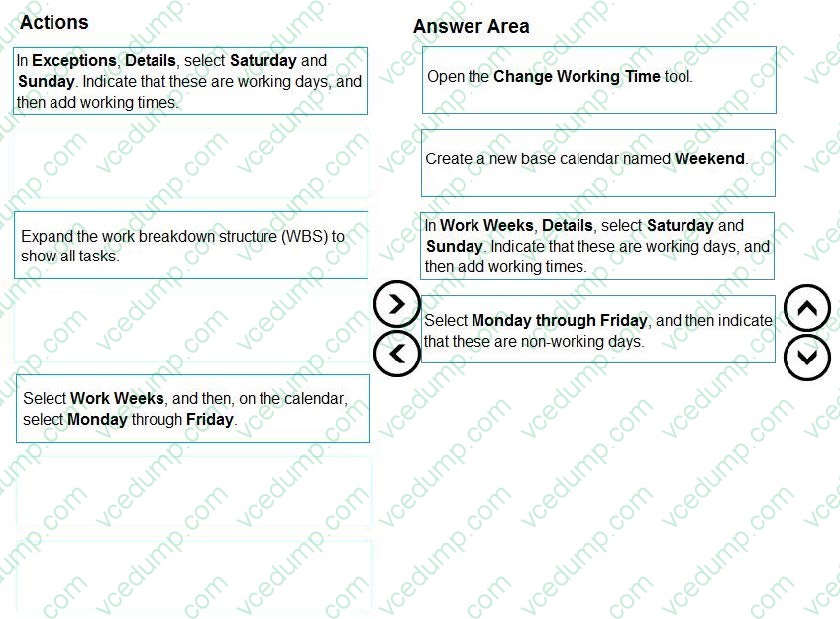
You are creating a new project schedule by using Microsoft Project. Some of the work on the project will take place on weekends.
You need to create a weekend calendar to apply to tasks as needed.
Which four actions should you perform in sequence? To answer, move the appropriate actions from the list of actions to the answer area, and arrange them in the correct order.
Select and Place:
Related Exams:
-
62-193
Technology Literacy for Educators -
70-243
Administering and Deploying System Center 2012 Configuration Manager -
70-355
Universal Windows Platform – App Data, Services, and Coding Patterns -
77-420
Excel 2013 -
77-427
Excel 2013 Expert Part One -
77-725
Word 2016 Core Document Creation, Collaboration and Communication -
77-726
Word 2016 Expert Creating Documents for Effective Communication -
77-727
Excel 2016 Core Data Analysis, Manipulation, and Presentation -
77-728
Excel 2016 Expert: Interpreting Data for Insights -
77-731
Outlook 2016 Core Communication, Collaboration and Email Skills
Tips on How to Prepare for the Exams
Nowadays, the certification exams become more and more important and required by more and more enterprises when applying for a job. But how to prepare for the exam effectively? How to prepare for the exam in a short time with less efforts? How to get a ideal result and how to find the most reliable resources? Here on Vcedump.com, you will find all the answers. Vcedump.com provide not only Microsoft exam questions, answers and explanations but also complete assistance on your exam preparation and certification application. If you are confused on your 74-343 exam preparations and Microsoft certification application, do not hesitate to visit our Vcedump.com to find your solutions here.