70-697 Exam Details
-
Exam Code
:70-697 -
Exam Name
:Configuring Windows Devices -
Certification
:Microsoft Certifications -
Vendor
:Microsoft -
Total Questions
:330 Q&As -
Last Updated
:Apr 18, 2020
Microsoft 70-697 Online Questions & Answers
-
Question 241:
Note: This question is part of a series of questions that present the same scenario. Each question in the series contains a unique solution that might meet the stated goals. Some question sets might have more than one correct solution, while
others might not have a correct solution.
After you answer a question in this section, you will NOT be able to return to it. As a result, these questions will not appear in the review screen.
You administer devices in your corporate environment. The company allows employees to bring their own devices (BYOD). All BYOD devices must run Windows 10. For employees who elect to not use BYOD, the company provides a
corporate laptop.
The company has a Microsoft Intune subscription and all BYOD devices have the Intune client installed. None of the BYOD devices are joined to the domain. All the corporate standard devices are managed by System Center Configuration
Manager (SCCM).
You have an application that was developed in house that must be installed on all the BYOD devices.
The application must be installed automatically on the BYOD devices without any user intervention.
Solution: You upload the app to the Intune storage and make the app available.
Does the solution meet the goal?
A. Yes
B. No -
Question 242:
You have an Active Directory domain named contoso.com. Work Folders are deployed.
A user named User1 has a Windows 10 Home computer that is configured to use Work Folders.
User1 connects a new removable USB drive to the computer.
User1 needs to move the Work Folders to the new drive.
What should User1 do first?
A. From the Work Folders settings, click Stop using Work Folders.
B. From Services, stop the Work Folders service.
C. From Services, set the BitLocker Drive Encryption Service to start automatically.
D. From the Work Folders settings, click Manage Credentials. -
Question 243:
DRAG DROP
You have a Microsoft Intune subscription.
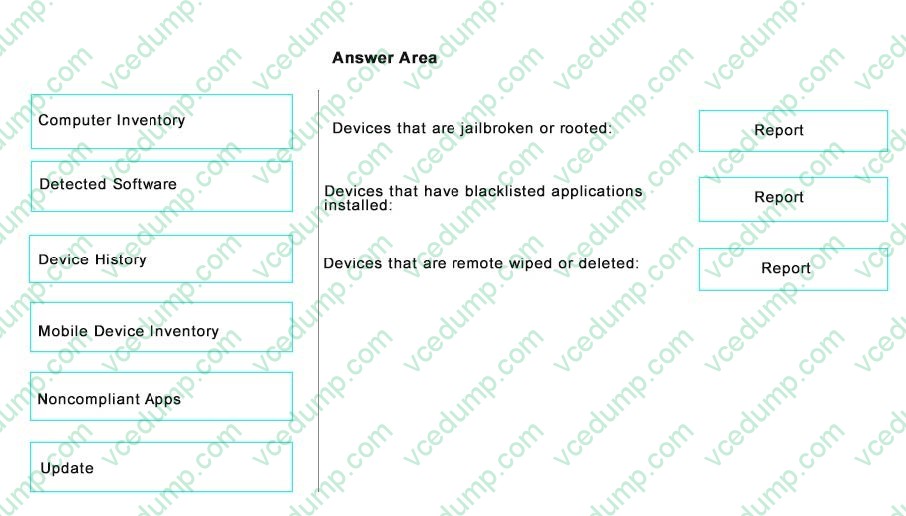
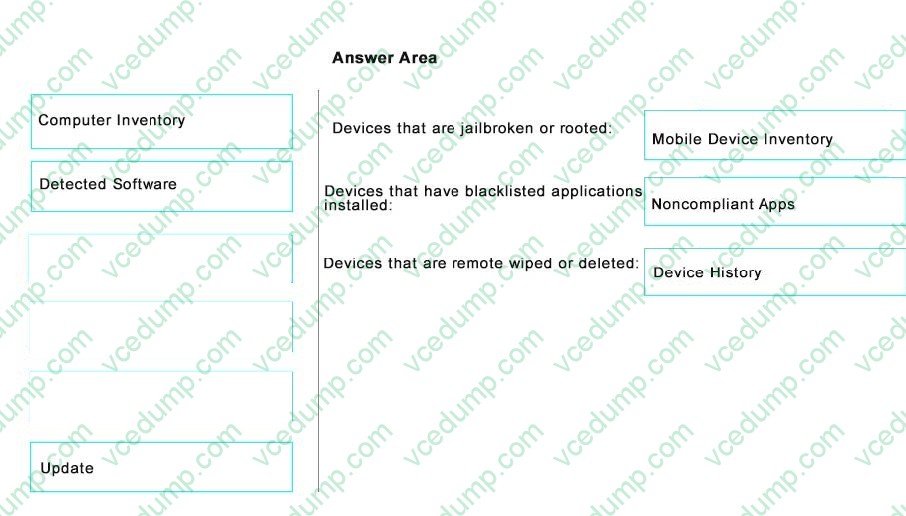
You need to identify devices based on the following requirements:
Devices that are jailbroken or rooted.
Devices that are remote wiped or deleted.
Devices that have blacklisted applications instated.
Which type of report should you use for each requirement? To answer, drag the appropriate reports to the correct requirements. Each report may be used once, more than once, are not at all. You may need to drag the split bar between panes or scroll to view content.
Select and Place:
-
Question 244:
Note: This question is part of a series of questions that present the same or similar answer choices. An answer choice may be correct for more than one question in the series. Each question is independent of the other questions in this series.
Information and details provided in a question apply only to that question.
You support Windows 10 Enterprise desktop computers and tablets. All of the computers are able to connect to your company network from the Internet by using DirectAccess.
Your company wants to deploy a new application. The deployment solution must meet the following requirements:
The application does not utilize the company server infrastructure.
The application is isolated from other applications.
The application uses the least amount of disk space possible on a solid-state drive (SSD) on the tablets.
The application utilizes the least amount of network bandwidth.
You need to deploy the new application and ensure that it can run on the tablets.
What should you do?
A. Deploy the application as an Application Virtualization (App-V) package. Install the App-V 4.6 client on the tablets.
B. Deploy the application as a published application on the Remote Desktop server. Create a Remote Desktop connection on the tablets.
C. Install the application on a local drive on the tablets.
D. Install the application in a Windows To Go workspace.
E. Install Hyper-V on tablets. Install the application on a virtual machine.
F. Publish the application within a separate Windows 10 Enterprise installation in a virtual hard disk (VHD) file. Configure the tablets with dual boot.
G. Install the application within a separate Windows 10 Enterprise installation in a VHDX file. Configure tablets with dual boot. -
Question 245:
You are the PC support specialist for Contoso, Ltd.
Your department upgrades your company's laptops to Windows 10 Enterprise.
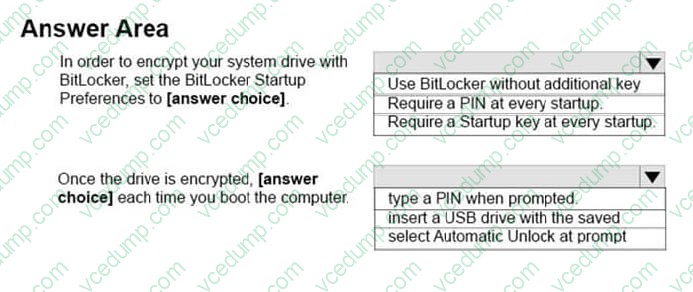
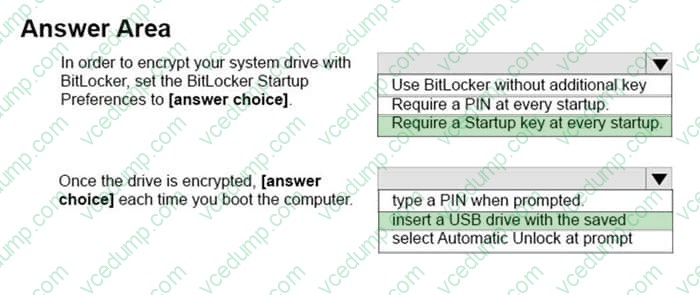
You need to use BitLocker to encrypt the system drives on these laptops. You attempt to encrypt several laptops but receive an error message shown in the following image:
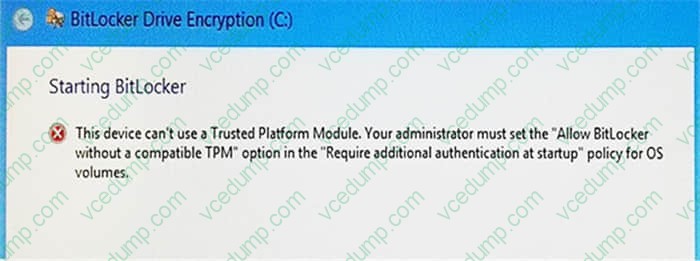
Use the drop-down menus to select the answer choice that completes each statement. Note: Each correct selection is worth one point.
Hot Area:
-
Question 246:
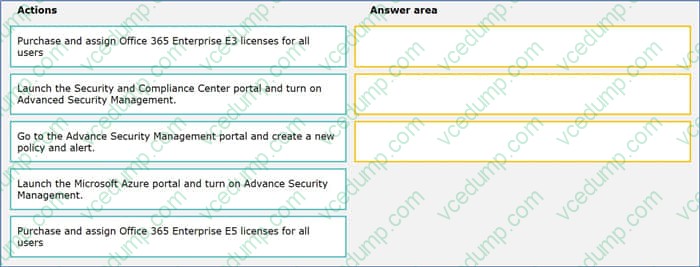
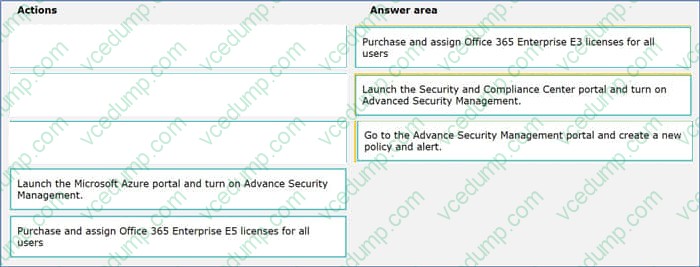
You plan to deploy Microsoft Office 365 for all users in an organization. You have the following requirements:
Users need to utilize Microsoft SharePoint Online.
Use Office 365 Advanced Security Management.
You need to deploy Office 365 to meet the requirements.
Which three actions should you perform in sequence. To answer, move the appropriate actions from the list of actions to the answer area and arrange them in the correct order.
Select and Place:
-
Question 247:
You connect a portable Windows 10 Enterprise computer to a corporate network by using a VPN connection.
You are unable to access websites on the Internet only when you are using the VPN connection.
You need to ensure that you can access websites when connected to the corporate network.
What should you do?
A. In the TCP/IPv4 properties of the VPN connection, disable the Use default gateway on remote network setting.
B. Configure the VPN connection to use only PPTP.
C. In the TCP/IPv4 properties of the VPN connection, enable the Use default gateway on remote network setting.
D. Configure the VPN connection to use only L2TP/IPSec.
E. In the TCP/IPv4 properties of the local area connection, disable the Automatic metric setting. -
Question 248:
You are the system administrator for a company. All devices run Windows 10 and use a variety of Microsoft Store for Business apps. All user reports issues updating a Windows Store app.
You need to troubleshoot the issue.
Winch three actions should you perform? Each correct answer presents a complete solution.
NOTE: Each correct selection is worth one point.
A. Run the SFC command.
B. Run the repair-bde command.
C. Run the net start wuauserv command.
D. Run the Windows App Troubleshooter.
E. Use the Programs and Features Control Panel applet to repair the application. -
Question 249:
You have a new computer that runs Windows 10.
The computer is a member of a workgroup and is connected to a Wi-Fi network.
You discover that the active network is a public network.
You need to change the network location to a private network.
Which Control Panel application should you use?
A. Network and Sharing Center
B. System
C. Windows Firewall
D. HomeGroup -
Question 250:
company has Windows 10 Enterprise client computers. File History is on.
An employee downloads data to a folder on drive D named Archives.
You need to ensure that the user can restore files from the Archives folder by using File History.
What should you do?
A. Configure the File History advanced settings to include the Archives folder.
B. Create a library named History and add the Archives folder to the library.
C. From the File History configuration options, change the drive and select the Archives folder.
D. Move the Archives folder into the Windows system folder.
Related Exams:
-
62-193
Technology Literacy for Educators -
70-243
Administering and Deploying System Center 2012 Configuration Manager -
70-355
Universal Windows Platform – App Data, Services, and Coding Patterns -
77-420
Excel 2013 -
77-427
Excel 2013 Expert Part One -
77-725
Word 2016 Core Document Creation, Collaboration and Communication -
77-726
Word 2016 Expert Creating Documents for Effective Communication -
77-727
Excel 2016 Core Data Analysis, Manipulation, and Presentation -
77-728
Excel 2016 Expert: Interpreting Data for Insights -
77-731
Outlook 2016 Core Communication, Collaboration and Email Skills
Tips on How to Prepare for the Exams
Nowadays, the certification exams become more and more important and required by more and more enterprises when applying for a job. But how to prepare for the exam effectively? How to prepare for the exam in a short time with less efforts? How to get a ideal result and how to find the most reliable resources? Here on Vcedump.com, you will find all the answers. Vcedump.com provide not only Microsoft exam questions, answers and explanations but also complete assistance on your exam preparation and certification application. If you are confused on your 70-697 exam preparations and Microsoft certification application, do not hesitate to visit our Vcedump.com to find your solutions here.