70-697 Exam Details
-
Exam Code
:70-697 -
Exam Name
:Configuring Windows Devices -
Certification
:Microsoft Certifications -
Vendor
:Microsoft -
Total Questions
:330 Q&As -
Last Updated
:Apr 18, 2020
Microsoft 70-697 Online Questions & Answers
-
Question 211:
You support desktop computers and tablets that run Windows 8 Enterprise. All of the computers are able to connect to your company network from the Internet by using DirectAccess.
Your company wants to deploy a new application to the tablets. The deployment solution must meet the following requirements:
The application is able to access files stored on an internal solid-state drive (SSD) on the tablets.
The application is isolated from other applications.
The application uses the least amount of disk space on the tablet.
You need to deploy the new application to the tablets.
What should you do?
A. Deploy the application as an Application Virtualization (App-V) package. Install the App-V 4.6 client on the tablets.
B. Deploy the application as a published application on the Remote Desktop server. Create a Remote Desktop connection on the tablets.
C. Install the application on a local drive on the tablets.
D. Install the application in a Windows To Go workspace.
E. Install Hyper-V on tablets. Install the application on a virtual machine.
F. Publish the application to Windows Store.
G. Install the application within a separate Windows 8 installation in a virtual hard disk (VHD) file. Configure the tablets with dual boot.
H. Install the application within a separate Windows 8 installation in a VHDX file. Configure tablets with dual boot. -
Question 212:
Employees are permitted to bring personally owned portable Windows 10 Enterprise computers to the office. They are permitted to install corporate applications by using the management infrastructure agent and access corporate email by
using the Mail app.
An employee's personally owned portable computer is stolen.
You need to protect the corporate applications and email messages on the computer.
Which two actions should you perform? Each correct answer presents part of the solution.
A. Prevent the computer from connecting to the corporate wireless network.
B. Change the user's password.
C. Disconnect the computer from the management infrastructure.
D. Initiate a remote wipe. -
Question 213:
A company has Windows 10 Enterprise client computers. Users store data files in their user profile libraries.
You need to ensure that you can restore data files to any date while minimizing system overhead.
Which two actions should you perform? Each answer presents part of the solution.
NOTE: Each correct selection is worth one point.
A. Turn on File History.
B. Configure Windows 7 File Recovery.
C. Configure settings to save copies of files daily.
D. Enable Storage Spaces. -
Question 214:
You have 100 client Windows 10 Enterprise computers.
Users are NOT configured as local administrators.
You need to prevent the users from running applications that they downloaded from the Internet, unless the applications are signed by a trusted publisher.
What should you configure in the Security settings from the Action Center?
A. Virus protection
B. Network Access Protection
C. Windows SmartScreen settings
D. User Account Control -
Question 215:
DRAG DROP
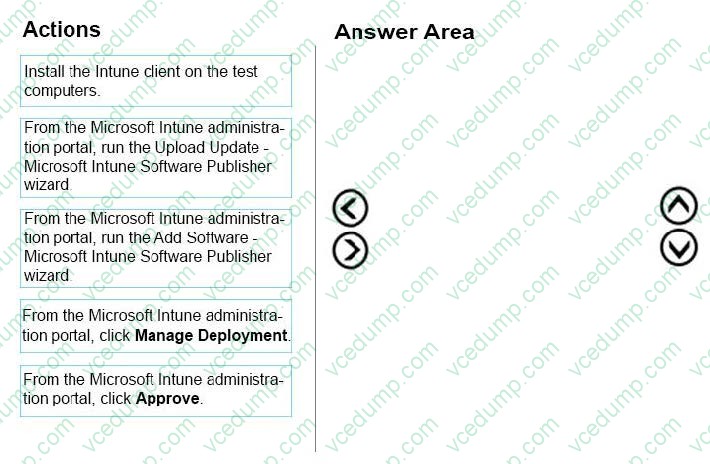
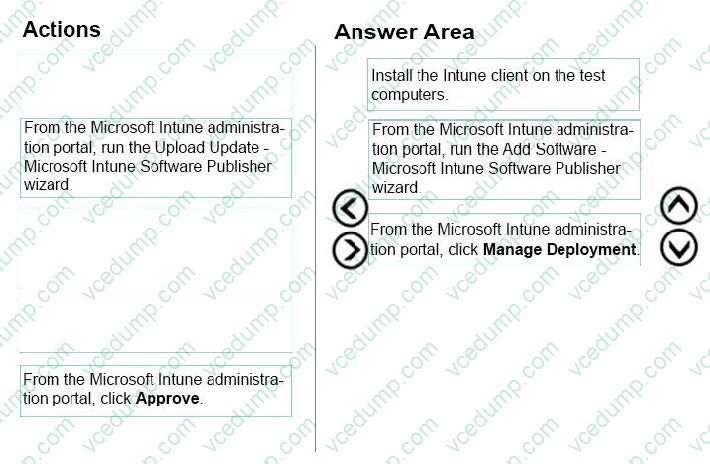
You plan to use Microsoft Intune to manage application updates for non-Microsoft applications.
You create a new Intune subscription.
You need to test the deployment of the updates on a computer. The solution must ensure that the updates are deployed only if the test computer has the corresponding application installed already.
Which three actions should you perform in sequence? To answer, move the appropriate actions from the list of actions to the answer area and arrange them in the correct order.
Select and Place:
-
Question 216:
You support Windows 10 Enterprise computers. Your company protects all laptops by using the BitLocker Network Unlock feature.
Some employees will be travelling on company business and will need to work at various locations.
You need to ensure that employees can log on to their laptops while they are travelling.
What should you do?
A. Provide each of the travelling employees with a laptop that has a Trusted Platform Module (TPM) chip that is version 1.2 or greater.
B. Use Remote Desktop to login to the traveling employees' laptops and run the Manage-bde.exe -unlock command before they disconnect from the company network.
C. Give each travelling employee his or her BitLocker PIN.
D. Collect the travelling employee's laptops and enable BitLocker To Go on them. -
Question 217:
You work for a small company that recently upgraded to Windows 10 Enterprise computers.
The HR department stores sensitive data in a folder named Personnel Files.
You need to encrypt this folder only, and no other data.
What are two possible ways to achieve this goal? Each correct answer presents a complete solution.
NOTE: Each correct selection is worth one point.
A. Use EFS.
B. Use cipher.exe.
C. Use BitLocker
D. Use REFS. -
Question 218:
Your network contains an Active Directory domain. The domain contains Windows 10 Enterprise client computers.
Users frequently use USB drives to store sensitive files that are used on multiple computers.
Your corporate security policy states that all removable storage devices such as USB data drives, must be encrypted.
You need to ensure that if a user forgets the password for a USB disk that is encrypted by using BitLocker To Go, the user can resolve the issue themselves.
What should you do?
A. Instruct the user to open BitLocker Drive Encryption, select Back up recovery key, and then select Save to a file.
B. From an elevated command prompt, run Manage-BDE -ForceRecovery.
C. For each computer, create a USB startup key.
D. Implement the BitLocker Network Unlock feature.
E. Publish a data recovery agent certificate by using a Group Policy object (GPO).
F. Instruct the user to open BitLocker Drive Encryption, select Back up recovery key, and then select Save to your Microsoft account. -
Question 219:
You are setting up a test environment and configuring a Windows 10 Enterprise computer. The test environment uses trunk ports.
The network department wants to use tagging to differentiate the networks. You need to modify the settings of the computer so that it uses network 81. Which network setting should you configure?
A. Flow Control
B. VLAN ID
C. Receive Side Scaling
D. Network Address -
Question 220:
You have a Microsoft Intune subscription.
You need to uninstall the Intune agent from a computer.
What should you do?
A. From the Groups node in the Microsoft Intune administration portal, click Retire/Wipe.
B. From the computer, use Programs and Features in Control Panel.
C. From the Groups node in the Microsoft Intune administration portal, click Remote Lock on the Remote Tasks menu.
D. From the computer, run the cltui.exe command.
Related Exams:
-
62-193
Technology Literacy for Educators -
70-243
Administering and Deploying System Center 2012 Configuration Manager -
70-355
Universal Windows Platform – App Data, Services, and Coding Patterns -
77-420
Excel 2013 -
77-427
Excel 2013 Expert Part One -
77-725
Word 2016 Core Document Creation, Collaboration and Communication -
77-726
Word 2016 Expert Creating Documents for Effective Communication -
77-727
Excel 2016 Core Data Analysis, Manipulation, and Presentation -
77-728
Excel 2016 Expert: Interpreting Data for Insights -
77-731
Outlook 2016 Core Communication, Collaboration and Email Skills
Tips on How to Prepare for the Exams
Nowadays, the certification exams become more and more important and required by more and more enterprises when applying for a job. But how to prepare for the exam effectively? How to prepare for the exam in a short time with less efforts? How to get a ideal result and how to find the most reliable resources? Here on Vcedump.com, you will find all the answers. Vcedump.com provide not only Microsoft exam questions, answers and explanations but also complete assistance on your exam preparation and certification application. If you are confused on your 70-697 exam preparations and Microsoft certification application, do not hesitate to visit our Vcedump.com to find your solutions here.