70-697 Exam Details
-
Exam Code
:70-697 -
Exam Name
:Configuring Windows Devices -
Certification
:Microsoft Certifications -
Vendor
:Microsoft -
Total Questions
:330 Q&As -
Last Updated
:Apr 18, 2020
Microsoft 70-697 Online Questions & Answers
-
Question 161:
You have a Windows 10 Enterprise client Computer.
The computer uses BitLocker Drive Encryption (BitLocker) on a fixed disk that only stores data.
You need to prevent any data from being written to the fixed disk.
What should you do?
A. Run the Add-BitLockerKeyProtector cmdlet.
B. Run the manage-bde command and specify the -pause switch.
C. Run the Lock-BitLocker cmdlet.
D. Run the manage-bde command and specify the -off switch. -
Question 162:
You purchase a new Windows 10 Enterprise desktop computer. You have six external USB hard drives.
You want to create a single volume by using the six USB drives. You want the volume to be expandable, portable, and resilient in the event of simultaneous failure of two USB hard drives.
You need to create the required volume.
What should you do?
A. From Control Panel, create a new Storage Space across 6 USB hard drives. Set resiliency type to Parity.
B. From Disk Management, create a new striped volume.
C. From Disk Management, create a new spanned volume.
D. From Control Panel, create a new Storage Space across 6 USB hard drives. Set resiliency type to Three-way mirror. -
Question 163:
You are a desktop support technician for your company. You manage more than 200 desktop and laptop computers. Laptop computers are configured to connect to the private network through a Local Area Connection and through Wi-Fi. All
computers are members of an Active Directory Domain Services (AD DS) domain.
Files created on the laptops are saved locally. These local files must be backed up. You need to configure File History on the laptops to back up the local files.
What should you do before turning on File History?
A. Ensure that each laptop is connected to a network server share as a destination for File History.
B. Create a recovery partition on the local drive of each laptop.
C. Configure OneDrive in the user profile on each laptop.
D. Schedule hourly backups of the local user profiles on each laptop. -
Question 164:
A company has an Active Directory Domain Services (AD DS) domain with Windows 10 Enterprise client computers.
You need to configure 20 portable computers so that they sleep after 20 minutes when running on battery power. You must accomplish this goal by using the least amount of administrative effort.
Which two actions should you perform? Each correct answer presents part of the complete solution.
NOTE: Each correct selection is worth one point.
A. Create a Group Policy object (GPO) that configures the Sleep Management settings.
B. Edit the local Group Policy to configure the Power Management settings.
C. Edit the local Group Policy to configure the Shut Down options.
D. Link the Group Policy object (GPO) to the organizational unit containing the portable computers.
E. Create a Group Policy object (GPO) that configures the Power Management settings. -
Question 165:
You plan to deploy a Microsoft Azure Remote App collection by using a custom template image. The image will contain Microsoft Office 365 apps. The image will be used to deploy a collection that will be accessed by 50 users.
You need to identify licensing requirements for the deployment.
Which two requirements should you identify? Each correct answer presents part of the solution.
A. An activated Office 365 ProPlus installation
B. Windows client access licenses (CALs) assigned to the users
C. Office 365 ProPlus licenses assigned to the users
D. Remote Desktop client access licenses (CALS) assigned to the users
E. Office 365 Enterprise E3 service plan -
Question 166:
You administer Windows 10 Enterprise laptops. The laptops are configured to connect to an unsecured wireless access point. You plan to configure the wireless access point to encrypt wireless traffic and turn off SSID broadcast.
You need to ensure the laptops will join the secured wireless network automatically after the configuration changes.
What should you do?
A. Create a network profile.
B. Create an ad hoc network.
C. Set Network Discovery to Enabled for the Public profile.
D. Set the Unidentified Networks Properties User permissions to User can change location. -
Question 167:
You are a desktop support technician for your company.
You deliver new Windows 10 Enterprise laptops to the software developers. The software developers frequently use laptops to work remotely and are often disconnected from the corporate network. One of the software developers works on an application that must run on Windows XP, Windows Vista, Windows 7, and Windows 10 Enterprise. The software developer needs the ability to test the application natively on each of these operating systems.
You need to provide the software developer with a way to test the application on all operating system versions on the new laptop. The software developer must be able to perform the testing while working remotely without access to corporate resources.
What should you do?
A. Create three virtual machines for Windows XP, Windows Vista, and Windows 7 on a company Windows Server 2012 that is running Hyper-V.
B. Use Hyper-V to create three virtual machines that provide Windows XP, Windows Vista, and Windows 7 environments.
C. Install the Windows PE version of Windows XP, Windows Vista, and Windows 7 on three USB drives and boot from each drive to test each operating system version.
D. Change the compatibility mode settings of the application to Windows XP, Windows Vista, and Windows 7 before testing each operating system version. -
Question 168:
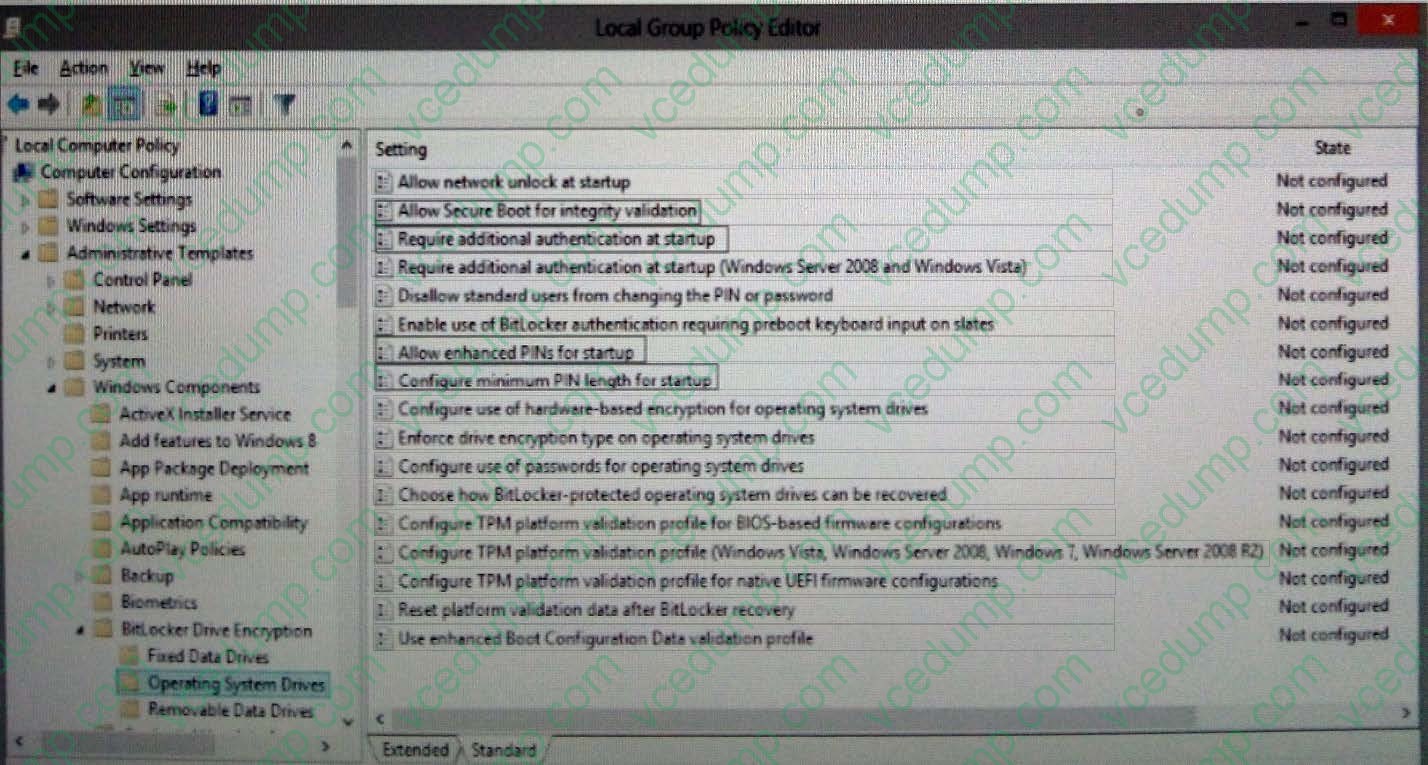
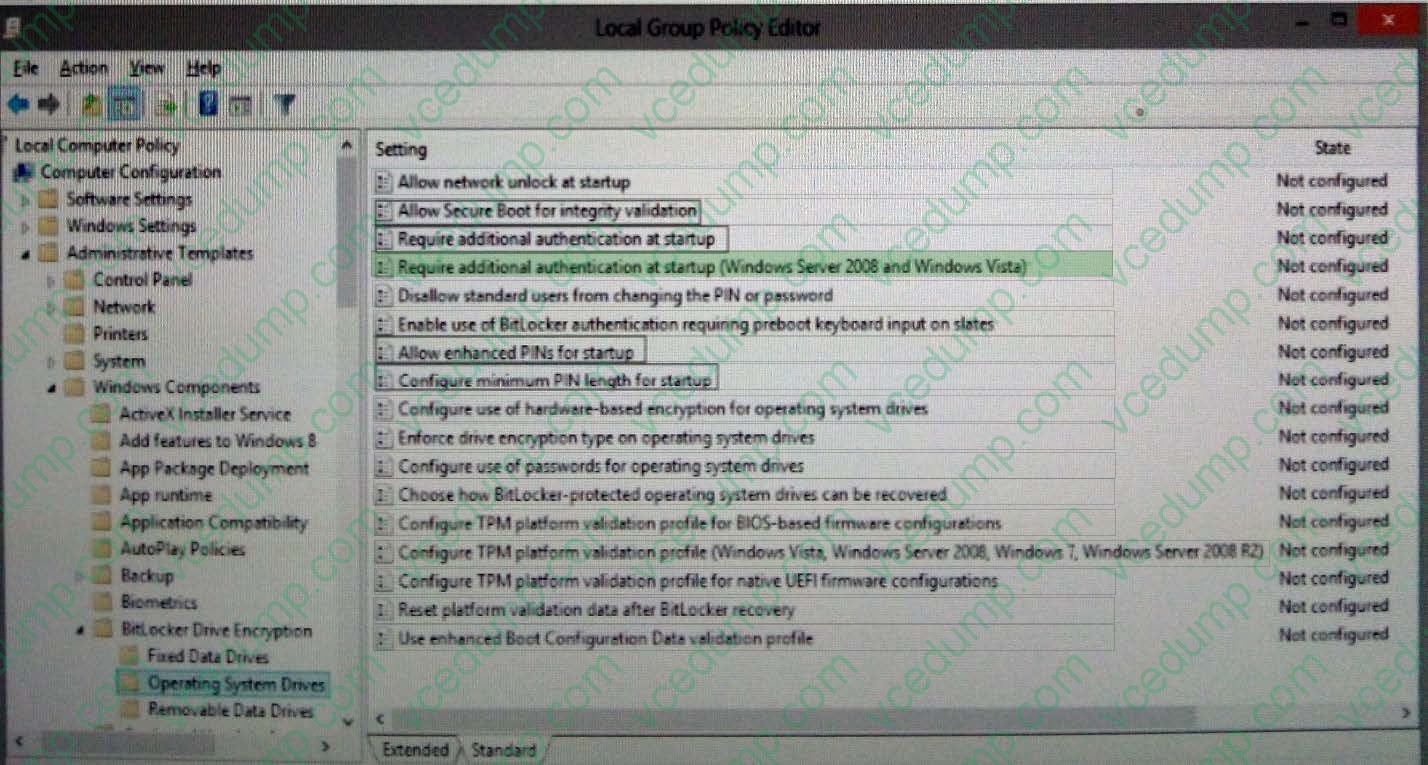
HOTSPOT
You administer Windows 10 Enterprise computers in your company network. All computers include Windows 10 Enterprise compatible Trusted Platform Module (TPM).
You configure a computer that will run a credit card processing application.
You need to ensure that the computer requires a user to enter a PIN code when starting the computer.
Hot Area:
-
Question 169:
You administer Windows 10 Enterprise client computers in your company network.
You change settings on a reference computer by using the Windows Firewall with Advanced Security tool. You want to apply the same settings to other computers.
You need to save the Windows Firewall with Advanced Security configuration settings from the reference computer. You also need to be able to import the configuration settings into a Group Policy object later.
What should you do?
A. Open Local Group Policy Editor, select the Windows Firewall with Advanced Security node, and then select the Export Policy action.
B. Run the netsh advfirewall export c:\settings.wfw command.
C. Run the netsh firewall export c:\settings.xml command.
D. Run the netsh advfirewall export c:\settings.xml command -
Question 170:
A company has Windows 10 Enterprise client computers. All user data is stored locally. Each data file has a system access control list (SACL).
You need to ensure that an event is generated when a user modifies a local file.
Which audit policy setting should you configure?
A. Audit process tracking
B. Audit object access
C. Audit policy change
D. Audit privilege use
Related Exams:
-
62-193
Technology Literacy for Educators -
70-243
Administering and Deploying System Center 2012 Configuration Manager -
70-355
Universal Windows Platform – App Data, Services, and Coding Patterns -
77-420
Excel 2013 -
77-427
Excel 2013 Expert Part One -
77-725
Word 2016 Core Document Creation, Collaboration and Communication -
77-726
Word 2016 Expert Creating Documents for Effective Communication -
77-727
Excel 2016 Core Data Analysis, Manipulation, and Presentation -
77-728
Excel 2016 Expert: Interpreting Data for Insights -
77-731
Outlook 2016 Core Communication, Collaboration and Email Skills
Tips on How to Prepare for the Exams
Nowadays, the certification exams become more and more important and required by more and more enterprises when applying for a job. But how to prepare for the exam effectively? How to prepare for the exam in a short time with less efforts? How to get a ideal result and how to find the most reliable resources? Here on Vcedump.com, you will find all the answers. Vcedump.com provide not only Microsoft exam questions, answers and explanations but also complete assistance on your exam preparation and certification application. If you are confused on your 70-697 exam preparations and Microsoft certification application, do not hesitate to visit our Vcedump.com to find your solutions here.