70-697 Exam Details
-
Exam Code
:70-697 -
Exam Name
:Configuring Windows Devices -
Certification
:Microsoft Certifications -
Vendor
:Microsoft -
Total Questions
:330 Q&As -
Last Updated
:Apr 18, 2020
Microsoft 70-697 Online Questions & Answers
-
Question 111:
A Windows 10 Enterprise client computer has two hard disk drives: a system drive and a data drive.
You are preparing to back up the computer prior to installing a developing software product. You have the following requirements:
The system disk that is part of the backup must be mountable from within Windows.
The system disk that is part of the backup must be bootable.
The backup must be viable to restore in the event of a hard disk failure.
The backup must contain data from both hard disk drives.
You need to select a backup method.
Which method should you use?
A. system image
B. storage pool
C. File History
D. system repair disk -
Question 112:
You plan to deploy a Microsoft Azure RemoteApp collection by using a custom template image. The image will contain Microsoft Office 365 ProPlus apps.
You need to ensure that multiple users can run Office 365 ProPlus from the custom template image simultaneously.
What should you include in the configuration file?
-
Question 113:
You administer Windows 10 Enterprise client computers in your company network.
A guest at your company is connected to the Internet as shown in the following exhibit. (Click the exhibit button.)
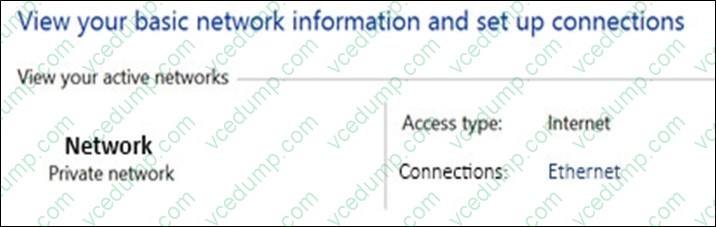
You need to ensure that the guest user is able to share network resources over Wi-Fi without lowering the overall security of the computer. What should you do?
A. Configure File and printer sharing settings for Public networks.
B. Change the network location type to Private.
C. Change the network location type to Work.
D. Configure File sharing connections settings for All networks. -
Question 114:
DRAG DROP
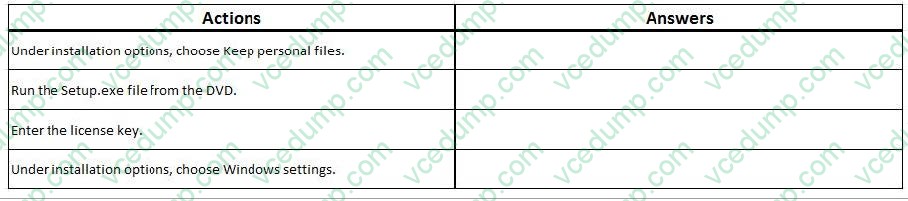
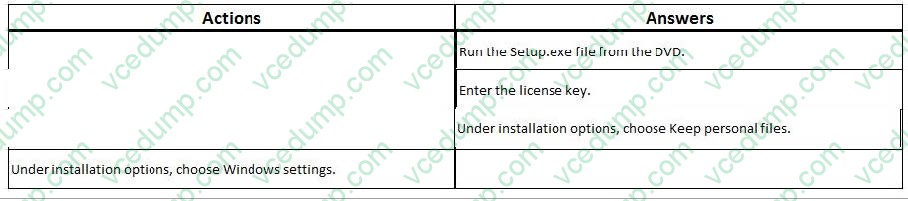
You have a Windows 8 computer. You need to migrate from Windows 8 to Windows 10 while retaining as much data as possible. You load the Windows 10 media into the DVD drive. Which three actions should you perform next in sequence?
Select and Place:
-
Question 115:
You have a Windows To Go workspace on a USB memory drive.
When you attempt to start a computer from the drive, you receive the following error message:
"Your PC/Device needs to be repaired. The application or operating system couldn't be loaded because a required file is missing or contains errors." You need to repair the Windows To Go workspace.
What should you do?
A. Restart the computer in safe mode, and then perform a system restore.
B. Restart the computer, and then select the Last Known Good Configuration.
C. Reapply the Windows To Go image to the USB memory drive.
D. Restart the computer by using a recovery disk, and then perform a system restore. -
Question 116:
Note: This question is part of a series of questions that present the same scenario. Each question in the series contains a unique solution that might meet the stated goals. Some question sets might have more than one correct solution, while
others might not have a correct solution.
After you answer a question in this section, you will NOT be able to return to it. As a result, these questions will not appear in the review screen.
A company has a forest trust with a partner organization. Users from both organizations log on to devices that run Windows 8.1.
You plan to replace the devices with devices running Windows 10.
You need to migrate user profiles from both forests using the least amount of administrative effort.
Solution: You enable roaming profiles on the user accounts and have them log on to the new device.
Does the solution meet the goal?
A. Yes
B. No -
Question 117:
You manage a branch office of a company named Contoso.
The branch office contains 20 computers that run Windows 10 Enterprise.
The main office of Contoso hosts a Windows Server Update Services (WSUS) server. Branch office computers are configured to download updates from the Internet.
You need to prevent computers in the branch office from sharing updates with other computers.
What should you do?
A. Modify the BranchCache hosted mode settings
B. Modify BranchCache distributed cache mode settings
C. Modify the Choose how updates are delivered settings
D. Deploy a downstream WSUS server to the branch office -
Question 118:
You have a Windows 10 Enterprise computer.
The computer has a shared folder named C:\Marketing. The shared folder is on an NTFS volume.
The current NTFS and share permissions are configured as follows.

UserA is a member of both the Everyone group and the Marketing group. UserA must access C:\Marketing from across the network. You need to identify the effective permissions of UserA to the C:\Marketing folder. What permission should you identify?
A. Full Control
B. Read and Execute
C. Read
D. Modify -
Question 119:
HOTSPOT
You manage 50 computers that run Windows 10 Enterprise.
You have a Windows To Go workspace installed on a USB drive named USB1.
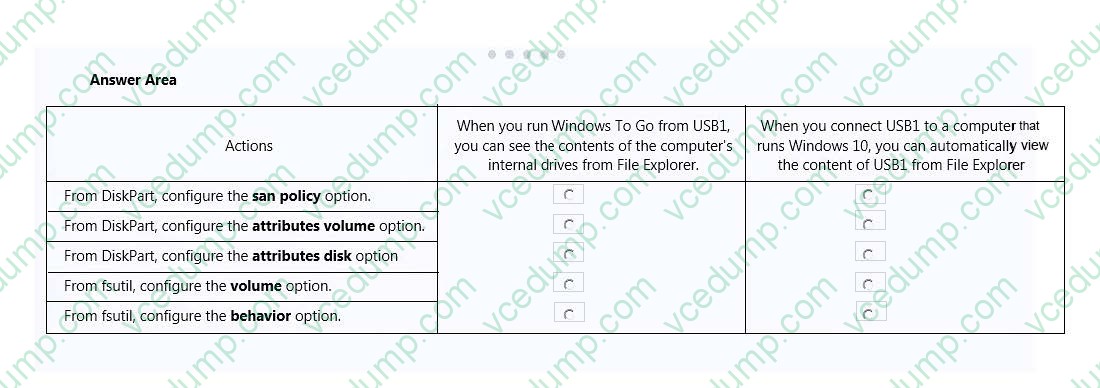
You need to configure USB1 to meet the following requirements:
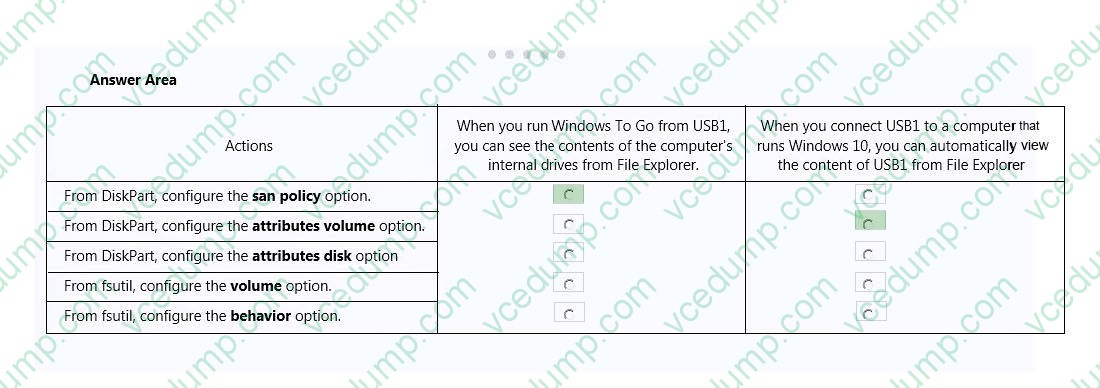
* When you run Windows To Go from USB1, you can see the contents of the computer's internal drives from File Explorer.
* When you connect USB1 to a computer that runs Windows 10, you can automatically view the content of USB1 from File Explorer.
In the table below, select the action that must be performed to achieve each requirement.
NOTE: Make only one selection in each column. Each correct selection is worth one point.
Hot Area:
-
Question 120:
DRAG DROP
You administer Windows 7 and Windows 10 Enterprise computers. You run an application that saves files that contain local settings unique to each user.
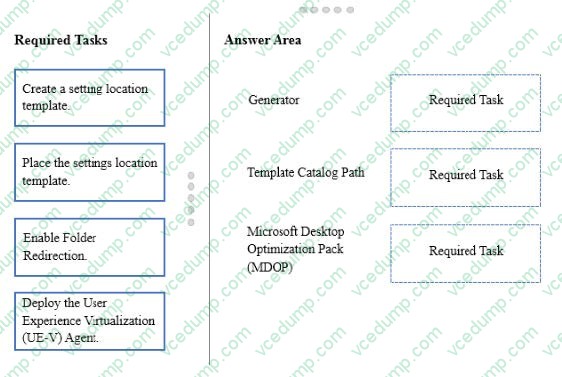
You want to allow users to synchronize settings for an application to any enterprise computer when they log on to the enterprise computer.
You need to implement a solution that will move a user's settings files to any computer.
You also need to ensure that you can roll back the changes if necessary.
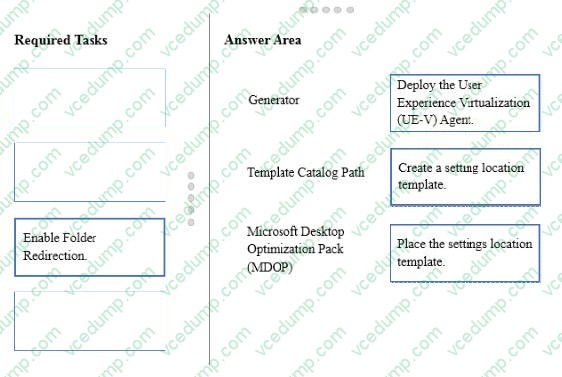
Which required task or tasks should you perform with each approach? To answer, drag the appropriate required task to the corresponding approach. Each required task may be used once, more than once, or not at all. You may need to drag
the split bar between panes or scroll to view content.
NOTE: Each correct selection is worth one point.
Select and Place:
Related Exams:
-
62-193
Technology Literacy for Educators -
70-243
Administering and Deploying System Center 2012 Configuration Manager -
70-355
Universal Windows Platform – App Data, Services, and Coding Patterns -
77-420
Excel 2013 -
77-427
Excel 2013 Expert Part One -
77-725
Word 2016 Core Document Creation, Collaboration and Communication -
77-726
Word 2016 Expert Creating Documents for Effective Communication -
77-727
Excel 2016 Core Data Analysis, Manipulation, and Presentation -
77-728
Excel 2016 Expert: Interpreting Data for Insights -
77-731
Outlook 2016 Core Communication, Collaboration and Email Skills
Tips on How to Prepare for the Exams
Nowadays, the certification exams become more and more important and required by more and more enterprises when applying for a job. But how to prepare for the exam effectively? How to prepare for the exam in a short time with less efforts? How to get a ideal result and how to find the most reliable resources? Here on Vcedump.com, you will find all the answers. Vcedump.com provide not only Microsoft exam questions, answers and explanations but also complete assistance on your exam preparation and certification application. If you are confused on your 70-697 exam preparations and Microsoft certification application, do not hesitate to visit our Vcedump.com to find your solutions here.