70-688 Exam Details
-
Exam Code
:70-688 -
Exam Name
:Supporting Windows 8.1 -
Certification
:Microsoft Certifications -
Vendor
:Microsoft -
Total Questions
:224 Q&As -
Last Updated
:Apr 07, 2020
Microsoft 70-688 Online Questions & Answers
-
Question 51:
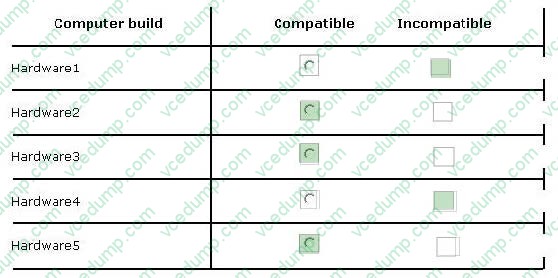
Your company has five hardware builds for client computers. The hardware builds are configured as shown in the following table.
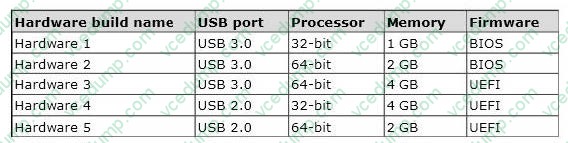
You plan to provide some users with Windows To Go disks that contain a corporate image of the 64-bit version of Windows 8 Enterprise and several line-of-business (LOB) applications.
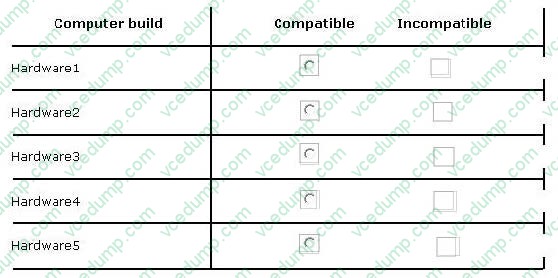
In the table below, identify whether the hardware build is compatible or incompatible with the Windows To Go disks. Make only one selection in each row. Each correct selection is worth one point.
Hot Area:
-
Question 52:
Your network contains an Active Directory domain. All client computers run Windows 8.1 Enterprise.
You have a client computer named Computer1 that has a shared printer named Printer1.
You need to recommend a solution to provide managers with the ability to print their print jobs before all of the other jobs in the print queue.
What should you recommend?
A. Modify the print processor of Printer1.
B. Add a new shared printer, and then modify the print processor of the new printer.
C. Add a new shared printer, and then modify the priority of the new printer.
D. Modify the priority of Printer1. -
Question 53:
Your network contains an Active Directory domain. The domain contains client computers that run Windows 8 Enterprise.
Users frequently use USB drives to store sensitive files that are used on multiple computers.
Your corporate security policy states that all removable storage devices, such as USB data drives, must be encrypted.
You need to ensure that if a user forgets the password for a USB disk that is encrypted by using BitLocker To Go, the user can resolve the issue them self.
What should you do?
A. Instruct the user to open BitLocker Drive Encryption, select Backup Recovery Key, and then select Save to your Microsoft account.
B. For each computer, create a USB startup key.
C. Instruct the user to open BitLocker Drive Encryption, select Backup Recovery Key, and then select Print the recovery key.
D. From an elevated command prompt, run Manage-BDE -ForceRecovery. -
Question 54:
Your company has a main office and a branch office. Each office contains several servers that run Windows Server 2012.
You need to configure BranchCache for the client computers in the branch office. The solution must ensure that all of the cached content is in a central location.
What should you run on each client computer?
A. the Enable-BCHostedClient cmdlet
B. the Enable-BCHostedAServer cmdlet
C. the Enable-BCDistributed cmdlet
D. the Enable-BCLocal cmdlet -
Question 55:
You manage a network that includes computers that run Windows 8 Enterprise. All of the computers on the network are members of an Active Directory domain.
The company recently proposed a new security policy that prevents users from synchronizing applications settings, browsing history, favorites, and passwords from the computers with their Microsoft accounts.
You need to enforce these security policy requirements on the computers.
What should you do?
A. From each computer, navigate to Change Sync Settings and set the Sync Your Settings options for Apps, Browser, and Passwords to Off.
B. On the Group Policy Object, configure the Accounts: Block Microsoft accounts Group Policy setting to Users can't add or log on with Microsoft accounts.
C. On the Group Policy Object, configure the Accounts: Block Microsoft accounts Group Policy setting to Users can't add Microsoft accounts.
D. From each computer, navigate to Change Sync Settings and set the Sync Your Settings option to Off. -
Question 56:
You have Windows 8.1 Enterprise client computers. All of the computers are managed by using Microsoft System Center 2012 Configuration Manager.
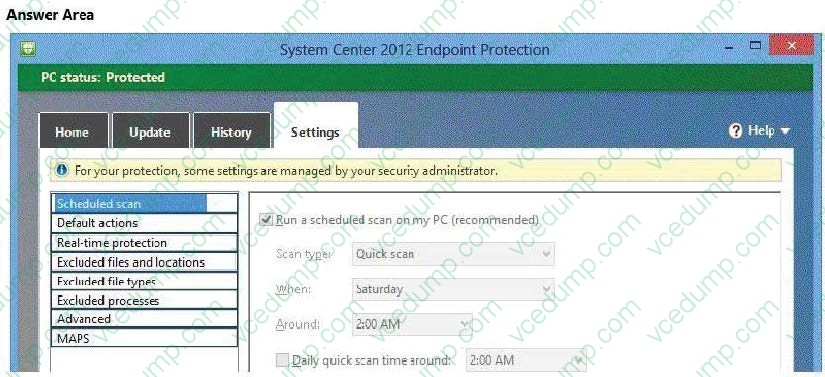
You enable Microsoft System Center 2012 Endpoint Protection on the computers.
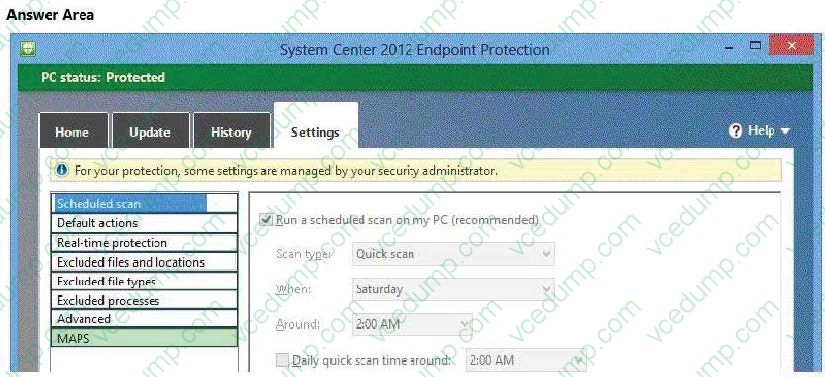
You need to ensure that Endpoint Protection automatically downloads the latest available malware definition updates when unidentified malware is detected on the computers,
What should you configure? (To answer, select the appropriate option in the answer area.)
Hot Area:
-
Question 57:
You are a systems administrator of a small branch office. Computers in the office are joined to a Windows 8 HomeGroup. The HomeGroup includes one shared printer and several shared folders.
You join a new computer to the HomeGroup and try to access the HomeGroup shared folders.
You discover that the shared folders are unavailable, and you receive an error message that indicates the password is incorrect.
You need to reconfigure the new computer in order to access the HomeGroup resources.
What should you do?
A. Adjust the time settings on the new computer to match the time settings of the HomeGroup computers.
B. Change the HomeGroup password and re-enter it on the computers of all members of the HomeGroup.
C. Change the default sharing configuration for the shared folders on the HomeGroup computers.
D. Reset your account password to match the HomeGroup password. -
Question 58:
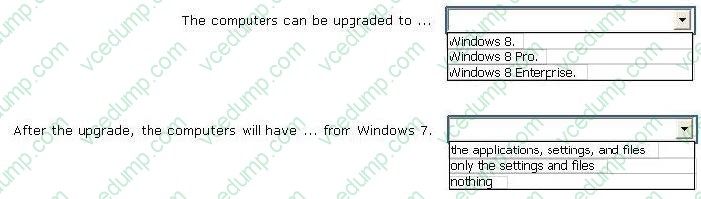
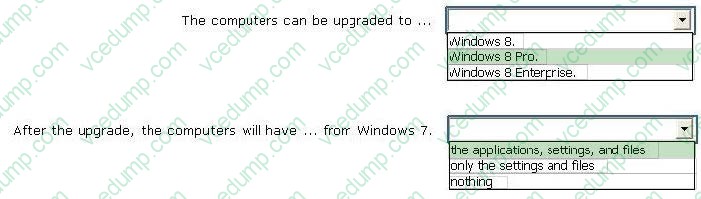
You have several client computers that run Windows 7. The computers have identical hardware and software.
The system properties of one of the computers are configured as shown in the following exhibit.
(Click the Exhibit button.)
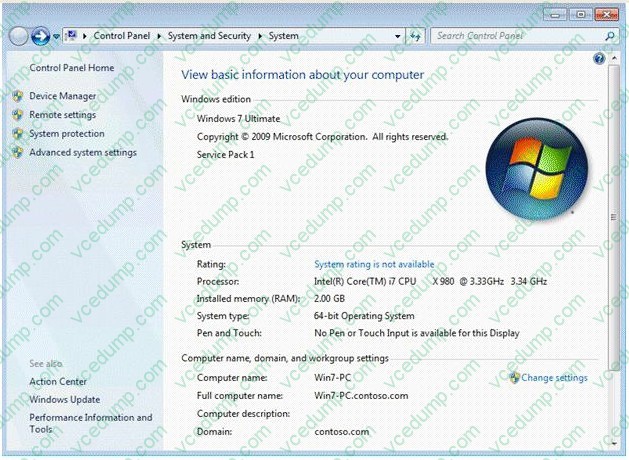
To answer, complete each statement according to the information presented in the exhibit. Each correct selection is worth one point.
Hot Area:
-
Question 59:
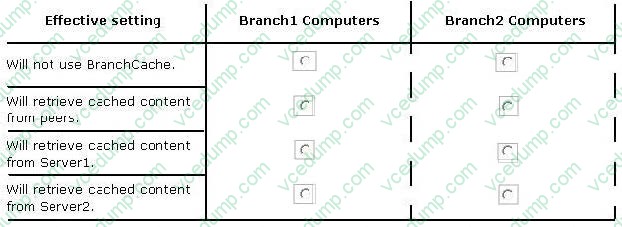
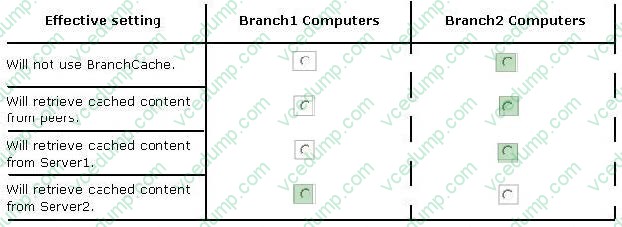
Your company has a main office and two branch offices named Branch1 and Branch2. The main office contains a file server named Server1 that has BranchCache enabled. Branch1 contains a server named Server2 that is configured as a
hosted cache server.
All client computers run Windows 8 Enterprise. All of the computers are joined to an Active Directory domain.
The BranchCache settings of all the computers are configured as shown in the following exhibit.
(Click the Exhibit button.)
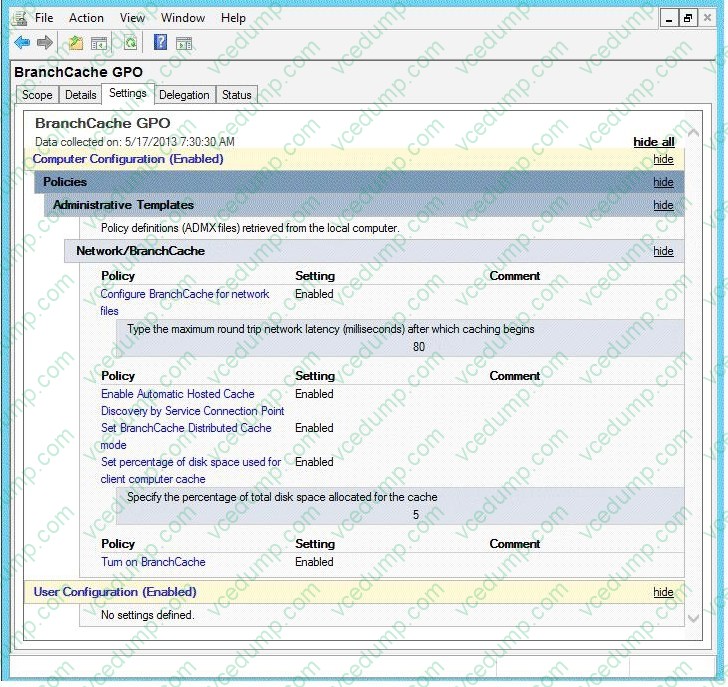
In the table below, identify the effective setting for the client computers in each branch office. Make one selection in each column. Each correct selection is worth one point.
Hot Area:
-
Question 60:
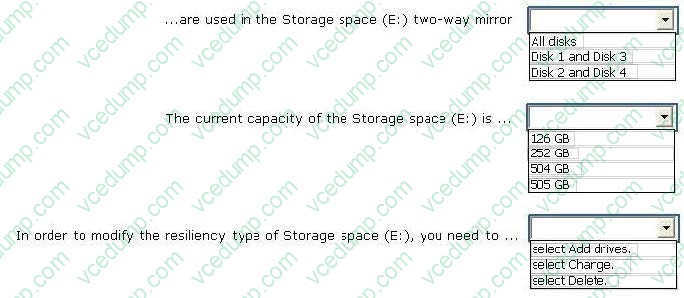
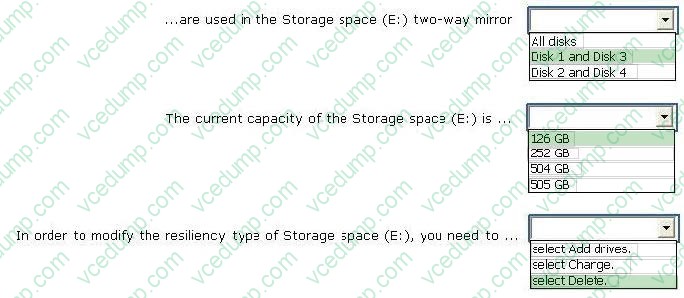
You have 10 client computers that run Windows 8 Pro. The Storage Spaces settings of the computers are configured as shown in the following exhibit. (Click the Exhibit button.)
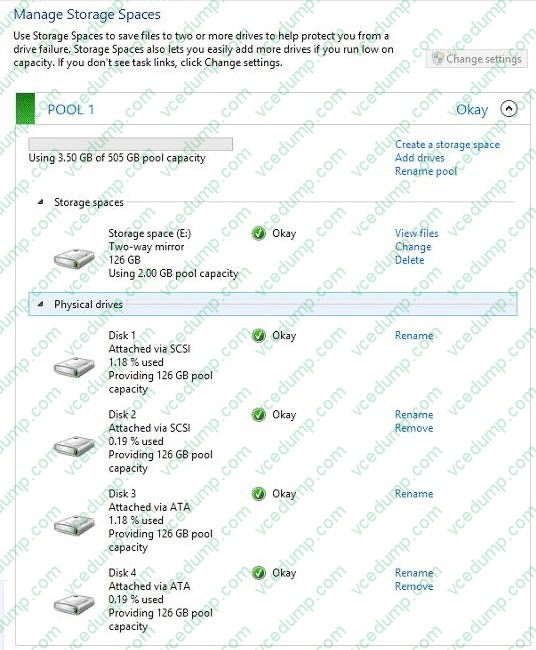
To answer, complete each statement according to the information presented in the exhibit. Each correct selection is worth one point.
Hot Area:
Related Exams:
-
62-193
Technology Literacy for Educators -
70-243
Administering and Deploying System Center 2012 Configuration Manager -
70-355
Universal Windows Platform – App Data, Services, and Coding Patterns -
77-420
Excel 2013 -
77-427
Excel 2013 Expert Part One -
77-725
Word 2016 Core Document Creation, Collaboration and Communication -
77-726
Word 2016 Expert Creating Documents for Effective Communication -
77-727
Excel 2016 Core Data Analysis, Manipulation, and Presentation -
77-728
Excel 2016 Expert: Interpreting Data for Insights -
77-731
Outlook 2016 Core Communication, Collaboration and Email Skills
Tips on How to Prepare for the Exams
Nowadays, the certification exams become more and more important and required by more and more enterprises when applying for a job. But how to prepare for the exam effectively? How to prepare for the exam in a short time with less efforts? How to get a ideal result and how to find the most reliable resources? Here on Vcedump.com, you will find all the answers. Vcedump.com provide not only Microsoft exam questions, answers and explanations but also complete assistance on your exam preparation and certification application. If you are confused on your 70-688 exam preparations and Microsoft certification application, do not hesitate to visit our Vcedump.com to find your solutions here.