70-688 Exam Details
-
Exam Code
:70-688 -
Exam Name
:Supporting Windows 8.1 -
Certification
:Microsoft Certifications -
Vendor
:Microsoft -
Total Questions
:224 Q&As -
Last Updated
:Apr 07, 2020
Microsoft 70-688 Online Questions & Answers
-
Question 41:
Your network contains a wireless network access point that uses 802.IX certificate-based authentication.
You purchase several devices that run Windows RT.
You need to ensure that the Windows RT devices can authenticate to the wireless access point.
What should you do first?
A. Add a certificate to the Trusted Devices certificate store of the user.
B. Add a certificate to the Trusted Root Certification Authorities certificate store of the computer.
C. Add a certificate to the Trusted Root Certification Authorities certificate store of the user.
D. Add a certificate to the Trusted Devices certificate store of the computer. -
Question 42:
You have client computers that run Windows 8 Pro. All of the computers are members of an Active Directory domain.
The Folder Redirection Policy settings of all domain users are configured as shown in the Folder
Redirection exhibit. (Click the Exhibit button.)
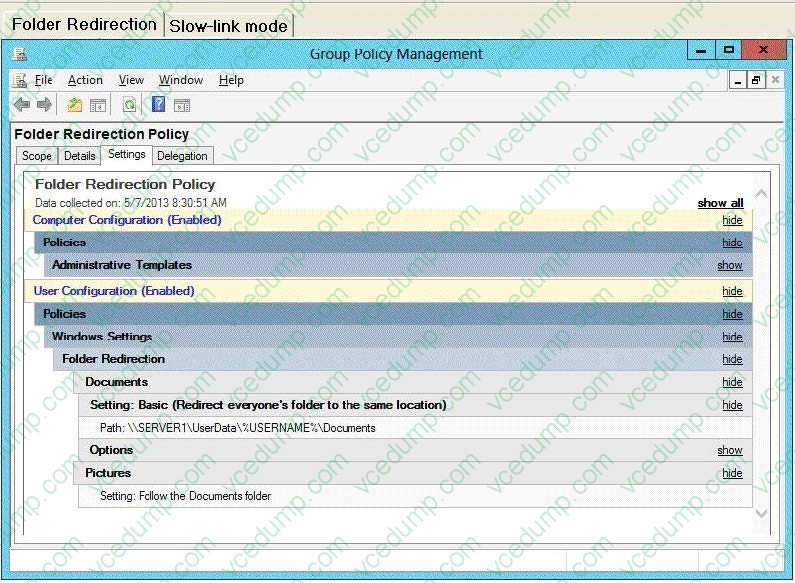
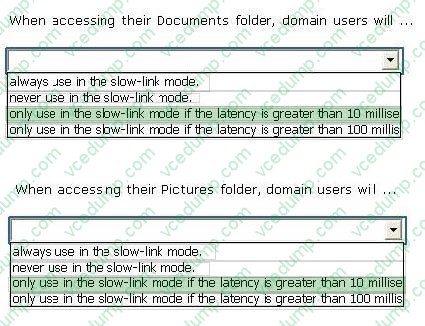
You enable and configure the Configure slow-link mode Group Policy setting that applies to all of the computers as shown in the Slow-link mode exhibit. (Click the Exhibit button.)
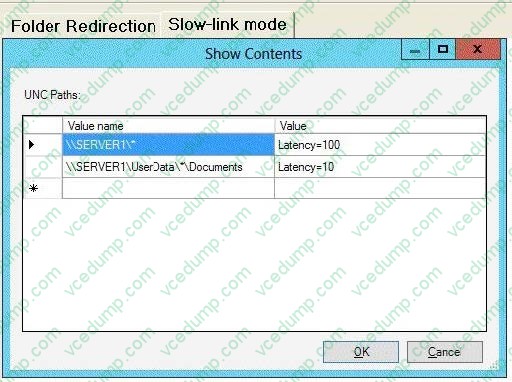
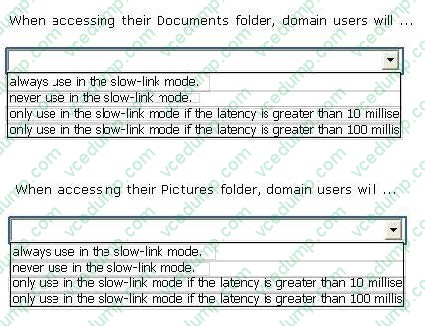
To answer, complete each statement according to the information presented in the exhibits. Each correct selection is worth one point.
Hot Area:
-
Question 43:
You have laptops that run Windows 8. The laptops have Microsoft User Experience Virtualization (UE-V) installed.
You need to ensure that the application settings, which are synchronized by using UE-V, apply to computers that are disconnected from the network.
What should you do?
A. From a command prompt, run sc config PeerDistSvc start=auto.
B. From Group Policy Management Editor, configure the Windows Connection Manager settings.
C. From a command prompt, run sc config CscService start=auto.
D. From Group Policy Management Editor, configure the Network Connections settings. -
Question 44:
Your company recently purchased 10 new desktop computers for a remote unconnected location. All of the desktop computers have the same hardware configuration.
You install Windows 8 Pro on a reference computer and install a custom driver to support the video adapter.
You want to create an image of the reference desktop that retains the custom driver in the image.
You need to edit the unattended answer file.
Which setting in the unattended answer file should you edit?
A. Microsoft-Windows-PnPSysprep | PersistAllDeviceInstalls
B. Microsoft-Windows-PnPSysprep | DoNotCleanUpNonPresentDevices
C. Microsoft-Windows-PnpCustomizattonNonWinPE | DriverPaths
D. Microsoft-Windows-Shell-Setup | OEMInformation -
Question 45:
You support Windows 8.1 desktop computers and tablets that are members of an Active Directory domain. The domain includes Active Directory Certificate Services. All users use virtual smart cards to log on to their computers.
A domain user wants to log on to both his desktop computer and his tablet computer by using the same domain user account.
You need to configure the desktop and tablet computers to support two-factor authentication for the same domain user account.
What should you do?
A. Enroll the user for two separate certificates based on the Smartcard Logon template. Install one certificate in a virtual smart card on each of the user's computers.
B. Export the private key from the desktop computer. Import the private key to the tablet.
C. After the user has logged on to one computer, disable the Trusted Platform Module (TPM) on the second computer. Run the tpmvscmgr.exe utility on each of the computers.
D. Issue a temporary physical smart card. Use this smart card for an initial logon on each computer, then disconnect the tablet from the office network and destroy the temporary smart card. -
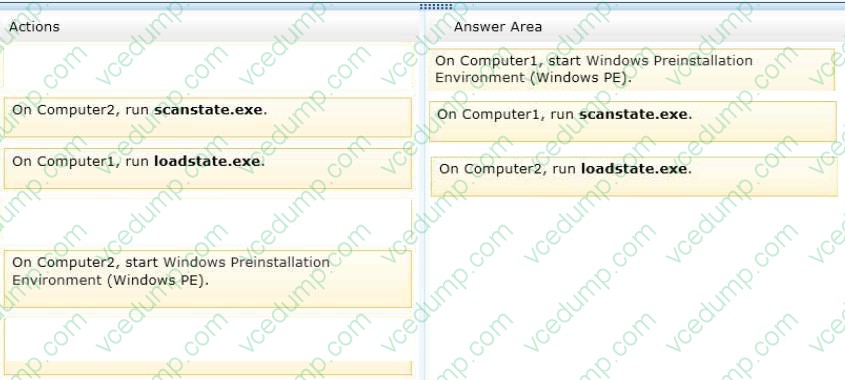
Question 46:
Your company is migrating from Windows 7 to Windows 8.1.
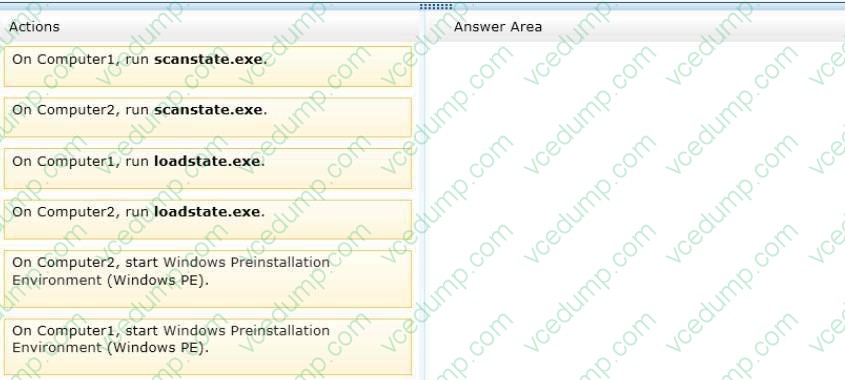
Before you attempt to migrate a client computer named Computer1. Computer1 fails and can no longer start Windows 7.
You need to migrate the user profile from Computer1 to a client computer named Computer2 that runs Windows 8.1.
Which three actions should you perform in sequence? (To answer, move the appropriate three actions from the list of actions to the answer area and arrange them in the correct order.)
Select and Place:
-
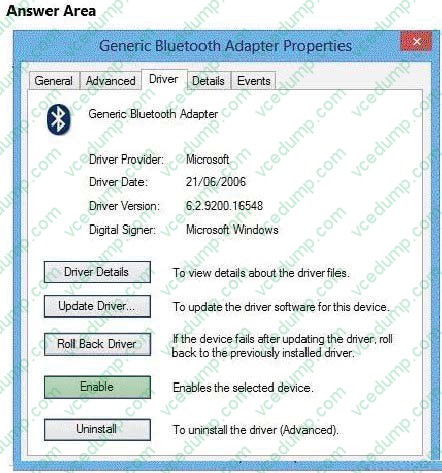
Question 47:
You have a Windows 8.1 Enterprise client computer.
You open Device Manager as shown in the following exhibit (Click the Exhibit button.)
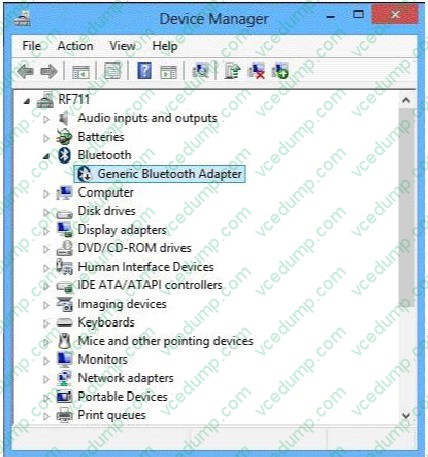
You need to ensure that you can pair a Bluetooth device to the computer.
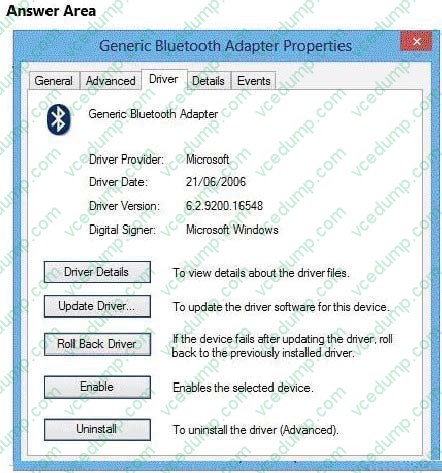
Which button should you click? (To answer, select the appropriate button in the answer area,)
Hot Area:
-
Question 48:
You support computers that run Windows 8 Pro and are members of an Active Directory domain. Several desktop computers are located in a subnet that is protected by a firewall. The firewall allows incoming TCP connections only to ports 80
and 443.
You want to manage disk volumes on the desktop computers from your computer, which is located outside the protected subnet.
You need to configure the network to support the required remote administration access.
What should you do?
A. Enable Remote Desktop on the desktop computers.
B. Run the winrm quickconfig command on your computer.
C. Install Remote Server Administration Tools (RSAT) on your computer.
D. Run the winrm quickconfig command on the desktop computers. -
Question 49:
You have Windows 8.1 Enterprise client computers. All of the computers are managed by using Microsoft System Center 2012 Configuration Manager.
You enable Microsoft System Center 2012 Endpoint Protection on the computers.
You need to ensure that Endpoint Protection automatically downloads the latest available malware definition updates when unidentified malware is detected on the computers.
What should you configure form the System Center 2012 Endpoint Protection settings?
A. Advanced
B. MAPS
C. Real-time protection
D. Default actions -
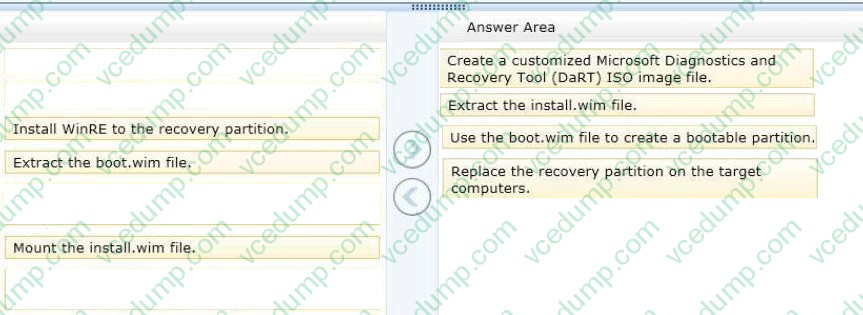
Question 50:
You support computers that run Windows 8 Pro.
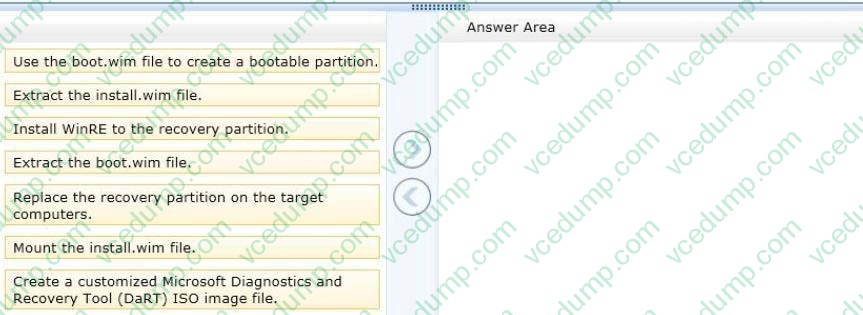
Your company recently purchased 200 new desktop computers. Company policy requires that the desktop computers include a recovery partition. The partition must contain a bootable image that includes support for incoming Remote Desktop connections.
You need to configure the desktop computers to comply with company policy.
Which four actions should you perform in sequence? (To answer, move the appropriate actions from the list of actions to the answer area and arrange them in the correct order.)
Select and Place:
Related Exams:
-
62-193
Technology Literacy for Educators -
70-243
Administering and Deploying System Center 2012 Configuration Manager -
70-355
Universal Windows Platform – App Data, Services, and Coding Patterns -
77-420
Excel 2013 -
77-427
Excel 2013 Expert Part One -
77-725
Word 2016 Core Document Creation, Collaboration and Communication -
77-726
Word 2016 Expert Creating Documents for Effective Communication -
77-727
Excel 2016 Core Data Analysis, Manipulation, and Presentation -
77-728
Excel 2016 Expert: Interpreting Data for Insights -
77-731
Outlook 2016 Core Communication, Collaboration and Email Skills
Tips on How to Prepare for the Exams
Nowadays, the certification exams become more and more important and required by more and more enterprises when applying for a job. But how to prepare for the exam effectively? How to prepare for the exam in a short time with less efforts? How to get a ideal result and how to find the most reliable resources? Here on Vcedump.com, you will find all the answers. Vcedump.com provide not only Microsoft exam questions, answers and explanations but also complete assistance on your exam preparation and certification application. If you are confused on your 70-688 exam preparations and Microsoft certification application, do not hesitate to visit our Vcedump.com to find your solutions here.